


Introduction
Business Process Model and Notation (BPMN) is the global standard for visualizing business processes. For beginners, however, the distinction between different gateway types—Parallel, Exclusive, and Inclusive—can be abstract and confusing. The most effective way to bridge this gap is not through theory alone, but by applying these concepts to a tangible, real-world scenario.
This tutorial uses a Hardware Retailer Shipment Preparation process as a comprehensive learning vehicle. Unlike simple linear workflows, shipping hardware involves concurrent tasks, conditional logic, and role-based responsibilities. By modeling this specific scenario, you will learn how to represent organizational structure using Pools and Lanes, distinguish between mandatory and optional parallel work using Inclusive Gateways, and leverage modern tooling like Visual Paradigm and its AI features to accelerate your learning curve. Whether you are a business analyst, a process owner, or a student, this guide will transform abstract BPMN symbols into practical modeling skills.
Part 1: Understanding the Scenario and Organizational Structure
Before drawing a single line, you must understand what you are modeling and who is involved. BPMN is not just about flow; it is about accountability.
The Hardware Retailer Context
In our example, a customer has ordered hardware goods. The process covers the internal preparation steps required before the package is physically handed over to a carrier. Key constraints include:
-
Internal Focus: We assume participants communicate internally; explicit message flows between lanes are omitted to reduce clutter.
-
Concurrency: Packaging happens at the same time as administrative preparation.
-
Conditional Logic: Shipping methods vary based on item size/value, affecting insurance and paperwork requirements.
Modeling Roles: Pools and Lanes
To visualize responsibility, we use a Single Pool labeled “Hardware Retailer” divided into three distinct Lanes:
| Lane | Role | Primary Responsibilities in This Process |
|---|---|---|
| Warehouse Worker | Operational Staff | Physical handling, packaging, moving goods to pick area. |
| Clerk | Administrative Staff | Decision making, carrier selection, label creation, paperwork. |
| Logistics Manager | Supervisory/Expert | Handling exceptions, approving/taking out extra insurance. |
💡 Beginner Tip: Lanes represent roles, not necessarily specific individuals. Multiple people can share a lane, and one person can span multiple lanes if they wear multiple hats. In Visual Paradigm, simply drag tasks from the palette directly into the appropriate lane to auto-assign ownership.
Part 2: Step-by-Step Process Flow Construction
Follow this sequence to build the model. Each step introduces a core BPMN concept anchored in the hardware retailer reality.
Step 1: Instantiation with a Plain Start Event
Every process needs a trigger. Place a Plain Start Event in the Clerk or Warehouse Worker lane (depending on who initiates; in this case, it’s often system-triggered, so placing it on the pool boundary or first active lane is acceptable).
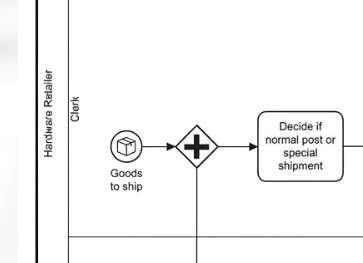
-
Label: “Goods to ship”
-
Meaning: The moment an order is confirmed, preparation begins immediately. No external message is modeled here; the event represents an internal state change.
Step 2: Parallel Execution (AND Split)
Packaging and administrative prep happen simultaneously. Use a Parallel Gateway (double lines) to split the flow.
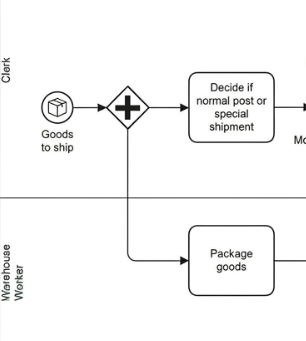
-
Branch A (Warehouse Worker): Task → “Package goods”
-
Branch B (Clerk): Task → “Decide if normal post or special shipment”
⚠️ Critical Rule: A Parallel Gateway splits unconditionally. Both paths activate every time. Do not use this for decision-making.
Step 3: Exclusive Routing (XOR Decision)
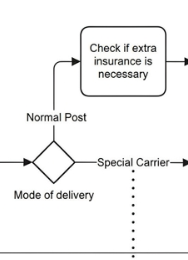
After the clerk decides the shipment mode, use an Exclusive Gateway (single line, X marker) labeled “Mode of delivery.” Only one outgoing path is taken per instance.
-
Path 1: Special Carrier → Clerk performs sequential tasks: “Request quotes,” “Assign carrier,” “Prepare special paperwork.”
-
Path 2: Normal Post → Proceeds to the Insurance Logic block below.
🔍 Realistic Example: If a customer orders a 50kg generator, the clerk selects “Special Carrier.” If they order a box of screws, “Normal Post” is selected. The XOR gateway ensures these paths never overlap in a single process instance.
Step 4: Conditional Parallelism (Inclusive Gateway – OR)
This is the most nuanced part of the model and where beginners struggle most. Under “Normal Post,” two things may happen:
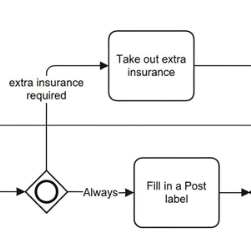
-
“Fill in a Post label” – Always required.
-
“Take out extra insurance” – Only if the item value exceeds a threshold (handled by Logistics Manager).
Use an Inclusive Gateway (circle with double ring) to split:
-
Path A: Always active → “Fill in a Post label” (Clerk)
-
Path B: Conditionally active → “Take out extra insurance” (Logistics Manager)
Then, use a second Inclusive Gateway to synchronize. This gateway intelligently waits:
-
It always waits for the label task.
-
It only waits for the insurance task if that path was activated.
💡 Why Not Parallel? A Parallel Gateway would force the insurance task to run every time, which is incorrect. An Exclusive Gateway would prevent the label and insurance from running together when both are needed. Only the Inclusive Gateway handles “one or more” correctly.
Step 5: Final Synchronization and Completion
Both major branches (Warehouse packaging + Clerk/Manager admin prep) must finish before the package is ready. Use a Parallel Gateway to merge all incoming flows.
-
Final Task: “Add paperwork and move package to pick area” (Warehouse Worker)
-
End Event: “Goods available for pick”
This final parallel join ensures no package reaches the pick area without both physical packaging AND correct documentation.
Part 3: Leveraging Visual Paradigm and AI Features
Modeling this manually teaches fundamentals, but modern tools dramatically accelerate proficiency and accuracy.
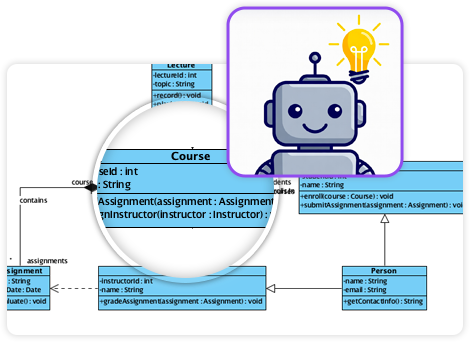
Why Visual Paradigm?
Visual Paradigm is a BPMN 2.0-compliant platform specifically suited for this type of organizational modeling:
-
Drag-and-Drop Lane Assignment: Tasks snap to lanes, enforcing role clarity.
-
Sub-process Decomposition: Right-click “Package goods” → “Open Sub-process” to detail packing steps without cluttering the main diagram.
-
Built-in Simulation: Walk through the Inclusive Gateway logic visually to verify synchronization behavior before deployment.
-
Auto-Documentation: Generate PDF/Word process guides directly from the model for stakeholder alignment.
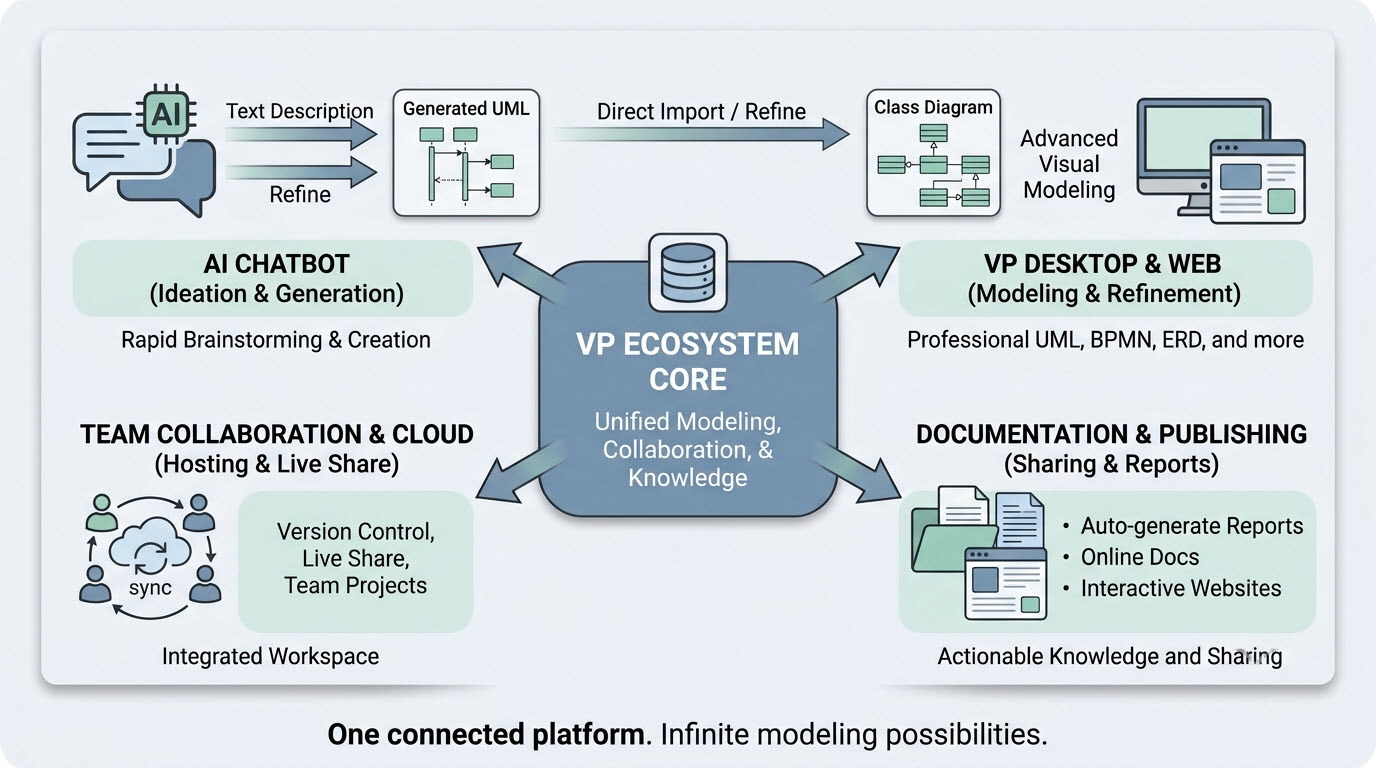
AI-Powered Learning and Modeling Assistance
Visual Paradigm integrates AI features that are particularly valuable for beginners:
| AI Feature | Application in This Tutorial | Benefit for Beginners |
|---|---|---|
| AI Process Generator | Describe “hardware retailer shipment with parallel packaging and conditional insurance” in natural language | Generates a draft BPMN diagram instantly, providing a starting template to refine rather than building from scratch |
| AI Model Validator | Check gateway pairing, lane assignments, and deadlocks | Catches common mistakes (e.g., mismatched inclusive gateways) before simulation |
| AI Documentation Assistant | Generate narrative descriptions from the visual model | Helps learners articulate why certain gateways were chosen, reinforcing conceptual understanding |
| AI Chat / Tutor | Ask “Why use inclusive instead of parallel for insurance?” | Provides contextual explanations tied to your specific model, not generic definitions |
🛠️ Practical Workflow: Start by prompting Visual Paradigm’s AI generator with the scenario description. Review the output against the step-by-step guide above. Use the AI validator to identify gaps. Then manually adjust gateways and labels to match the precise logic described. This hybrid approach builds muscle memory while reducing frustration.
Part 4: Common Pitfalls and Best Practices
As you practice with this example, watch for these frequent beginner errors:
-
Misusing Parallel Gateways for Decisions: Remember, parallel = always both. If there’s any condition, use Exclusive or Inclusive.
-
Unpaired Inclusive Gateways: Every inclusive split must have a corresponding inclusive join. Failing to synchronize causes tokens to accumulate or deadlock.
-
Lane Crossing Confusion: Sequence flows should generally stay within lanes. Cross-lane flows imply handoffs; ensure they’re intentional and clearly directed.
-
Over-modeling Communication: The prompt specifies internal communication is assumed. Resist adding message flows between lanes unless external parties are involved.
-
Ignoring Labels: Unlabeled gateways are ambiguous. Always label Exclusive and Inclusive gateways with the decision criterion (“Mode of delivery,” “Insurance required?”).
Conclusion
The Hardware Retailer Shipment Process is more than an academic exercise—it encapsulates the three gateway patterns that define real-world business process complexity. By mastering the Parallel split for concurrency, the Exclusive choice for routing, and the Inclusive pattern for conditional parallelism, you gain transferable skills applicable to healthcare, finance, manufacturing, and software development.
Modern tooling like Visual Paradigm, especially when augmented with AI assistance, lowers the barrier to entry significantly. AI generators provide scaffolding, validators enforce correctness, and chat tutors offer just-in-time learning. However, technology amplifies understanding; it does not replace it. Use this tutorial to build foundational knowledge, then let the tools handle the mechanics. Your ability to read, create, and validate BPMN models will become a critical asset in bridging business strategy and operational execution.
Start small. Model this retailer scenario end-to-end. Simulate it. Break it. Fix it. Then apply the same disciplined approach to your organization’s most complex processes. Mastery follows practice.

