


The Problem with GUI-First Architecture
For years, C4 modeling has been trapped in a paradox: we advocate for “architecture as code,” yet most teams still build their C4 diagrams by dragging boxes in a GUI. This leads to stale documentation, merge conflicts in binary files, and a disconnect between the diagram and the actual system.
Modern development teams need a workflow where conversation sparks design and code sustains it. By combining Visual Paradigm’s AI Chatbot with VPasCode, you can move from natural language prompts to production-grade C4 PlantUML in minutes—without ever touching a mouse.
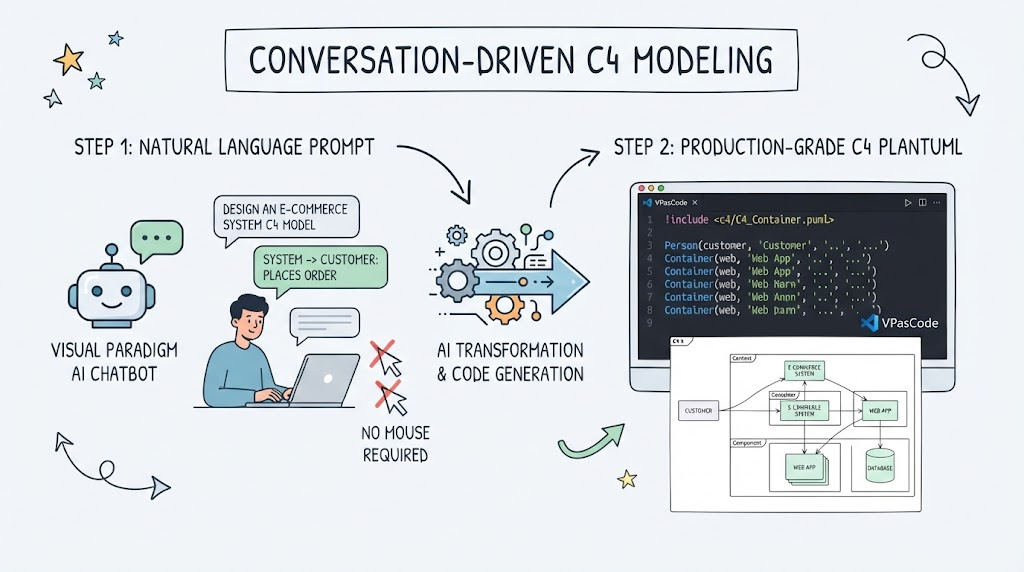
This guide demonstrates that workflow using concrete PlantUML examples.
Phase 1: Conversational Design with AI Chatbot
The AI Chatbot in Visual Paradigm acts as your architectural co-pilot. Instead of starting with a blank canvas, you start with intent.
✅ Effective Prompting Strategy
Don’t ask the AI to “draw a diagram.” Ask it to model a system using C4 semantics. Be specific about boundaries, technologies, and data flows.
💬 Sample AI Chatbot Prompt:
“Act as a software architect. Create a C4 Container diagram for an ‘Online Banking System.’ Include a Web App (React), a Mobile App (Flutter), an API Gateway (Kong), a Core Banking Service (.NET), and a PostgreSQL database. Show authentication flow via OAuth2 and account balance queries. Output valid C4-PlantUML code using the official macros.”
🤖 Expected AI Output (Refined)
The AI will generate a first-draft PlantUML model. Review it critically—AI is great at structure but may hallucinate relationships. Use follow-up chat prompts to refine: “Add a Redis cache between the API Gateway and Core Banking Service for session management” or “Mark the PostgreSQL database as deprecated and add a new MongoDB cluster.”
Phase 2: Deterministic Modeling with VPasCode & PlantUML
Once the AI generates a viable draft, stop chatting and start coding. Copy the refined PlantUML into a .puml file managed by VPasCode. This is your single source of truth.
Below are production-ready C4 PlantUML examples generated through this workflow. Ensure your Visual Paradigm project includes the C4-PlantUML library.
Example 1: System Context Diagram (Level 1)
This defines the boundary of your system and its external actors.
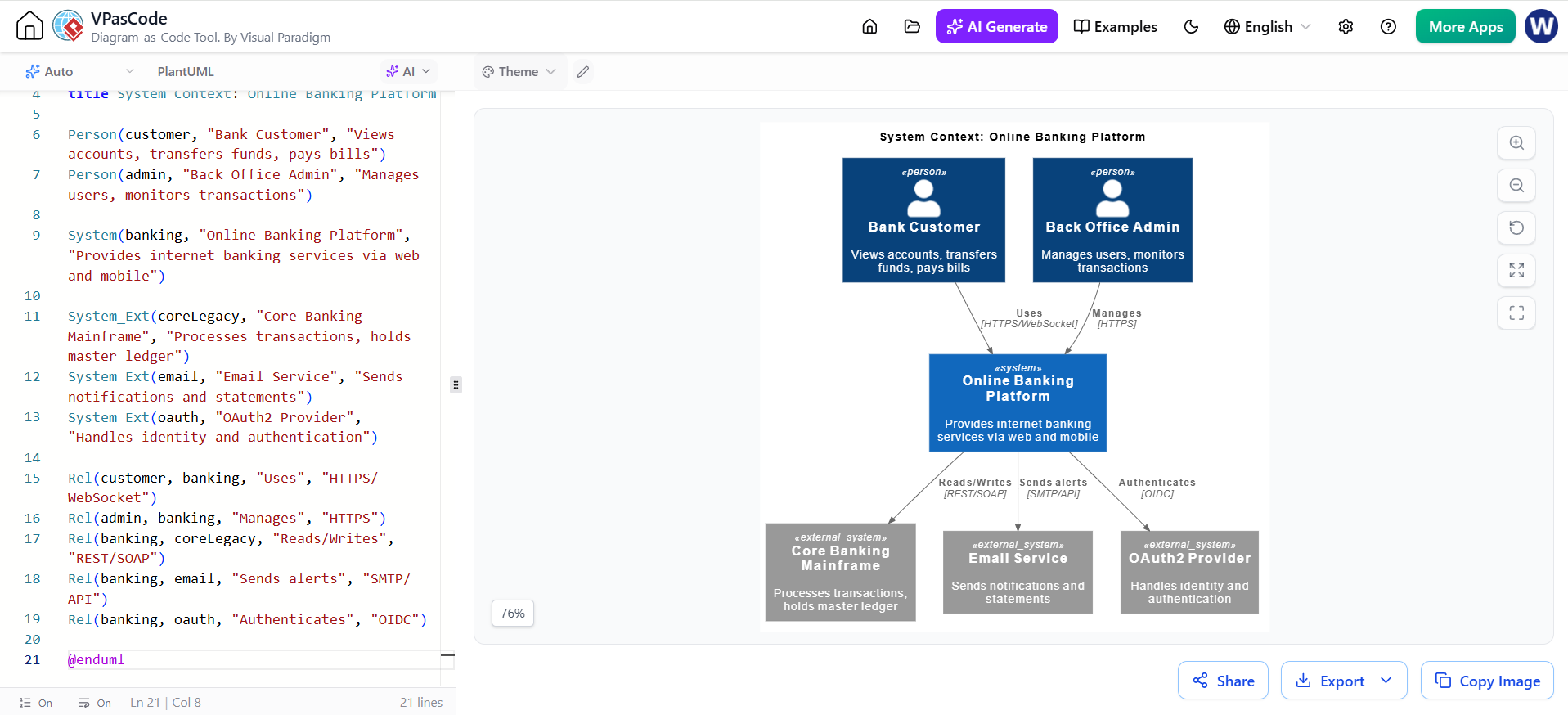
@startuml OnlineBanking_Context
!include https://raw.githubusercontent.com/plantuml-stdlib/C4-PlantUML/master/C4_Context.puml

title System Context: Online Banking Platform

Person(customer, "Bank Customer", "Views accounts, transfers funds, pays bills")
Person(admin, "Back Office Admin", "Manages users, monitors transactions")

System(banking, "Online Banking Platform", "Provides internet banking services via web and mobile")

System_Ext(coreLegacy, "Core Banking Mainframe", "Processes transactions, holds master ledger")
System_Ext(email, "Email Service", "Sends notifications and statements")
System_Ext(oauth, "OAuth2 Provider", "Handles identity and authentication")

Rel(customer, banking, "Uses", "HTTPS/WebSocket")
Rel(admin, banking, "Manages", "HTTPS")
Rel(banking, coreLegacy, "Reads/Writes", "REST/SOAP")
Rel(banking, email, "Sends alerts", "SMTP/API")
Rel(banking, oauth, "Authenticates", "OIDC")

@enduml
Example 2: Container Diagram (Level 2)
Decomposes the system into runtime containers. Note the use of ContainerDb, ContainerQueue, and technology tags—critical for modern cloud-native systems.
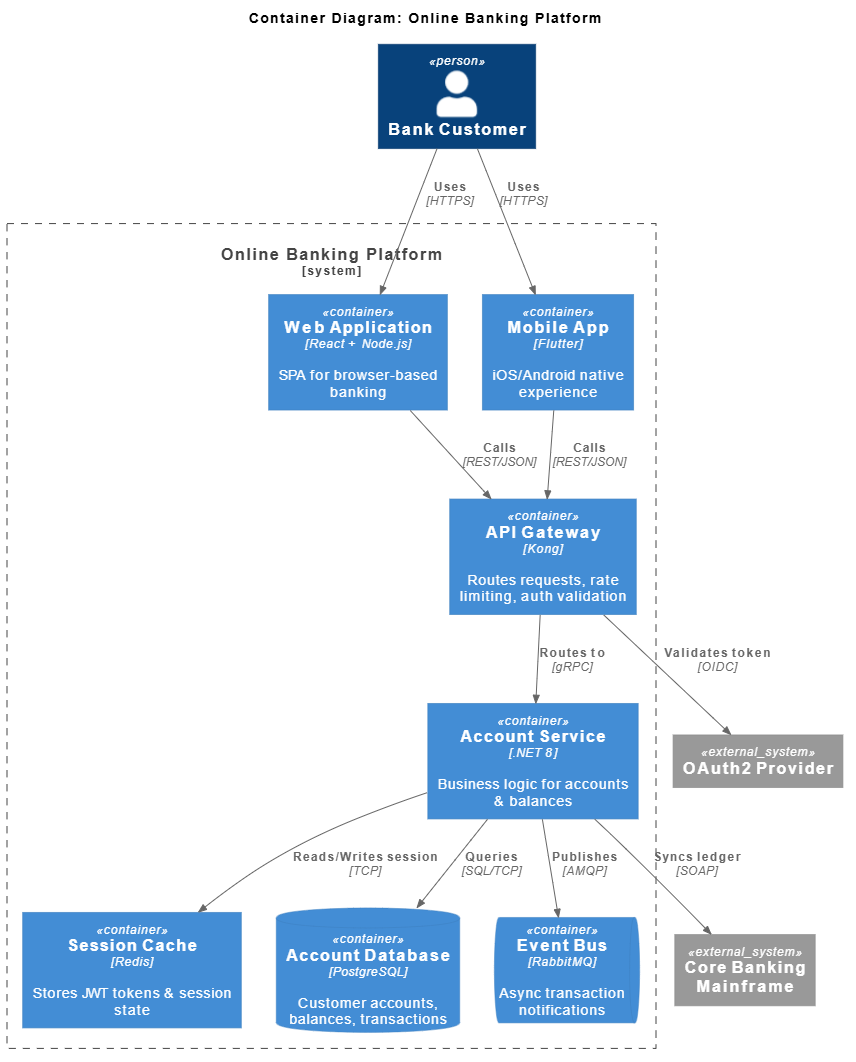
@startuml OnlineBanking_Containers
!include https://raw.githubusercontent.com/plantuml-stdlib/C4-PlantUML/master/C4_Container.puml

title Container Diagram: Online Banking Platform

Person(customer, "Bank Customer")

System_Boundary(banking, "Online Banking Platform") {
    Container(webapp, "Web Application", "React + Node.js", "SPA for browser-based banking")
    Container(mobile, "Mobile App", "Flutter", "iOS/Android native experience")
    Container(api, "API Gateway", "Kong", "Routes requests, rate limiting, auth validation")
    Container(service, "Account Service", ".NET 8", "Business logic for accounts & balances")
    Container(cache, "Session Cache", "Redis", "Stores JWT tokens & session state")
    ContainerDb(db, "Account Database", "PostgreSQL", "Customer accounts, balances, transactions")
    ContainerQueue(events, "Event Bus", "RabbitMQ", "Async transaction notifications")
}

System_Ext(oauth, "OAuth2 Provider")
System_Ext(legacy, "Core Banking Mainframe")

Rel(customer, webapp, "Uses", "HTTPS")
Rel(customer, mobile, "Uses", "HTTPS")
Rel(webapp, api, "Calls", "REST/JSON")
Rel(mobile, api, "Calls", "REST/JSON")
Rel(api, oauth, "Validates token", "OIDC")
Rel(api, service, "Routes to", "gRPC")
Rel(service, cache, "Reads/Writes session", "TCP")
Rel(service, db, "Queries", "SQL/TCP")
Rel(service, events, "Publishes", "AMQP")
Rel(service, legacy, "Syncs ledger", "SOAP")

@enduml
Example 3: Component Diagram (Level 3) – Account Service
Zooms into a single container. This is where VPasCode shines: components map directly to code modules.
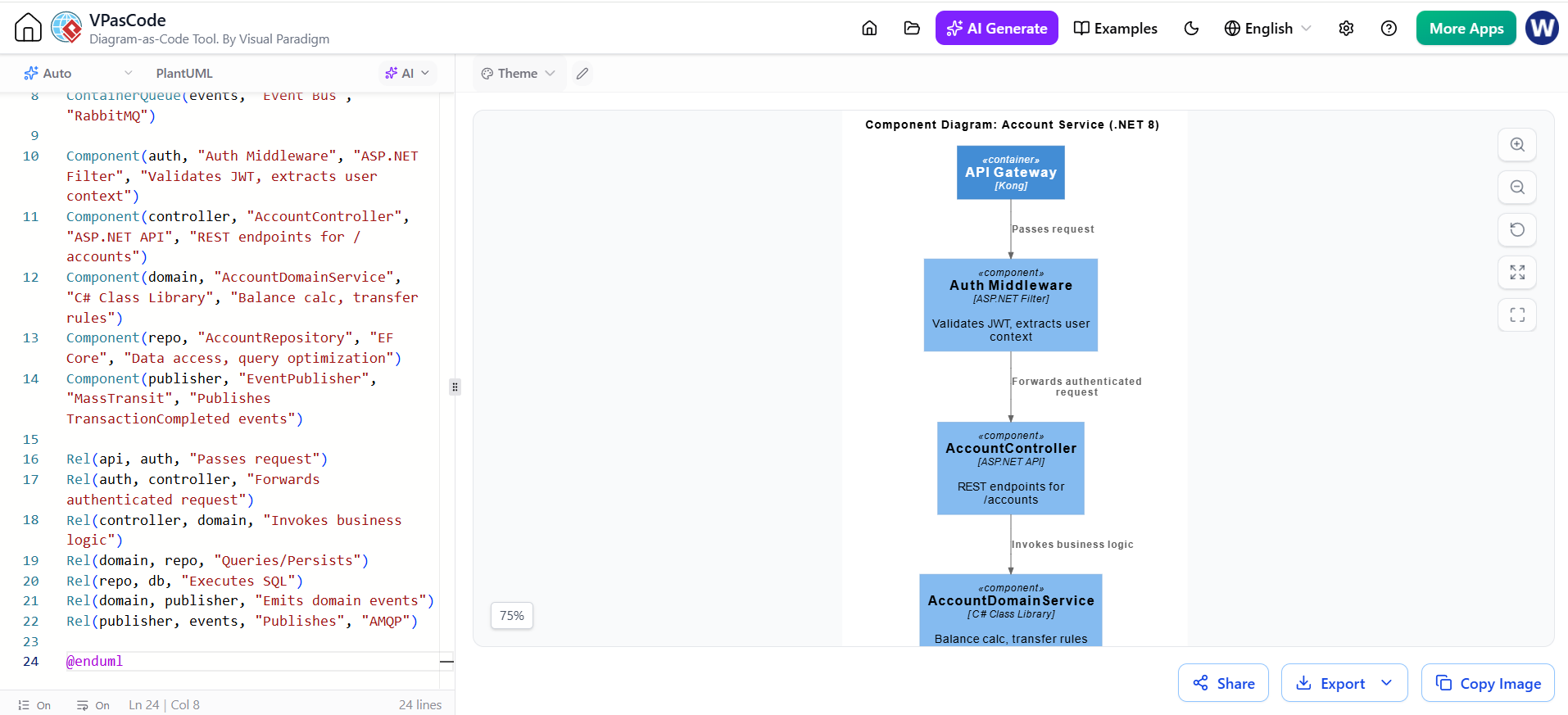
@startuml AccountService_Components
!include https://raw.githubusercontent.com/plantuml-stdlib/C4-PlantUML/master/C4_Component.puml

title Component Diagram: Account Service (.NET 8)

Container(api, "API Gateway", "Kong")
ContainerDb(db, "Account DB", "PostgreSQL")
ContainerQueue(events, "Event Bus", "RabbitMQ")

Component(auth, "Auth Middleware", "ASP.NET Filter", "Validates JWT, extracts user context")
Component(controller, "AccountController", "ASP.NET API", "REST endpoints for /accounts")
Component(domain, "AccountDomainService", "C# Class Library", "Balance calc, transfer rules")
Component(repo, "AccountRepository", "EF Core", "Data access, query optimization")
Component(publisher, "EventPublisher", "MassTransit", "Publishes TransactionCompleted events")

Rel(api, auth, "Passes request")
Rel(auth, controller, "Forwards authenticated request")
Rel(controller, domain, "Invokes business logic")
Rel(domain, repo, "Queries/Persists")
Rel(repo, db, "Executes SQL")
Rel(domain, publisher, "Emits domain events")
Rel(publisher, events, "Publishes", "AMQP")

@enduml
Phase 3: Integrating VPasCode into Your Dev Workflow
Generating PlantUML is only half the battle. Here’s how to make it stick in a modern team:
Version Control Everything
Store all .puml files alongside your application code in the same repository. Treat diagrams like infrastructure-as-code:
/docs/architecture/c4/
├── 01-context.puml
├── 02-containers.puml
├── 03-account-service-components.puml
└── README.md
Automate Rendering in CI/CD
Use Visual Paradigm’s CLI or a GitHub Action to render PNGs/SVGs on every PR. Never commit rendered images manually.
# Example GitHub Action snippet
- name: Render C4 Diagrams
  run: |
    vp-cli render -i docs/architecture/c4/*.puml \
                  -o docs/architecture/output/ \
                  -f svg --c4-layout auto
Bidirectional Sync with VPasCode
VPasCode isn’t just a renderer—it’s a model synchronization engine. When you update PlantUML:
-
Visual Paradigm’s central model updates automatically
-
Cross-references (e.g., linking a Component to a Jira epic or a Git repo) remain intact
-
Team members using the GUI see changes reflected in real-time
-
AI Chatbot conversations can reference the current model state, not a stale snapshot
⚠️ Critical Warning: Never let AI-generated PlantUML bypass human review. AI frequently invents non-existent APIs, mislabels protocols, or omits critical security boundaries. Always validate generated code against your actual codebase and threat model before committing.
Adoption Checklist for Modern Teams
| Step | Action | Tool |
|---|---|---|
| 1 | Bootstrap initial C4 model via conversational prompting | AI Chatbot |
| 2 | Refine and correct AI output through iterative chat | AI Chatbot |
| 3 | Export validated PlantUML to version-controlled repo | VPasCode |
| 4 | Set up CI pipeline to auto-render on PR | VPasCode CLI |
| 5 | Link C4 elements to code repos, tickets, and docs | Visual Paradigm |
| 6 | Schedule quarterly “model hygiene” reviews using AI critique | AI Chatbot |
Final Thought
C4 modeling shouldn’t be a tax on your team’s velocity. By treating AI as the creative spark and VPasCode as the deterministic anchor, you get the best of both worlds: rapid exploration and sustainable documentation. Stop dragging boxes. Start architecting at the speed of conversation.