


Introduction
Business Process Model and Notation (BPMN) is the global standard for modeling business processes, and at the heart of effective process modeling lies a fundamental understanding of gateways. While activities represent work and events mark occurrences, gateways serve as the critical control points that determine how sequence flows branch, fork, merge, and join throughout a process.
This guide provides a comprehensive exploration of gateway fundamentals, focusing on proper modeling conventions, common misconceptions, and practical applications. Understanding these concepts is essential for creating clear, executable, and maintainable process models that accurately reflect business logic and enable effective communication across enterprise stakeholders.
What Are Gateways?
Gateways are BPMN elements that control the flow of a process by determining the path that sequence flows take based on specific conditions or events. They do not represent work themselves, nor are they decision points in the traditional sense. Instead, they orchestrate how process execution proceeds through different branches.
Five Fundamental Principles of Gateways
1. Gateways Determine Flow Direction
What it means: Gateways act as the junctions in your process. They decide where the “traffic” (the process flow) goes next. They can split one path into many (branching/forking) or bring many paths back into one (merging/joining).
- Beginner Example: The Highway Interchange
Imagine you are driving on a highway (the sequence flow). You approach a major interchange (the gateway).- Branching: The road splits. You can take Exit A to go to the Airport, or Exit B to go to Downtown. The gateway manages this split.
- Merging: Later, two different on-ramps (from the Airport and Downtown) merge back onto the same main highway. The gateway manages this join.
2. Gateways Are Condition-Dependent
What it means: A gateway doesn’t just randomly pick a path. It looks at information (data) from what happened before it, or waits for something specific to happen after it, to decide which way to send the flow.
- Beginner Example: The Bouncer at a Club
Imagine a nightclub entrance. The “Bouncer” is the gateway.- Condition: Before letting you in, the bouncer checks your ID (data from the activity “Show ID”).
- Rule: If Age ≥ 21, you go to the “VIP Lounge” path. If Age < 21, you go to the “Go Home” path.
- The bouncer doesn’t guess; they rely on the specific condition (your age) to control the flow.
3. Gateways Are NOT Decision Points (No “Yes/No” Labels!)
What it means: This is a common mistake. In old-school flowcharts, diamonds were labeled “Yes” or “No.” In BPMN, we avoid this. Instead of labeling the arrow with a binary answer, we label the arrow with the condition or the outcome. This makes the model readable for everyone, not just programmers.
- Beginner Example: Ordering Coffee
❌ Bad Modeling (The “Yes/No” Trap):- Gateway: “Do you want milk?”
- Arrow 1: “Yes”
- Arrow 2: “No”
(This is vague. What if I want oat milk? What if I’m lactose intolerant?)
✅ Good Modeling (Expressive Language):
- Gateway: “Select Milk Preference”
- Arrow 1: “Customer selects Dairy Milk”
- Arrow 2: “Customer selects Oat Milk”
- Arrow 3: “Customer selects No Milk”
(Now the process is clear, detailed, and captures the actual business rule.)
4. Gateways Do Not Represent Work
What it means: Activities (like boxes labeled “Write Report” or “Call Client”) take time and effort. Gateways do not. They are instantaneous. They don’t “do” anything; they just direct. If you find yourself thinking, “I need to spend an hour at this gateway,” you’re modeling it wrong.
- Beginner Example: The Railroad Switch
Imagine a train track.- Activity: The train engine moving down the track is the work. It takes time and fuel.
- Gateway: The metal switch on the tracks that points the train left or right.
- The switch itself doesn’t move the train. It doesn’t consume fuel. It simply changes the direction instantly. The work is done by the train (the activity), not the switch (the gateway).
5. Gateways Can Be Data-Based or Event-Based
What it means: There are two main ways a gateway decides where to send the flow:
- Data-Based: It looks at existing information (like a form field or a database value).
- Event-Based: It waits for something specific to happen (like a timer running out or a message arriving).
- Beginner Example: Waiting for a Package
- Data-Based Gateway (Checking a Status):
You check your tracking app. The data says “Delivered.”- Gateway Logic: If Status = “Delivered,” go to “Open Box.” If Status = “In Transit,” go to “Wait.”
- Key: You are evaluating existing data.
- Event-Based Gateway (Waiting for Something to Happen):
You are sitting on your porch waiting.- Gateway Logic: Wait for either:
- The Doorbell Rings (Event: Package Arrives)
- The Sun Sets (Event: Timeout/End of Day)
- Key: You aren’t checking a database; you are waiting for a specific event to occur first. Whichever happens first determines your next step.
- Gateway Logic: Wait for either:
- Data-Based Gateway (Checking a Status):
Summary Cheat Sheet for Beginners
| Principle | Simple Analogy | Key Takeaway |
|---|---|---|
| Flow Direction | Highway Interchange | Splits or joins paths. |
| Condition-Dependent | Club Bouncer | Checks rules/ID before letting you pass. |
| Not Decision Points | Menu Options | Don’t use “Yes/No.” Use descriptive outcomes like “Selected Vegan Option.” |
| No Work | Railroad Switch | It directs traffic but doesn’t do the heavy lifting. |
| Data vs. Event | Tracking App vs. Doorbell | Data = Checking info. Event = Waiting for something to happen. |
Types of Gateways
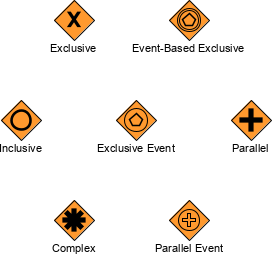
1. Exclusive Gateway (XOR Gateway)
The exclusive gateway is the most commonly used gateway type. It represents a point where exactly one path is chosen from multiple alternatives based on data-driven conditions.
Key Characteristics:
- Data-driven: Routing decisions are based on evaluating data or conditions
- Mutually exclusive paths: Only one outgoing path is taken
- Diverging behavior: Splits one incoming flow into multiple possible outgoing flows
- Converging behavior: Merges multiple incoming flows into one outgoing flow (only one will arrive)
Example: Student Engagement Scenario
Consider a teaching process where an instructor must decide how to proceed based on student engagement levels:
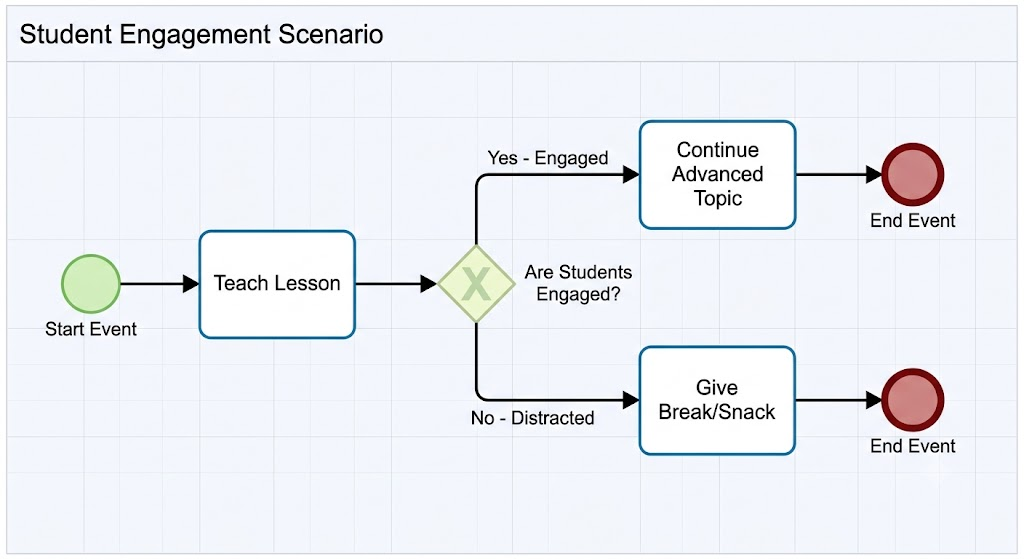
Modeling Notes:
- The condition “Are students engaged?” is evaluated based on observable data:
- Are students nodding off?
- Are they sitting on the edge of their seats?
- Are they asking questions?
- Is there active participation?
- The gateway does not have labels like “Yes/No” on the arrows
- Instead, each path has descriptive labels explaining the condition or outcome
Proper Labeling Convention:
❌ Incorrect:
- Arrow 1: “Yes”
- Arrow 2: “No”
✅ Correct:
- Arrow 1: “Students are actively participating and asking questions”
- Arrow 2: “Students appear distracted or disengaged”
2. Parallel Gateway (AND Gateway)
The parallel gateway splits the flow into multiple concurrent paths that all execute simultaneously, or merges multiple concurrent paths back into a single flow.
Key Characteristics:
- No conditions required: All outgoing paths are taken simultaneously
- Concurrency: Multiple activities execute in parallel
- Synchronization: When merging, waits for all incoming paths to complete
Example: Order Processing
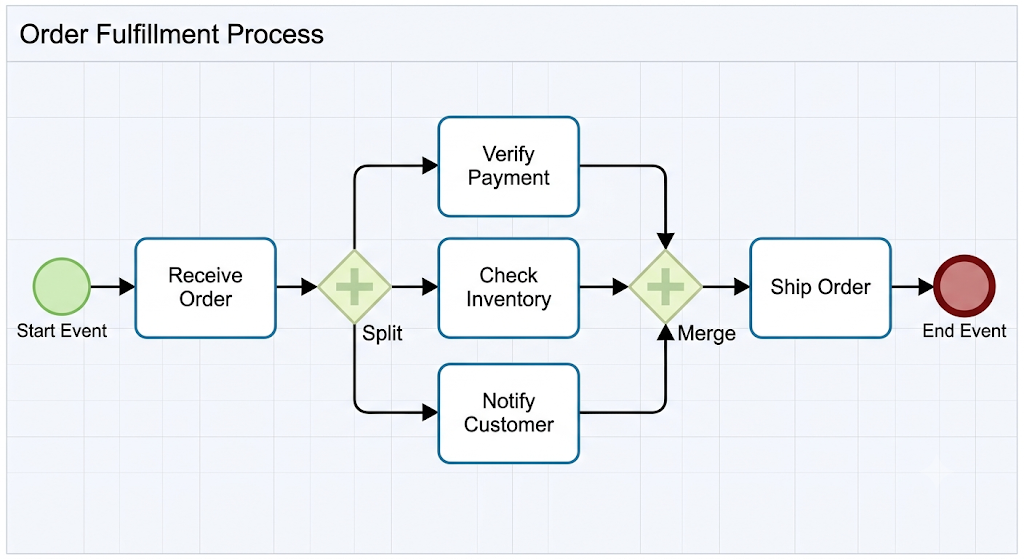 Modeling Notes:
- Payment verification, inventory checking, and customer notification all happen concurrently
- The process cannot proceed to shipping until all three parallel activities complete
- No conditional labels needed on outgoing arrows
3. Inclusive Gateway (OR Gateway)
The inclusive gateway allows one or more paths to be taken based on conditions. Unlike the exclusive gateway (exactly one path), multiple paths can execute simultaneously if their conditions are met.
Key Characteristics:
- Conditional branching: Each path has a condition
- Multiple paths possible: Zero, one, or multiple paths may be taken
- Flexible execution: More flexible than exclusive but less rigid than parallel
Example: Customer Onboarding
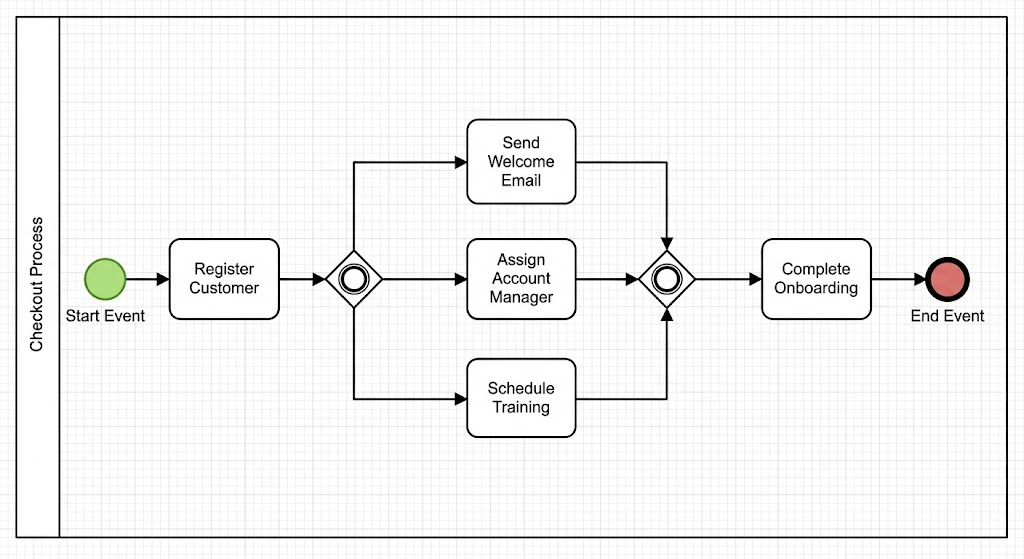
Modeling Notes:
- Depending on customer type and preferences:
- All new customers receive a welcome email
- Enterprise customers get an account manager
- Technical products require training scheduling
- Any combination of these paths may execute
4. Event-Based Gateway
The event-based gateway routes flow based on which event occurs first, rather than evaluating data conditions.
Key Characteristics:
- Event-driven: Waits for one of several possible events
- First-come-first-served: Whichever event triggers first determines the path
- Common use cases: Timeout scenarios, competing signals, interrupt events
Example: Application Review Process
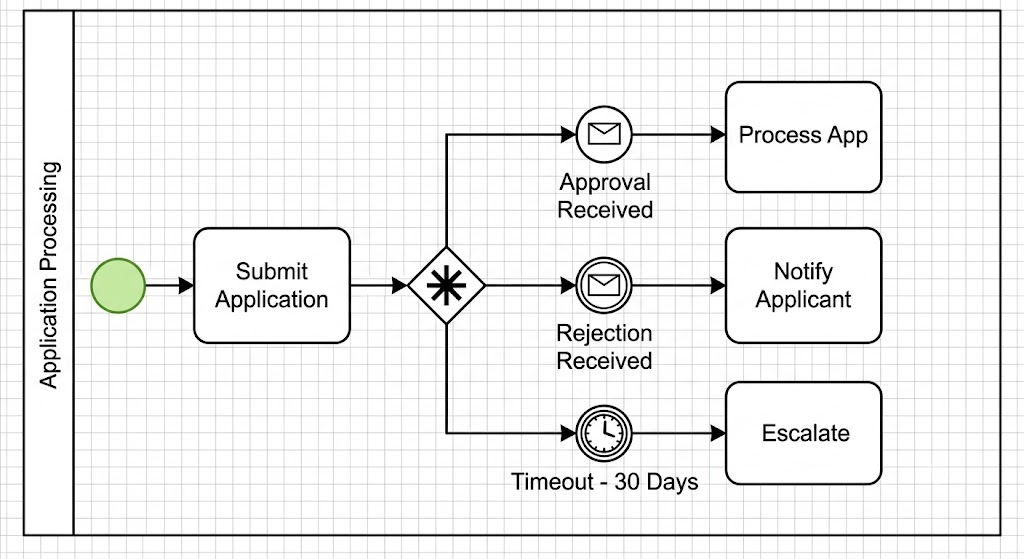
Modeling Notes:
- The process waits for whichever happens first: approval, rejection, or timeout
- No data evaluation—purely event-triggered routing
5. Complex Gateway
The complex gateway handles sophisticated routing scenarios that don’t fit neatly into other gateway types. It’s used sparingly due to its complexity.
Key Characteristics:
- Custom behavior: Defined by complex expressions or rules
- Rarely used: Most scenarios can be modeled with combinations of simpler gateways
- Advanced modeling: Requires careful documentation
Gateway Modeling Conventions and Best Practices
1. Diverging Gateway Requirements
A diverging gateway (one that splits flow) must have at least two outbound arrows.
❌ Invalid:
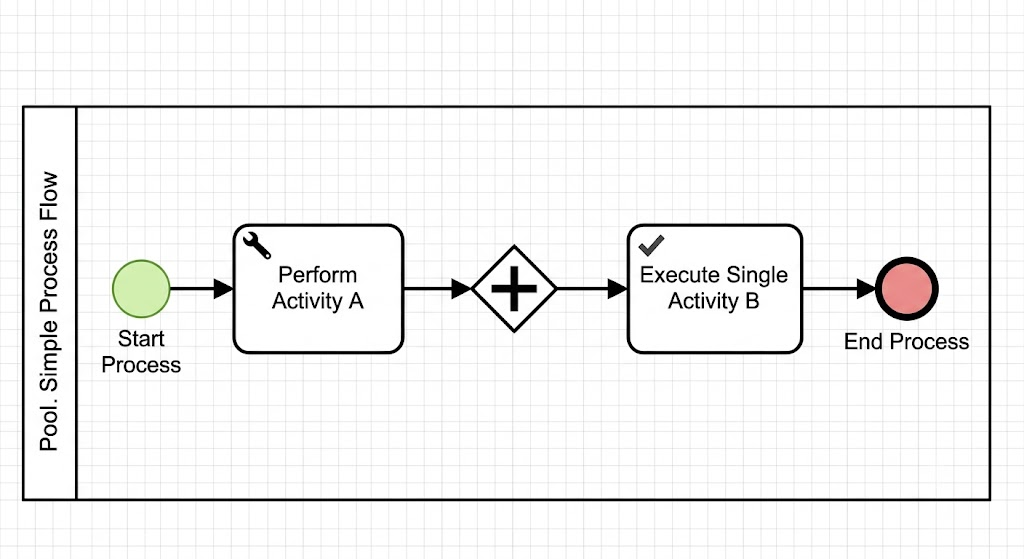
✅ Valid:
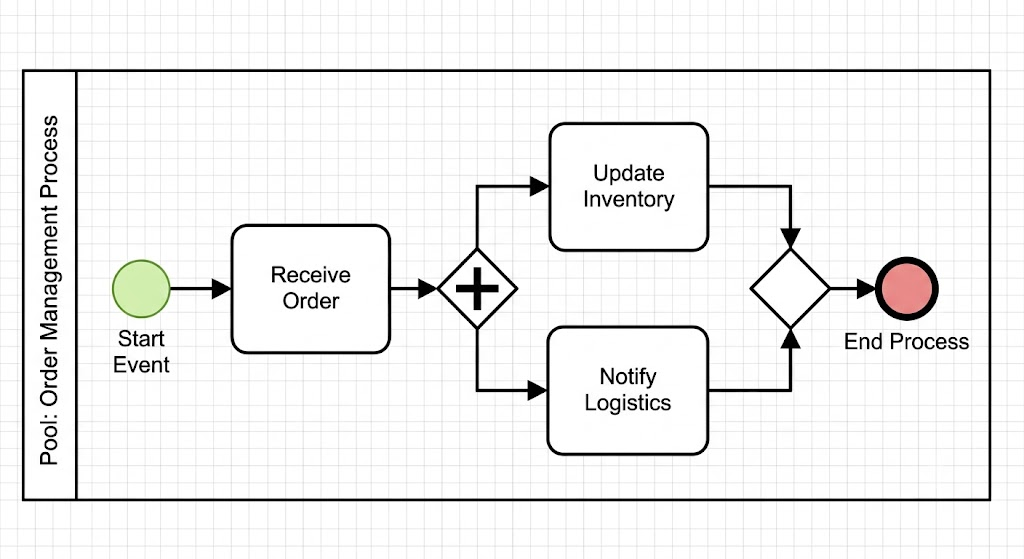
2. Merging Gateway Requirements
A merging gateway (one that joins flows) must have at least two inbound arrows.
❌ Invalid:
[Activity A] → [Gateway] → [Next Activity]
✅ Valid:
[Activity A] → [Gateway] → [Next Activity]
[Activity B] ↗
3. Start and End Events
Every well-formed process model should include:
- At least one start event: Marks where the process begins
- At least one end event: Marks where the process completes
4. Avoid “Yes/No” Labels
As emphasized in the fundamentals, gateways are not decision points in the traditional flowchart sense.
Why this matters:
- Enables expressive, business-friendly language
- Makes models self-documenting
- Facilitates better communication with non-technical stakeholders
- Aligns with BPMN specification standards
5. Clear Path Descriptions
Each sequence flow exiting a gateway should have a clear, descriptive label that explains:
- The condition being evaluated
- The expected outcome
- The business context
Example:
Instead of:
- Path 1: “Condition A”
- Path 2: “Condition B”
Use:
- Path 1: “Customer credit score is above 700”
- Path 2: “Customer credit score is below 700”
Practical Examples
Example 1: Loan Approval Process
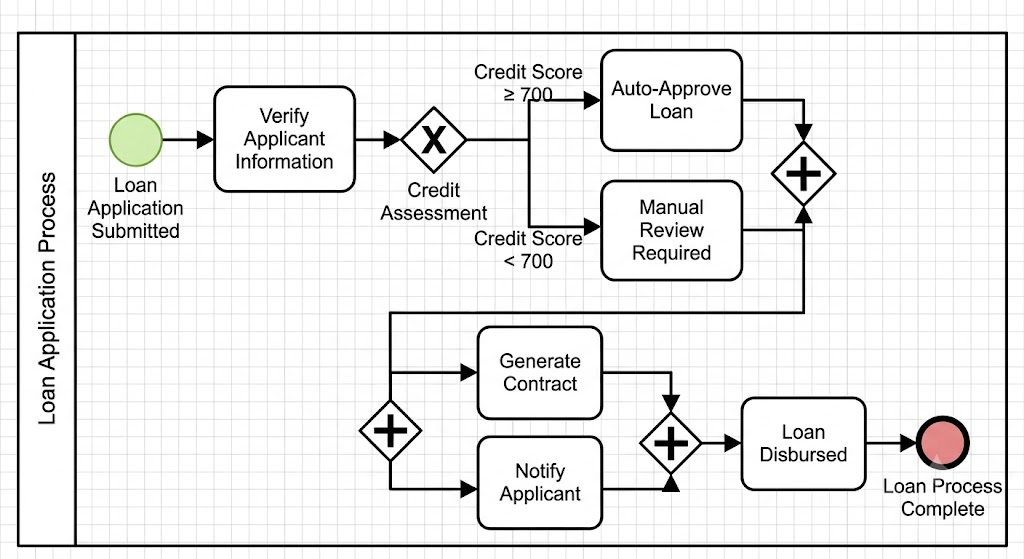
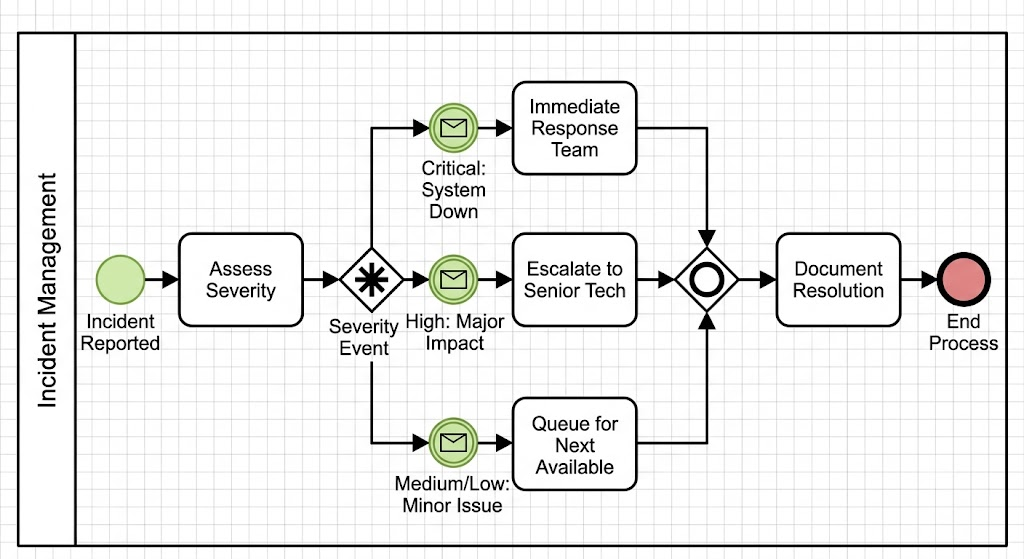
Example 2: Incident Response Process
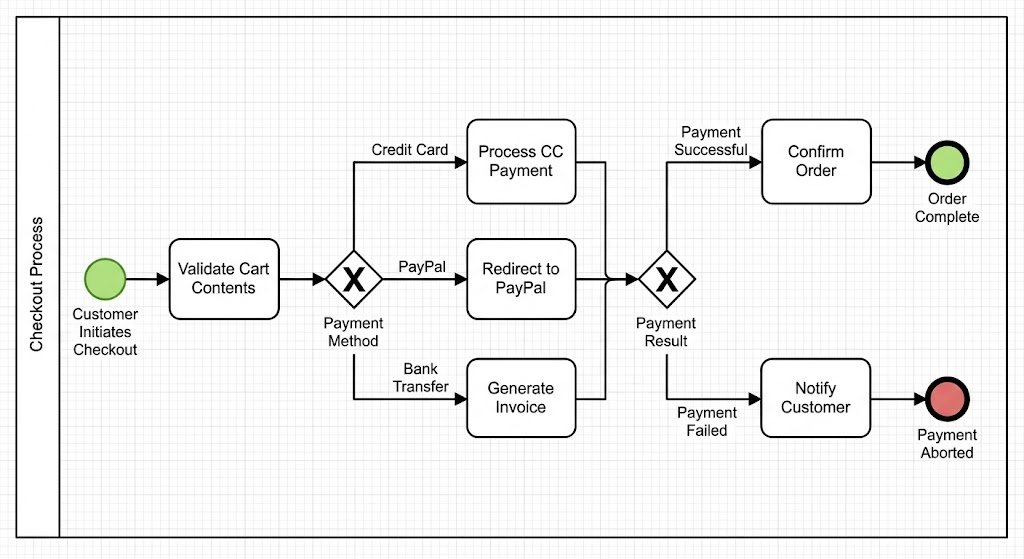
Example 3: E-Commerce Checkout
Common Mistakes to Avoid
1. Using Gateways as Decision Points with Yes/No Labels
This violates BPMN conventions and reduces model clarity.
2. Creating Single-Path Gateways
A gateway with only one incoming or one outgoing flow serves no purpose and should be removed.
3. Mixing Gateway Types Incorrectly
Don’t use an exclusive gateway when you need parallel execution, or vice versa.
4. Omitting Conditions on Outgoing Flows
For conditional gateways (exclusive, inclusive), always specify what determines each path.
5. Forgetting to Merge Parallel Flows
If you split into parallel paths, ensure they eventually merge back together using a corresponding parallel gateway.
Gateway Selection Guide
| Scenario | Recommended Gateway |
|---|---|
| Choose exactly one path based on conditions | Exclusive Gateway |
| Execute all paths simultaneously | Parallel Gateway |
| Choose one or more paths based on conditions | Inclusive Gateway |
| Wait for whichever event occurs first | Event-Based Gateway |
| Complex custom routing logic | Complex Gateway |
Conclusion
Mastering BPMN gateways is fundamental to creating effective, clear, and executable business process models. By understanding that gateways control flow rather than represent work, avoiding the temptation to label them as simple “yes/no” decision points, and applying the appropriate gateway type for each scenario, you can create models that accurately reflect business logic and facilitate clear communication across your organization.
Remember the key principles:
- Gateways determine branching, forking, merging, and joining
- They rely on conditions or events, not arbitrary decisions
- They never represent work themselves
- Always use descriptive, business-friendly labels on sequence flows
- Ensure diverging gateways have multiple outputs and merging gateways have multiple inputs
As you continue developing your process modeling skills, leverage professional tools like Visual Paradigm to create, validate, and share your BPMN diagrams. Visual Paradigm provides comprehensive BPMN support, including intelligent gateway suggestions, automatic validation of modeling rules, and collaborative features that help teams build consistent, high-quality process models. With the right understanding of gateway fundamentals and the right tooling, you’ll be well-equipped to model processes that drive real business value across your enterprise.