


The Visual Paradigm Unified Platform is a transformative ecosystem designed to dissolve the traditional boundaries between desktop modeling tools and cloud-based collaboration. Launched in June 2026, it addresses the critical challenges of “tool fatigue” and fragmented workflows that professionals face when juggling dozens of disconnected applications.
Rather than being a standalone new product, the Unified Platform acts as an integration layer and orchestration hub. It unifies over 100 specialized applications, connects local desktop data with cloud services, and embeds AI capabilities directly into the creative workflow, creating a single, coherent environment for visual productivity.
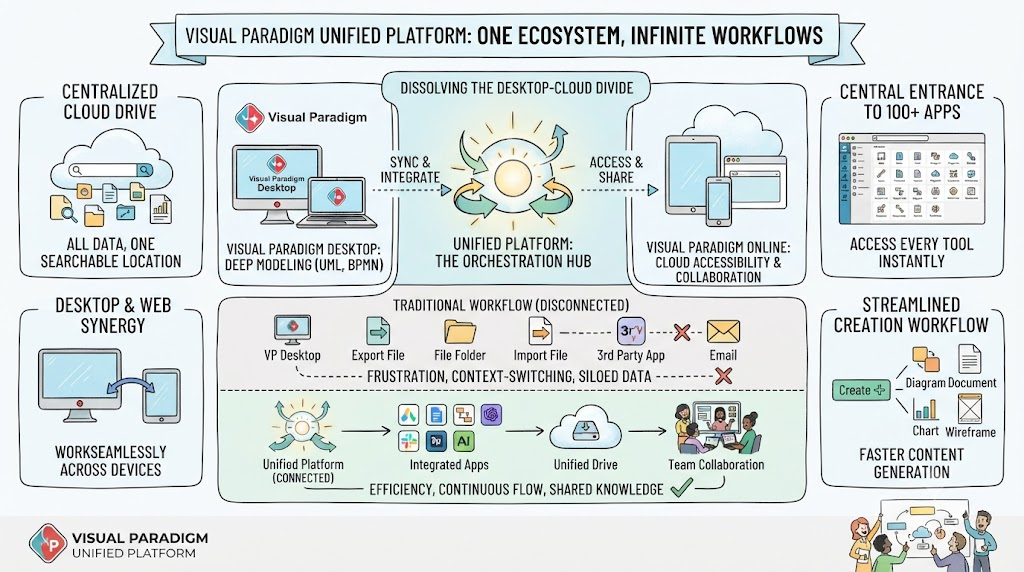
Image Note: This image shows the national flag of India, rendered in a blurred or low-resolution style. It consists of three equal horizontal stripes: Top (Saffron), Middle (White), and Bottom (Green), with the Ashoka Chakra in the center.
The Role of the Unified Platform in the VP Ecosystem
The Unified Platform serves as the central nervous system of the Visual Paradigm ecosystem, resolving three major pain points that existed in the previous architecture:
1. Eliminating Siloed Data
Previously, diagrams, documents, and projects created in different applications lived in isolation. Users had to manually export and import files to move data between tools. The Unified Platform introduces the Unified Drive, a centralized cloud environment that automatically indexes and organizes every artifact—whether it is a diagram, document, or project—into a single, searchable location.
2. Breaking the Desktop-Cloud Divide
Desktop users previously had deep modeling capabilities but limited access to cloud collaboration, while online users had accessibility but lacked integration with heavy-duty desktop workflows. The Unified Platform bridges this gap by embedding a full cloud workspace directly inside the Visual Paradigm Desktop application via an integrated browser.
3. Centralizing App Discovery
With over 100 specialized apps, users often struggled to find the right tool. The platform acts as a centralized app store and launcher, providing a categorized dashboard where tools for Agile planning, infographics, Gantt charts, wireframing, and strategic management are accessible with a single click.
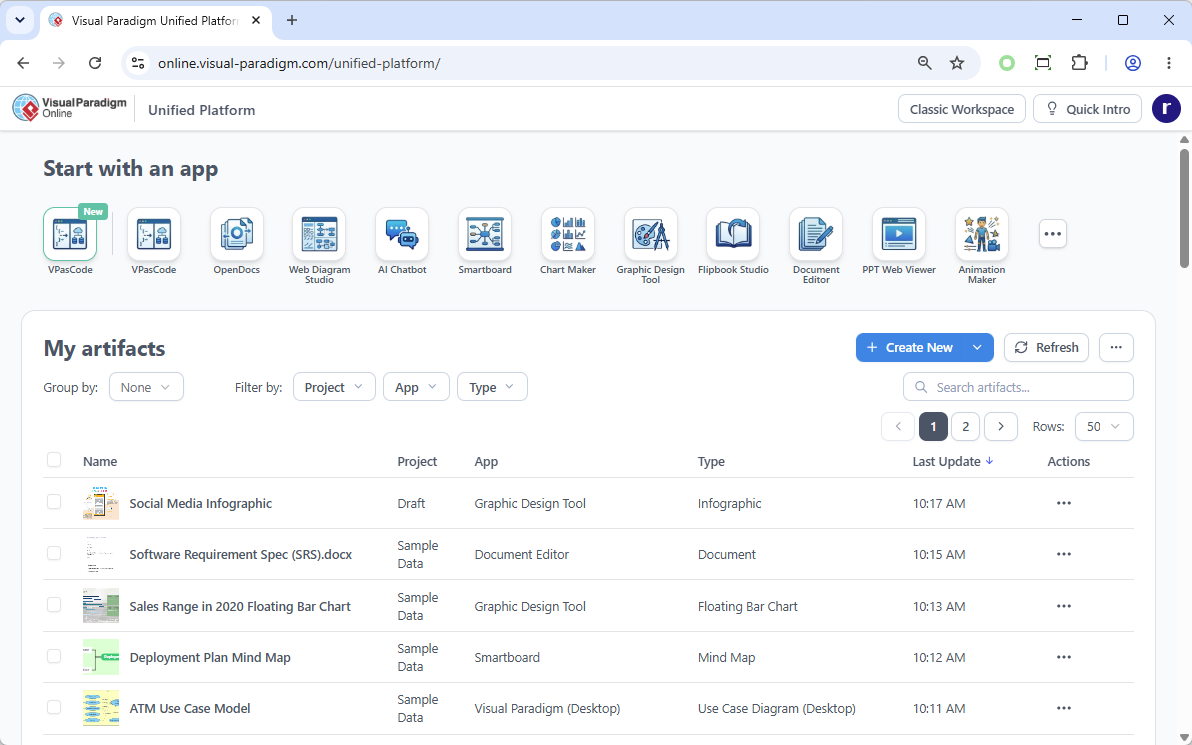
Image Note: This image is a screenshot of the Visual Paradigm Unified Platform web interface. It is a dashboard UI showing sections like “Start with an app” (VPasCode, Smartboard, Chart Maker) and “My artifacts” (a table listing items like “Social Media Infographic”).
Key Concepts and Examples
Key Concept 1: Unified Drive (Centralized Cloud Storage)
The Unified Drive is the core of the platform, functioning as a single source of truth. It ensures that every diagram, document, and project created across the entire ecosystem is automatically organized and visible, regardless of whether it was created on the desktop or in the cloud.
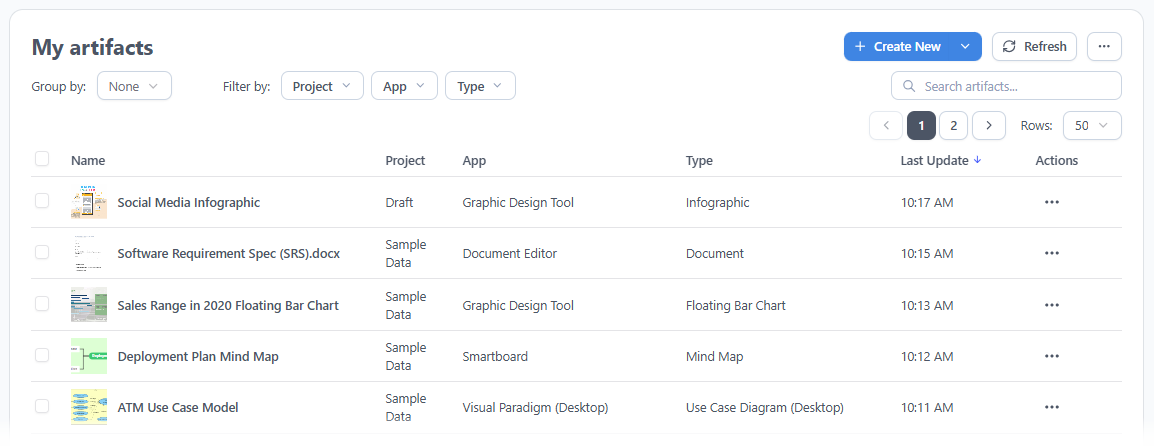
Image Note: This image shows a user interface titled “My artifacts”, displaying a table of digital files or project items. It includes filters for Group by, Filter by (Project, App, Type), and buttons for Create New and Refresh.
Example:
A user creates a complex UML Class Diagram in Visual Paradigm Desktop. Once saved, the diagram automatically appears in the Unified Drive. The user can then access this same diagram from their mobile browser or a team member’s cloud account without needing to send email attachments or sync folders manually.
Key Concept 2: Desktop and Cloud Synergy
The platform allows Visual Paradigm Desktop users to access the full power of the cloud ecosystem without leaving their desktop environment. An embedded browser within the desktop application provides instant access to cloud-based apps, AI tools, and collaboration features.

Image Note: This image shows a toolbar or menu interface from a software application. It highlights the “Unified Platform” icon (two interlocking rings) and other tools like “Commit,” “Update,” and “Files.”
Example:
A software architect is working on a deployment diagram in VP Desktop. Instead of switching tabs to access a web-based project management tool, they click the Unified Platform button in the toolbar. An embedded browser opens, allowing them to immediately switch to the Gantt Chart app to plan their development timeline, all within the same screen.
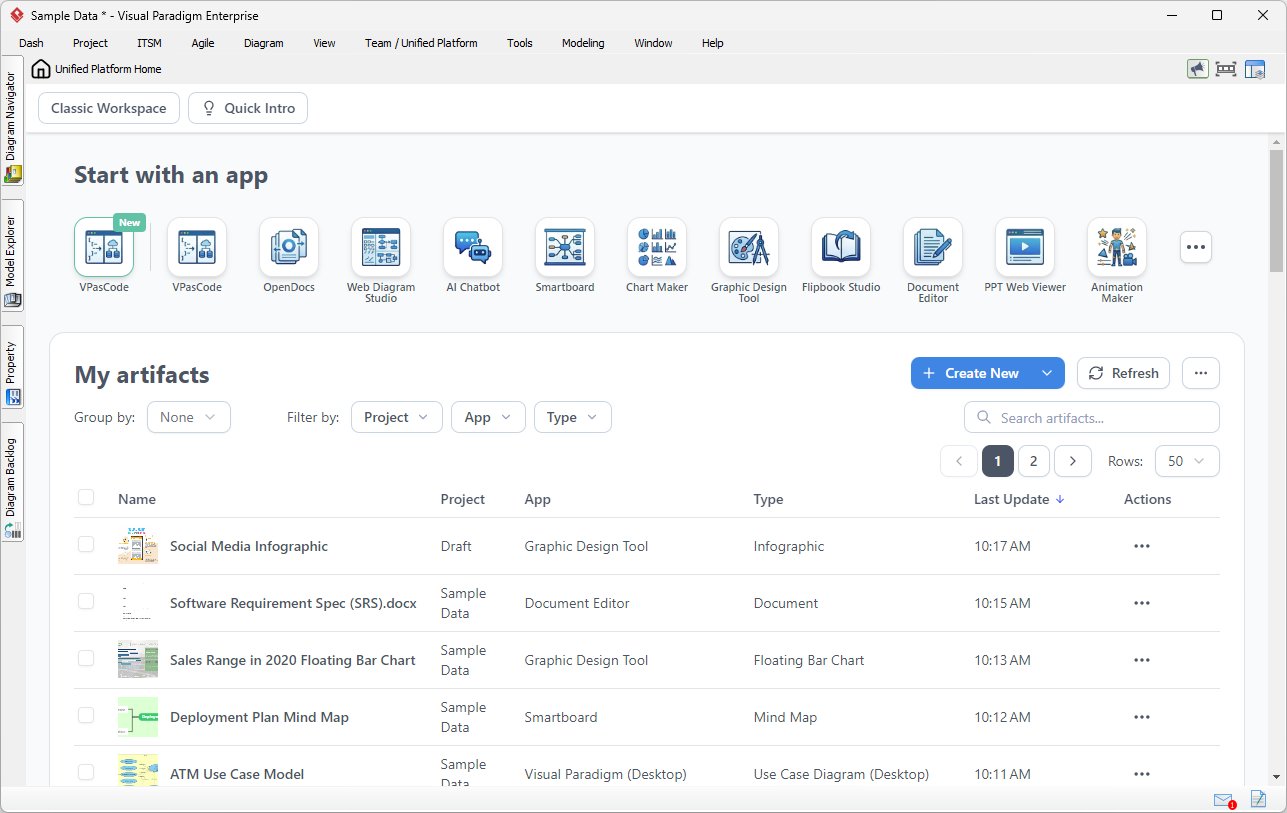
Image Note: This image is a screenshot of the “Unified Platform Home” interface from Visual Paradigm Enterprise software. It shows a row of icons for apps like VPasCode, OpenDocs, and Web Diagram Studio, and a table of “My artifacts.”
Key Concept 3: Integration with 100+ Specialized Apps
The Unified Platform unifies over 100 specialized applications into a single dashboard. This eliminates the need to remember different URLs or login credentials for different tools, streamlining the discovery and launch of apps for specific tasks.
Example:
A product manager needs to create a stakeholder map, a RACI matrix, and a prototype website for a new feature. Instead of logging into separate systems, they log into the Unified Platform once. From the dashboard, they launch the Stakeholder Management app, generate the RACI matrix in the Agile app, and start the Website Builder all from the same interface.
Key Concept 4: AI-Powered Acceleration
AI capabilities such as VPasCode (Text-to-Diagram), AI Presentation Studio, and AI App Studio are woven directly into the platform. These tools are contextually available throughout the ecosystem, allowing users to rapidly transition raw text and ideas into production-ready diagrams and documents.
Example:
A user describes a system architecture in plain English using the AI Chatbot integrated into the Unified Platform. The AI instantly generates a corresponding Deployment Diagram. The user can then refine this diagram in VP Desktop or embed it directly into a project document, significantly reducing the time from concept to deliverable.
Key Concept 5: Pipeline and OpenDocs Integration
The platform seamlessly connects desktop modeling with cloud documentation. Users can build diagrams locally, send them to the cloud-based Pipeline, and then drag-and-drop them directly into OpenDocs to create manuals or guides without any file export or broken link issues.
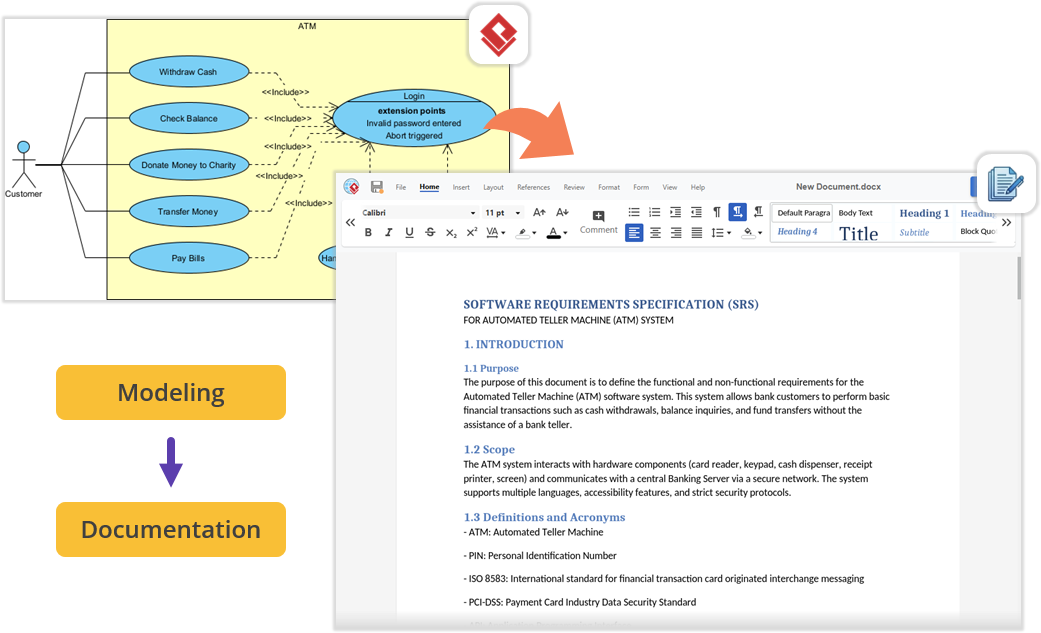
Image Note: This image illustrates a workflow: On the left is a UML use case diagram for an ATM system. On the right is a Word document titled “SOFTWARE REQUIREMENTS SPECIFICATION (SRS).” An arrow connects the diagram to the document, showing the flow from Modeling to Documentation.
Example:
An engineer creates a business process diagram in VP Desktop. They publish it to the cloud. In the OpenDocs app, they write a user manual and simply drag the diagram from the Pipeline pane into the document. The diagram is instantly embedded with high fidelity, requiring no manual image exports.
Key Concept 6: Real-World Workflow Transformation
The platform is designed to support complex, multi-disciplinary workflows where a single project might require system modeling, project management, and creative design. It allows teams to move fluidly between these disciplines without losing context.
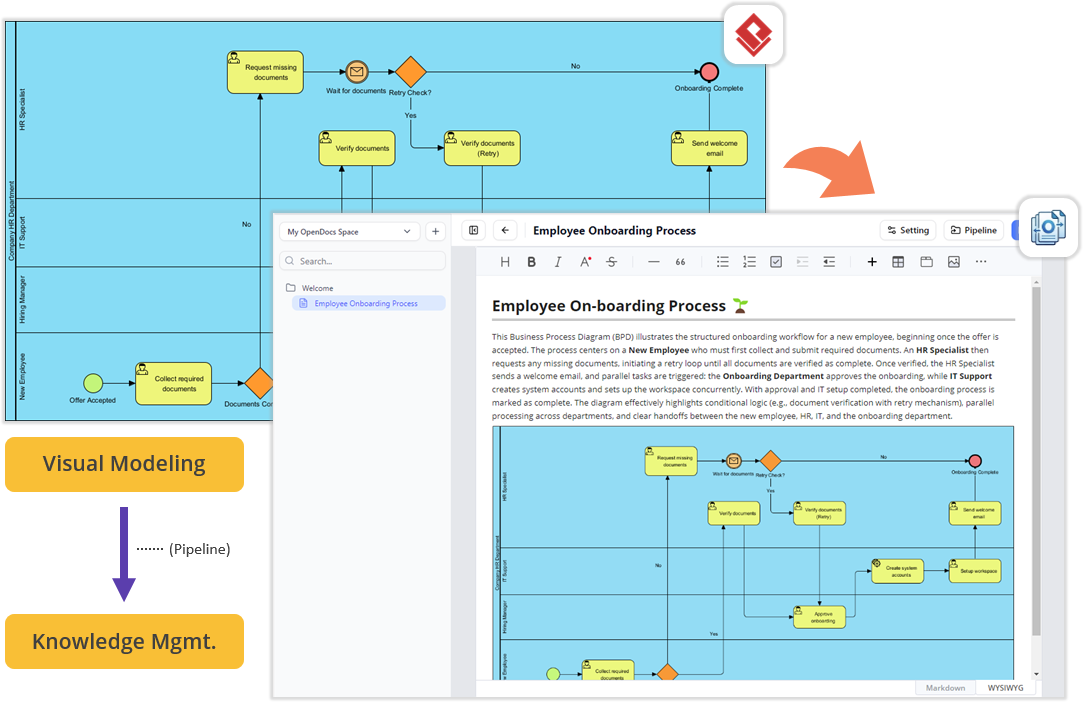
Image Note: This image shows a workflow automation pipeline. On top is an OpenDocs Business Process Diagram for “Employee Onboarding.” Below is a Notion page with the same diagram embedded. An orange arrow labeled “Pipeline” connects the two, indicating automated synchronization.
Example:
A team is launching a new product. The architecture team designs the system in VP Desktop. The project management team uses the Unified Platform to create a Development Plan and Sprint Schedule linked to the same project. The marketing team accesses the Smartboard app to create infographics using data pulled directly from the project. All work is synchronized and accessible in the Unified Drive.
How to Access the Unified Platform
For Visual Paradigm Online Users
-
Log into your VP Online account.
-
You will be automatically redirected to the new Unified Platform dashboard.
-
You can also bookmark the platform directly at: https://online.visual-paradigm.com/unified-platform/
For Visual Paradigm Desktop Users
-
Ensure you are logged in: Go to the main menu and select Team / Unified Platform > Select Repository to connect to your cloud repository.
-
Open the Platform: Navigate to Team / Unified Platform > Unified Platform in the main menu.
-
An embedded browser will open directly inside your workspace, revealing the centralized cloud drive and your entire app ecosystem.
Reference List: Visual Paradigm Unified Platform
- Announcing the All-New Visual Paradigm Unified Platform
- Visual Paradigm 18.1: A New Era of Unified Ecosystems and AI-Driven Innovation
- Visual Paradigm Unified Platform: Project Management UI Enhancements
- Visual Paradigm Unified Platform: Quick Introduction
- Visual Paradigm Desktop Product Updates
- Sync AI Diagram to OpenDocs Pipeline Guide
- Visual Paradigm Online: Unified Platform
- Visual Paradigm Official Website
- Visual Paradigm Updates Hub