

Introduction
Business Process Model and Notation (BPMN) is the standard for visualizing business processes, bridging the gap between business analysts and technical developers. One of the most powerful aspects of BPMN is its ability to model complex interactions, such as process reusability and exception handling, without cluttering the diagram.
This guide explores the Order Fulfillment and Procurement example—a classic scenario often found in BPMN literature (such as Section 5.3 of Fundamentals of Business Process Management)—to demonstrate how to effectively model sub-processes, call activities, and boundary events. By analyzing this specific workflow, we will uncover how BPMN handles “happy paths” versus critical exceptions like undeliverable items or late deliveries.
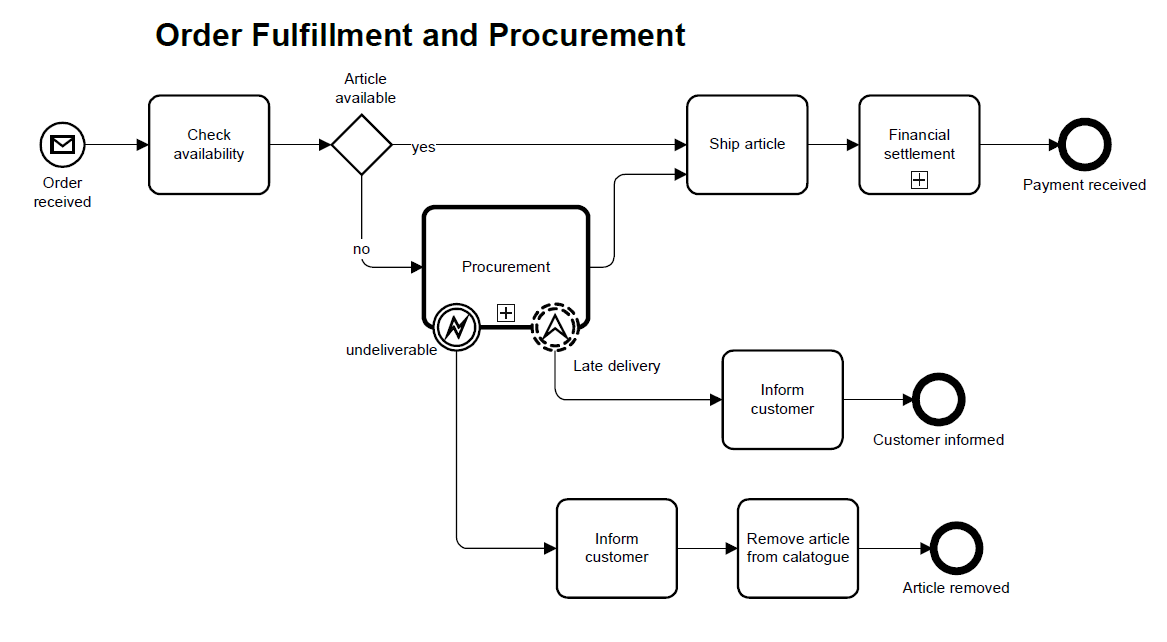
(Note: The diagram above illustrates the Order Fulfillment process interacting with a Procurement Call Activity, featuring Error and Escalation boundary events.)
1. The Core Workflow: Order Fulfillment
The primary process depicted is the Order Fulfillment Process. This workflow is initiated by an external trigger and follows a logical sequence of checks and actions.
The Start Event
The process begins with a Message Start Event (the envelope icon), labeled “Order received.” This notation specifically indicates that the process instance is created only when a message—in this case, a customer order—arrives from an external participant [[1]].
The Decision Gateway
Following the “Check availability” task, the flow reaches an Exclusive Gateway (the diamond shape) labeled “Article available.” This gateway acts as a decision point:
-
Yes Path: If the article is in stock, the process proceeds directly to “Ship article” and then to “Financial settlement.”
-
No Path: If the article is out of stock, the process diverts to the “Procurement” activity to acquire the necessary goods.
Collapsed Sub-processes
The “Financial settlement” task includes a small plus sign (+) at the bottom. This indicates a Collapsed Sub-process. It implies that financial settlement involves multiple granular steps (e.g., invoicing, payment verification) that are hidden to keep the main diagram readable [[5]].
2. Process Reusability: The Call Activity
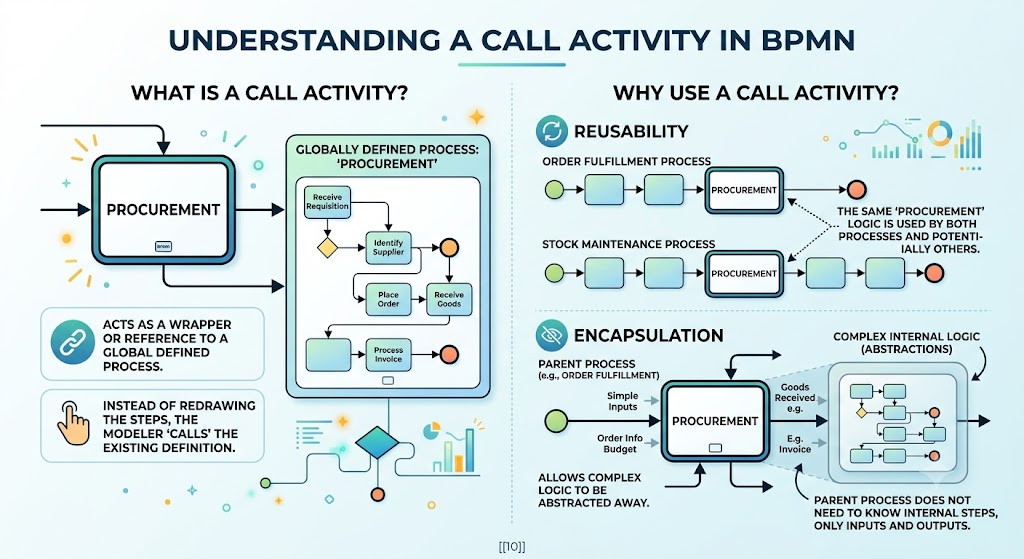
A critical concept illustrated in this diagram is the Call Activity, represented by the “Procurement” rectangle with a thick border.
What is a Call Activity?
A Call Activity acts as a wrapper or a reference to a globally defined process. Instead of redrawing the procurement steps every time they are needed, the modeler simply “calls” the existing definition.
Why Use It?
-
Reusability: The same “Procurement” logic can be used by the Order Fulfillment process and potentially other processes, such as a “Stock Maintenance” process [[10]].
-
Encapsulation: It allows complex logic to be abstracted away. The parent process (Order Fulfillment) does not need to know the internal steps of Procurement; it only needs to know the inputs and outputs.
3. Advanced Exception Handling: Boundary Events
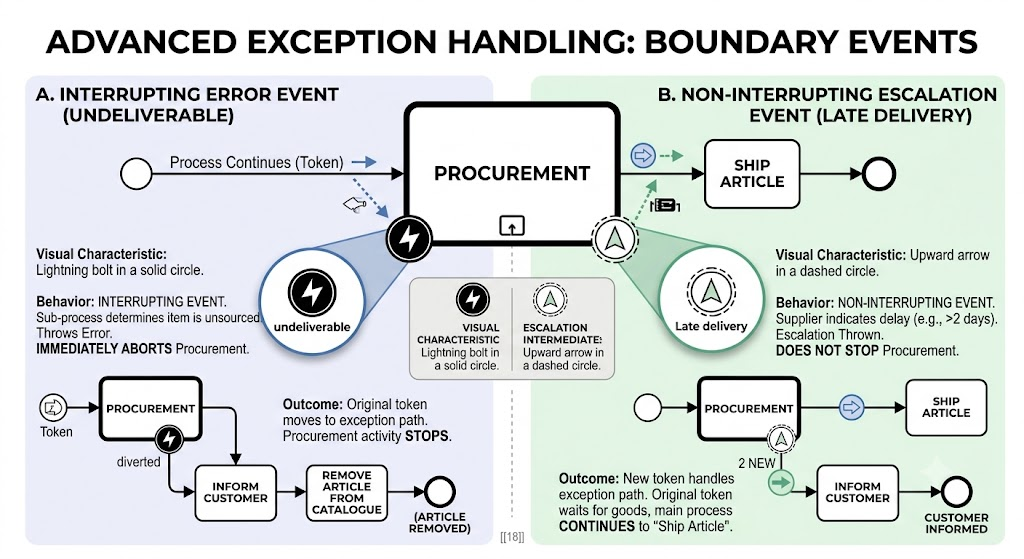
The most sophisticated part of this diagram is the handling of exceptions attached to the “Procurement” Call Activity. BPMN distinguishes between errors that stop a process and warnings that allow it to continue.
A. Interrupting Error Event (Undeliverable)
Attached to the bottom-left of the Procurement activity is an Error Intermediate Event with a solid line border, labeled “undeliverable.”
-
Visual Characteristic: A lightning bolt icon inside a solid circle attached to the activity boundary.
-
Behavior: This is an interrupting event. If the Procurement sub-process determines that an item cannot be sourced, it throws an error. This immediately aborts the Procurement activity.
-
Outcome: The token moves to the exception path: “Inform customer” $\rightarrow$ “Remove article from catalogue” $\rightarrow$ End Event (“Article removed”).
B. Non-Interrupting Escalation Event (Late Delivery)
Attached to the bottom-right is an Escalation Intermediate Event with a dashed line border, labeled “Late delivery.”
-
Visual Characteristic: An upward arrow icon inside a dashed circle attached to the activity boundary.
-
Behavior: This is a non-interrupting event. If the supplier indicates a delay (e.g., delivery > 2 days), an escalation is thrown. However, unlike the error event, this does not stop the Procurement activity.
-
Outcome: A new token is created to follow the exception path (“Inform customer” $\rightarrow$ “Customer informed”), while the original token remains in the “Procurement” activity, waiting for the goods to eventually arrive so the main process can continue to “Ship article” [[18]].
4. Summary of Key BPMN Notations
The table below summarizes the specific notations used in the Order Fulfillment and Procurement example and their functions.
| Notation Element | Visual Characteristic | Function in Example |
|---|---|---|
| Message Start Event | Circle with an envelope icon | Triggers the process upon receipt of a customer order. |
| Exclusive Gateway | Diamond shape | Splits the flow based on article availability (Yes/No). |
| Call Activity | Rectangle with a thick border | References the global “Procurement” process for reuse. |
| Collapsed Sub-process | Rectangle with a + marker |
Hides details of “Financial settlement” to reduce clutter. |
| Error Boundary Event | Solid circle with lightning bolt | Interrupts procurement if the item is undeliverable. |
| Escalation Boundary Event | Dashed circle with arrow | Non-interrupting; notifies of late delivery while procurement continues. |
Conclusion
The Order Fulfillment and Procurement example serves as a masterclass in BPMN modeling. It moves beyond simple linear flows to demonstrate how real-world business logic requires modularity and robust exception handling. By using Call Activities, organizations can maintain a “single source of truth” for common processes like procurement. Furthermore, the distinction between Interrupting Error Events and Non-Interrupting Escalation Events allows modelers to precisely define how a system should react to failures—whether to abort the mission or to manage the delay while keeping the core objective alive.
For professionals looking to design, simulate, and document such sophisticated workflows, utilizing robust modeling software is essential. Tools like Visual Paradigm provide comprehensive support for BPMN 2.0 standards, allowing users to easily drag and drop these specific elements—from thick-bordered Call Activities to dashed Escalation events—ensuring that your process models are both syntactically correct and visually intuitive.
