


Introduction
In today’s fast-paced business environment, the ability to quickly translate operational concepts into visual process models has become essential for organizations striving to maintain agility and clarity. Traditional business process modeling often requires hours of manual diagramming, demanding both technical BPMN expertise and significant time investment. This is where Visual Paradigm’s AI-powered BPMN Diagram Generator enters the scene, promising to revolutionize how business analysts and process architects approach workflow documentation. After extensive hands-on testing, this review explores whether the tool truly delivers on its promise of transforming natural language narratives into professional-grade, standards-compliant process diagrams.
Case Study: Shipment Process of a Hardware Retailer
Process Overview and Organizational Context
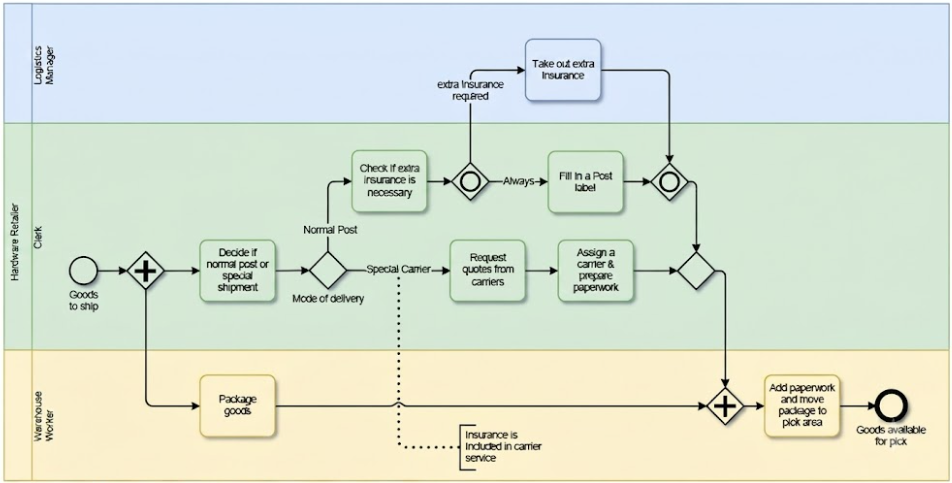
The shipment process describes the preparatory steps a hardware retailer must fulfill after a customer orders goods but before they are actually shipped. This model focuses on the organizational aspects of the business process rather than technical execution.
The process is contained within a single pool representing the “Hardware Retailer” and is divided into three lanes: Logistics Manager, Clerk, and Warehouse Worker. By using a single pool with multiple lanes, the model assumes that communication between these individuals occurs naturally, without the need to explicitly model message flows as one would in a collaboration between separate participants.
Key Concepts and Modeling Guidelines
Based on this shipment example, several core BPMN guidelines are established:
-
Gateways vs. Activities: A fundamental recommendation is that a gateway should not be responsible for making a decision; it merely acts as a router. The actual work of deciding—for instance, determining the “mode of delivery”—must occur in an activity (task) immediately preceding the gateway. The gateway then routes the sequence flow based on the result of that prior work.
-
Exclusive Routing: The Exclusive Gateway is used when only one of several alternative paths can be traversed. In this case, a shipment is either a “Special Carrier” shipment or a “Normal Post” shipment, but never both.
-
Inclusive Parallelism: An Inclusive Gateway is effective for showing that certain branches are taken conditionally while others are always taken. This allows for situations where multiple paths might be active simultaneously and must be synchronized later.
-
Synchronization: When processes split into parallel paths, they eventually require a synchronizing gateway to ensure all tasks are completed before a final activity begins.
Detailed Process Interpretation and Examples
The shipment workflow follows a structured sequence of parallel and conditional activities:
-
Instantiation: The process begins with a plain start event labeled “Goods to ship”.
-
Parallel Execution: Immediately after the start, a parallel gateway splits the flow into two concurrent paths:
-
The Warehouse Worker begins the task to “Package goods”.
-
The Clerk performs the task to “Decide if normal post or special shipment”.
-
-
Mode of Delivery (Exclusive Path): Following the Clerk’s decision, an exclusive gateway routes the process:
-
Special Carrier: The Clerk must “Request quotes from carriers,” then “Assign a carrier & prepare paperwork”.
-
Normal Post: The Clerk moves to an inclusive gateway to handle insurance needs.
-
-
Handling Insurance (Inclusive Path): Within the postal branch, the task “Fill in a Post label” is always performed. Simultaneously, the Clerk performs “Check if extra insurance is necessary”.
-
If extra insurance is required, the Logistics Manager performs the task to “Take out extra insurance”.
-
A synchronizing inclusive gateway follows, which waits for the postal label to be finished and, if applicable, the extra insurance to be secured.
-
-
Final Synchronization and Completion: Before the process can end, a parallel gateway merges the warehouse packaging path and the clerk’s paperwork path. This ensures that both the goods are packed and the administrative tasks are finished before the final task: “Add paperwork and move package to pick area”.
-
End State: The process concludes with the end event “Goods available for pick”.
Core BPMN Capabilities in Visual Paradigm
Visual Paradigm functions as an enterprise-grade BPMN suite designed for business analysts and process architects, offering a comprehensive set of professional modeling tools.
-
Full BPMN 2.0 Compliance: The platform accurately maps formal business processes using exact notations for tasks, gateways, data objects, and event types, ensuring that models adhere to industry standards.
-
Advanced Layout Structure: Workflows can be organized structurally via customizable pools and swimlanes to clearly differentiate roles, departments, or systems, making complex organizational processes easier to understand at a glance.
-
Verification & Validation: Built-in syntax engines check that models comply with formal rules, preventing orphaned elements or invalid sequence flows that could cause confusion or execution errors.
-
Execution & Simulation: Teams can run simulations to expose process bottlenecks and export clean BPMN XML for downstream execution engines, bridging the gap between design and implementation.
The AI-Assisted BPMN Advantage
The integrated AI Diagram Generator represents a significant shift in workflow methodology, moving from manual shape dragging to text-driven automation. This feature has proven particularly valuable for teams looking to accelerate their process documentation efforts.
-
Text-to-Diagram Translation: Instead of building components manually, users supply plain-English descriptions of an operational concept, and the system handles the heavy lifting of diagram creation.
-
Contextual Parsing: The natural language processing engine recognizes operational tasks, defines logical sequence structures, and applies appropriate gateways (e.g., XOR logic) automatically, demonstrating sophisticated understanding of process logic.
-
Automated Swimlane Formatting: The AI actively identifies distinct actors or departments in text narratives and populates them into categorized pools and lanes, saving considerable manual formatting time.
-
Fully Editable Output: The generated result is not a flat image; it is a fully interactive, adjustable model nested directly inside the Visual Paradigm Desktop environment, allowing for further refinement and customization.
Step-by-Step: How to Generate an AI BPMN Diagram
The AI feature operates natively inside the desktop software when connected to a synchronized workspace. Here’s a practical walkthrough of the process:
-
Open your workspace inside Visual Paradigm Desktop.
-
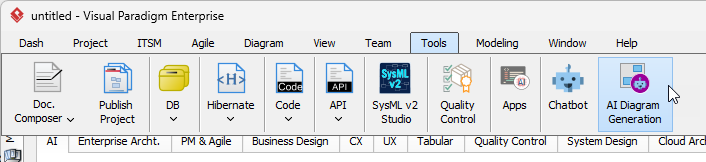
Navigate to the top menu and select Tools > AI Diagram Generation.
-
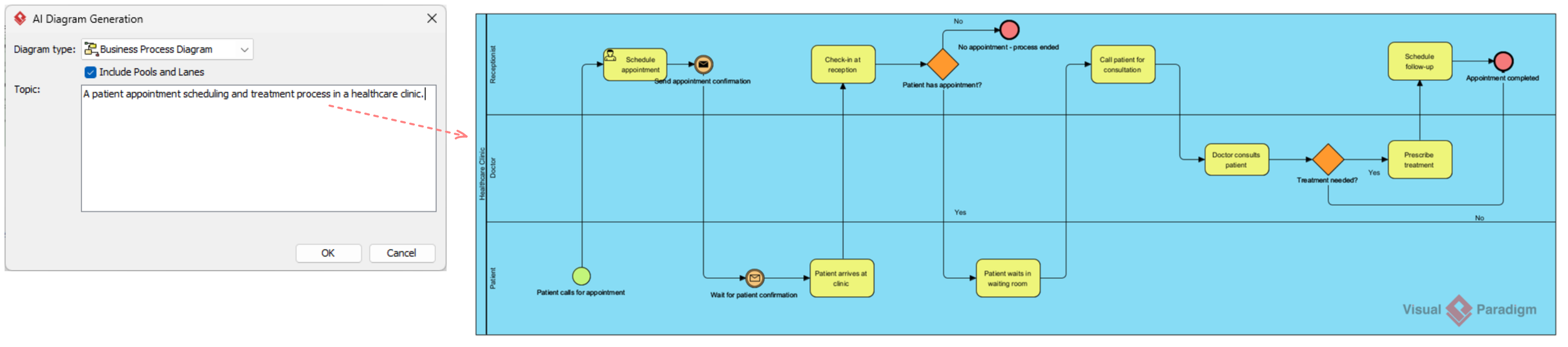
Choose Business Process Diagram from the target diagram selection field.
-
Enable the checkbox for Include Pools and Lanes to automatically structure participants.
-
Type or paste your workflow narrative into the main description box.
-
Example text: “The customer submits a claim request. The Support Team reviews the submission. If approved, Finance processes the payment. If rejected, Support sends an update.”
-
-
Click OK to let the engine populate your compliance-ready process map.
The entire process typically takes less than a minute, compared to the 30-60 minutes typically required for manual diagram creation of similar complexity.
Conclusion
Visual Paradigm’s AI-powered BPMN Diagram Generator represents a meaningful evolution in business process modeling tools. By successfully bridging the gap between high-level business logic and rapid diagram creation, it allows teams to bypass tedious manual drafting while maintaining professional standards. The tool’s ability to interpret natural language and translate it into BPMN 2.0-compliant diagrams with proper gateway logic, swimlane organization, and sequence flows demonstrates sophisticated natural language processing capabilities.
For business analysts, process architects, and organizational leaders looking to document and optimize their workflows, this AI-assisted approach offers tangible time savings without sacrificing quality or standards compliance. The combination of automated generation with full editability ensures that users maintain complete control over their models while benefiting from accelerated initial creation. As organizations continue to prioritize operational efficiency and clear process documentation, tools like Visual Paradigm’s AI BPMN Generator are poised to become essential components of the business analyst’s toolkit.
References
- From Narrative to Diagram: How Visual Paradigm’s AI BPMN Generator Transforms Process Modeling Workflows: Comprehensive guide on AI-powered text-to-diagram transformation
- Mastering Business Process Modeling BPMN 2.0 with Visual Paradigm’s AI-Powered Tools: Expert insights on leveraging AI for BPMN modeling
- Visual Paradigm BPMN Review: Bridging the Gap Between Business Logic and Technical Execution: Analysis of BPMN capabilities and execution features
- AI BPMN Business Process Diagram Generator Update: Latest release notes and feature updates
- Understanding the BPMN Notation: A Key to Effective Business Process Modeling: Guide to BPMN notation standards and best practices
- Visual Paradigm AI BPMN Generator Video Tutorial: Video demonstration of AI diagram generation features
- Beyond Code and AI: Why Visual Paradigm Remains Essential for Professional Software Architecture: Overview of comprehensive modeling capabilities
- BPMN Activity Types Explained: Detailed explanation of BPMN task and activity types
- How AI-Powered NLP is Revolutionizing Text-to-BPMN Generation for Enterprise Process Modeling: Deep dive into NLP technology for process modeling
- Visual Paradigm Features Overview: Complete feature set documentation
- BPMN Diagram and Tools: BPMN-specific tools and capabilities
- Visual Paradigm Official Website: Main product information and resources
- Click Start AI – Technical Support: Setup and configuration guide for AI features
- Testing Visual Paradigm’s AI-Powered BPMN Diagram Generator for Real-World Process Mapping: Real-world testing and evaluation