


1. Introduction: A Practitioner’s Perspective
As a business process analyst who has evaluated dozens of modeling tools over the years, I can confidently say that finding the right balance between simplicity and enterprise-grade power is rare. Recently, I embarked on a project to standardize our cross-functional workflows, and I decided to put Visual Paradigm to the test using Business Process Model and Notation (BPMN) 2.0.2 standards.
What started as a skeptical trial quickly turned into a transformative experience. This guide is born from my hands-on journey. It walks you through the end-to-end process of designing, validating, and optimizing a business process. Whether you are an HR professional, process analyst, manager, or developer, I hope my practical takeaways and this structured walkthrough equip you to model, simulate, and improve real-world processes with absolute confidence.
✅ Why I Ultimately Chose Visual Paradigm:
Full BPMN 2.0.2 compliance out of the box
Intuitive drag-and-drop interface with smart auto-routing
Built-in validation and real-time error detection
Robust process simulation and performance analytics
Automatic RACI/CRUD matrix generation
Seamless team collaboration and cloud sync
2. Core Concept: The “Swimlane” Architecture That Changed My Workflow
One of the first things I noticed was how BPMN uses a visual metaphor inspired by swimming pools to organize responsibilities. In my past experiences, messy diagrams led to endless meetings just to clarify “who does what.” Visual Paradigm’s swimlane architecture solved this immediately.
🏊♂️ Swimlanes: Who Does What?
| Element | Purpose | My Real-World Example |
|---|---|---|
| Pool | Represents a major participant or organization. | ABC Company, Online Shop, Customer |
| Blackbox Pool | A pool with no internal details—perfect for external entities. | Customer pool (external, no internal tasks shown) |
| Lane | Subdivision within a pool to represent roles, departments, or systems. | Employee, Manager, HR, Warehouse, Payment Gateway |
🎯 My Best Practice Takeaway:
Use one pool per organization to maintain clear boundaries.
Use lanes to reflect real operational roles, not rigid organizational charts.
Avoid over-nesting lanes—keep it simple and aligned with the actual process flow.
3. BPMN Notation Guide: Symbols, Roles & Logic Demystified
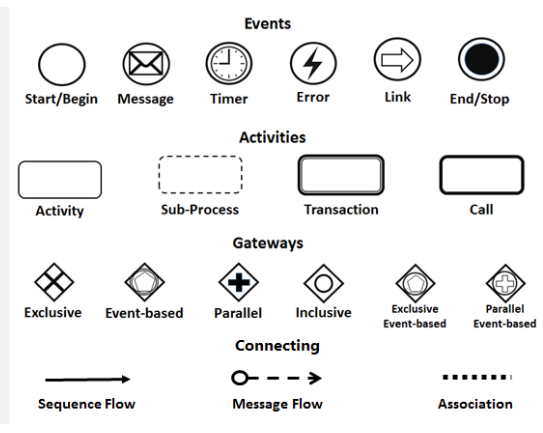
BPMN’s visual language is both intuitive and precise. Mastering these elements was the key to creating professional, executable diagrams in Visual Paradigm.
🔹 Events (Circles)
These represent occurrences that trigger or conclude a process.
| Type | Symbol | Use Case |
|---|---|---|
| Start Event | Thin-bordered circle | “Leave Application Submitted” |
| Message Start Event | Message icon inside circle | “Purchase Order Received” |
| End Event | Thick-bordered circle (often red) | “Leave Taken” or “Order Delivered” |
💡 Pro Tip: I always use message start events for external triggers like API calls or incoming emails.
🔹 Activities (Rounded Rectangles)
These represent work units performed by individuals or systems.
| Type | Symbol | Description |
|---|---|---|
| Task/Activity | Rounded rectangle | Atomic action: e.g., “Evaluate Application” |
| Sub-Process | Rounded rectangle with dotted border or + sign | Complex task with internal steps (e.g., “Process Payment”) |
📌 I highly recommend expanding sub-processes into child diagrams for deeper, clutter-free analysis.
🔹 Gateways (Diamonds)
These control the flow logic of the process.
| Type | Symbol | Behavior |
|---|---|---|
| Exclusive (XOR) | Diamond with X | Only one path is taken (e.g., “Approved? Yes/No”) |
| Parallel (+) | Diamond with + | All outgoing paths execute simultaneously |
| Inclusive (OR) | Diamond with OR | One or more paths may execute |
| Event-Based | Diamond with event icon | Waits for an external event (e.g., “Payment Received”) |
⚠️ Rule of thumb: Use exclusive gateways for strict decisions, and parallel gateways for concurrent tasks.
🔹 Connecting Objects (Lines & Arrows)
Defining how elements are linked is where many beginners stumble. Here is how I keep it clean.
| Object | Symbol | Use Case |
|---|---|---|
| Sequence Flow | Solid line with arrow | Internal flow within a pool (e.g., Employee → Manager) |
| Message Flow | Dashed line with arrow | Inter-pool communication (e.g., Manager → HR) |
| Association | Dotted line | Links data, annotations, or artifacts to elements |
✅ My Golden Rule:
Sequence Flow = Inside the pool (same participant)
Message Flow = Between pools (different participants)
Never mix them—it breaks BPMN semantics and validation.
4. Case Study: My Experience Modeling the ABC Company Leave Process
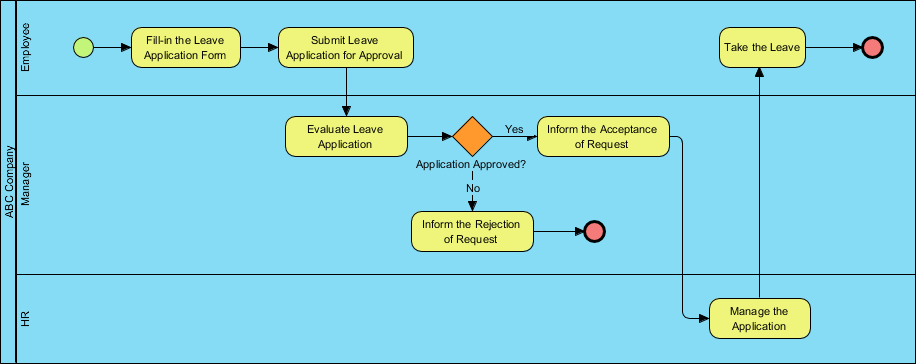
To test the tool, I mapped a real-world example: the ABC Company Leave Application Process. This demonstrated how BPMN clarifies cross-functional workflows beautifully.
🔄 Process Flow Summary
| Step | Actor | Action |
|---|---|---|
| 1 | Employee | Submits leave application |
| 2 | Manager | Evaluates request |
| 3 | Exclusive Gateway | “Approved?” → Yes → HR; No → End |
| 4 | HR | Manages application (update records) |
| 5 | Employee | Takes leave → End Event |
📌 This is a classic example of a private, internal process with clear ownership and a defined end state.
5. Step-by-Step: My Walkthrough of Building the Leave Process in Visual Paradigm
Here is the exact professional workflow I followed to create a fully compliant and interactive BPMN diagram.
✅ Step 1: Launch Visual Paradigm
-
I opened Visual Paradigm Desktop (VP Online works just as well).
-
Signed in (you can grab a free 30-day trial to follow along).
✅ Step 2: Create a New BPMN Diagram
-
Navigated to Diagram > New.
-
Selected Business Process Diagram (BPD).
-
Named it:
Leave_Application_Process.
✅ Step 3: Set Up Pools and Lanes
-
Dragged a Pool from the toolbar → Named it:
ABC Company. -
Right-clicked the pool → Add Lane → Added:
Employee,Manager,HR. -
For external context, I created a Blackbox Pool and labeled it
Customer.
🎯 Use blackbox pools for external participants whose internal processes are irrelevant to your scope.
✅ Step 4: Add the Start Event
-
Dragged a Start Event from the palette.
-
Dropped it in the Employee lane.
-
Double-clicked to rename:
Leave Application Submitted.
✅ Step 5: Add the First Activity
-
Dragged a Task (rounded rectangle) and connected it to the Start Event using Sequence Flow.
-
Labeled it:
Fill in Leave Application Form.
✅ Step 6: Add the Manager’s Task
-
Dragged another Task into the Manager lane.
-
Connected it via Sequence Flow.
-
Labeled:
Evaluate Leave Application.
✅ Step 7: Insert the Exclusive Gateway
-
Dragged an Exclusive Gateway (XOR) into the Manager lane.
-
Connected the “Evaluate” task to the gateway.
-
From the gateway, drew two Sequence Flows:
-
One labeled “Yes” → pointing to HR
-
One labeled “No” → pointing to an End Event
-
📌 Always label all outgoing flows from gateways clearly (e.g., Yes/No, Approved/Rejected).
✅ Step 8: Add HR Task and End Event
-
Dragged a Task into the HR lane → Labeled:
Manage the Application. -
Connected it from the “Yes” flow.
-
Dragged an End Event (red circle) into the Employee lane.
-
Connected it from the HR task → Labeled:
Take the Leave.
✅ Step 9: Add Message Flows (Optional but Recommended)
-
Used Message Flow (dashed arrow) from Manager to HR to show communication.
-
Used Message Flow from HR back to Employee to notify of approval.
✅ Step 10: Validate & Refine
-
Clicked Tools > Validate Diagram.
-
Fixed minor errors (like a missing label).
-
Used Auto-Layout to instantly clean up the diagram’s spacing.
✅ Step 11: Simulate & Analyze
-
Navigated to Tools > Process Simulation.
-
Assigned:
-
Resources: e.g., “Manager (1)”, “HR (1)”
-
Time: e.g., “Evaluate” = 1 day, “Manage” = 2 hours
-
Costs: e.g., $5 per approval
-
-
Ran the simulation to view process duration, resource utilization, and bottleneck analysis.
✅ Step 12: Export & Share
-
Exported to PDF (for documentation), HTML (for web sharing), and PNG/SVG (for presentations).
-
Generated a RACI Matrix (auto-generated from lanes), CRUD Matrix, and Process Specification Document.
📤 Sharing via VP Online or a team workspace made collaborative review with stakeholders incredibly smooth.
6. Pro Tips & Best Practices I Learned the Hard Way
| Tip | Why It Matters |
|---|---|
| Use Verb + Noun Format | E.g., “Submit Form”, “Approve Request” → Ensures clarity and consistency. |
| Always Label Flows | Avoids ambiguity: explicitly label “Yes”, “No”, “Approved”, “Rejected”. |
| Model Left to Right | Improves readability and aligns with standard BPMN reading patterns. |
| Use Sub-Processes for Complexity | Hides internal steps (e.g., “Verify Leave Balance”) to keep the main diagram clean. |
| Avoid Crossing Sequence Flows | Use message flows or rearrange lanes to prevent messy inter-pool communication lines. |
| Validate Before Sharing | Ensures strict compliance with BPMN 2.0.2 standards. |
| Simulate Early and Often | Uncovers inefficiencies and bottlenecks before real-world implementation. |
✅ My Pro Insight:
“A well-labeled, validated diagram is not just a picture—it’s a living document that drives actual business decisions.”
7. Beyond Leave Requests: Scaling BPMN to Other Processes
The same principles I applied to the leave process scale beautifully to other critical workflows. Here is how I adapt BPMN with Visual Paradigm for different domains:
| Process | BPMN Application |
|---|---|
| Online Shopping Checkout | Model: Cart → Payment → Order Confirmation → Delivery |
| Procurement Request | Show: Request → Approval → Vendor Selection → PO → Invoice |
| Customer Support Ticketing | Map: Ticket Created → Assigned → Resolved → Closed |
| Onboarding New Hires | Visualize: HR → IT → Department → Training |
🛠️ I highly recommend using Visual Paradigm’s template library to start quickly with pre-built, industry-standard process models.
8. Conclusion: Final Verdict on Visual Paradigm
After putting it through its paces, my verdict is clear: Visual Paradigm is not just a drawing tool; it is a comprehensive process intelligence platform. The ABC Company Leave Application Process exercise proved how BPMN transforms complex, cross-functional workflows into clear, executable, and analyzable diagrams.
What sets Visual Paradigm apart in my experience is the seamless transition from static modeling to dynamic simulation. You gain the ability to design professional BPMN diagrams with ease, validate them for strict compliance, simulate real-world performance, generate actionable reports, and collaborate in real time.
If you are tired of ambiguous flowcharts and siloed processes, this is the tool to bridge the gap between concept and execution. As the saying goes, “If you can’t model it, you can’t improve it.” With BPMN and Visual Paradigm, you are not just drawing diagrams—you are building the foundation for process excellence, automation, and digital transformation.
References & Recommended Reading
- What is BPMN? – Visual Paradigm Guide: Introductory guide on BPMN purpose, structure, and benefits.
- BPMN Notation Overview – Visual Paradigm Guide: Comprehensive overview of BPMN notation elements like events, activities, and gateways.
- How to Draw a BPMN Diagram – Visual Paradigm Tutorial: Step-by-step tutorial on creating professional BPMN diagrams using industry best practices.
- Understanding Pools and Lanes in BPMN – Visual Paradigm User Guide: Detailed explanation of using pools and lanes to represent departments or roles.
- As-Is to To-Be Business Process Modeling Tutorial: Guide on analyzing current processes and designing improved future states.
- BPMN for Beginners: A Complete Guide to Business Process Modeling Notation: Comprehensive introduction to BPMN concepts and modeling fundamentals.
- Process Design Tool Features: Overview of Visual Paradigm’s process design capabilities and tools.
- BPMN Made Easy: Guide to simplifying BPMN modeling with Visual Paradigm.
- Visual Paradigm BPMN Tutorial Video: Video walkthrough of practical BPMN modeling techniques.
- Project Management Learning Resources: Educational materials for project and process management.
- Complete BPMN Guide: Comprehensive BPMN reference and modeling guide.
- BPMN Standards and Notation: Detailed coverage of BPMN notation standards.
- BPMN Activity Types Explained: In-depth explanation of different BPMN activity types.
- Comprehensive Guide to BPMN: Key Concepts, Benefits and Use Cases: Complete overview of BPMN concepts and practical applications.
- Sequence and Message Flows Documentation: Technical documentation on connecting objects in BPMN.
- BPMN Tutorial Series: Step-by-step BPMN modeling tutorials.
- Data Objects in BPMN: Guide to using data objects and artifacts in process models.
- Getting Started with BPMN: Beginner’s tutorial for creating BPMN diagrams.
- BPMN Artifacts for Better Process Models: Article on enhancing process model clarity with artifacts.
- From Narrative to Diagram: AI BPMN Generator: Guide to AI-powered text-to-diagram generation.
- BPMN Diagram and Tools Features: Overview of BPMN diagramming tools and capabilities.
- Visual Paradigm Complete Features: Comprehensive list of all Visual Paradigm features.
- Drawing Business Process Diagrams: User guide for creating business process diagrams.