
UML Sequence Diagrams: Mastering Message Continuity Across Frames in Visual Paradigm
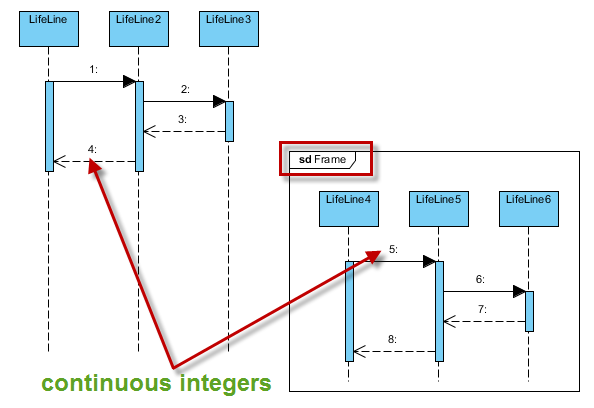
Sequence diagrams are the backbone of understanding interaction logic in software architecture. They map out how objects communicate over time, providing a clear view of system behavior. However, a common challenge arises when designing complex systems: how do you manage message numbering when you introduce frames (such as sd Frame or alt blocks) to break down complex logic?
In Visual Paradigm, the default behavior often resets counters or requires manual intervention, which can lead to fragmented diagrams. This tutorial explores the concept of maintaining continuous message numbering across frames, ensuring your diagrams remain logically coherent and easy to follow.
The Challenge of Message Numbering
When creating a sequence diagram, you typically assign sequential numbers to messages (1, 2, 3…) to represent the order of execution. Visual Paradigm’s default tooling is powerful, but it treats frames as distinct scopes. If you create a frame, the system might reset the numbering counter for messages inside that frame, or it might require you to manually renumber everything to maintain flow.
Consider a scenario where you have a high-level sequence (1 through 4), and then you need to detail a specific part of that interaction using a frame. If the numbering inside the frame starts over at 1, the reader loses the thread of the overall system state.
Configuring Continuous Integers in Visual Paradigm
To ensure that your message numbering remains continuous even when using frames, you must adjust the configuration settings within Visual Paradigm. This is particularly useful when you are documenting a system where the order of operations is critical and spans across different logical blocks.
Step-by-Step Configuration
Follow these steps to enable continuous numbering across frames:
- Open Model Settings: Go to the Project menu and select Model Settings.
- Navigate to Diagram Defaults: In the settings tree, locate the Diagram Defaults section and select Sequence Diagram.
- Enable Continuous Numbering: Look for the option labeled Continuous numbering for messages. Ensure this is checked. This tells the tool to maintain the sequence ID across the entire diagram, regardless of frame boundaries.
- Apply to Diagram: Once enabled, you can add frames (like the sd Frame seen in our examples) without worrying about the numbering resetting.
Visualizing the Logic
When you enable this feature, the diagram editor automatically detects the last message number sent before a frame and starts the next frame’s messages immediately after. This is crucial for maintaining the “story” of the interaction.
As demonstrated in standard modeling patterns, if you have a message 4 going out, and then you enter a frame for a detailed sub-process, the first message inside that frame should logically be 5, not 1. This continuity helps stakeholders trace the flow from the top-level interaction down to the granular details without confusion.
Best Practices for Complex Diagrams
While continuous numbering is powerful, it is essential to use it judiciously. Here are a few tips for managing complex sequence diagrams:
- Use Frames for Modularity: Use frames to group related interactions. Do not let your diagram become a single block of text. Frames like alt (alternative) or opt (optional) are standard UML constructs that should be utilized.
- Label Your Frames: Always give your frames a meaningful label. In our example, the sd Frame might represent a specific state or a sub-process.
- Keep Messages Clear: Ensure that the message names themselves are descriptive. If the numbering is continuous, the names should still clearly indicate the action being taken.
Conclusion
By mastering the configuration of message numbering in Visual Paradigm, you can create sequence diagrams that are not only visually appealing but also logically robust. Whether you are documenting a simple API call or a complex distributed system, maintaining continuous integers across frames ensures that your documentation is clear, professional, and easy to understand.
Remember, the goal of a sequence diagram is to communicate. If the numbering is continuous and the logic is clear, you have succeeded in your modeling task.