
OpenDocs & VP AI Ecosystem: Integrating 118+ Visual Designs into Workflows
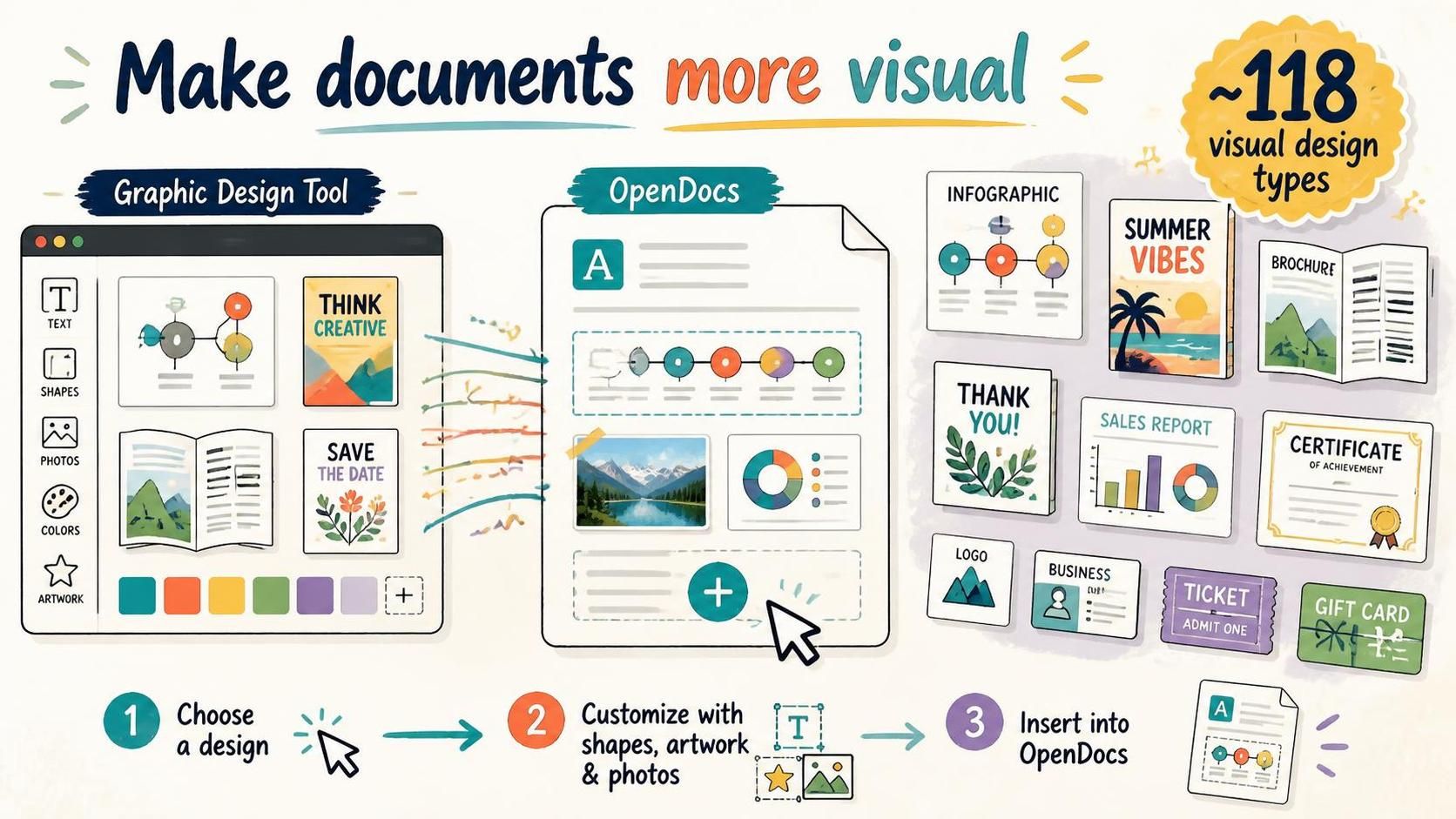
Modern documentation has evolved far beyond simple text and tables. In today’s information-dense environment, the ability to embed rich visual assets directly into a document can be the difference between a document that is read and one that is ignored. Visual Paradigm’s OpenDocs has introduced a powerful integration with its Graphic Design Tool, fundamentally shifting the paradigm of how we approach content creation. This tutorial explores the technical workflow, the architectural benefits of this integration, and the strategic advantages of utilizing approximately 118 distinct visual design types.
The Architectural Shift: From Siloed Assets to Unified Workspaces
Traditionally, technical documentation or business reporting involved a disjointed workflow. An author would write the narrative in a word processor, while a designer would create the necessary charts, infographics, or certificates in a separate graphic design application (like Adobe Illustrator or Canva). These assets would then be exported as static image files (PNG, JPG) and manually inserted into the document. This process introduces several friction points:
- Version Control Issues: Updating the visual asset requires re-exporting and re-inserting, often leading to outdated images in the final document.
- Loss of Editability: Once an image is inserted, the text within it is usually locked. Changing a date on a ticket or a value in a chart requires opening the external tool again.
- Workflow Interruptions: Context switching between different software environments breaks the author’s flow of thought.
OpenDocs solves this by embedding the design engine directly into the document publishing environment. This is not merely an “image insertion” feature; it is a connected workflow where the document and the visual asset are part of the same publishing pipeline.
The Integration Workflow
The new system architecture simplifies the creation process into three logical steps, effectively creating a seamless loop between design and publication:
- Selection: The user selects a specific visual context from the library of ~118 types (e.g., a “SWOT Analysis” matrix or a “Sales Report” chart).
- Customization: The user enters the Graphic Design Tool environment. Here, they utilize vector tools to add shapes, text, photos, and artwork. The tool treats the document as a canvas, allowing for professional-grade layout adjustments.
- Insertion: The designed asset is saved and rendered directly into the OpenDocs page. Crucially, this maintains a high-fidelity link, allowing the visual to be part of the document’s native structure.
Strategic Visual Communication: The 118 Design Types
The inclusion of ~118 visual design types is not just about quantity; it represents a comprehensive taxonomy of visual communication needs. These assets are categorized to support specific modeling and business communication goals.
1. Information Visualization (Infographics & Charts)
For technical documentation, clarity is paramount. OpenDocs supports infographics and designed charts that can summarize complex topics. Unlike standard Excel charts, these are designed to tell a “visual story.” For instance, a data-heavy report can be enhanced with a designed chart that highlights the key metrics, turning raw numbers into an understandable narrative.
2. Branding and Professional Identity
In corporate environments, consistency is key. The integration allows users to generate business cards, logos, and certificates that adhere strictly to brand guidelines. This is particularly useful for creating “Recognition Documents” or operational “Labels” that need to look professional and polished without requiring a dedicated graphic designer.
3. Event and Operational Management
OpenDocs extends into event management and operational logistics through specific design templates. Users can create tickets, gift cards, and invitations that are fully integrated into the document. This is ideal for publishing event information or internal announcements where the visual format (e.g., a ticket stub) is part of the user experience.
4. Strategic Analysis (SWOT & PEST)
One of the most powerful use cases for this integration is in strategic planning. Teams can embed SWOT (Strengths, Weaknesses, Opportunities, Threats) and PEST (Political, Economic, Social, Technological) analysis visuals directly into a strategy document. Rather than a plain text list, the team can present a visually structured grid that is easier to review and share with stakeholders.
Technical Best Practices for Visual Documentation
When utilizing these new capabilities, it is important to adhere to best practices to ensure the document remains performant and accessible.
Benefits of the Unified Workflow
- Reduced Cognitive Load: Authors can focus on the content without worrying about external file formats or image resolution.
- Enhanced Engagement: Documents with visual breaks (like a flyer or a poster) are statistically more likely to be read and understood than text-only walls.
- Scalability: Whether you need a single page or a multi-section publication, the design tools scale with your needs.
By bridging the gap between document publishing and graphic design, Visual Paradigm’s OpenDocs empowers users to create richer knowledge resources. It transforms the document from a passive container of information into an active, engaging communication tool.