
Mastering UML Sequence Diagrams: The Language of Message Types
In the world of software architecture and system design, communication is everything. Just as humans use words to convey commands, requests, and confirmations, software objects communicate through messages. The UML Sequence Diagram is the primary tool we use to visualize this interaction over time. However, not all arrows are created equal.
Understanding the specific Message Types is the difference between a diagram that merely looks like a picture and one that accurately models the system’s behavior. In this tutorial, we will decode the “Language of Interaction” by exploring the three fundamental message types: Call, Return, and Asynchronous messages.
1. The Call Message: The Synchronous Standard
The most common interaction in software is the “Call Message.” This represents a standard method invocation where the flow of control is strictly synchronized.
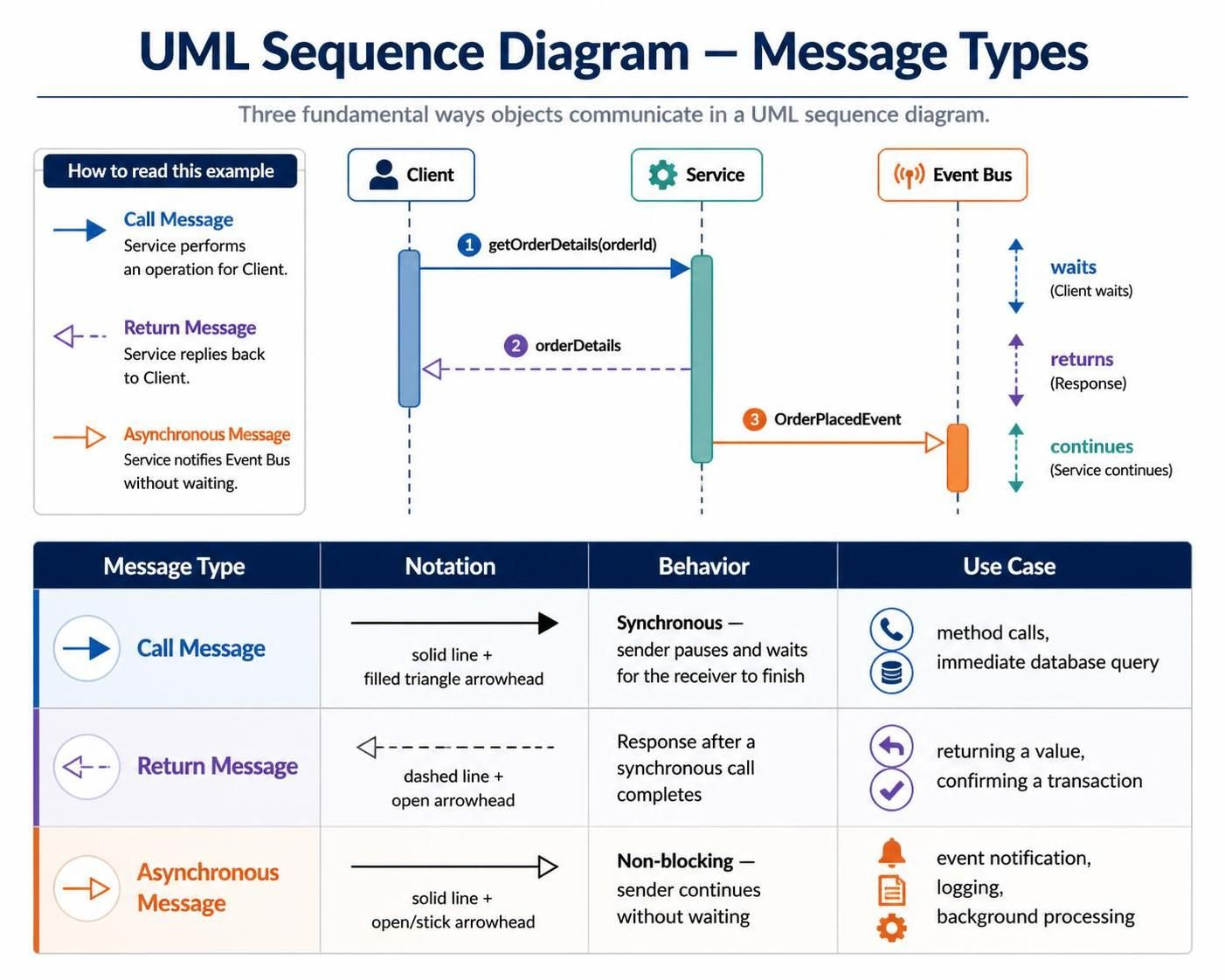
When you see a solid line with a filled (solid) triangle arrowhead, you are looking at a Call Message. This notation implies a blocking behavior. The sender initiates the action and then enters a waiting state.
- Behavior: The sender pauses execution. It does not proceed to the next step until the receiver has completed the requested task and the operation is finished.
- Analogy: Think of this like a traditional phone call. You dial a number (send the message), and you must wait on the line until the other party answers and the conversation is complete before you hang up and move on.
- Typical Use Case: This is used for method calls, database queries where a result is required immediately, or any operation where the caller depends on the outcome of the receiver.
Visualizing the Call
In a sequence diagram, this message flows from the Client to the Service. The vertical “activation bar” (the rectangle on the lifeline) indicates that the Service is now active and processing the request. The Client remains active but blocked until the response is received.
2. The Return Message: The Synchronous Response
Every synchronous call requires a response. The Return Message is the mechanism by which the receiver sends data back to the caller or confirms that the task is complete.
You will identify this message by a dashed line with an open arrowhead. Notice the distinction from the Call Message: the line is dashed, and the arrowhead is hollow (open).
- Behavior: This is the “reply” to the Call Message. It flows back from the receiver to the caller. It signifies the end of the service execution.
- Analogy: If the Call Message is speaking, the Return Message is listening. It is the “Okay, got it” or the actual data payload being handed back.
- Typical Use Case: Returning a value (like a list of orders), confirming a transaction ID, or simply acknowledging that a process finished successfully.
3. The Asynchronous Message: The Non-Blocking Event
Not all interactions require an immediate answer. In modern, distributed systems, components often need to fire off events without stopping their own workflow to wait for a response. This is the Asynchronous Message.
Notation-wise, this looks like a Call Message (solid line) but uses an open (hollow) arrowhead instead of a filled one.
- Behavior: Non-blocking. The sender “fires” the message and immediately continues with its own processing. It does not wait for the receiver to finish.
- Analogy: Think of sending an email. You hit “Send” and immediately close your laptop to go do something else. You do not wait for the recipient to open and read the email before you leave. The email is delivered, but the interaction is decoupled.
- Typical Use Case: Event notifications (e.g., “Order Placed”), logging activities, triggering background processing tasks, or updating a status indicator.
Putting It Together: A Scenario
Let’s look at a realistic interaction flow involving a Client, a Service, and an Event Bus:
- Step 1: The Request (Call)
The Client sends a
getOrderDetails(orderId)message to the Service. This is a solid line with a filled arrow. The Client waits. - Step 2: The Response (Return)
The Service processes the request and sends the data back. This is a dashed line with an open arrow. The Client receives the data and resumes its process.
- Step 3: The Notification (Async)
While processing, the Service also needs to log that an order was viewed. It sends an
OrderPlacedEventto the Event Bus. This is a solid line with an open arrow. The Service does not wait for the Event Bus to acknowledge receipt; it continues its work immediately.
Tooling: Visual Paradigm
To create professional UML Sequence Diagrams, you need the right tools. Visual Paradigm is a powerful UML modeling tool that supports the full spectrum of diagramming needs.
When using Visual Paradigm, you can easily switch between these message types using the toolbar. Simply select the Call Message tool for synchronous interactions and the Asynchronous Message tool for events. The tool automatically handles the alignment of activation bars and lifelines, ensuring your diagrams remain readable and compliant with UML standards.