
Mastering AI-Powered Diagram-as-Code: From Ideation to Deployment with VPasCode
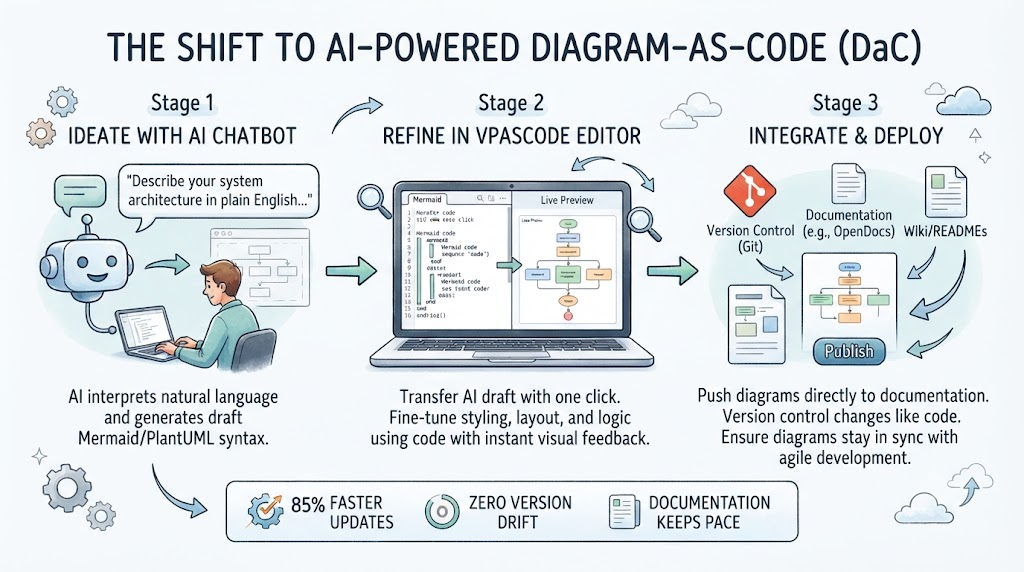
The landscape of software architecture documentation is undergoing a seismic shift. For decades, architects and developers have struggled to keep visual documentation in sync with rapidly evolving codebases. The traditional “draw and forget” approach is dead. We are now entering the era of Diagram-as-Code (DaC), where diagrams are treated as living artifacts that are version-controlled, automated, and generated.
This tutorial explores the transformative workflow enabled by combining AI chatbots with powerful code editors like VPasCode. We will walk through the three-stage process of ideating, refining, and integrating diagrams into your software development lifecycle.
The Problem: Why Traditional Diagramming Fails
In agile environments, architecture changes as fast as the code. Traditional tools often create friction at every step:
- Manual Updates: Updating a diagram manually often lags behind code changes by multiple sprints.
- Static Assets: Static PNGs or JPEGs become outdated the moment they are exported.
- Workflow Interruption: Switching between drawing tools and code editors breaks the developer’s flow.
The industry standard solution is to stop drawing and start coding. By treating diagrams as text files, we enable version control and automation.
The Solution: A Three-Stage AI Workflow
Visual Paradigm’s ecosystem bridges the gap between natural language and professional diagramming through a streamlined three-stage process.
Stage 1: Ideation with AI Chatbot
The journey begins with the AI Chatbot, which acts as your virtual architect. Instead of wrestling with drag-and-drop interfaces or memorizing complex syntax, you describe your system in plain English. The AI interprets your intent and generates the underlying diagram structure.
Example Scenario: You need a microservice architecture for a food delivery app.
User Prompt: “Create a microservice architecture for a food delivery app with customers, delivery drivers, and restaurant managers. Show how they interact with the main application.”
The AI processes this request and produces a complete diagram structure with properly formatted syntax, ready for refinement.
Stage 2: Refinement in VPasCode Editor
Once the AI generates the draft, the critical bridge is the “Open in VPasCode” button. One click transfers the AI-generated diagram to VPasCode’s full editor. This solves the “Last Mile Problem” of AI generation—the AI gives you a 90% complete draft, and you use the code editor to perfect the final 10%.
VPasCode provides:
- Granular Control: Modify styling, layout, and logic through code.
- Multi-Engine Support: Seamlessly switch between Mermaid, PlantUML, and Graphviz.
- Real-time Preview: See changes instantly as you edit.
Stage 3: Integrate & Deploy
The final stage is integration. Unlike static images, VPasCode diagrams can be pushed directly to documentation platforms (e.g., OpenDocs) or Wiki/READMEs.
By using Version Control (Git), you ensure that diagram changes stay in sync with code changes. This guarantees that your documentation never suffers from version drift.
Technical Deep Dive: Mermaid Syntax
When the AI generates the Mermaid code for your food delivery system, it looks like the following structure. Understanding this syntax is key to mastering the workflow.
graph TD
    subgraph "Food Delivery System"
        A[Customer App] -->|Order| B(Order Service)
        B -->|Assign| C[Driver App]
        D[Restaurant Manager] -->|Menu Update| E(Menu Service)
        B -->|Payment| F(Payment Gateway)
    end

    style A fill:#e1f5fe,stroke:#01579b
    style C fill:#e8f5e9,stroke:#2e7d32
    style F fill:#fff3e0,stroke:#ef6c00
This code block defines a graph where nodes represent services and edges represent interactions. In VPasCode, you can easily modify the style definitions to match your corporate branding without losing the layout logic.
Conclusion
By adopting the AI + VPasCode workflow, engineering teams can achieve 85% faster updates and zero version drift. The shift to Diagram-as-Code is not just about efficiency; it’s about ensuring that your architecture documentation remains a reliable source of truth throughout the development lifecycle.