
Mastering UML Sequence Diagrams: MVC Logic with Visual Paradigm
In the vast landscape of software engineering, understanding how different parts of a system communicate is just as critical as designing the parts themselves. While a Class Diagram acts as the skeleton of your application—defining the structure and static relationships—a Sequence Diagram brings that skeleton to life. It is the muscle movement, detailing the precise programming logic and data flow required to execute a specific feature.
This tutorial guides you through the mechanics of Sequence Diagrams, using a real-world scenario: the “Schedule Inspection” process within a Safety Management system. We will deconstruct the interaction between the user, the interface, the controller, and the database to understand how to model complex logic flows effectively.
What is a Sequence Diagram?
A sequence diagram is a type of interaction diagram because it describes how—and in what order—a group of objects works together. These diagrams are a facet of the Unified Modeling Language (UML). They map out the interaction between objects and classes, showing how messages are passed to perform a task.
Unlike a static view, a sequence diagram captures the dynamic behavior of a system over time. It helps developers visualize:
- The lifelines of objects involved in the interaction.
- The messages passed between them.
- The activation bars (the vertical rectangles) that indicate when an object is actively processing a method.
Deconstructing the “Schedule Inspection” Workflow
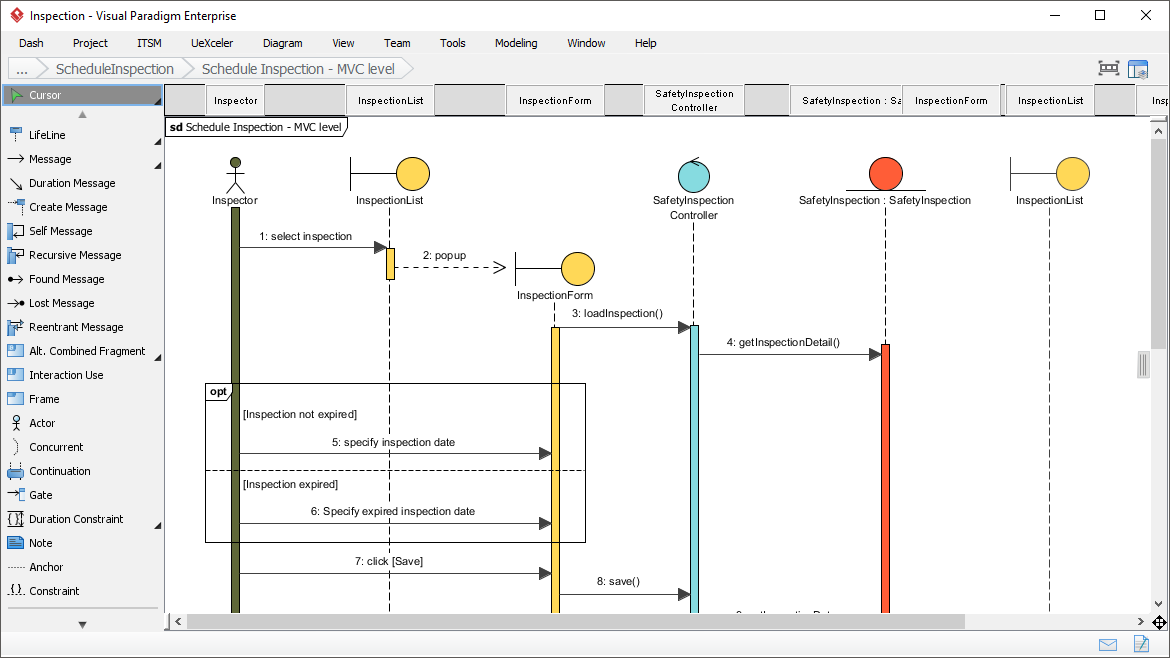
Let’s analyze the provided diagram, which represents a Model-View-Controller (MVC) architecture. This specific diagram, titled sd Schedule Inspection - MVC level, illustrates the step-by-step logic when an Inspector attempts to schedule a new inspection.
1. The Actors and Objects (Lifelines)
At the top of the diagram, we see the participants in this interaction. Visual Paradigm provides distinct icons for different types of objects:
- Actor (Inspector): Represented by the stick figure, this is the human user initiating the process.
- Boundary Objects (InspectionList, InspectionForm): Represented by cylinders, these handle the user interface. They are responsible for displaying data and capturing user input.
- Control Object (SafetyInspection Controller): Represented by a cylinder with a specific label, this object manages the business logic and coordinates the flow between the interface and the data.
- Entity Object (SafetyInspection): Represented by a red cylinder, this usually maps to a database table or persistent data object.
2. The Message Flow
The arrows connecting these lifelines represent messages. Let’s trace the execution path:
- 1: select inspection: The Inspector clicks a button on the InspectionList interface.
- 2: popup: The InspectionList triggers the creation of a new window, the InspectionForm.
- 3: loadInspection(): The form requests data from the SafetyInspection Controller to populate the fields.
- 4: getInspectionDetail(): The Controller queries the SafetyInspection entity (likely fetching existing data or defaults).
- 5 & 6: Input Logic: The user enters a date. The diagram shows a conditional block (opt) determining if the inspection is expired or not, requiring different input handling.
- 7: click [Save]: The user finalizes the action.
- 8: save(): The Controller receives the save request and persists the data to the SafetyInspection entity.
3. Modeling Conditional Logic
One of the most powerful features of sequence diagrams is the ability to show decision logic. In our diagram, you will see a large box labeled opt (short for “Optional” fragment).
Inside this box, the diagram splits into two paths based on the state of the inspection:
- [Inspection not expired]: If the condition is true, the user is asked to
5: specify inspection date. - [Inspection expired]: If the condition is false, the system prompts for a different action,
6: Specify expired inspection date.
This visual representation is crucial for developers because it prevents ambiguity. It tells the programmer exactly which method calls need to happen under which conditions.
Best Practices for Modeling with Visual Paradigm
When creating these diagrams using tools like Visual Paradigm, accuracy and clarity are paramount. Here are some professional tips to ensure your diagrams are production-ready:
- Use Standard Notation: Always distinguish between synchronous messages (solid arrow) and asynchronous messages (dashed arrow). In the diagram, the
popupmessage is asynchronous, meaning the caller does not wait for the popup to finish before continuing. - Define Activation Bars: Ensure the vertical bars (activation rectangles) are placed correctly. They should start when the message is received and end when the return message is sent. In the diagram, the Controller is active for the duration of the
getInspectionDetailcall. - Group Related Logic: Use frames like
opt(optional),alt(alternative), andloop(iteration) to keep the diagram organized. This prevents the diagram from becoming a tangled “spaghetti” of lines.
Conclusion
Sequence diagrams are the blueprint for your application’s logic. By visualizing the interaction between the Inspector, the Controller, and the Data, you create a shared language for designers, developers, and stakeholders. Whether you are debugging a complex workflow or planning a new feature, a well-drawn sequence diagram is your most valuable asset.