
Mastering Enterprise Docs: Sync Org Charts via Visual Paradigm Pipeline
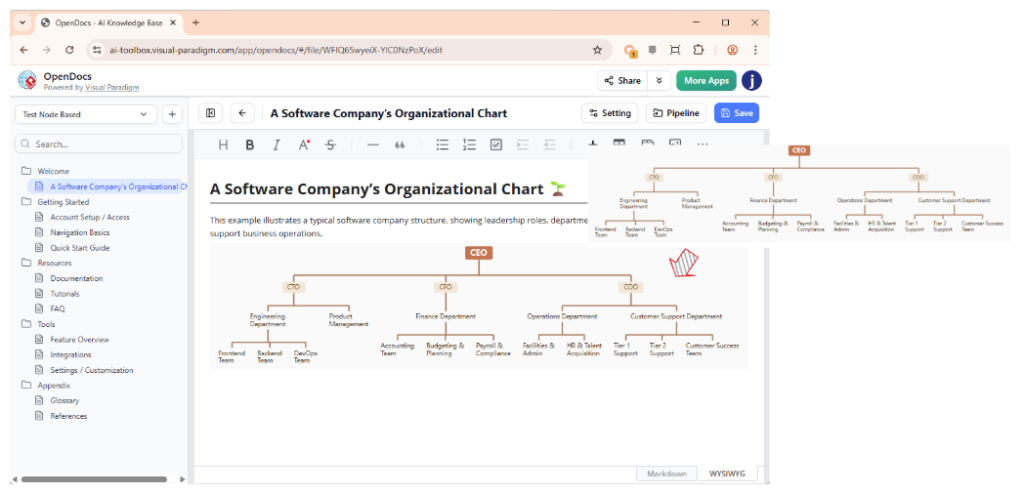
In the modern landscape of enterprise architecture, information silos are a significant risk. Organizations often struggle to keep their high-level structural models synchronized with their operational documentation. This tutorial explores how the Visual Paradigm Pipeline ecosystem solves this challenge, specifically focusing on the integration of organizational charts into comprehensive knowledge bases.
The image above illustrates a powerful workflow: an organizational chart, originally modeled within the Visual Paradigm suite, has been seamlessly transferred to OpenDocs. The result is a living document that combines structured hierarchy data with rich documentation capabilities, ensuring that the “Who” of your organization is always aligned with the “How” of your operations.
Understanding the Pipeline Architecture
Before diving into the specifics of the organizational chart, we must understand the underlying mechanism that makes this integration possible: the Pipeline. Think of the Pipeline not just as a file transfer tool, but as a secure, centralized repository for “artifacts.” These artifacts are the assets you create across the entire Visual Paradigm ecosystem.
Because Visual Paradigm tools cover everything from enterprise architecture (EA) to agile development and technical writing, the Pipeline serves as the essential bridge to hold and transfer these artifacts. It allows for a “secure handoff” between different stages of the software development lifecycle (SDLC).
The Concept of Artifacts
An artifact in this context is any structured data object. In our example, the artifact is the organizational hierarchy. When you define a CEO, a CTO, or a specific department in a modeling tool, that structure is stored as an artifact in the Pipeline. This ensures that the data is version-controlled and accessible across different applications.
The Workflow: From Model to Manual
The true power of this system lies in the seamless handoff between tools. The workflow typically follows these logical steps:
- Modeling Phase: An architect creates an organizational chart using a specialized tool within the ecosystem (such as the EA or Process Designer). This establishes the hierarchy (e.g., CEO $\rightarrow$ CTO $\rightarrow$ Engineering).
- Pipeline Integration: The model is pushed to the Pipeline. At this stage, the diagram is treated as a data object, not just a static image.
- Consumption Phase: A technical writer or knowledge base administrator opens OpenDocs. They access the artifact from the Pipeline.
- Rendering: OpenDocs renders the artifact. As seen in the screenshot, the chart appears within the document editor, allowing for immediate context.
The Power of Reuse
This architecture allows the output from one tool (the structural diagram) to become the input for another (the technical manual). You don’t need to manually redraw the chart in the documentation tool. If the organization changes and a new VP is added to the model, the artifact in the Pipeline updates. When the document is refreshed, the chart updates automatically.
Detailed Analysis of the Integration
Looking closely at the interface provided in the context, we can see the specific capabilities that enable this workflow.
1. The OpenDocs Editor
The main window shows the OpenDocs editor. This is a rich text environment where documentation is assembled. The toolbar at the top (with options for Bold, Italic, Alignment, etc.) allows the user to wrap the organizational chart in explanatory text, ensuring that the chart is not just an image, but part of a narrative.
2. The Sidebar Navigation
The left sidebar demonstrates the “Welcome” and “Getting Started” structure, typical of a knowledge base. The presence of the “Pipeline” button in the top right (visible in the screenshot) indicates that the user can push or pull assets directly from the central repository without leaving the writing environment.
3. The Organizational Chart Visualization
The chart itself is a classic top-down hierarchy. It features:
- Root Node: The CEO (Chief Executive Officer).
- Executive Layer: CTO (Chief Technology Officer), CFO (Chief Financial Officer), etc.
- Departments: Engineering, Product Management, Finance, Operations.
- Teams: The breakdown of departments into specific functional units like “Frontend Team” or “Accounting Team.”
This level of detail proves that the Pipeline preserves not just the visual layout, but the semantic relationships between the nodes. The diagram is “smart,” meaning it understands that the “Frontend Team” belongs to the “Engineering Department.”
Best Practices for Documentation
When utilizing the Pipeline to integrate charts into documentation, keep the following best practices in mind to ensure maintainability:
- Single Source of Truth: Always model the organization in the primary EA tool. Do not edit the chart directly in OpenDocs if you intend to keep it synchronized with the model.
- Contextual Annotation: Use the text editor in OpenDocs to explain the chart. A chart shows the structure; text explains the strategy. Combine them for maximum impact.
- Version Control: Leverage the Pipeline’s history. If a department restructure occurs, you can roll back to a previous version of the organizational artifact if the documentation needs to reflect a past state.
Conclusion
The integration of Visual Paradigm tools via the Pipeline represents a shift from static documentation to dynamic knowledge management. By treating diagrams as reusable artifacts, organizations can ensure that their “Organizational Charts” are always accurate, up-to-date, and easily accessible within their broader technical documentation ecosystem.