
Mapping User Stories to BPMN: A Visual Paradigm Architecture Tutorial
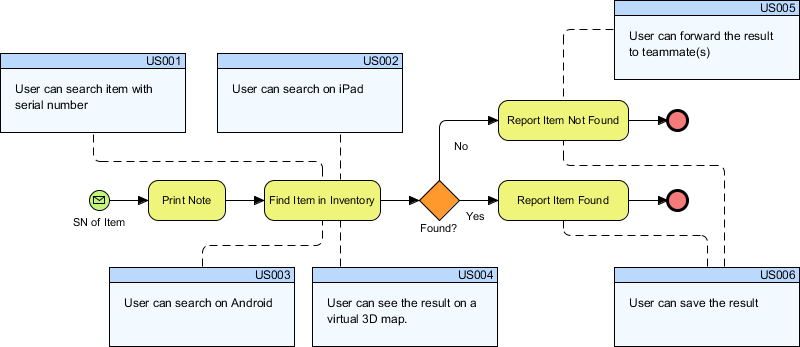
In the modern landscape of software development, bridging the gap between high-level business processes and detailed system requirements is often the most challenging hurdle. Business analysts excel at defining “what” the business does, while developers focus on “how” the system executes those actions. When these two worlds operate in isolation, project requirements often become fragmented, leading to scope creep and miscommunication.
This tutorial explores a powerful architectural approach: Mapping User Stories to BPMN Processes. By leveraging the layered capabilities of Visual Paradigm, we can embed User Stories directly into a Business Process Model and Notation (BPMN) diagram. This integration transforms a static process map into a dynamic, traceable requirements management tool.
Understanding the Architecture: The Layered Approach
The core concept behind this methodology is the separation of concerns through layers. In a standard BPMN diagram, you visualize the flow of data, tasks, and decision points. However, to make this model truly effective for software development, we must attach specific functional requirements to these process steps.
Visual Paradigm supports this through its Layering feature. This allows us to create a specific layer for “User Stories.” This architectural decision offers several distinct advantages:
- Clarity: Stakeholders can view the clean business process flow without the clutter of technical requirements.
- Traceability: Each User Story is visually anchored to the specific BPMN element (Task, Gateway, or Event) it satisfies.
- Visibility Control: You can toggle the visibility of the User Story layer. This is crucial when presenting to C-level executives (who care about the process) versus QA teams (who care about the specific story details).
Step-by-Step Implementation in Visual Paradigm
Following the best practices outlined in the context, we will walk through the steps to architect this model. We will use a hypothetical scenario: an inventory search process where users need to locate items across different devices.
1. Create the BPMN Process Model
First, establish the baseline business process. Using Visual Paradigm’s BPMN palette, draw the core flow. In our example, the process involves searching for an item and deciding whether it was found.
[Start Event: Serial Number Input]
    |
    v
[Task: Print Note]
    |
    v
[Task: Find Item in Inventory]
    |
    v
[Exclusive Gateway: Found?]
    | (No)
    v
[Task: Report Item Not Found] --> [End Event]
    |
    | (Yes)
    v
[Task: Report Item Found] --> [End Event]
2. Configure the Layer System
To ensure we don’t pollute the main process view, we must define a dedicated layer. In Visual Paradigm, you access the Layer Manager to create a new layer specifically for User Stories.
Ensure the following settings are applied:
- Layer Name: User Stories
- Visibility: Initially set to “Hide” or “Off” so the diagram remains clean.
- Locking: Consider locking this layer to prevent accidental movement of the requirements during process refactoring.
3. Map User Stories to BPMN Elements
This is the critical step. We are no longer treating User Stories as separate documents; they are now visual elements within the BPMN canvas. In Visual Paradigm, User Stories are often represented as specific shapes (like sticky notes or custom shapes) or linked via connectors.
For the Find Item in Inventory task, we map the following requirements based on the diagram provided in the context:
- US001: User can search item with serial number. (Linked to the input event).
- US002: User can search on iPad. (Linked to the search task).
- US003: User can search on Android. (Linked to the search task).
- US004: User can see the result on a virtual 3D map. (Linked to the output task).
4. Establish Traceability Connectors
To enforce the “Traceability” benefit mentioned in the context, we use dashed connectors. These lines visually link the User Story boxes to the specific BPMN tasks they support.
Consider the logic flow shown in the diagram:
- Search Logic: The process must support multiple inputs (Serial Number, iPad, Android). By mapping these stories to the “Find Item” task, we ensure the system architecture accounts for all entry points.
- Decision Logic: The “Found?” gateway dictates the flow. We map US005 (Forward result to teammate) and US006 (Save result) to the respective “Found” and “Not Found” paths.
The resulting diagram looks like this:
      [Start]
         |
         v
    (SN of Item)
         |
         v
   [Print Note]
         |
         v
[Find Item in Inventory] <---(Mapped: US001, US002, US003)
         |
         v
      (Gateway)
    /       \
  Yes        No
  /           \
 v             v
[Report Item Found] <---(Mapped: US004, US006)
        |
        v
    [End]

[Report Item Not Found] <---(Mapped: US005)
        |
        v
      [End]
5. Managing Visibility and Documentation
Once the model is complete, you utilize the Layer Manager to control the narrative. When discussing the process with the business stakeholders, you hide the User Story layer. This keeps the conversation focused on the "Big Picture" process flow.
Conversely, when handing off to the development team, you reveal the layer. This acts as comprehensive documentation, proving that every step of the process has a corresponding functional requirement. This is vital for Change Management; if a requirement changes, you can immediately see which part of the BPMN process is impacted.
The Strategic Value of Synergy
By combining BPMN and User Stories within Visual Paradigm, you are not just drawing a diagram; you are creating a single source of truth. This architecture simplifies Prioritization by allowing teams to see which process steps are supported by which stories, making it easier to focus on critical path items. Ultimately, this approach streamlines requirements management, reduces misunderstandings, and ensures the final software product aligns perfectly with the business vision.