
Bridging the BPMN Gap: Mastering Diagram-as-Code with VPasCode and AI
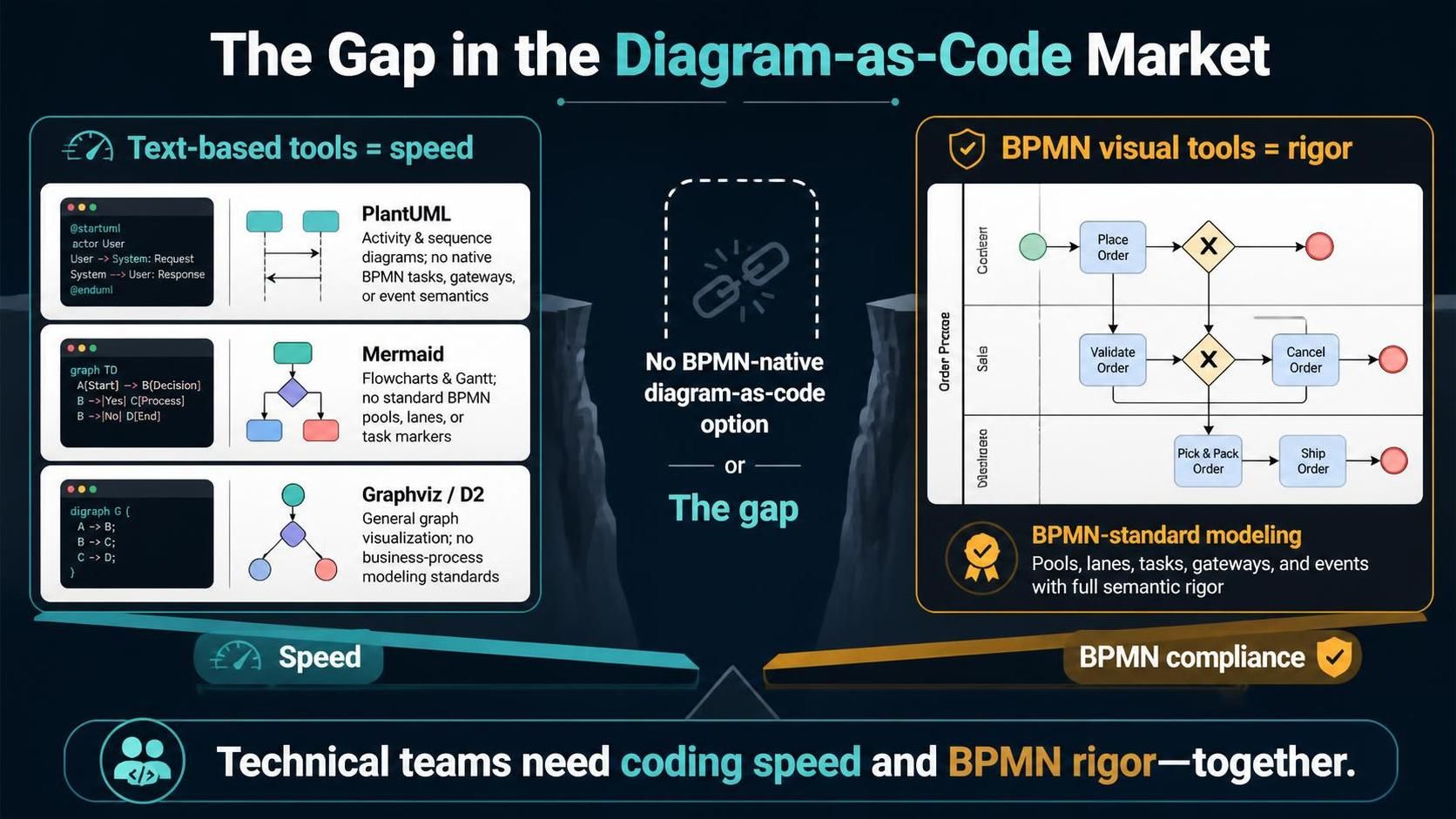
In the modern software development lifecycle, technical teams are often forced to choose between two distinct paths: the speed of text-based diagramming or the rigor of visual BPMN standards. For years, a significant gap existed in the “Diagram-as-Code” market. Popular tools like PlantUML and Mermaid offered rapid prototyping but lacked native support for complex BPMN semantics like gateways, event types, and lane pools.
This tutorial explores how to bridge that divide. We will move beyond the limitations of general-purpose graphing tools and dive into the specific architecture of VPasCode. This approach allows you to maintain the version-control-friendly nature of code while achieving full compliance with the BPMN 2.0 specification.
Understanding the “Gap” in the Market
To appreciate the value of a tool like VPasCode, we must first understand the limitations of the tools that came before it. The image provided illustrates the dichotomy:
- Text-Based Tools (The Speed Trap): Tools like
PlantUMLandMermaidare excellent for high-level flowcharts. However, they often abstract away critical business logic. For instance, they might lack native task types (distinguishing between a Service Task and a User Task) or specific event semantics. - Visual Tools (The Rigor Bottleneck): Traditional visual editors (like the “BPMN visual tools” shown in the diagram) enforce strict standards—pools, lanes, and gateways—but are notoriously difficult to integrate into CI/CD pipelines or edit via CLI.
VPasCode solves this by allowing you to define standard BPMN constructs (Pools, Lanes, Gateways, Events) directly within your code editor, rendering them into a fully compliant visual diagram.
Core Modeling Concepts: The Building Blocks
When writing BPMN-as-Code, you are essentially defining the structural elements of a business process. VPasCode maps these elements to standard diagram components.
1. Pools and Lanes (The Container Structure)
In BPMN, a Pool represents the boundary of a process, while Lanes organize activities within that process (usually by department or role). In VPasCode, you define these hierarchically.
@startuml
' Define the main process container (Pool)
pool "Order Process" as OP

    ' Define lanes within the pool
    lane "Customer" in OP
    lane "Sales" in OP
    lane "Warehouse" in OP
@enduml
2. Tasks and Markers (The Activities)
Unlike standard flowcharts, BPMN requires you to specify the type of work being done. VPasCode supports specific task markers:
- User Task: Work done by a human (e.g., “Validate Order”).
- Service Task: Work done by an automated system (e.g., “Ship Order”).
- Call Activity: A reference to a sub-process.
' Example of different task types
lane "Sales" in OP
    userTask "Validate Order" as VO
    serviceTask "Ship Order" as SO
3. Gateways (The Logic)
Gateways control the flow of the process. The most common is the Exclusive Gateway (XOR), represented by an “X”. VPasCode renders these with standard BPMN semantics, ensuring that the logic (e.g., Yes/No paths) is semantically correct.
' Defining a decision point
gate "Check Order" as CO
Step-by-Step: Building an Order Process with VPasCode
Let’s walk through creating the diagram shown in the reference image. We will build a process that handles an order from the customer’s perspective through to the warehouse.
Step 1: Initialize the Structure
First, we set up the diagram header and the main pool. This establishes the context for our process.
@startuml
title Order Fulfillment Process

' Define the main Pool
pool "Order Process" as OP

' Define Lanes for different departments
lane "Customer" as Cust
lane "Sales" as Sales
lane "Warehouse" as Ware
Step 2: Define the Start and End Events
BPMN diagrams must start with a Start Event (usually a circle) and end with an End Event. Using VPasCode, these are distinct from simple nodes.
' Start Event in Customer Lane
startEvent "Receive Order" as SE
' End Events
endEvent "Order Complete" as EE1
endEvent "Order Cancelled" as EE2
Step 3: Connect Tasks and Gateways
Now we connect the elements. In text-based BPMN, you define the flow using arrows. VPasCode supports standard notation for routing.
' Flow from Start to Place Order
SE --> PlaceOrder

' Place Order Task
userTask "Place Order" as PO

' Exclusive Gateway for Decision
gate "Valid Order?" as GO

' Connect Tasks to Gateway
PO --> GO

' Routing Logic
GO --> ValidateOrder : Yes
GO --> CancelOrder : No

' End Events
ValidateOrder --> EE1
CancelOrder --> EE2
Why VPasCode Matters for Technical Teams
By using a tool like VPasCode, you eliminate the “gap” described in the initial context. You gain the ability to:
- Version Control Processes: Just like your code, your process diagrams can be diffed, merged, and tracked in Git.
- Enforce Standards: The rendering engine ensures that your diagram adheres to BPMN 2.0 specifications, preventing semantic errors common in generic flowcharts.
- Automate Generation: You can generate diagrams automatically from code, ensuring documentation is never out of sync with the actual system logic.