
From AI Prompt to Docs: Mastering Visual Paradigm’s VP AI Ecosystem Workflow
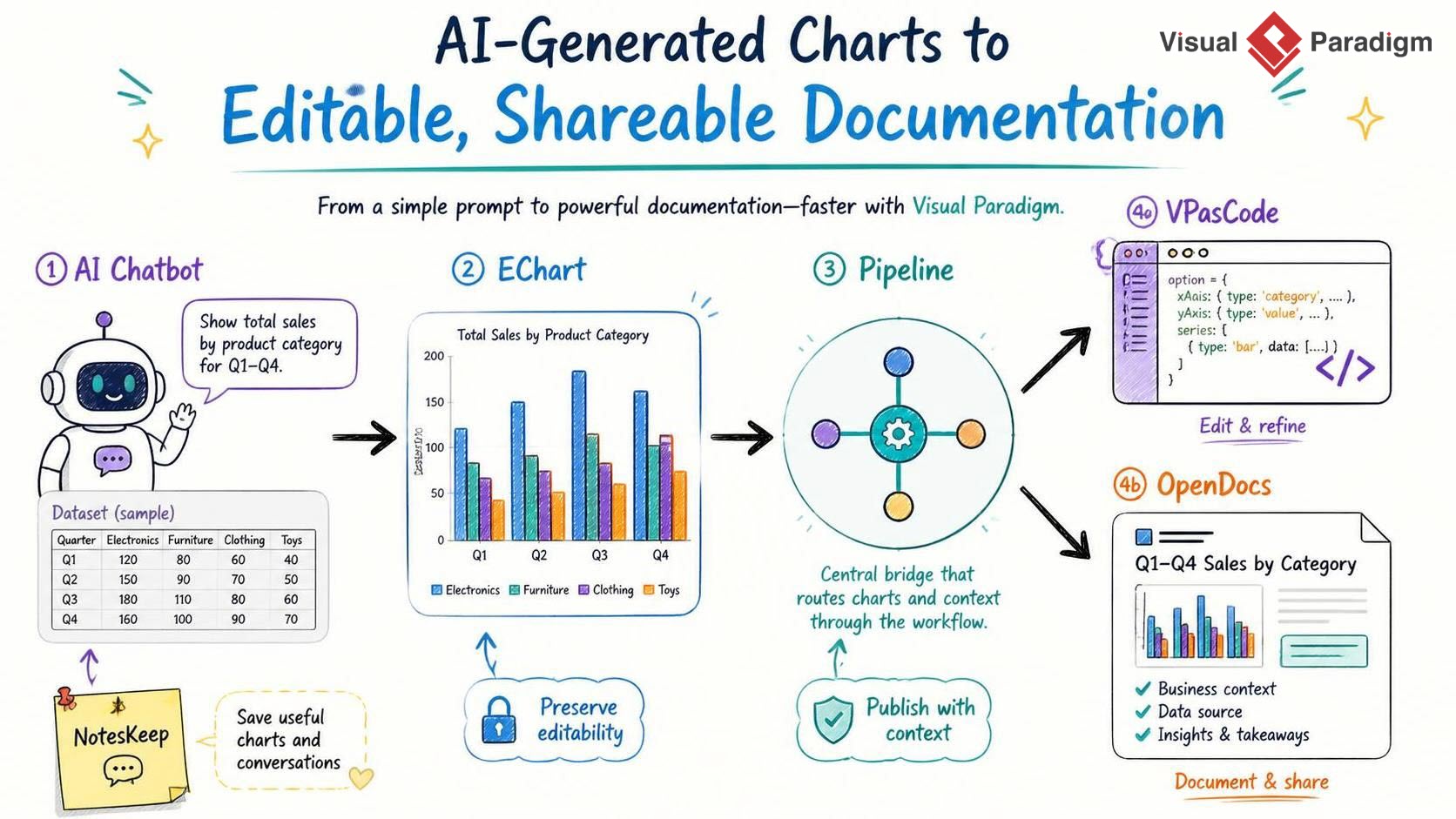
In the modern software engineering and data analysis landscape, the gap between raw data and actionable documentation is often bridged by manual effort. Visual Paradigm has recently revolutionized this process by introducing a seamless workflow that connects natural language prompts with code-level editing and professional documentation.
This tutorial breaks down the system architecture of this new feature, demonstrating how to transition from a simple conversational request to a structured, shareable document using the Pipeline, VPasCode, and OpenDocs modules.
1. The Architecture: A Connected Ecosystem
The core innovation described in the context is not just the ability to generate charts, but the ability to route them. Previously, an AI-generated chart was often a “dead end”—a static image that required exporting and re-importing to be edited or documented. The new architecture treats the chart as a living data artifact.
The workflow is structured as a linear pipeline with branching paths for refinement:
- Input Layer: The AI Diagramming Chatbot acts as the interface for data ingestion and initial generation.
- Processing Layer: The EChart serves as the visual representation of the data.
- Orchestration Layer: Pipeline acts as the central hub, ensuring data integrity as it moves between tools.
- Output Layers: VPasCode (for code refinement) and OpenDocs (for narrative documentation).
2. Step-by-Step: The Workflow
Step 1: Initiation with the AI Chatbot
The process begins with the AI Chatbot. This component leverages Large Language Models (LLMs) to interpret natural language requests and convert them into structured visualization code. The user provides the intent (the prompt) and the data (the dataset).
Example Scenario: You need to visualize employee headcount by department.
User Prompt: "Generate a column chart showing employee headcount by department based on the dataset below."

Dataset:
Engineering: 75
Sales: 42
Marketing: 28
Human Resources: 15
Support: 34
The AI Chatbot processes this input and generates an initial EChart. In the Visual Paradigm ecosystem, ECharts are typically rendered using JSON-based configuration files that define the data structure, axes, and visual styles.
Step 2: The Pivot Point — Pipeline
Once the chart is generated and reviewed in the diagram viewer, the critical step occurs: sending the chart to Pipeline. Pipeline is described as a “cross-application content hub.” It functions as the system’s central nervous system for this workflow.
Without Pipeline, the chart might remain isolated within the chat session. By sending it to Pipeline, the user:
- Preserves Editability: The chart is saved as an artifact, not just an image.
- Establishes Context: The link between the prompt, the data, and the visual is maintained.
- Enables Routing: It opens the door to downstream applications like VPasCode and OpenDocs.
3. Diverging Paths: Refinement vs. Documentation
Once the chart is in the Pipeline, the workflow splits into two distinct technical paths depending on the user’s goal.
Path A: Technical Refinement (VPasCode)
If the generated chart requires precise adjustments that are difficult to achieve through natural language prompts (e.g., specific hex color codes, complex axis configurations, or specific library behaviors), the chart can be imported into VPasCode.
VPasCode (Visual Paradigm as Code) allows the user to view and edit the underlying code of the diagram. This is essential for developers who want to treat diagrams as code, enabling version control and programmatic manipulation.
Code Representation Example:
When the EChart is imported into VPasCode, it is represented as a configuration object, often resembling JavaScript or JSON.
option = {
    title: {
        text: 'Employee Headcount by Department'
    },
    tooltip: {
        trigger: 'axis'
    },
    xAxis: {
        type: 'category',
        data: ['Engineering', 'Sales', 'Marketing', 'HR', 'Support']
    },
    yAxis: {
        type: 'value'
    },
    series: [
        {
            data: [75, 42, 28, 15, 34],
            type: 'bar',
            itemStyle: {
                color: '#5470C6'
            }
        }
    ]
};
This code block represents the exact state of the chart generated by the AI, now available for manual syntax editing.
Path B: Business Documentation (OpenDocs)
If the goal is to explain the data to stakeholders, the chart is routed to OpenDocs. This application is designed for “diagram-as-document.” It allows the user to embed the chart into a structured document that includes context, data sources, and insights.
This path transforms the technical artifact into a business asset. The document can include:
- Business Context: A narrative explaining what the chart represents.
- Data Source: Links to the raw dataset used.
- Insights & Takeaways: Analysis derived from the visualization.
4. System Benefits and Use Cases
This architecture solves the “fragmentation” problem in data visualization. Instead of creating a chart in one tool, copying it to Excel, and pasting it into Word, the user maintains a single source of truth.
Common Use Cases:
- Department Headcount Analysis: Quickly visualize workforce distribution and document it in HR reports.
- Sales Performance: Generate revenue reports and refine them in code before publishing.
- Marketing Campaigns: Track campaign results and share dashboards with stakeholders.
- Project Progress: Visualize delivery metrics and embed them in project documentation.
Conclusion
The integration of the AI Chatbot with Pipeline, VPasCode, and OpenDocs represents a significant evolution in diagramming. It moves the user from a static “create and export” mindset to a dynamic “generate, refine, and document” workflow. By treating charts as programmable artifacts that can flow between natural language interfaces and code editors, Visual Paradigm enables a more robust and professional approach to data visualization.