


As a product manager who has spent years navigating the gap between technical architecture and stakeholder communication, I’ve seen countless tools promise to streamline documentation. Most fall short, leaving us with static images that are outdated the moment they are exported. The release of Visual Paradigm Version 18.1 caught my attention not just for its version number, but for its ambitious claim: moving from a diagramming tool to a unified, AI-driven ecosystem.
After diving into the new features, it’s clear that Visual Paradigm isn’t just offering a cosmetic update. They are redefining how we bridge the gap between code, diagrams, and living documentation. Here is my comprehensive review of what’s new in VP 18.1, focusing on the practical implications for product teams, architects, and developers.
The Core Philosophy: A Unified Creative Command Hub
The most immediate change in Version 18.1 is the introduction of the Unified Platform. For those of us juggling multiple tools—Jira for tickets, Confluence for docs, and various diagramming apps for visuals—the fragmentation is exhausting. Visual Paradigm has addressed this by creating a centralized hub that acts as a dashboard for their entire ecosystem of over 100 apps.
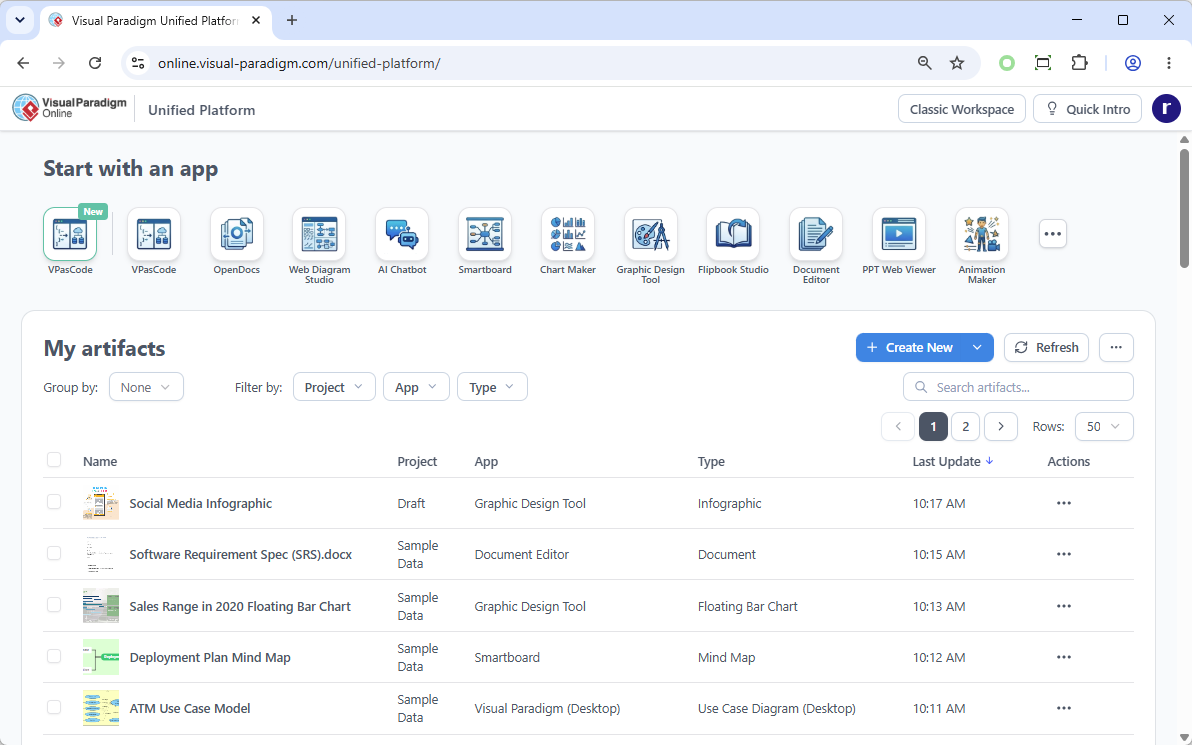
What stands out here is the Desktop & Web Synergy. Previously, desktop users were often siloed from cloud collaborations. Now, Desktop users can open the Unified Platform inside an embedded browser. This means your locally designed diagrams and cloud-based app data coexist in one space. It’s a subtle but powerful shift that reduces context switching and keeps all project assets within reach.
VPasCode: Diagramming at the Speed of Thought
For technical teams, the standout feature is VPasCode, a high-performance text-to-diagram engine. If you’ve ever struggled with aligning boxes in a drag-and-drop interface, VPasCode feels like liberation. It supports native syntax for PlantUML, Mermaid, and Graphviz, allowing you to generate complex Sequence diagrams, ERDs, Mind Maps, and C4 models instantly.
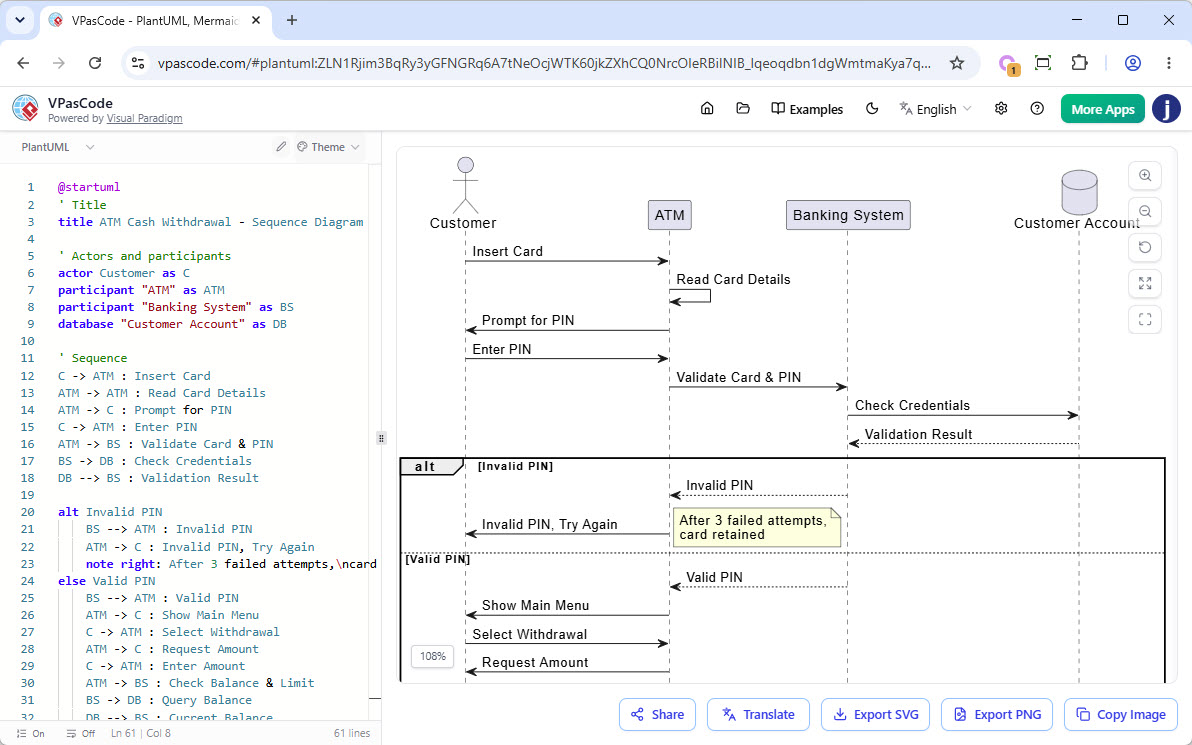
The real magic, however, lies in the AI Superpowers. The premium tier offers AI Code Error Fixing and instant Language Translation. Imagine writing a Mermaid chart in English and having the AI translate the logic into another language or fix a missing bracket automatically. This isn’t just about speed; it’s about reducing the cognitive load of maintaining accurate technical visuals.
AI Presentation Studio: Retaining Creative Control
Most AI presentation tools feel like black boxes—you input a prompt, and it spits out a slide deck that’s often generic and hard to edit. Visual Paradigm’s AI Presentation Studio takes a different approach by prioritizing an iterative, human-in-the-loop workflow.
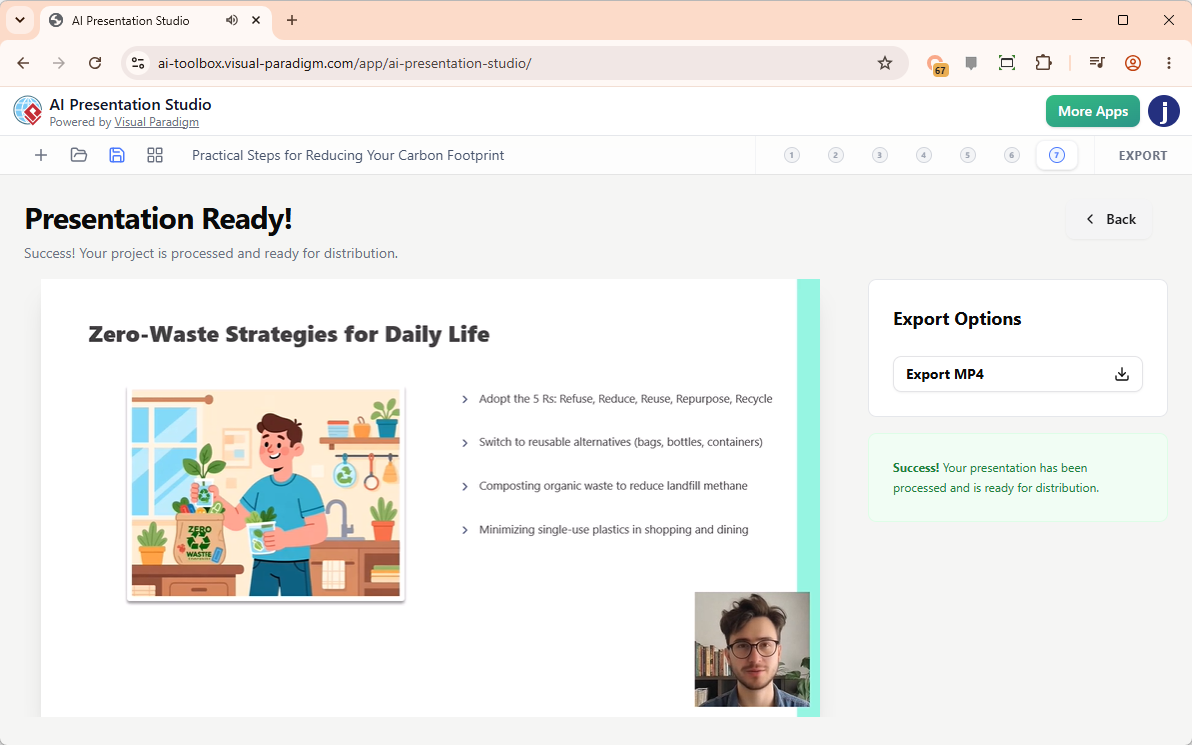
The process is intuitive:
- Input Context: Define your topic and audience.
- Refine Outline: Use a visual content editor to tweak the AI-generated structure.
- Design & Animate: Apply professional themes and choose from over 60 cinematic transitions.
But the feature that truly sets it apart is the Humanless Narration & Avatars. You can generate text-to-speech scripts with diverse voice profiles or use AI Face Swap to map your own face onto a professional avatar. The final output is a polished MP4 video, ready for stakeholder updates or training modules. For product managers who need to communicate complex roadmaps without spending hours in front of a camera, this is a game-changer.
AI App Studio: Building Stable Apps with Data-First Logic
One of the biggest pain points in AI-assisted coding is the “stateless” problem. AI coders often guess user data logic, leading to broken apps upon refresh. AI App Studio solves this by enforcing a strict, data-driven methodology.
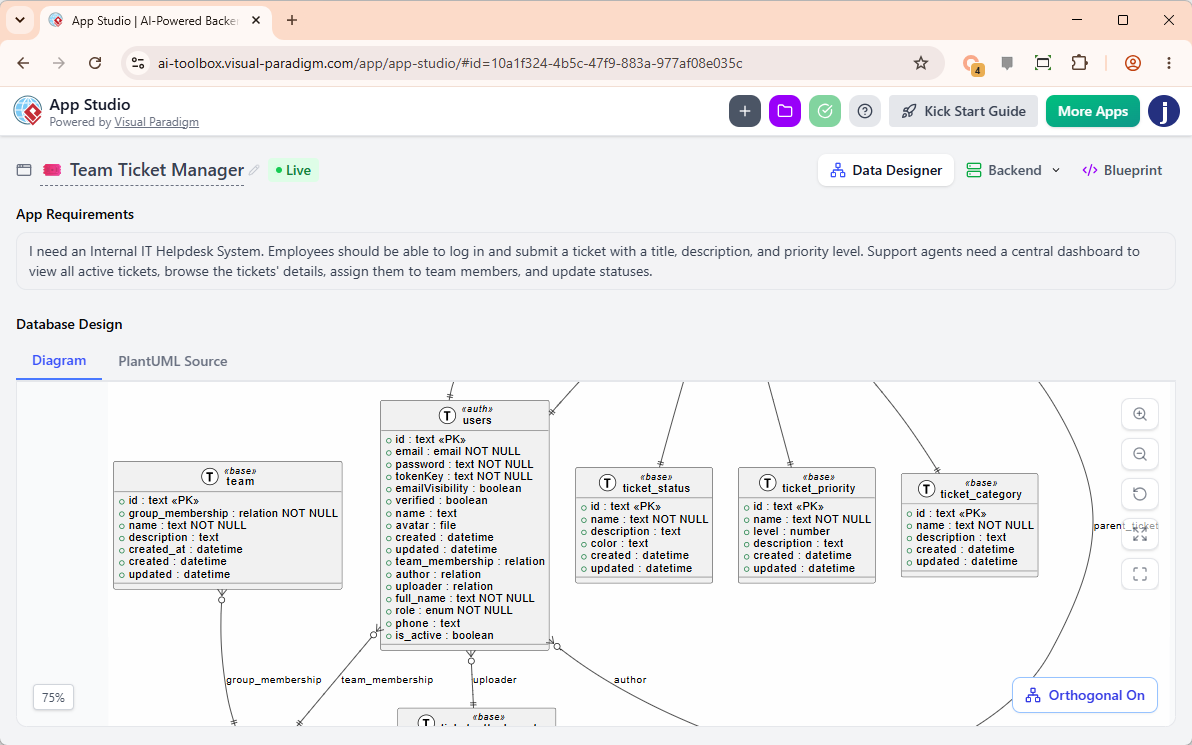
Instead of locking you into a proprietary low-code interface, App Studio provisions a secure, live cloud backend database based on your requirements or a PlantUML ERD import. It then generates a Master AI Prompt that packages your database infrastructure, UI frameworks (React, Vue, Svelte, Angular), and styles (Tailwind CSS v4, Bootstrap) into a cohesive package. You can take this prompt to external engines like Google AI Studio to launch a persistent, stable application. Plus, the ability to seed mock data instantly means your app is functional and testable right out of the gate.
AI VPP Chatbot: Conversing with Your Models
Navigating large, complex models can be daunting. The new VPP Chatbot allows you to interact with your .vpp files using natural language.
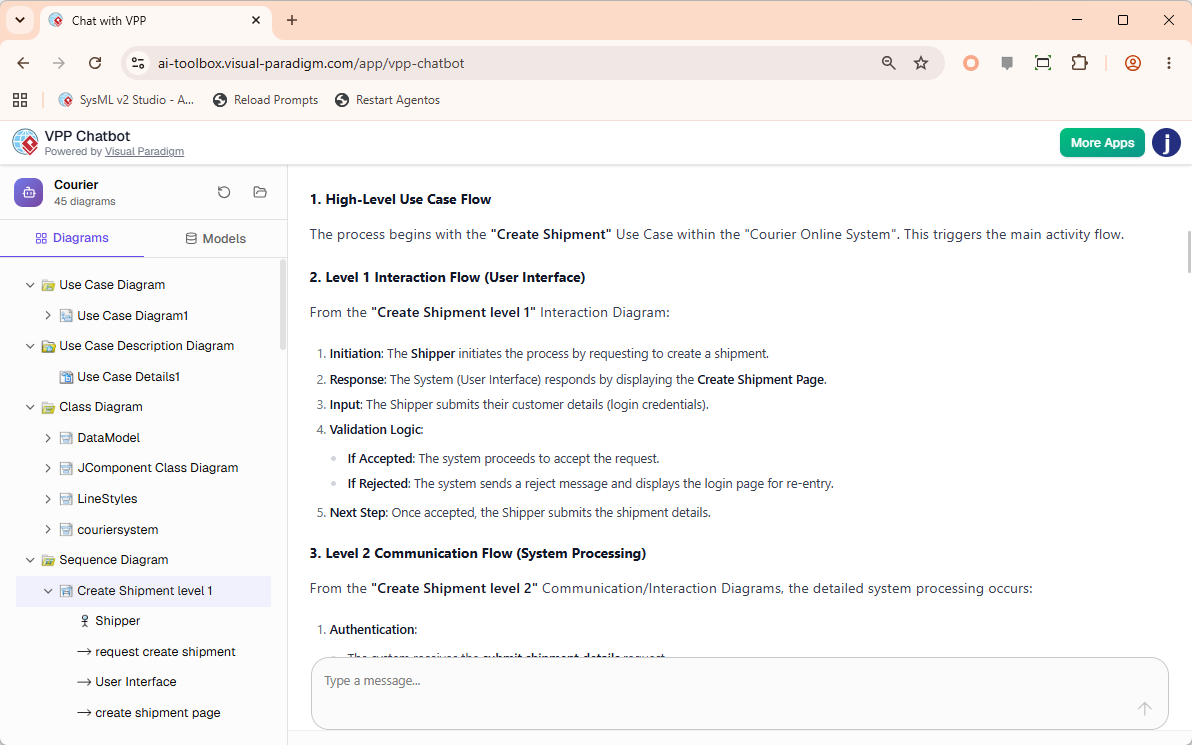
Simply drop your project file into the app, and the AI analyzes the structure. You can ask questions like, “List all key use cases for the payment module” or “Summarize the interaction flow for user login.” The chatbot provides plain-language answers, referencing the specific diagrams in the sidebar. This is invaluable for onboarding new team members or auditing existing architectures without manually tracing every connector.
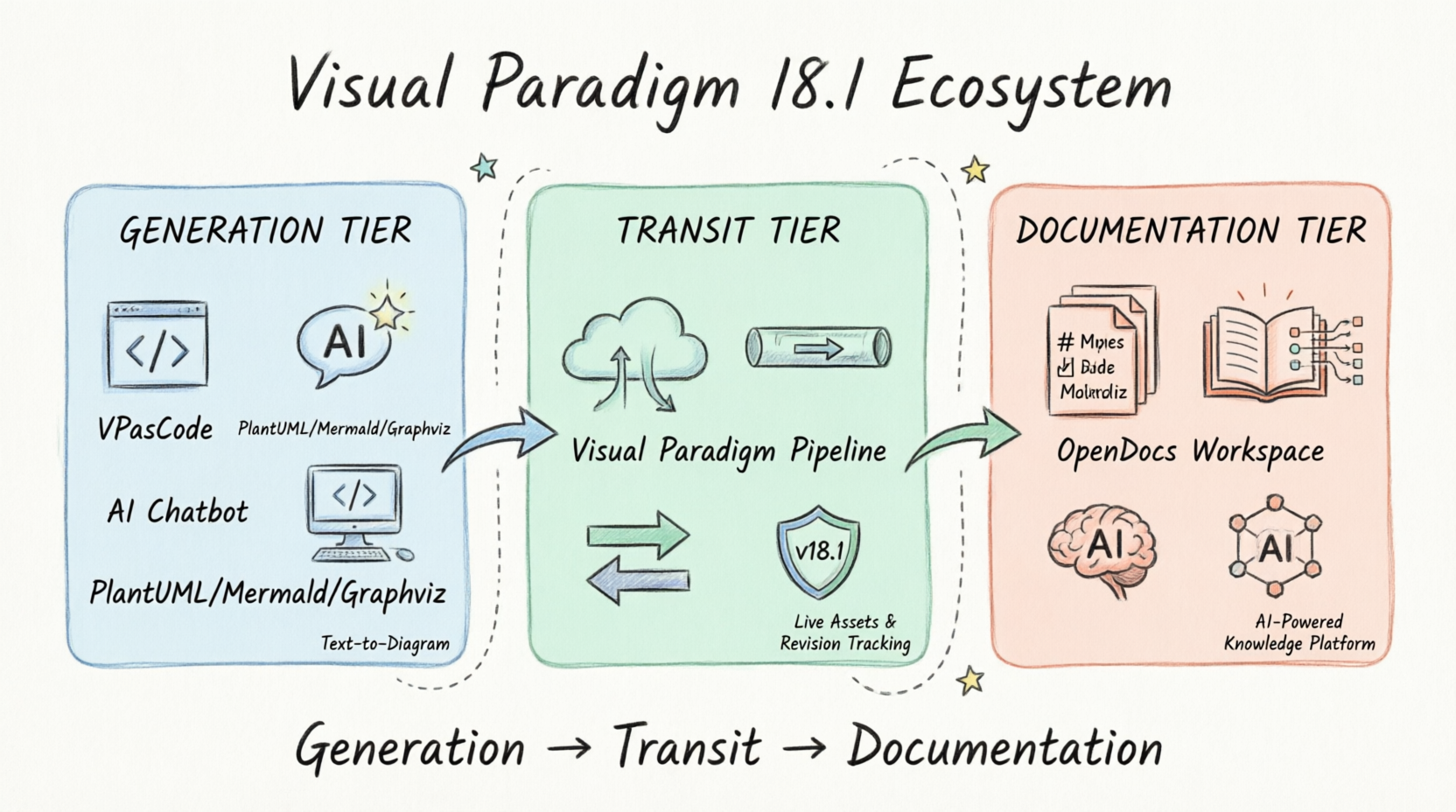
The Three-Tier Ecosystem: Generation, Transit, and Documentation
Underpinning these features is a robust three-tier ecosystem designed to eliminate documentation decay.
1. The Generation Tier
This is where diagrams are born, either through VPasCode (Diagram-as-Code) or the AI Chatbot (Natural Language to Diagram). The AI bridges the gap by converting plain English requests into structured visuals, which can then be fine-tuned in VPasCode.
2. The Transit Tier
The Visual Paradigm Pipeline acts as the secure, cloud-based connective tissue. When you push a diagram to the pipeline, it becomes a live reference asset with automated revision tracking. This ensures that your documentation always points to the latest version of your design.
3. The Documentation Tier
OpenDocs is an AI-powered knowledge platform. Instead of embedding static images, you reference live assets from the Pipeline. When a developer updates the underlying code in VPasCode, the visual asset updates in the pipeline, and OpenDocs highlights the modification. With a single click, your documentation stays current.
Licensing and Accessibility
Access to these advanced AI tools requires an active subscription or maintenance plan. However, Visual Paradigm offers a compelling cross-platform advantage: Desktop Professional Edition users with active maintenance are automatically granted full access to the web apps of the VP Online Combo Edition. This means you get the best of both worlds—desktop power and cloud AI capabilities—without additional costs.
| Feature | Free Capabilities | Premium / AI Elements Included In: |
|---|---|---|
| Unified Platform | Core Hub & Dashboard View | N/A |
| VPasCode | Code Editor, Preview, URL Sharing, SVG/PNG Export |
|
| AI Presentation Studio | N/A |
|
| AI App Studio | N/A |
|
| AI VPP Chatbot | N/A |
|
Final Thoughts: Is Visual Paradigm 18.1 Worth the Upgrade?
For teams already invested in the Visual Paradigm ecosystem, Version 18.1 is a no-brainer. The integration of AI into the core workflow—from generating diagrams via text to creating narrated presentations—significantly reduces manual effort. The Unified Platform finally breaks down the barriers between desktop and cloud, while the Three-Tier Ecosystem offers a sustainable solution to the perennial problem of outdated documentation.
Even for new users, the focus on Diagram-as-Code and Git-friendly workflows makes VP 18.1 a strong contender for engineering teams looking to standardize their architectural documentation. It’s not just a tool; it’s a pipeline that keeps your technical truth alive and accessible.
If you’re ready to move beyond static diagrams and embrace a living, AI-driven documentation strategy, Visual Paradigm 18.1 delivers on its promise of a new era in visual modeling.
References
- From Diagram to Documentation: A Beginner’s Guide to the Visual Paradigm Pipeline: A foundational guide explaining how Visual Paradigm connects diagramming tools directly to living enterprise workspaces, replacing fragmented documentation silos.
- Visual Paradigm OpenDocs: The Complete Developer’s Guide to AI-Powered Technical Documentation: An in-depth look at OpenDocs as an AI-powered knowledge management platform tailored for DevOps teams and engineers.
- Mastering Visual Paradigm OpenDocs: The Ultimate Guide to AI-Powered Knowledge Management and the Pipeline Ecosystem: A comprehensive resource on leveraging the Pipeline ecosystem to maintain documentation consistency and eliminate decay.
- AI Diagram Generation: Overview of Visual Paradigm’s AI capabilities for transforming natural language and code into structured visual diagrams.
- Comprehensive Guide to VPasCode by Visual Paradigm: Detailed instructions on using VPasCode as a Diagram-as-Code playground supporting Mermaid.js, PlantUML, and Graphviz.
- Seamlessly Connect Diagramming to Documentation: VPasCode Integrates with OpenDocs: Release notes detailing the integration between VPasCode and OpenDocs for streamlined workflows.
- VPasCode Features: Official feature list for VPasCode, highlighting its cloud-native, zero-installation sandbox environment and AI syntax support.
- How the Visual Paradigm AI Chatbot and VPasCode Function as an Integrated Ecosystem for Diagramming: Explanation of the synergy between the AI Chatbot’s natural language processing and VPasCode’s manual fine-tuning capabilities.
- Mastering VPasCode: The Ultimate Guide to AI-Powered Diagram as Code with Multi-Engine Support: Advanced techniques for leveraging AI error-fixing and multi-engine support in VPasCode.
- Sync AI Diagram to OpenDocs Pipeline Guide (Video): A video tutorial demonstrating the practical steps for syncing AI-generated diagrams to the OpenDocs pipeline.
- Sync AI Diagram to OpenDocs Pipeline Guide: Step-by-step documentation on establishing live reference assets and automated revision tracking in the Pipeline.
- Sync AI Diagram to OpenDocs Pipeline Guide: Additional resources on maintaining documentation consistency through the Pipeline ecosystem.
- From Code to Clarity: A Beginner’s Guide to Seamless Diagramming with VPasCode and OpenDocs: A beginner-friendly overview of the end-to-end workflow from code-based design to clear documentation.
- OpenDocs Features: Official feature list for OpenDocs, emphasizing its role as an AI-powered knowledge platform for technical teams.
- Visual Paradigm’s Pipeline: Hands-On Review of Visual Paradigm’s Desktop to OpenDocs Integration: A practical review of how desktop models integrate with the cloud-based OpenDocs platform.
- Mastering VPasCode: The Ultimate Guide to AI-Powered Diagram as Code with Multi-Engine Support: Further insights into eliminating documentation decay by binding visuals to text-based source files.
- Mastering VPasCode: The Ultimate Guide to AI-Powered Diagram as Code with Multi-Engine Support: Discussion on Git-friendly workflows and the benefits of storing diagram definitions in code repositories.