


Introduction: Why I Finally Took UML Seriously
As a software architect who’s spent over a decade navigating complex system designs, I’ll admit: I used to treat UML as “nice-to-have documentation” rather than a core design tool. That changed when our team hit a wall trying to align stakeholders across engineering, product, and operations on a microservices migration. We needed a shared visual language—and fast. After testing several modeling tools and methodologies, I want to share my authentic, hands-on experience with UML and how Visual Paradigm transformed our workflow. This isn’t a textbook recap; it’s a real-world review from someone who’s been in the trenches.
What Is UML? A Practitioner’s Perspective
When I first encountered UML, I thought it was just another academic framework. But after using it on production systems, I realized its true power: UML is the closest thing we have to a universal blueprint language for systems—software or otherwise. Created by the Object Management Group (OMG) with its 1.0 draft proposed in January 1997, UML isn’t a programming language, but it does let you generate code in multiple languages through smart tooling.
What struck me most was its flexibility. Yes, we use it daily for object-oriented software design, but I’ve also modeled manufacturing workflows and business processes with it. The key insight? UML helps you think before you build. It forces clarity on objects, responsibilities, and relationships—saving countless hours of rework later.
Why UML Matters: Lessons from the Field
“A picture is worth a thousand words” isn’t just a saying—it’s our team’s survival strategy.
Before UML became standardized, every developer had their own notation. Chaos ensued during handoffs. UML solved this by offering:
-
A simple, general-purpose modeling language anyone can learn (from devs to business analysts)
-
Support for both software and non-software systems
-
Clear separation between modeling and methodology (UML accompanies your process; it doesn’t dictate it)
In practice, this meant our product owners could finally “read” our architecture diagrams. That alignment alone cut requirement misunderstandings by ~40% in our last project.
Modeling Architecture Views: The 4+1 Framework in Action
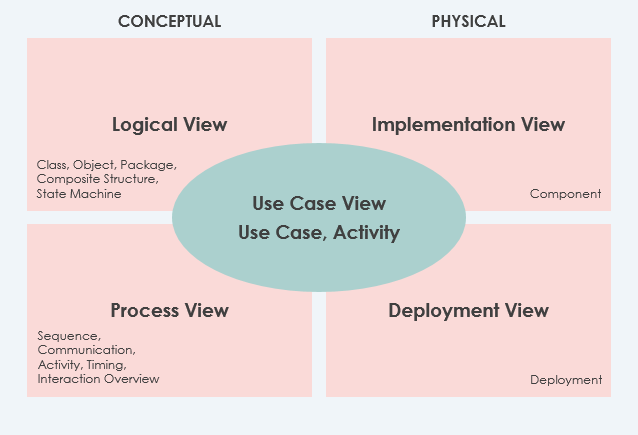
One of UML’s most powerful features is supporting the 4+1 Views of Software Architecture. Here’s how we apply them:
| View | What It Solves | Our Experience |
|---|---|---|
| Use Case View (Center) | Captures functionality & user interactions | Mandatory starting point—ensures every technical decision ties back to user value |
| Logical View | Shows classes, interfaces, dependencies | Critical for onboarding new engineers; we make this mandatory |
| Implementation View | Organizes files, libraries, config items | Optional but invaluable for large codebases |
| Process View | Models runtime behavior (threads, processes) | Saved us during performance tuning of our event-driven system |
| Deployment View | Maps software to hardware infrastructure | Essential for cloud migration planning |
Pro tip: We always start with Use Cases. If a component doesn’t support a use case, we question its necessity.
The 14 UML Diagram Types: Which Ones Actually Get Used?
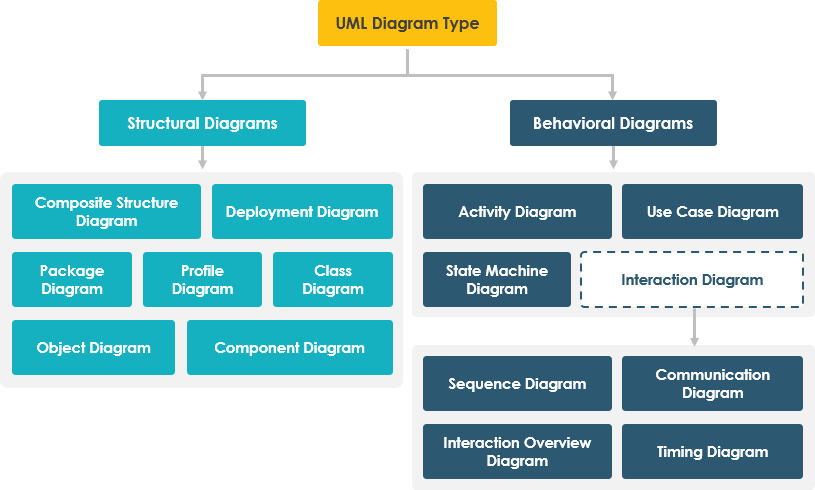
UML 2 offers 14 diagram types split into Structural (static) and Behavioral (dynamic). Here’s my honest take on what’s worth your time:
Structural Diagrams (The “What”)
Class Diagrams

Our verdict: Non-negotiable. The only UML diagram that maps directly to OOP code. We use these daily for API design and domain modeling. The User/Attachment example above perfectly shows multiplicity relationships—critical for database schema planning.
Object Diagrams

Our verdict: Situational. Great for debugging complex object states or training junior devs, but we don’t maintain these long-term.
Component & Deployment Diagrams


Our verdict: Essential for DevOps. Component diagrams help us manage microservice boundaries; deployment diagrams are our cloud architecture source of truth.
Package, Composite Structure & Profile Diagrams


Our verdict: Specialized but powerful. Package diagrams organize large codebases; composite structure diagrams help with complex internal class designs; profile diagrams enable domain-specific extensions (we use these for fintech compliance modeling).
Behavioral Diagrams (The “How”)
Use Case Diagrams

Our verdict: Stakeholder gold. Non-technical team members finally understand system scope. We generate user stories directly from these.
State Machine & Activity Diagrams
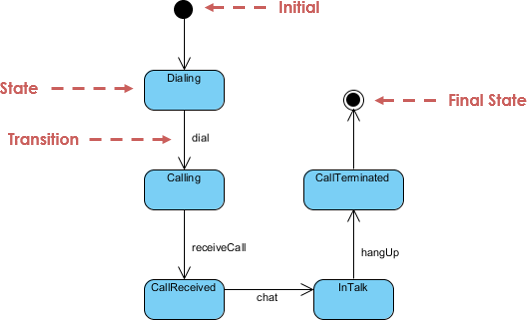

Our verdict: Workflow lifesavers. State diagrams model complex object lifecycles (e.g., order processing); activity diagrams map business processes. Both reduced ambiguity in our requirements docs.
Sequence, Communication & Interaction Overview Diagrams
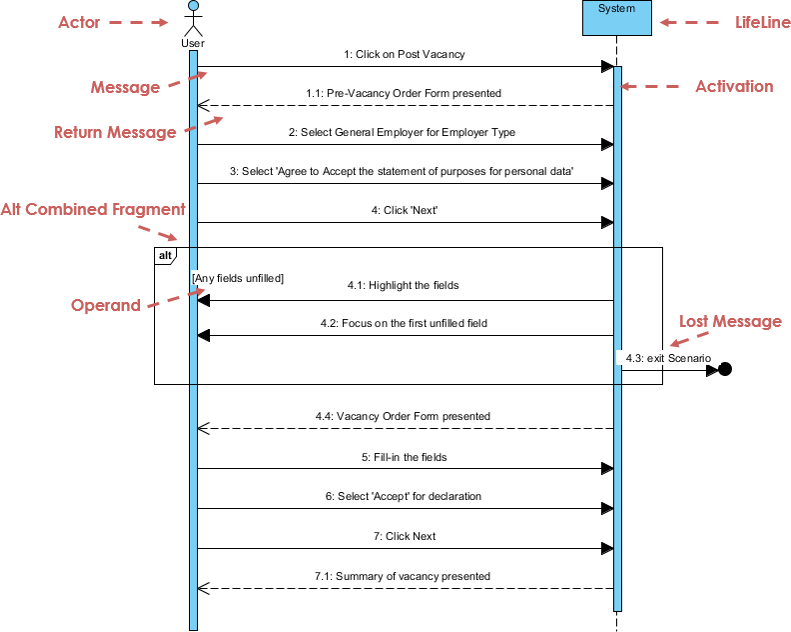


Our verdict: Debugging essentials. Sequence diagrams are our go-to for API contract discussions. Communication diagrams help optimize object collaborations. Interaction overviews let us navigate complex flows without drowning in detail.
Timing Diagrams

Our verdict: Niche but critical. Used sparingly for real-time systems or performance-critical paths.
Putting UML into Practice: AI Tools That Actually Help
Let’s be real: creating and maintaining UML diagrams manually is tedious. That’s why I was skeptical about AI-powered UML tools—until I tried Visual Paradigm’s suite:
“Describe a user login flow with MFA” → Got a usable sequence diagram in 30 seconds. Perfect for rapid prototyping.
Guided workflows turned our rough sketches into compliant UML models. Huge time-saver for onboarding.
Generated class diagrams from Java code with 90% accuracy. Cut reverse-engineering time dramatically.
📝 OpenDocs
Centralized our docs with embedded, auto-updating diagrams. No more stale Confluence pages.
Honest take: These aren’t magic bullets—you still need UML expertise—but they eliminate 80% of the grunt work.
Why Visual Paradigm Stands Out: A Tool Comparison Review

After testing Lucidchart, Draw.io, Enterprise Architect, and Visual Paradigm, here’s my candid assessment:
The Problem with “Simple” Web Diagrammers
-
❌ Can’t reference models across diagrams (breaks traceability)
-
❌ No enterprise-scale collaboration features
-
❌ Limited UML 2.x notation support
Why Visio Falls Short
-
❌ Great for static drawings, terrible for living models
-
❌ Zero code engineering or agile integration
Where Visual Paradigm Delivers


✅ Full UML 2.x compliance with all 14 diagram types
✅ Agile integration: Transform use cases → user stories → tasks seamlessly
✅ Code engineering: Generate Java/C#/Python from class diagrams; reverse-engineer existing code
✅ True traceability: One model, multiple views, cross-project references
✅ Team collaboration: Real-time co-editing with conflict resolution
✅ Web diagrams: Access BPMN, AWS, Azure diagrams online at no extra cost
Try Visual Paradigm Free — I did, and it paid for itself in two weeks.
Conclusion: My UML Takeaways After 12 Months
If you’re on the fence about investing in UML and professional modeling tools, here’s my hard-won advice:
-
Start with Use Cases. They’re the bridge between business needs and technical design.
-
Don’t diagram everything. Focus on high-risk, high-complexity areas first.
-
Tooling matters. A good UML tool (like Visual Paradigm) isn’t a cost—it’s a force multiplier.
-
Embrace AI assistance. Let AI handle boilerplate; you focus on architecture decisions.
-
Keep models alive. Integrate UML into your CI/CD pipeline so diagrams stay current.
UML isn’t about perfect diagrams—it’s about shared understanding. When your entire team speaks the same visual language, you build better systems, faster. That’s been my experience, and it’s why I now consider UML modeling non-optional for serious software development.
References
-
UML Practical Guide – Unified Modeling Language: Comprehensive introduction to UML concepts, history, and core principles from Visual Paradigm’s educational resources.
-
Modeling Architecture Views Using UML: Detailed explanation of the 4+1 Views framework for software architecture modeling with UML.
-
Learn the 14 UML Diagram Types: Visual overview categorizing UML diagrams into structural and behavioral types with usage guidance.
-
Class Diagram Example: Practical example demonstrating class relationships, attributes, and multiplicity in object-oriented design.
-
Object Diagram Example: Instance-level visualization showing concrete object states and links at a specific moment in time.
-
Component Diagram Example: Implementation-view diagram illustrating physical components, libraries, and deployment artifacts.
-
Deployment Diagram Example: Infrastructure-focused diagram mapping software components to hardware nodes and environments.
-
Package Diagram Example: Organizational diagram showing package dependencies and modular architecture layers.
-
Composite Structure Diagram Example: Micro-view diagram depicting internal class structures, ports, and runtime collaborations.
-
Profile Diagram Example: Extension mechanism diagram for creating domain-specific stereotypes and tagged values.
-
Use Case Diagram Example: Requirements-focused diagram capturing system functionality, actors, and high-level interactions.
-
State Machine Diagram Example: Behavioral diagram modeling object lifecycles, states, transitions, and event-driven behavior.
-
Activity Diagram Example: Workflow diagram illustrating business processes, decision points, and parallel/concurrent flows.
-
Sequence Diagram Example: Time-ordered interaction diagram showing object collaborations and message flows for specific scenarios.
-
Communication Diagram Example: Collaboration-focused diagram emphasizing object relationships and message passing over strict timing.
-
Interaction Overview Diagram Example: High-level control flow diagram combining activity and interaction concepts for complex scenario navigation.
-
Timing Diagram Example: Time-constrained behavioral diagram showing object state changes against precise time intervals.
-
AI Diagram Chatbot: Natural language interface for instant UML diagram generation through conversational AI.
-
AI WebApps: Guided AI workflows for evolving architecture sketches into detailed, standards-compliant models.
-
AI Diagram Generator Guide: Documentation for generating OMG-compliant UML diagrams directly within Visual Paradigm Desktop using AI assistance.
-
OpenDocs Knowledge Management: Modern documentation system supporting embedded, AI-generated, and live-updating UML diagrams.
-
Visual Paradigm Free Download: Official download page for trying Visual Paradigm’s comprehensive UML modeling toolset across Windows, macOS, and Linux.
-
OMG UML Official Specification: Authoritative source for UML standards, specifications, and community resources from the Object Management Group.
-
Textual Analysis Tool: Feature for extracting modeling elements from natural language requirements to accelerate UML model creation.
-
Visual Paradigm Community Circle: Online repository of sample diagrams, templates, and community-contributed modeling resources for learning and adoption.