


Software architecture is often misunderstood as merely the technical structure of an application. In reality, it is the art of communication. When teams build complex systems, they require a shared language to describe how data flows, where services live, and how components interact. Without a standardized approach, diagrams become inconsistent, outdated, or simply ignored. The C4 Model addresses this challenge directly.
This framework provides a structured way to visualize software architecture at different levels of abstraction. It helps architects and developers document their systems without getting lost in the weeds of implementation details. By focusing on the relationships between boxes rather than the code inside them, teams can maintain clarity as systems grow.
Understanding the Core Philosophy 🧠
Before diving into the specific diagram types, it is essential to understand the mindset behind the C4 Model. It is not a rigid set of rules but a flexible toolkit. The primary goal is to answer specific questions for specific audiences.
- Who is looking? Developers, stakeholders, or operations teams?
- What do they need to know? Business context, infrastructure, or logic?
- How much detail is required? High-level overview or deep dive?
Traditional documentation often fails because it tries to answer all these questions in a single document. This leads to information overload. The C4 Model separates concerns by defining distinct levels of detail. This separation ensures that the right people see the right information at the right time.
The Levels of Abstraction 📊
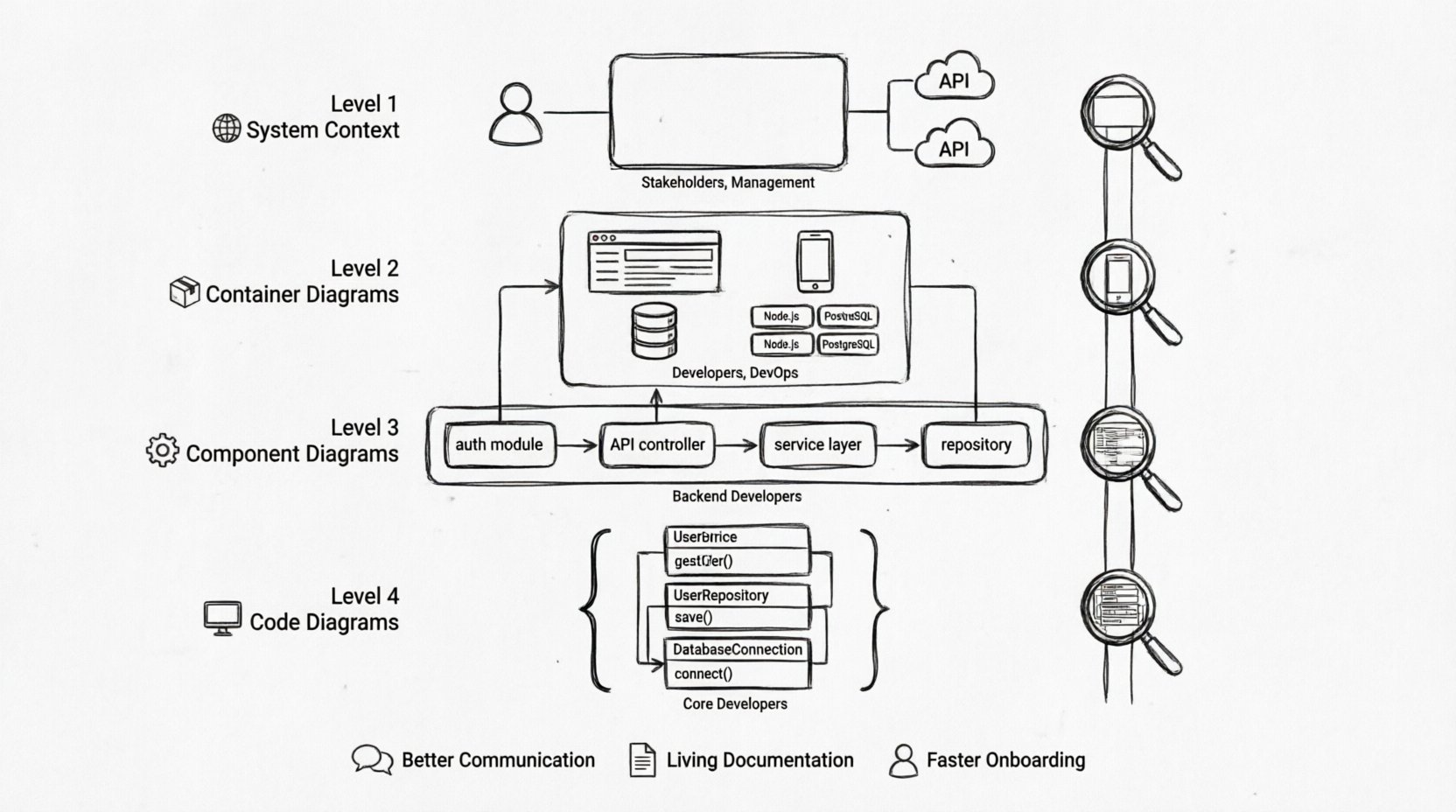
The heart of the C4 Model lies in its four levels. Each level represents a different zoom level into the software system. Moving from Level 1 to Level 4 increases the granularity of the information presented.
Level 1: System Context 🌍
Level 1 provides the big picture. It shows the system you are building and how it relates to the wider world. This diagram is crucial for stakeholders who do not need to know technical details but need to understand where the system fits.
- Scope: The entire system as a single box.
- People: End-users or external actors.
- Systems: Other software systems that interact with yours.
- Relationships: Data flows and interactions between the system and the outside world.
For example, if you are building an online banking application, the Level 1 diagram would show the application itself, the bank customers, the credit card processor, and the SMS notification service. It does not show databases or microservices inside the application.
Level 2: Container Diagrams 📦
Level 2 zooms in to show the major building blocks of the system. A container is a deployable unit of software. This could be a web application, a mobile app, a database, or a microservice.
- Containers: Web apps, mobile apps, data stores, command-line tools.
- Technology: The technology used (e.g., Node.js, PostgreSQL, Docker).
- Connections: Protocols used between containers (e.g., HTTPS, SQL, REST).
This diagram answers the question: “How is the system built?” It bridges the gap between business context and technical implementation. It is useful for developers joining the project who need to understand the deployment topology.
Level 3: Component Diagrams ⚙️
Level 3 goes deeper into a specific container. It breaks down a container into its constituent components. A component is a logical grouping of functionality within the system.
- Components: Modules, classes, or services within a container.
- Responsibilities: What each component does (e.g., Authentication, Reporting).
- Interactions: How components talk to each other.
This level is primarily for developers working on the code. It helps them understand the internal structure of a service without needing to read every line of code. It maps the logical design to the physical implementation.
Level 4: Code Diagrams 💻
Level 4 is rare and typically reserved for specific situations. It shows the code structure, such as classes and their relationships. This level is usually too detailed for general architecture documentation but can be generated automatically from source code.
Most teams skip this level unless they are dealing with complex algorithms or legacy code refactoring.
Comparison of C4 Levels ⚖️
To clarify the differences between the levels, refer to the table below.
| Level | Focus | Audience | Example Content |
|---|---|---|---|
| Level 1 | System Context | Stakeholders, Management | Users, External APIs, Business Goals |
| Level 2 | Containers | Developers, DevOps | Web App, Database, Mobile App, Cloud Services |
| Level 3 | Components | Backend Developers | Controllers, Services, Repositories |
| Level 4 | Code | Core Developers | Classes, Methods, Interfaces |
Why Adopt This Framework? 🚀
Adopting the C4 Model brings tangible benefits to an organization. It is not just about drawing boxes; it is about improving the software development lifecycle.
Better Communication 🗣️
When everyone uses the same notation and levels of abstraction, misunderstandings decrease. A stakeholder looking at a Level 1 diagram does not get confused by database schema details. A developer looking at a Level 3 diagram does not waste time on user interface flows.
Living Documentation 📝
Documentation often becomes stale. The C4 Model encourages a lightweight approach. By keeping diagrams at a high level, they remain relevant longer. You do not need to update every diagram when a single variable changes in the code.
Onboarding Efficiency 🎓
New team members can understand a system much faster. Instead of digging through repositories, they can look at the Level 2 container diagram to see where the data lives and how services connect. This reduces the time to productivity.
Implementation Strategy 🛠️
Integrating the C4 Model into your workflow requires a deliberate approach. You cannot simply draw diagrams after the fact and expect them to be useful. They must be part of the design process.
- Start with Level 1: Before writing code, define the system context. Agree on the boundaries with stakeholders.
- Iterate on Level 2: As you design the architecture, flesh out the containers. Decide on technology choices here.
- Drill down as needed: Create Level 3 diagrams only for complex containers. Do not diagram every simple microservice.
- Keep it simple: Avoid clutter. If a diagram has more than 10 boxes, it is likely too complex.
Common Pitfalls to Avoid ⚠️
Even with a good framework, teams can make mistakes. Being aware of these common pitfalls will help you maintain the integrity of your documentation.
1. Mixing Levels
Do not put database schemas inside a Level 2 container diagram. Do not show external users inside a Level 3 component diagram. Mixing levels confuses the reader about the scope of the diagram.
2. Over-Engineering
Creating detailed diagrams for simple applications is a waste of time. If you have a single-page application with no backend, a Level 2 diagram is sufficient. Assess the complexity before investing effort.
3. Ignoring the Audience
Creating a Level 3 diagram for a project manager will not help them. They need to see the business value and system boundaries, not the internal service architecture. Match the diagram to the reader’s needs.
4. Stale Diagrams
A diagram that does not match the code is worse than no diagram at all. If the code changes, update the diagram. Treat diagrams as code. If you do not have time to update them, stop creating them.
Integrating with Modern Workflows 🔄
The C4 Model fits well within modern software development practices. It complements Agile and DevOps methodologies by providing visual context without slowing down delivery.
Continuous Documentation
Instead of creating diagrams once and filing them away, integrate diagram updates into your pull request process. If the architecture changes, the diagram should change. This ensures that the documentation is always current.
Automated Generation
Some tools allow you to generate diagrams from code or configuration files. While manual drawing offers more control, automated generation ensures accuracy. Use a hybrid approach where the base structure is automated and the context is manually added.
Collaboration
Share diagrams across teams. A backend team can share their Level 2 diagrams with the frontend team so they understand the API structure. This cross-team visibility reduces integration friction.
Best Practices for Maintenance 🛡️
Maintaining architecture documentation is an ongoing responsibility. Here are strategies to keep the C4 Model effective over time.
- Version Control: Store your diagrams in the same repository as your code. This makes it easy to track changes alongside code changes.
- Review Cycles: Include diagram reviews in your sprint planning. Ask the team: “Did we update the architecture diagram for the feature we just built?”
- Standardize Notation: Define a style guide for your diagrams. Use consistent colors, shapes, and line styles. This makes the diagrams easier to read at a glance.
- Focus on Relationships: The most important part of a C4 diagram is the line connecting the boxes. Ensure the labels on these lines clearly describe the data being exchanged.
Scaling the Model 📈
As organizations grow, they often build multiple systems. The C4 Model scales well across this complexity. You can create a Level 1 diagram for the entire enterprise ecosystem, showing how all the different applications connect.
- Enterprise View: Use Level 1 diagrams to show dependencies between business units.
- System View: Use Level 2 diagrams to manage the complexity of individual applications.
- Team View: Use Level 3 diagrams to guide development within specific squads.
This hierarchical approach prevents information overload. Leaders see the big picture, while engineers see the details they need to execute.
Conclusion on Documentation Value 📌
The effort put into the C4 Model pays off in reduced technical debt and clearer communication. It transforms architecture from a hidden activity into a visible asset. By adhering to the levels and focusing on the audience, teams can create documentation that actually gets used.
Remember that the goal is not perfection. The goal is clarity. A simple Level 1 diagram that explains the system boundaries is more valuable than a complex diagram that no one reads. Start small, stay consistent, and let the diagrams evolve with your software.