


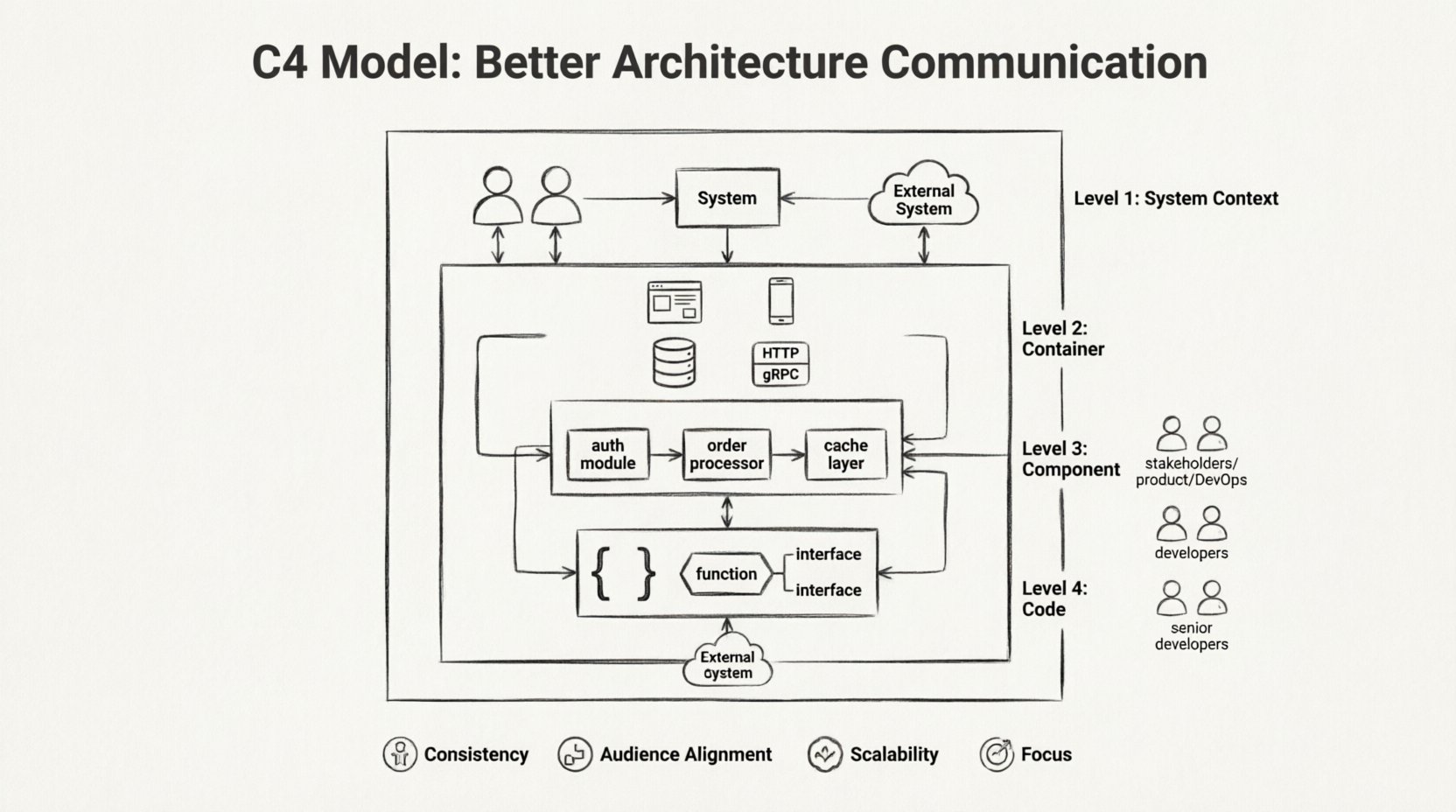
Software systems grow complex. As teams expand and features multiply, the mental models of how everything fits together begin to diverge. Developers, product managers, and stakeholders often visualize the same system differently. This disconnect leads to bugs, rework, and friction. To solve this, architects need a standardized way to describe their systems. The C4 Model provides a structured approach to creating software architecture diagrams that scale. It offers a consistent language for documenting high-level designs down to code-level details.
This guide explores how the C4 Model improves clarity across organizations. We will examine each of the four levels, discuss who should use them, and outline strategies for maintaining documentation without creating overhead. By adopting this framework, teams can ensure everyone understands the system, regardless of their technical depth.
🤔 The Challenge of Architecture Documentation
Before diving into the solution, it is necessary to understand the problem. Traditional documentation often falls into two traps:
- Too High Level: Diagrams that are too abstract fail to provide actionable details for engineers building the system.
- Too Low Level: Diagrams that focus on implementation details overwhelm stakeholders who need to understand business capabilities.
When documentation is static or infrequent, it becomes outdated quickly. A diagram drawn during a sprint planning session may not reflect the reality of the production environment six months later. The C4 Model addresses these issues by offering a hierarchy of abstraction. This allows architects to create multiple views of the same system, each tailored to a specific audience.
📐 What Is the C4 Model?
The C4 Model is a method for documenting software architecture using a hierarchy of diagrams. It was created to help architects communicate design decisions effectively. The model is named after its four levels of abstraction:
- Context: Level 1
- Container: Level 2
- Component: Level 3
- Code: Level 4
Each level zooms in further into the system. You do not need to create all four levels for every project. The goal is to select the level that matches the information gap in your team.
🌍 Level 1: System Context Diagram
The System Context diagram provides the broadest view. It shows the software system as a single box and its relationships with users and other systems. This diagram answers the question: “How does this system fit into the wider world?”
👥 Who Uses This?
- Product Owners
- Stakeholders
- New Team Members
- Management
🧩 What Goes Inside?
A Level 1 diagram typically contains:
- The Software System: Represented as one central box.
- People: Actors interacting with the system (e.g., Admins, Customers).
- Other Systems: External services or databases the system connects to.
- Relationships: Arrows showing data flow or dependencies between elements.
Keep the diagram simple. Avoid showing internal logic. Focus on boundaries. If a stakeholder asks why a specific feature exists, this diagram often provides the context needed to answer that question.
📦 Level 2: Container Diagram
The Container diagram zooms in to show the high-level technical building blocks. A container is a deployable unit of software. It could be a web application, a mobile app, a microservice, or a database. This level answers the question: “What are the main technologies used, and how do they connect?”
🛠️ What Is a Container?
Containers are distinct from components. They have a lifecycle of their own. Examples include:
- A Java Spring Boot application running on a server.
- A React frontend hosted on a CDN.
- A PostgreSQL database instance.
- A Python script running as a scheduled job.
🧩 What Goes Inside?
When creating a Container diagram, focus on:
- The Types: Identify the technology stack for each container (e.g., “Web App”, “Database”, “API Service”).
- The Connections: Show how containers talk to each other (e.g., HTTP, TCP, gRPC).
- The Responsibilities: Briefly describe what each container does.
This diagram is crucial for onboarding backend engineers. It helps them understand where they should deploy their code and which external services they can call.
🧱 Level 3: Component Diagram
The Component diagram looks inside a single container. It breaks down a container into smaller logical parts. This level answers the question: “How is the functionality organized within this specific application?”
🧩 What Is a Component?
Components are logical units of code. They are not necessarily deployable on their own. Examples include:
- A user authentication service.
- An order processing module.
- A reporting engine.
- A caching layer.
🧩 What Goes Inside?
When documenting components, consider:
- Responsibility: What does this component do?
- Interfaces: How does it communicate with other components inside the same container?
- Dependencies: Does it rely on external libraries or APIs?
This level is often the most useful for developers working on specific features. It provides enough detail to understand the architecture without getting lost in code syntax.
💻 Level 4: Code Diagram
The Code diagram shows the implementation details. It maps components to classes, interfaces, or functions. This level answers the question: “What is the specific structure of the code?”
🛠️ When to Use This?
Most teams do not need to maintain Level 4 diagrams. Code changes frequently, making manual documentation difficult to keep up to date. Use this level only when:
- Onboarding a new developer to a legacy codebase.
- Explaining a complex algorithm or design pattern.
- Documenting a critical integration point.
For most modern applications, Level 3 is sufficient. If you find yourself needing Level 4 often, it may indicate that the architecture is too complex or the documentation is not up to date.
📊 Comparison of C4 Levels
To help visualize the differences, consider the following table:
| Level | Name | Audience | Focus | Granularity |
|---|---|---|---|---|
| 1 | System Context | Stakeholders | External Interaction | High |
| 2 | Container | Architects, DevOps | Technology Stack | Medium-High |
| 3 | Component | Developers | Logical Structure | Medium-Low |
| 4 | Code | Senior Developers | Implementation | Low |
🚀 Benefits of Adopting the C4 Model
Why should a team invest time in this framework? There are several tangible advantages to structuring architecture documentation this way.
- Consistency: Everyone uses the same terminology. There is no confusion between a “module,” “service,” or “component” because the definitions are standardized.
- Audience Alignment: You can tailor the diagram to the person reading it. A manager sees the Context diagram, while a developer sees the Component diagram.
- Scalability: As the system grows, you can add more containers or components without breaking the overall structure.
- Focus: It forces you to decide what information is relevant. You stop trying to document everything and focus on what matters.
🛠️ Creating Diagrams Without Tools
While many tools exist to generate these diagrams, the process matters more than the software. The act of drawing forces you to think through the design.
🎨 Best Practices for Drawing
- Start Simple: Begin with Level 1. Do not jump to Level 3 until Level 2 is stable.
- Use Whiteboards: Collaborative sessions work best for initial drafts. Get the team aligned before digitizing.
- Keep it Clean: Avoid clutter. If a diagram is hard to read, it is not useful.
- Version Control: Store diagrams in the same repository as the code. This ensures they are updated alongside the software.
⚠️ Common Pitfalls to Avoid
Even with a good model, mistakes happen. Here are common issues teams encounter when implementing the C4 Model.
- Over-Documentation: Creating diagrams for every minor change slows down development. Only document significant architectural decisions.
- Inconsistency: Different teams using different styles makes the documentation confusing. Agree on a standard style guide.
- Outdated Content: If the code changes and the diagram does not, the diagram becomes a lie. Treat diagrams as living documents.
- Ignoring Context: Focusing only on internal details without showing external dependencies leads to integration failures.
🔄 Integrating into Your Workflow
Documentation should not be a separate phase. It needs to be part of the development lifecycle.
📝 During Planning
Use Level 1 and Level 2 diagrams to define the scope of a project. Ensure stakeholders agree on the boundaries before writing code.
🛠️ During Development
Use Level 3 diagrams to guide the implementation of new features. When adding a new component, update the diagram to reflect the change.
🔍 During Reviews
Use diagrams during code reviews to verify that the implementation matches the design. This catches architectural drift early.
🤝 Communication Across Teams
The true power of the C4 Model lies in its ability to bridge gaps between teams. In large organizations, teams often work in silos. One team builds an API, while another builds a frontend. If they do not understand the boundaries, integration becomes painful.
The Container diagram is particularly effective here. It clearly shows which team owns which container. It also shows how data flows between them. This reduces the need for meetings to clarify basic connections.
📈 Scaling the Documentation
As your organization grows, you may have multiple systems to document. Managing this requires a strategy.
- Link Diagrams: Connect Level 1 diagrams to Level 2 diagrams. Clicking a system in the Context view should take you to its Container view.
- Central Repository: Host all diagrams in a central location. Avoid scattered folders that are hard to find.
- Automate: Where possible, generate diagrams from code. This reduces the maintenance burden.
🧠 The Human Element
Documentation is communication. It is not about perfection; it is about understanding. A rough sketch that conveys the main idea is better than a perfect diagram that no one reads.
Encourage a culture where diagrams are welcomed. Make it easy for developers to contribute. If a diagram is too hard to edit, people will ignore it. The goal is to reduce cognitive load, not increase it.
🔮 Future Proofing Your Architecture
Technology changes. Cloud providers evolve. Frameworks become obsolete. The C4 Model remains relevant because it focuses on concepts rather than specific tools.
When you migrate from a monolith to microservices, your Level 2 diagram changes. The containers shift. But the logic of the model remains the same. This flexibility makes it a long-term investment for any organization.
📝 Summary of Key Takeaways
- Start with Context: Understand the big picture before diving into details.
- Match the Audience: Use the right level for the right person.
- Keep it Updated: Outdated diagrams are worse than no diagrams.
- Focus on Logic: Document the design, not just the code.
- Collaborate: Involve the team in creating the documentation.
By following these principles, teams can build systems that are easier to understand, maintain, and evolve. The C4 Model provides a proven structure for this journey. It turns architecture from an abstract concept into a tangible asset.