


The pace of software development has accelerated dramatically. Agile teams are expected to deliver value in short cycles, often iterating weekly or even daily. However, as systems grow in complexity, the risk of architectural drift increases. Without a clear mental model of the system, communication breaks down, technical debt accumulates, and new team members struggle to onboard. This is where the C4 Model becomes an essential asset. It provides a structured way to document software architecture that scales with the needs of the development process. By focusing on clarity and hierarchy, this approach allows teams to maintain precision without sacrificing speed.
Architecture documentation often suffers from being either too abstract to be useful or too detailed to be maintainable. The C4 Model solves this by offering four distinct levels of abstraction. Each level serves a specific audience and answers specific questions. When integrated into an agile workflow, these diagrams become living artifacts that support decision-making rather than sitting in a static repository.
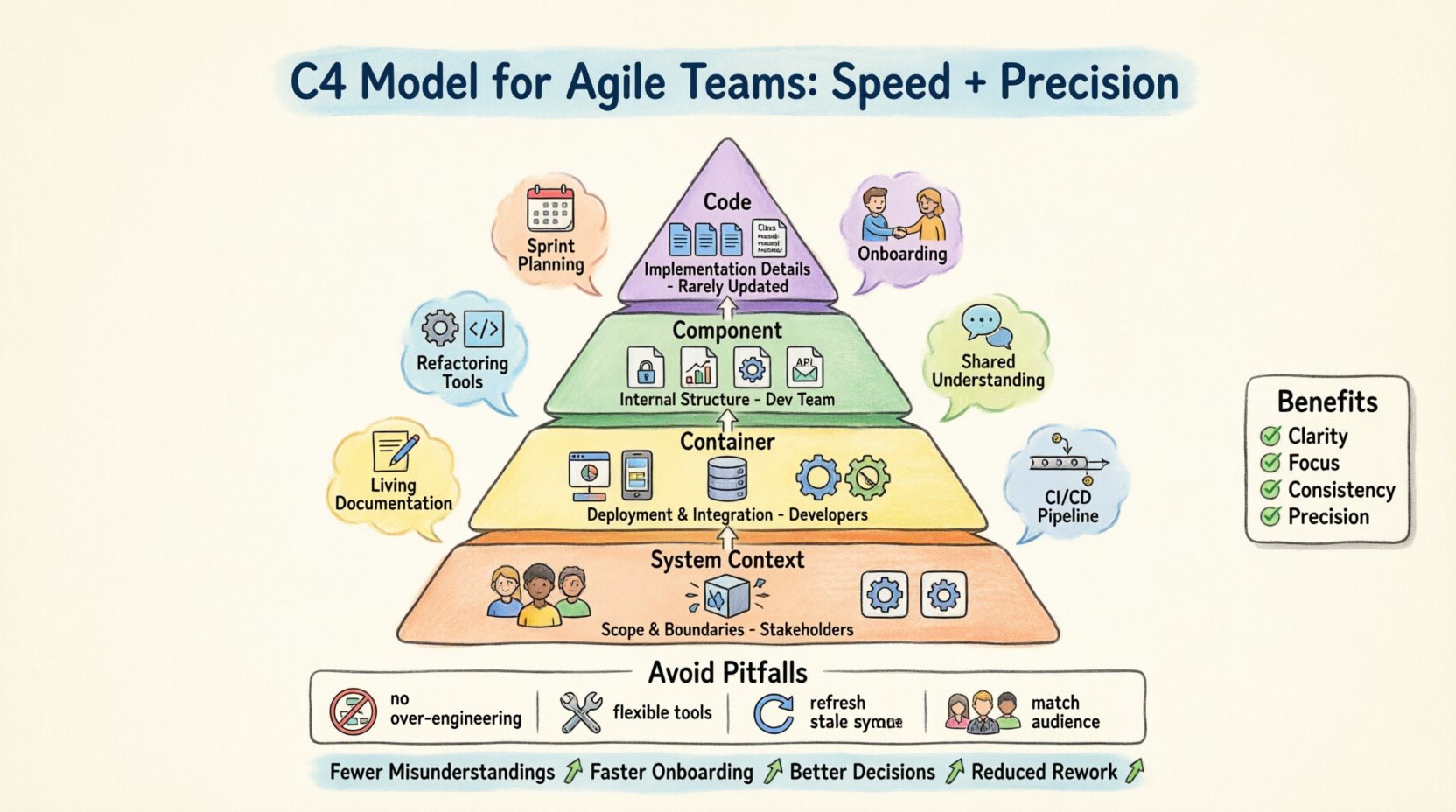
📚 Understanding the Core Levels
The C4 Model is built on a hierarchy of views. This hierarchy ensures that a developer does not need to see the entire system’s code structure to understand how a feature fits into the broader ecosystem. It also ensures that stakeholders who are not technical can grasp the high-level flow without getting lost in implementation details.
- Level 1: System Context – The big picture.
- Level 2: Container – The building blocks.
- Level 3: Component – The internal logic.
- Level 4: Code – The specific implementation.
Let us explore each level in detail to understand how they contribute to a cohesive documentation strategy.
1️⃣ Level 1: System Context
The System Context diagram is the entry point. It defines the boundary of the software system being described. It answers the fundamental question: “What does this system do?” and “Who uses it?”. This level is crucial for Product Owners and Project Managers who need to understand the scope of the work without needing to know technical specifics.
In this view, the system is represented as a single box. Surrounding this box are external actors, such as users, other systems, or third-party services. Lines connecting these elements indicate communication flows. For example, a user might send data to the system, while the system might retrieve data from a payment provider. This high-level view helps teams align on requirements early in the sprint planning phase.
2️⃣ Level 2: Container
Once the boundary is set, the next step is to break the system down into containers. A container is a deployable unit. It could be a web application, a mobile application, a microservice, or a database. This level is particularly useful for developers and architects who are planning deployment strategies or infrastructure needs.
- Web Application: A browser-based interface.
- Mobile App: An iOS or Android application.
- Database: Persistent storage.
- Microservice: A backend process handling specific logic.
Connections between containers show how data moves. For instance, the web application might communicate with the microservice via an API. This level helps teams identify where services need to be hosted and how they interact during runtime. It is often the primary focus during architectural reviews for new features.
3️⃣ Level 3: Component
Inside a container, we find components. Components represent a collection of related functionality. They are not physical deployment units but logical groupings of code. A component might be a “User Authentication Service” or a “Reporting Engine” within a microservice.
This level is vital for the developers working on the code. It helps them understand the internal structure of the service they are modifying. When a developer joins a team, this diagram acts as a map. It shows which component handles user data and which handles financial calculations. It reduces the cognitive load required to navigate the codebase.
Components connect to each other to pass data. These connections are often interfaces or APIs defined within the code. By visualizing these relationships, teams can spot circular dependencies or tight coupling before it becomes a problem.
4️⃣ Level 4: Code
The final level is the Code level. This is rarely used for general architecture documentation because it is too specific. It details classes, functions, and specific data structures. However, it is useful for onboarding or deep-dive troubleshooting. It maps the component level to the actual files in the repository.
Most agile teams will not maintain this level of diagram constantly. It is too fragile to changes in the code. Instead, code-level diagrams are generated automatically or created only when a specific complex logic needs to be explained.
⚡ Integrating C4 into Agile Workflows
Documentation is often seen as a blocker in agile environments. Teams fear that drawing diagrams will slow down the delivery of features. The C4 Model counters this by being lightweight and scalable. Here is how teams can integrate these practices without disrupting the flow of work.
📝 Sprint Planning
During sprint planning, the team discusses upcoming user stories. If a story involves a new feature that touches multiple services, a quick sketch at the Container level can clarify the impact. This prevents assumptions about data flow. It ensures that the backend team and the frontend team agree on the API contract before writing code.
🚀 Onboarding New Developers
One of the most time-consuming tasks in agile teams is getting a new hire up to speed. Reading through thousands of lines of code is inefficient. A set of C4 diagrams provides a structured learning path. A new developer starts at the System Context to see where they fit. They move to the Container level to understand the deployment topology. Finally, they look at the Component level to see the specific modules they will touch. This reduces the burden on senior developers who would otherwise have to explain the system verbally.
🛠️ Refactoring and Technical Debt
When technical debt accumulates, the system becomes harder to change. Refactoring requires a clear understanding of the current state. C4 diagrams help visualize the target state. Teams can sketch the desired architecture before writing the migration code. This reduces the risk of breaking existing functionality. It allows the team to validate the plan with stakeholders who might not understand code but understand business logic.
🔄 Continuous Documentation
The biggest risk with documentation is that it becomes stale. If the code changes but the diagram does not, the diagram is useless. Agile teams must treat diagrams as code. They should be updated as part of the definition of done for relevant tickets. If a component is added to the system, the diagram must be updated in the same pull request. This ensures the documentation remains accurate.
📊 Comparing the Levels
To make the decision-making process clearer, teams can use a table to compare the levels. This helps identify which view is appropriate for a specific meeting or discussion.
| Level | Primary Audience | Focus | Update Frequency |
|---|---|---|---|
| System Context | Stakeholders, Product Owners | Scope and Boundaries | Low |
| Container | Developers, Architects | Deployment and Integration | Medium |
| Component | Developers | Internal Logic and Structure | High |
| Code | Developers (Specific) | Implementation Details | Variable |
Notice that the update frequency increases as the level of detail increases. The System Context diagram rarely changes, while the Component diagram might change with every major feature. This hierarchy allows teams to prioritize their documentation efforts.
🛠️ Communication and Precision
One of the main benefits of the C4 Model is improved communication. Different stakeholders speak different languages. Executives care about business value. Developers care about implementation. The C4 Model bridges this gap by providing distinct views.
- Clarity: Everyone sees the same structure. Misunderstandings about where data flows are minimized.
- Focus: Teams can zoom in or out as needed. A meeting about infrastructure does not need to discuss component logic.
- Consistency: Using a standard model ensures that diagrams look similar across different projects. This reduces the learning curve when moving between teams.
Precision is also maintained by limiting the scope of each diagram. A diagram should have a single purpose. If you try to put every detail into one image, it becomes unreadable. The C4 Model enforces this discipline. It forces the team to decide what information is necessary for the current context.
⚠️ Common Pitfalls to Avoid
While the C4 Model is powerful, it can be misused. Teams often fall into traps that reduce the value of the diagrams. Being aware of these pitfalls helps maintain the integrity of the architecture documentation.
❌ Over-Engineering
Do not create diagrams for every single feature. If a feature is small and contained within a single component, a diagram might be unnecessary. Over-documentation leads to maintenance fatigue. Teams should focus on diagrams that explain complex interactions or new architectural patterns.
❌ Tool Dependency
It is common to become attached to a specific tool. While tools are helpful, the value lies in the model, not the software. Relying too heavily on a specific platform can create lock-in. Teams should be able to recreate the diagrams if the tool changes. The content matters more than the drawing.
❌ Stale Diagrams
A diagram that does not match the code is worse than no diagram. It misleads the reader. To avoid this, integrate diagram updates into the CI/CD pipeline or the code review process. If the code changes the architecture, the diagram must change.
❌ Ignoring the Audience
Do not show a Component diagram to a Product Manager. They will get lost in the details. Match the level of the diagram to the audience. This respects their time and ensures they get the information they need.
🔍 Maintaining the Architecture
Maintaining architecture documentation is an ongoing process. It requires commitment from the team. Here are some strategies to keep the documentation healthy over time.
- Assign Ownership: Designate a person or a rotating role to review the diagrams. This ensures someone is responsible for accuracy.
- Review in Retrospectives: Make diagram quality a topic in sprint retrospectives. If the diagrams are outdated, discuss why and how to fix the process.
- Keep it Simple: Use simple shapes and lines. Complex diagrams are hard to read. Stick to the standard C4 shapes and colors.
- Version Control: Store the diagrams in the same repository as the code. This allows for version history and easy rollback if a change is reverted.
🚀 Speed vs. Detail
Agile teams often face a trade-off between speed and detail. The C4 Model resolves this by providing a “just enough” documentation approach. You do not need to draw the whole system at once. You can start with a quick sketch on a whiteboard during a meeting. Then, formalize it later if needed.
This flexibility supports the agile principle of responding to change over following a plan. If the architecture changes during a sprint, the diagram can be updated quickly. It does not require a massive overhaul of a document. The modular nature of the levels means you can update one part without breaking the whole.
📈 Scaling the Approach
As the team grows, the need for clear architecture increases. New members join, and the system becomes more complex. The C4 Model scales well with the team size. It does not require a dedicated documentation team. Every developer can contribute to the diagrams relevant to their work.
In larger organizations, different teams might own different containers. The System Context diagram becomes the contract between these teams. It defines the boundaries and the interfaces. This allows teams to work in parallel without stepping on each other’s toes. It is a foundation for microservices and distributed systems.
🔎 Evaluating Success
How do you know if the C4 Model is working for your team? Look for these indicators.
- Fewer Misunderstandings: Meetings are shorter because the diagrams clarify the scope.
- Faster Onboarding: New developers become productive quicker.
- Better Decisions: Architecture reviews are more data-driven and less opinion-based.
- Reduced Rework: Fewer bugs related to integration or incorrect assumptions.
If you see these trends, the documentation is serving its purpose. If not, revisit the frequency of updates and the relevance of the diagrams to the daily work.
📝 Final Thoughts
The C4 Model offers a practical framework for documenting software architecture in an agile environment. It balances the need for speed with the necessity of precision. By breaking down the system into logical levels, it allows different stakeholders to engage with the architecture at the right depth. When integrated into the development lifecycle, these diagrams become valuable assets rather than overhead.
Teams that adopt this approach often find that communication improves significantly. The shared vocabulary provided by the model reduces ambiguity. It allows developers to focus on solving problems rather than deciphering the system. Ultimately, the goal is to build better software, and clear architecture is a stepping stone to that goal.
Start small. Draw one diagram. Update it when the code changes. Over time, this habit will lead to a more maintainable and understandable system. The investment in documentation pays off in the long run through reduced complexity and faster delivery.