


Software architecture documentation often feels like a chore. Teams struggle to keep diagrams up to date, or worse, they create complex charts that no one understands. The C4 Model offers a structured approach to visualizing software architecture at different levels of detail. It helps developers, architects, and stakeholders communicate effectively without getting lost in technical weeds.
This guide explores the C4 Model in depth. We will cover the four levels of abstraction, how to apply them in real projects, and best practices for maintaining your documentation. Whether you are just starting your career or looking to refine your architectural communication, this resource provides a clear path forward. 🚀
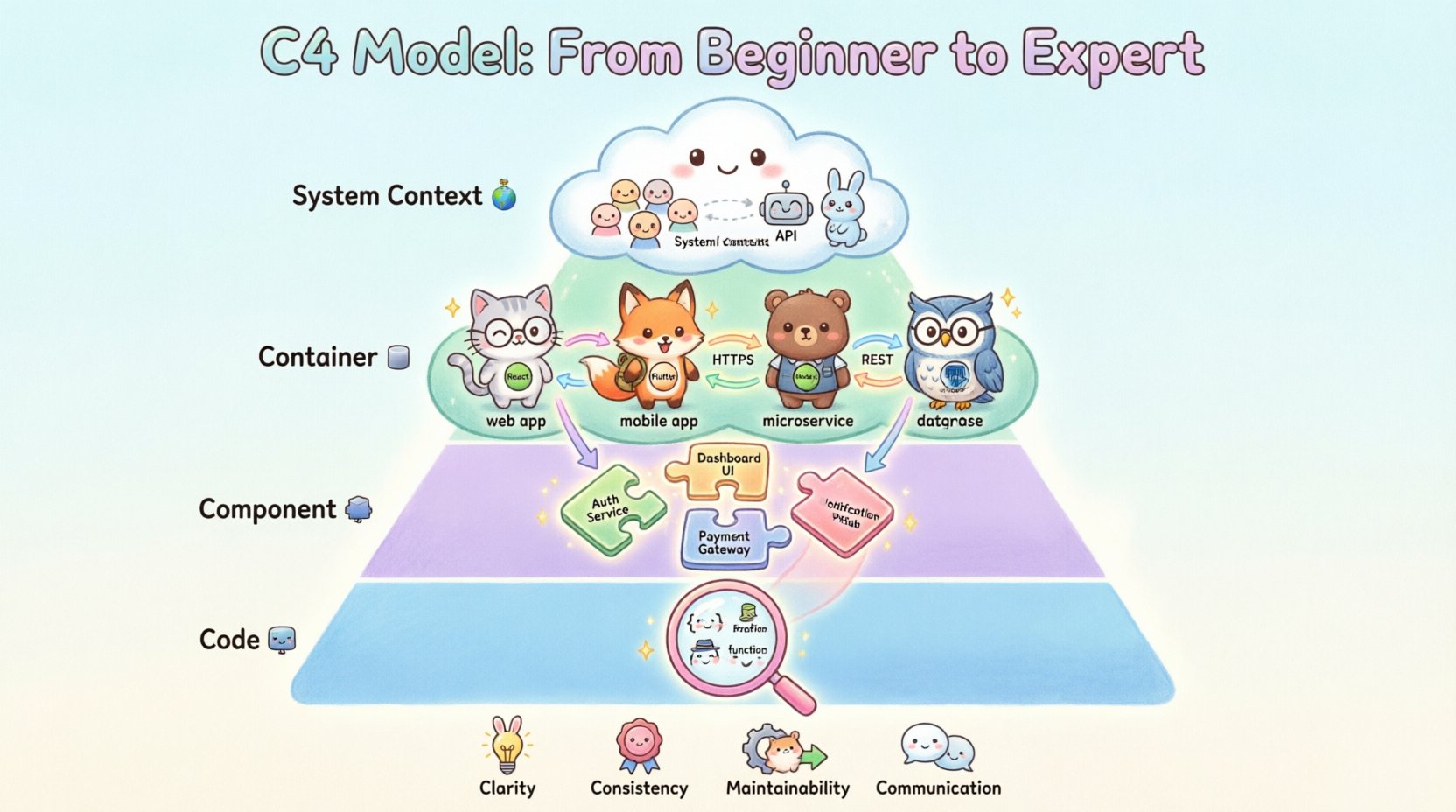
🤔 What is the C4 Model?
The C4 Model is a hierarchical approach to documenting software architecture. It was created to address the limitations of traditional UML (Unified Modeling Language) diagrams, which often became too complex or too vague. The core philosophy is simple: start high and go low. You begin with the big picture and gradually zoom in to see more detail only when necessary.
By organizing diagrams into four distinct levels, the model ensures that the right audience sees the right information. It reduces cognitive load and makes architecture accessible to everyone from new hires to senior management.
Why Choose This Approach?
- Clarity: Each level serves a specific purpose, preventing information overload.
- Consistency: Everyone in the team uses the same notation and structure.
- Maintainability: It is easier to update diagrams when the code changes.
- Communication: It bridges the gap between technical and non-technical stakeholders.
🗺️ The Four Levels of Abstraction
The model consists of four layers. Each layer represents a deeper dive into the system. You do not need to create all four levels for every project. Start with what is needed to understand the system.
1. System Context 🌍
This is the highest level of abstraction. It shows your software system as a single box within its environment. The goal is to understand who uses the system and what external systems it interacts with.
Key Elements:
- Software System: The box representing your application.
- People: Users or administrators who interact with the system.
- Other Systems: External services, databases, or APIs that connect to your system.
When to Use It:
- Onboarding new team members.
- Presenting the project to business stakeholders.
- Understanding the boundaries of your system.
This diagram answers the question: What does this system do, and who cares?
2. Container 📦
Once you understand the system boundary, you break it down into containers. A container is a high-level building block, such as a web application, a mobile app, a microservice, or a database. It is the unit that runs in a runtime environment.
Key Elements:
- Containers: The distinct runtime environments (e.g., React frontend, Node.js API, PostgreSQL DB).
- Relationships: How containers talk to each other (HTTP, gRPC, message queues).
- Technology Stack: A brief note on the language or framework used.
When to Use It:
- Designing the high-level infrastructure.
- Explaining deployment topology.
- Onboarding backend developers.
This diagram answers the question: How is the system built, and what technologies are involved?
3. Component 🧩
Containers are often too large to understand fully. This level breaks a container down into components. A component is a logical grouping of functionality within a container. It could be a class, a module, a package, or a feature set.
Key Elements:
- Components: Distinct functional units within a container.
- Interfaces: How components communicate internally.
- Responsibilities: What each component is responsible for.
When to Use It:
- Designing specific features or modules.
- Refactoring complex codebases.
- Deep dives into business logic.
This diagram answers the question: How is the logic organized inside the container?
4. Code 💻
The fourth level represents the actual code structure. This includes classes, interfaces, functions, and methods. While useful for very specific technical discussions, this level is rarely diagrammed for the whole system. It is usually reserved for explaining complex algorithms or specific data structures.
Key Elements:
- Classes/Functions: Detailed implementation details.
- Dependencies: Specific library or package usage.
When to Use It:
- Code reviews for critical logic.
- Explaining complex algorithms.
- Debugging intricate flow issues.
This diagram answers the question: How is this specific part implemented?
📊 Comparing C4 with Traditional UML
Many teams are used to UML. However, UML diagrams can become overwhelming. The table below highlights the differences between the two approaches.
| Feature | C4 Model | Traditional UML |
|---|---|---|
| Focus | Architecture and high-level structure | Often implementation details |
| Complexity | Reduced through abstraction | Can become overly complex |
| Target Audience | Developers, Stakeholders, Managers | Often Developers only |
| Maintenance | Easier to keep up to date | Harder to maintain |
| Granularity | 4 clear levels | Many diagram types (Sequence, Class, etc.) |
🛠️ Creating Your Diagrams
Now that you understand the theory, let’s discuss the practical steps to creating these diagrams. You do not need specialized expensive software to get started. Many generic diagramming tools support the necessary shapes and connectors.
Step 1: Define the Scope
- Identify the system you are documenting.
- Determine who the primary audience is.
- Decide which levels are necessary for your current needs.
Step 2: Choose Your Tools
There are many diagramming tools available. Some allow you to write code to generate diagrams (like text-to-diagram tools), while others offer drag-and-drop interfaces. The choice depends on your team’s workflow and preference.
- Code-based: Good for version control and automation.
- Visual-based: Good for quick sketches and brainstorming.
Step 3: Draft the System Context
Start with the big picture. Draw the system box. Add the people and external systems. Keep it simple. Avoid cluttering the diagram with internal details at this stage.
Step 4: Drill Down to Containers
Expand the system box. Identify the web apps, services, and databases. Draw lines to show how they communicate. Label the protocols (e.g., HTTPS, REST, SQL).
Step 5: Refine Components
Focus on one container at a time. Break it down into logical groups. Ensure each component has a clear responsibility. Avoid creating too many components; if you have more than ten, consider refactoring.
🎨 Best Practices for Documentation
Creating a diagram is only half the battle. Keeping it relevant is the challenge. Follow these guidelines to ensure your documentation remains valuable.
1. Keep It Simple
Do not over-engineer the diagrams. If a diagram is confusing, simplify it. Use standard shapes and colors. Consistency is key. If you use a red box for a database in one diagram, use it in all diagrams.
2. Focus on the Audience
A diagram for a manager should look different from one for a developer. Adjust the level of detail accordingly. The System Context is for everyone; the Code level is for engineers.
3. Version Control Your Diagrams
Store your diagrams in the same repository as your code. This ensures that the documentation evolves alongside the software. If you use code-based tools, you can even link the diagram generation to your build process.
4. Name Things Clearly
Use descriptive names for boxes and lines. “Service A” is not helpful. “User Authentication Service” is much better. Clear naming reduces the need for additional explanation.
5. Regular Reviews
Make diagram updates part of your definition of done. When a feature is merged, the diagram should be updated. Schedule periodic reviews to ensure the documentation hasn’t drifted from reality.
🚧 Common Pitfalls to Avoid
Even with a solid model, teams can make mistakes. Being aware of these common errors helps you stay on track.
- Mixing Levels: Do not put component details inside a container box in the Container diagram. Keep the levels distinct.
- Too Much Detail: Avoid showing every single class in a component diagram. Only show the important ones.
- Ignoring Relationships: The lines are as important as the boxes. Ensure arrows show the correct direction of data flow.
- Static Documentation: If the diagram never changes, it is outdated. Treat it as living documentation.
- Lack of Ownership: Someone must be responsible for updating the diagrams. If no one owns it, it will rot.
🔄 Integrating with Development Workflow
Documentation should not be a separate activity. It should be integrated into your daily work. Here is how to make it part of the process.
During Sprint Planning
Discuss the architecture changes required for new features. Update the diagrams to reflect the new design before coding begins.
During Code Reviews
Check if the implementation matches the diagram. If the code has diverged, update the diagram or the code.
During Incident Response
Use the diagrams to understand how components interact during a failure. This helps in identifying bottlenecks or single points of failure.
🌟 The Value of Abstraction
The power of the C4 Model lies in its ability to manage complexity. By separating concerns into levels, you prevent the reader from being overwhelmed. You can understand the high-level business value without needing to know the database schema.
Similarly, a developer can understand the internal logic of a module without worrying about the external API contracts. This separation of concerns is crucial for large-scale systems.
Scaling the Model
As your system grows, you may need multiple diagrams at the same level. For example, you might have a Container diagram for the entire platform, and specific Container diagrams for individual microservices. This keeps the information manageable.
🔍 Deep Dive: When to Stop Detailing
One of the hardest questions in architecture is knowing when to stop. There is a tendency to keep zooming in until the diagram is unreadable.
- Stop at Component: For most systems, the Component level is sufficient. It provides enough detail for developers to work without getting lost in code.
- Use Code for Specifics: Only go to the Code level if you are explaining a complex algorithm or a specific design pattern implementation.
- Link to Code: Instead of drawing every class, link to the repository or documentation where the code lives.
Remember, the goal is communication, not replication. Your diagrams should guide the reader to the information they need, not contain every single line of code.
📈 Measuring Success
How do you know if your documentation strategy is working? Look for these indicators.
- Fewer Questions: New hires spend less time asking basic architectural questions.
- Faster Onboarding: Developers can understand the system faster.
- Better Design Discussions: Meetings are more focused when there is a shared visual reference.
- Reduced Technical Debt: Clear architecture helps prevent structural issues down the line.
🛡️ Security and Architecture
The C4 Model is also useful for security planning. By visualizing data flows, you can identify where sensitive information moves.
- Data Classification: Mark containers or components that handle sensitive data.
- Trust Boundaries: Clearly show where data crosses trust boundaries (e.g., from internal to external).
- Authentication: Indicate where authentication and authorization occur in the flow.
This visual approach helps security teams spot potential vulnerabilities during the design phase, rather than after deployment.
🤝 Collaboration and Team Culture
Documentation is a team sport. If only one person understands the diagrams, the effort is wasted. Foster a culture where documentation is valued.
- Encourage Contributions: Allow anyone on the team to suggest changes to the diagrams.
- Keep it Accessible: Host diagrams where everyone can view them, such as a shared wiki or repository.
- Lead by Example: Senior engineers should update their diagrams regularly to set the standard.
When the whole team owns the architecture, the documentation becomes a source of truth rather than a burden.
🚀 Moving Forward
Implementing the C4 Model requires a shift in mindset. It asks you to think about your system at multiple scales simultaneously. It is not about perfection; it is about clarity. Start small. Create a System Context diagram for your current project. Then, slowly add the Container level for the most critical services.
Over time, your documentation will evolve into a living map of your software. It will help you navigate complex changes, onboard new talent, and communicate effectively with stakeholders. The journey from beginner to expert in architecture documentation is continuous, but the C4 Model provides a reliable compass for the path.