


Software architecture documentation often struggles with a single, rigid standard that fails to address the diverse realities of development environments. While the C4 model provides a structured approach to visualizing system design, applying it without modification can lead to unnecessary overhead. Teams frequently find that strict adherence to all four levels—Context, Container, Component, and Code—does not align with their specific project scale or maturity. This guide explores how to adapt the C4 model effectively. We will examine strategies for customization, workflow integration, and maintaining relevance across different organizational structures. The goal is to create documentation that aids understanding rather than hindering progress.
🤔 Why One Size Does Not Fit All
Adopting a documentation framework requires understanding the underlying purpose of the artifacts. Architecture diagrams serve multiple functions: onboarding new developers, communicating with stakeholders, guiding refactoring efforts, and facilitating troubleshooting. However, the audience for these diagrams varies significantly. A system architect might require deep detail, while a product manager needs a high-level overview of data flows. A rigid application of the C4 model forces every diagram to fit every audience, which often results in information overload or, conversely, insufficient detail.
Consider the lifecycle of a project. Early stages demand speed and flexibility. Heavy documentation requirements can slow down initial development. As the system stabilizes, the need for precision increases. Adapting the C4 model means recognizing these phases and adjusting the depth of documentation accordingly. It is not about discarding the model, but rather treating it as a flexible toolkit. Teams should feel empowered to skip levels or merge concepts when the value of the extra detail does not justify the maintenance cost.
Key factors influencing adaptation include:
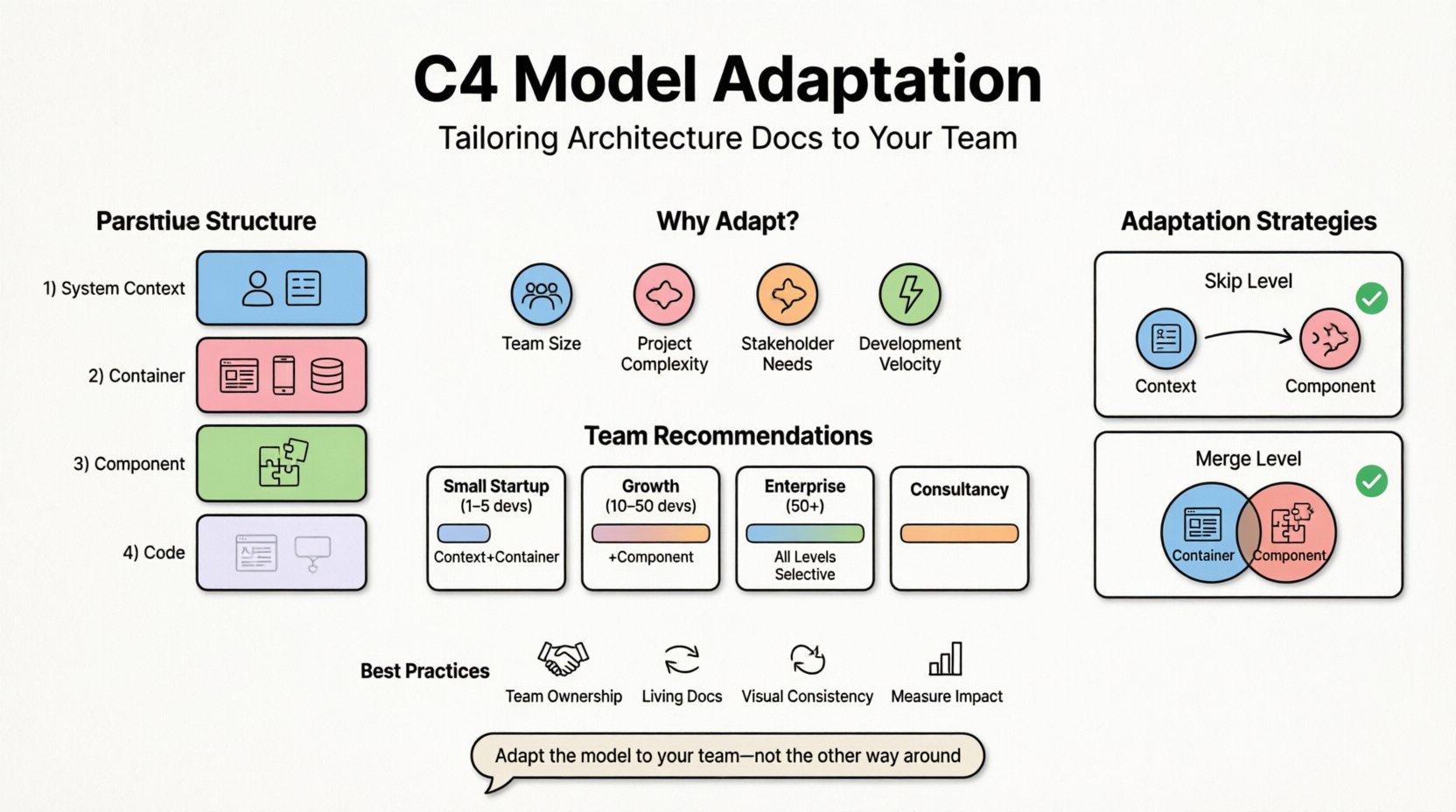
- Team Size: Small teams often communicate verbally. Large teams require explicit documentation to prevent silos.
- Project Complexity: A monolithic application may not need distinct container diagrams. Microservices architectures often require more granular breakdowns.
- Stakeholder Requirements: Regulatory bodies or external clients may demand specific views of the system that standard levels do not cover.
- Development Velocity: High-velocity environments benefit from lightweight documentation that can be updated quickly.
📊 Understanding the Core Hierarchy
Before adapting, it is essential to understand the baseline structure. The C4 model consists of four hierarchical levels. Each level adds a layer of detail while maintaining a consistent visual language.
- Level 1: System Context Diagram: Shows the system as a single box and how people and other systems interact with it. This is the broadest view.
- Level 2: Container Diagram: Breaks the system down into containers, such as web applications, mobile apps, or databases.
- Level 3: Component Diagram: Breaks down containers into high-level logical components, such as services or modules.
- Level 4: Code Diagram: Shows classes and relationships. This is rarely used in the standard C4 model but exists for deep technical analysis.
Adaptation involves deciding which of these levels are necessary for your specific situation. For many teams, Levels 1 and 2 provide sufficient clarity. Levels 3 and 4 can be reserved for specific subsystems that require deep architectural review. The decision to include or exclude levels should be documented as part of your team’s architectural standards.
🛠️ Strategic Adaptation for Different Team Structures
Organizational structure dictates how information flows. A startup operating with a flat hierarchy has different documentation needs compared to a regulated enterprise with multiple departments. The C4 model must be tuned to these structural realities. Below is a breakdown of how different team configurations might approach the model.
| Team Type | Recommended Depth | Focus Area |
|---|---|---|
| Small Startup (1-5 devs) | Context + Container | Rapid iteration, onboarding |
| Growth Phase (10-50 devs) | Context + Container + Component | Service boundaries, integration |
| Enterprise (50+ devs) | All Levels (Selective) | Compliance, legacy maintenance |
| Consultancy / Outsourcing | Context + Container | Handover, knowledge transfer |
For a small startup, creating a component-level diagram for every microservice is a waste of time. The team can communicate verbally. However, the System Context diagram is vital to ensure everyone understands the external dependencies. As the team grows, the risk of communication breakdown increases. Introducing Container and Component levels helps define boundaries and ownership. In an enterprise setting, the focus often shifts to integration and legacy support. Here, the Component level becomes critical for understanding internal logic without exposing implementation details.
🔄 Modifying the Levels: Skipping and Merging
Strict adherence to the hierarchy can sometimes obscure the actual flow of data. Sometimes, skipping a level or merging two levels creates a clearer picture. This is a form of adaptation that prioritizes clarity over strict compliance.
Skip Level Strategy
It is acceptable to skip from Context directly to Component if the number of containers is small. For example, if an application consists of a single web server and a database, a Container diagram might add little value over the Context diagram. In this scenario, you can treat the web server as a component within the system context. This reduces the number of diagrams to maintain and keeps the architecture view concise.
Merge Level Strategy
Conversely, merging levels can be useful for complex subsystems. If a specific container is highly complex, you might create a hybrid diagram that combines Container and Component details. This is often referred to as a “detailed container view.” It retains the context of the container but shows the internal components without the overhead of a separate, full-scale component diagram. This approach is particularly effective for critical services that require frequent architectural review.
👥 Collaboration Patterns for Architects and Developers
Documentation is a shared responsibility. When adapting the C4 model, it is crucial to define who creates and maintains the diagrams. A common pitfall is assigning diagram creation solely to architects. This creates a bottleneck and often leads to outdated documentation because developers do not feel ownership. Instead, the process should be distributed.
Effective collaboration models include:
- Team Ownership: Each feature team owns the diagrams for their specific services. The architect reviews for consistency.
- Pair Diagramming: Developers and architects work together to create diagrams during design sessions. This ensures accuracy and shared understanding.
- Living Documentation: Diagrams are updated as part of the pull request process. If the code changes, the diagram must change. This integrates documentation into the definition of done.
When teams adopt this distributed model, the adaptation of the C4 model becomes a natural part of the development workflow rather than an administrative task. It reduces the friction between design and implementation.
🛡️ Handling Legacy Systems and Technical Debt
Legacy systems present a unique challenge for architecture documentation. The original design may not match the current implementation. In these cases, a strict C4 model can be difficult to apply because the boundaries are blurred. Adaptation here involves focusing on the “as-is” state rather than the intended design.
For legacy systems, the priority is often understanding dependencies. A simplified Context diagram is usually sufficient to map out external integrations. Attempting to create detailed Component diagrams for legacy code can be a trap. It requires significant effort to document internal logic that is not well understood. Instead, focus on the interfaces and contracts. Document how the legacy system interacts with the new world, rather than how it works internally.
When refactoring legacy code, use the C4 model to visualize the target state. Create diagrams that represent the desired architecture. This serves as a roadmap for the refactoring effort. Over time, as the code is updated, the diagrams become accurate representations of the “to-be” state. This approach allows you to document the future without being bogged down by the past.
📝 Integrating Diagrams into Your Workflow
Creating diagrams is only half the battle. Keeping them relevant requires integration into the daily workflow. If diagrams are stored in a separate repository or wiki that is never updated, they become liabilities. Adaptation involves embedding diagram creation into the tools and processes developers already use.
Consider the following integration points:
- Version Control: Store diagrams alongside the code they describe. This ensures they are versioned and reviewed together.
- CI/CD Pipelines: Run checks to ensure diagram files are present and valid. This prevents the accidental removal of documentation during refactoring.
- Code Generation: Where possible, generate diagrams from the codebase. This reduces manual maintenance. While the C4 model is visual, tools can extract structural data to populate the diagrams.
- Issue Tracking: Link diagrams to specific tickets or epics. This provides context for why a diagram exists and what it covers.
The goal is to make the documentation a byproduct of development, not a separate activity. When diagrams are updated naturally as part of coding tasks, the maintenance burden decreases significantly.
🔍 Maintaining Accuracy Without Overhead
Maintenance is the primary reason documentation fails. Teams start with great diagrams and end with outdated ones. To adapt the C4 model for sustainability, you must limit the scope of maintenance. Do not attempt to document every single class or variable. Focus on the architectural boundaries and data flows.
Strategies for sustainable maintenance include:
- Review Cycles: Schedule regular reviews of the architecture diagrams. Quarterly reviews are often sufficient for stable systems.
- Trigger-Based Updates: Update diagrams only when the architecture changes. Do not update them for minor code changes like renaming variables.
- Visual Simplification: Use generic shapes for internal components unless specific logic is being explained. This reduces the time needed to redraw diagrams.
- Feedback Loops: Encourage developers to report outdated diagrams. If a developer uses a diagram and finds it wrong, they should have a simple way to flag it.
By reducing the frequency of required updates and focusing only on structural changes, you ensure that the diagrams remain accurate without consuming excessive developer time.
📈 Measuring the Impact of Your Diagrams
How do you know if your adapted C4 model is working? You need metrics that reflect the utility of the documentation. Standard metrics like “number of diagrams created” are vanity metrics. They do not indicate value. Instead, look for indicators of understanding and efficiency.
Indicators of success include:
- Onboarding Time: How long does it take a new developer to understand the system? Effective diagrams should reduce this time.
- Incident Resolution: Does the team refer to diagrams during troubleshooting? If diagrams are ignored during outages, they are not useful.
- Design Discussions: Are diagrams used as the basis for design meetings? If discussions happen without visual aids, the documentation may be insufficient.
- Refactoring Confidence: Do developers feel confident making changes? Accurate diagrams reduce the fear of breaking dependencies.
If these metrics show improvement, your adaptation strategy is successful. If not, it may be time to adjust the level of detail or the distribution process. The C4 model is a means to an end, not the end itself.
🎨 Visual Consistency and Standards
Even when adapting the model, visual consistency is key. If different teams use different colors, shapes, or naming conventions, the diagrams become confusing. Establish a shared style guide. This guide should specify:
- Color Palette: Define what colors represent different environments (e.g., production, development).
- Shapes: Standardize the shapes for containers, components, and external systems.
- Labels: Create a naming convention for services and components to avoid ambiguity.
- Tools: Agree on a generic set of tools for drawing. This ensures compatibility and ease of editing.
Consistency reduces the cognitive load when reading diagrams. When every diagram follows the same rules, readers can focus on the content rather than deciphering the visual language. This is especially important when adapting the model across multiple teams within an organization.
🚀 Moving Forward with Flexibility
Adapting the C4 model is an ongoing process. It requires regular reflection on what is working and what is not. The landscape of software development changes, and your documentation strategy must evolve with it. Do not be afraid to discard parts of the model that no longer serve your team. The value lies in the understanding gained, not in the adherence to a standard.
By focusing on the needs of your team, the complexity of your system, and the goals of your stakeholders, you can create a documentation strategy that supports rather than hinders development. The C4 model provides the vocabulary, but your team provides the context. Use that context to shape the documentation into something that is truly useful for your specific environment.