


Legacy systems represent the backbone of many modern enterprises. They contain decades of business logic, critical data processing, and complex dependencies that new greenfield projects often cannot replicate overnight. However, over time, documentation fades, knowledge leaves with retiring staff, and the original intent of the architecture becomes obscured. This state of decay creates significant risk during modernization efforts, onboarding new engineers, or simply maintaining daily operations.
The C4 model provides a structured approach to software architecture documentation that scales from high-level context down to code-level detail. While often associated with new development, its layered approach is uniquely suited to untangling the complexity of existing systems. By breaking down massive monoliths into understandable Context, Container, Component, and Code levels, teams can regain clarity without needing to rewrite everything immediately.
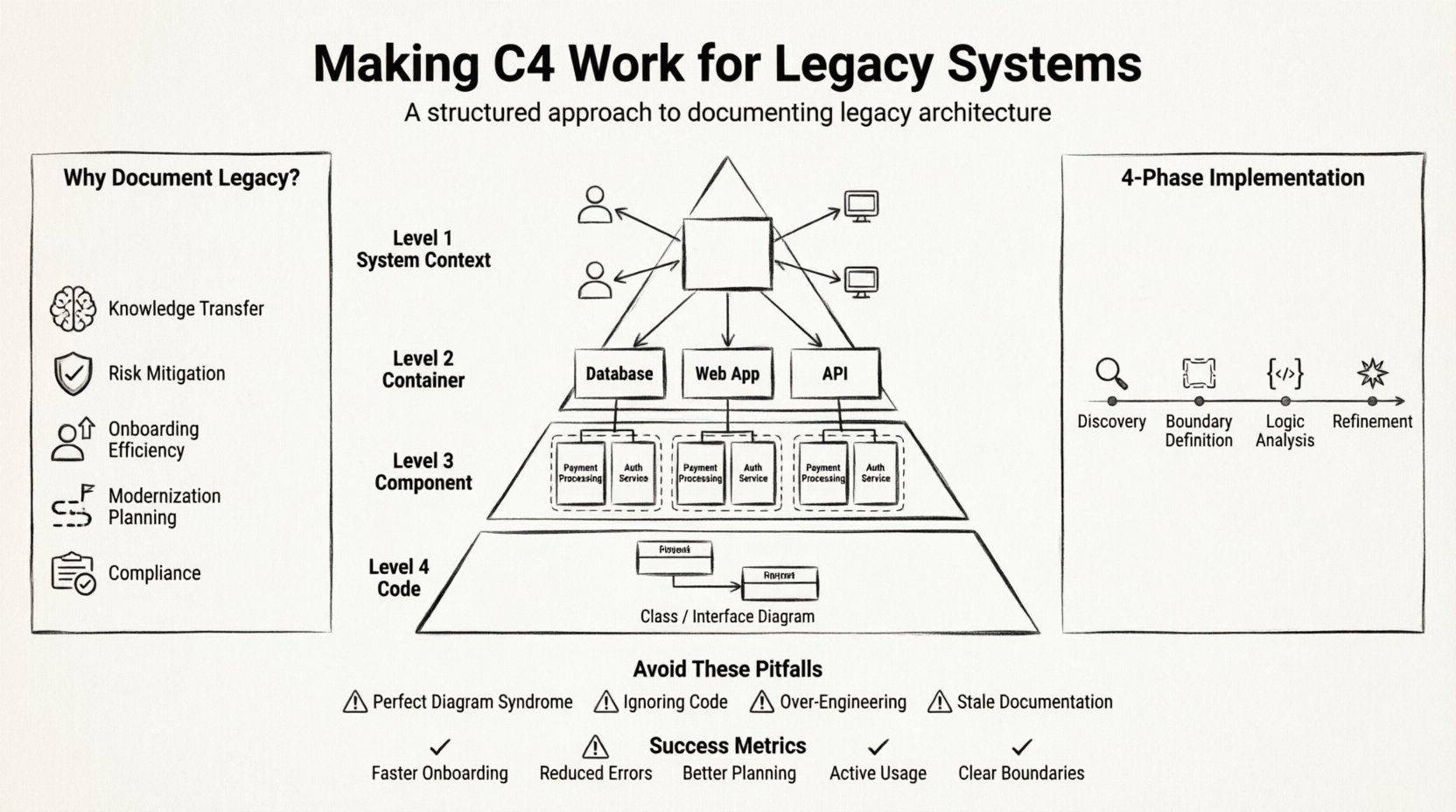
🧐 Why Legacy Systems Need Better Documentation
Legacy codebases often suffer from what is known as “architecture drift.” Over years of patches, hotfixes, and feature additions, the system evolves in ways the original architects did not anticipate. Without a clear map, developers hesitate to touch critical areas, fearing unintended side effects. This hesitation leads to technical debt accumulation, slower feature delivery, and a reliance on a few key individuals who hold the knowledge in their heads.
Documentation is not just about drawing boxes; it is about communication. A well-defined architecture diagram facilitates discussions between stakeholders, developers, and business owners. For legacy environments, this communication is vital because the cost of error is high. When you introduce changes to a system that has been running for a decade, understanding the boundaries of data flow and dependency is non-negotiable.
Key drivers for applying the C4 model to older systems include:
- Knowledge Transfer: Reducing reliance on tribal knowledge by visualizing structure.
- Risk Mitigation: Identifying single points of failure or tightly coupled modules before refactoring.
- Onboarding Efficiency: Helping new hires understand the landscape faster than reading raw source code.
- Modernization Planning: Creating a baseline to plan migration to microservices or cloud-native environments.
- Compliance & Audit: Providing evidence of system boundaries and data handling for regulatory requirements.
📐 Understanding the C4 Model Levels
The C4 model organizes documentation into four distinct levels of abstraction. Each level serves a specific audience and answers a specific question. When applying this to legacy systems, you do not need to create every single diagram immediately. You can start at the level of highest value and work downwards.
1. System Context Diagram (Level 1)
This is the macro view. It shows the entire system as a single box and the people or external systems that interact with it. For legacy applications, this helps answer: “What is the boundary of what we are looking at?” and “Who depends on this?”
Common elements found in legacy contexts include:
- Users (internal staff, customers, partners).
- External databases (ERP systems, CRM platforms).
- Legacy mainframes or middleware.
- Communication protocols (HTTP, SOAP, proprietary APIs).
2. Container Diagram (Level 2)
Containers represent distinct deployable units. In a legacy context, this might be a compiled executable, a WAR file, a database, a server-side process, or a frontend application. This level answers: “What are the building blocks of the system?”
Legacy systems often blur the line between components and containers. A monolithic application might be one large container, while a modernized version splits this into smaller services. Identifying these boundaries helps in planning decomposition strategies.
3. Component Diagram (Level 3)
Components are the building blocks inside a container. They represent logical groupings of functionality, such as a “Payment Processing Module” or “User Authentication Service.” This level is crucial for legacy code because it reveals internal logic without getting bogged down in specific method signatures or class names.
Focus on the responsibilities of these components. How does data flow between them? What are the interfaces they expose?
4. Code Diagram (Level 4)
Code diagrams show the relationship between classes and interfaces. This is typically generated automatically from source code. While less common in high-level architectural reviews, it is useful for deep dives into specific legacy modules that require refactoring.
🛠️ Adapting C4 for Existing Codebases
Applying the C4 model to a new project is straightforward because you design the boxes before you build the house. Applying it to a legacy system is like reverse engineering a building while people are still living inside it. You must be careful not to disrupt operations while gathering information.
Starting with the Context
Begin by interviewing key stakeholders. Ask about the business capabilities the system supports. Map these capabilities to external systems. If the system processes payroll, who provides the employee data? Where does the final report go? This high-level view anchors the documentation in business value rather than technical implementation.
Mapping Containers
For legacy systems, container identification often requires inspecting deployment artifacts. Look for:
- Configuration files that define endpoints.
- Build scripts that package the application.
- Runtime logs that show service startup sequences.
- Network traffic analysis to see what services talk to each other.
Do not assume every folder in the source code is a container. A container is a deployable unit. Sometimes, a single legacy jar file contains logic that should logically be separated into multiple containers in a future state.
Component Extraction
This is the most labor-intensive part of legacy analysis. You are essentially reading the code to understand the intent. Look for:
- Package names and directory structures.
- Interface definitions and abstract classes.
- Database schema relationships.
- API endpoints and their request/response structures.
Group related functionality together. If you find five classes that all handle “Email Notification,” they likely belong to one component called “Notification Service.” This abstraction hides implementation noise and focuses on behavior.
📋 Step-by-Step Implementation Plan
Implementing C4 in a legacy environment requires a phased approach. Attempting to document everything at once will likely stall the project. Use the following workflow to ensure steady progress.
| Phase | Focus Area | Key Activity | Output |
|---|---|---|---|
| 1 | Discovery | Interview stakeholders and inspect deployment configs | System Context Diagram |
| 2 | Boundary Definition | Identify deployable units and data stores | Container Diagrams |
| 3 | Logic Analysis | Review source code for functional groupings | Component Diagrams |
| 4 | Refinement | Validate diagrams with developers and update | Finalized Architecture Docs |
Phase 1: Discovery
Gather existing documentation, even if outdated. Talk to the “people who remember.” Ask about integrations. Create a rough sketch of the Context diagram. This should be high level and agreeable to all parties.
Phase 2: Boundary Definition
Map out the physical and logical boundaries. Distinguish between the application logic and the data storage. Identify where the legacy system interacts with third-party services. This often reveals hidden dependencies that were not documented.
Phase 3: Logic Analysis
Drill down into the containers. Identify the core modules. For example, in an inventory system, distinct components might include “Stock Management,” “Order Processing,” and “Reporting.” Use code analysis tools if available, but prioritize manual review for complex logic.
Phase 4: Refinement
Present the diagrams to the team. Ask for corrections. Does this match the mental model of the developers? If a diagram shows a flow that doesn’t exist, update it. The goal is accuracy, not artistic perfection.
⚠️ Common Pitfalls and How to Avoid Them
Working with legacy systems introduces unique challenges. Being aware of these pitfalls can save significant time and effort.
Pitfall 1: The “Perfect Diagram” Syndrome
Trying to create a diagram that is 100% accurate for every edge case is a trap. Legacy systems are messy. Focus on the happy path and the critical flows. If a diagram is 80% accurate, it is still better than no documentation.
Pitfall 2: Ignoring the Code
Documentation must be grounded in reality. If the diagram says Component A talks to Component B, but the code shows no network call, there is a discrepancy. Verify claims against the actual codebase. Sometimes the architecture has drifted significantly from the written design.
Pitfall 3: Over-Engineering the Structure
Do not try to force a microservices architecture onto a monolith just because it is trendy. If the legacy system works as a monolith, document it as a monolith. Use the C4 model to describe the reality, not the aspiration. If you want to move to microservices, document the target state as a separate diagram.
Pitfall 4: Stale Documentation
Documentation decays faster than code. If a change is made to the system, the diagram should ideally be updated. Establish a lightweight process for this. For example, require a diagram update only when the change impacts a major component boundary.
🤝 Integrating Documentation into Workflow
Documentation is often seen as an overhead activity. To make it sustainable, integrate it into the existing engineering workflow. This ensures that diagrams are not created once and then abandoned.
- Code Reviews: Include architectural diagrams in pull requests that affect component boundaries. This forces the author to think about the impact.
- Sprint Planning: Allocate time for documentation updates during sprints. Treat diagram maintenance as a task, not an optional extra.
- Onboarding: Use the diagrams as the first resource for new engineers. If they find errors, have them fix them as part of their onboarding tasks.
- Architecture Decision Records: Link diagrams to decisions. When a decision is made to integrate a new service, update the Context diagram immediately.
🔄 Maintaining Diagrams Over Time
Maintenance is the hardest part of the C4 model in legacy environments. The system changes constantly. Here are strategies to keep the documentation relevant without overwhelming the team.
Automate Where Possible
For the Code level diagrams, use automated generation tools. These can extract class relationships directly from the source code. While they may not be pretty, they are always accurate. Use them for deep technical reviews rather than high-level communication.
Version Control Diagrams
Store diagrams in the same repository as the source code. This ensures that the documentation version matches the code version. Use branch strategies to draft changes before merging them into the main documentation branch.
Regular Audits
Schedule a quarterly review of the architecture. Have a senior engineer walk through the diagrams and verify them against the current state of the system. This is a good opportunity to identify technical debt that was previously unnoticed.
📈 Measuring Success
How do you know if applying the C4 model to your legacy system is working? Look for these indicators:
- Faster Onboarding: New team members reach productivity levels sooner.
- Reduced Errors: Fewer regressions occur during deployment because dependencies are understood.
- Better Planning: Modernization projects have more accurate timelines and resource estimates.
- Active Usage: Developers reference the diagrams during meetings and troubleshooting.
- Clear Boundaries: Teams can identify which parts of the system they own and which they do not.
Applying the C4 model to legacy systems is not about creating a museum of the past. It is about creating a living map that guides the future. By understanding the current structure, you can make informed decisions about where to invest in refactoring, where to introduce new services, and where to stabilize the core.
The process requires patience and discipline. It involves talking to people, reading code, and drawing boxes. But the result is a shared understanding of the system that empowers the entire organization to move forward with confidence. Whether you are planning a full migration or simply trying to keep the lights on, clear architecture documentation is a fundamental asset.
Start small. Pick one container. Draw its components. Share it. Iterate. Over time, the picture becomes clearer, and the legacy system becomes a manageable asset rather than an opaque liability.