


Designing complex distributed systems requires more than just code; it demands a clear vision of how different parts interact. The C4 model offers a structured way to visualize software architecture, making it particularly effective for microservices environments. By breaking down complexity into manageable levels, teams can communicate system design without getting lost in technical noise. This guide explores how to apply the C4 model specifically to microservices architecture, ensuring clarity, maintainability, and scalability.
Understanding the Need for Structured Diagramming 📐
Microservices architecture divides an application into smaller, independent services. While this improves flexibility and deployment speed, it introduces complexity in tracking data flow and dependencies. Without a standardized approach, documentation becomes fragmented, and new team members struggle to understand the system landscape. Diagramming bridges this gap, providing a visual language that transcends technical jargon.
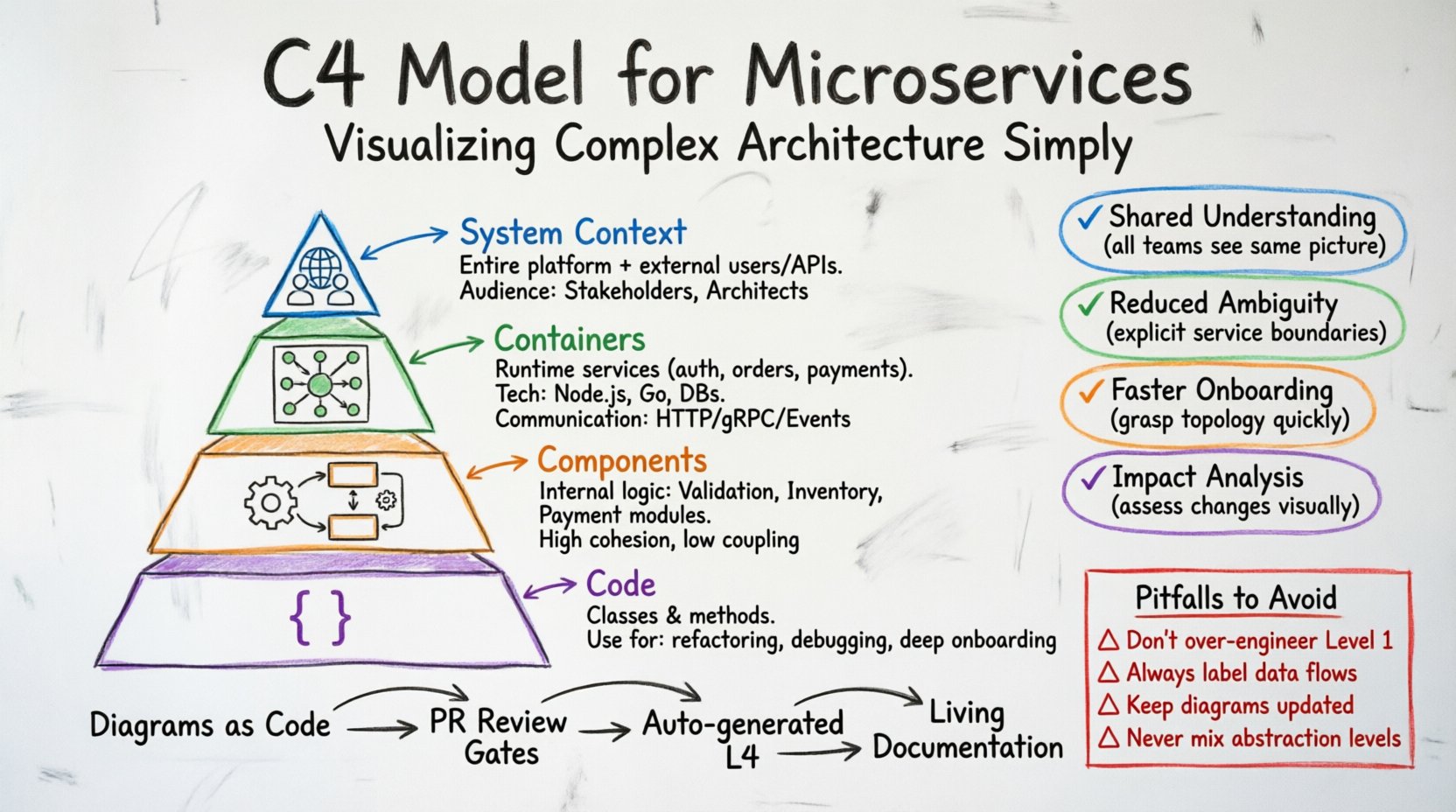
The C4 model addresses this by offering a hierarchy of abstraction. It moves from high-level overviews to detailed internal logic. This progression allows stakeholders to engage at their preferred level of detail. Architects can focus on boundaries, while developers dive into component logic. This separation of concerns is vital when managing a large number of services.
Key benefits include:
- Shared Understanding: Everyone from product managers to engineers sees the same picture.
- Reduced Ambiguity: Explicit boundaries prevent assumptions about how services interact.
- Faster Onboarding: New hires can grasp the system topology quickly.
- Impact Analysis: Changes can be assessed against the existing structure before implementation.
The Four Levels of the C4 Model 🧩
The C4 model consists of four distinct levels, each serving a specific purpose. When applied to microservices, these levels help define the scope of documentation. It prevents the common pitfall of over-documenting every single line of code while ensuring critical architectural decisions are recorded.
| Level | Focus | Target Audience |
|---|---|---|
| Level 1: System Context | Entire system and external interactions | Stakeholders, Managers, Architects |
| Level 2: Containers | High-level runtime technologies | Developers, System Architects |
| Level 3: Components | Internal logic within a container | Backend Developers, QA Engineers |
| Level 4: Code | Class structures and methods | Individual Developers |
Level 1: System Context Diagrams 🌍
The System Context diagram provides the widest view. It shows the software system as a single box and identifies the people and external systems that interact with it. In a microservices environment, the “software system” is often the entire platform, encompassing all individual services.
What to include:
- People: Users, administrators, or external organizations using the system.
- Software Systems: Third-party APIs, databases, or legacy systems that the microservices platform communicates with.
- Connections: The protocols and data types exchanged between the system and external entities.
For microservices, this level is crucial for understanding the perimeter. It answers the question: “What is the boundary of our responsibility?” If a dependency changes, this diagram helps identify the impact immediately. It avoids the need to list every internal service here, keeping the view clean and strategic.
Best Practices for Context Diagrams:
- Keep the central system box generic. Do not label it with specific service names.
- Use clear labels for relationships, such as “Reads Data” or “Processes Payments”.
- Limit the number of external systems to only those critical to the business logic.
- Update this diagram whenever a new external dependency is introduced.
Level 2: Container Diagrams 📦
Containers represent the runtime environment where the code executes. In the context of microservices, a container is often synonymous with a service. It could be a web application, a mobile app, a batch process, or a database. This level is the most critical for microservices architecture because it defines the deployment boundaries.
Key elements to define:
- Technology Stack: The language or framework used (e.g., Java, Node.js, Go).
- Functionality: What the container does from a user perspective.
- Communication: How containers talk to each other (e.g., HTTP, gRPC, Message Queue).
In a microservices setup, this diagram maps the topology of the platform. It shows how the frontend application connects to the authentication service, which in turn connects to the user database. It does not show the internal logic of the authentication service, just that it exists and how it is accessed.
Microservices Specific Considerations:
- Service Boundaries: Clearly separate distinct business domains into different containers.
- Protocol Usage: Specify if synchronous (REST) or asynchronous (Events) communication is used.
- Data Ownership: Indicate which container owns which data store to prevent database coupling.
- Deployment Artifacts: Reflect the actual deployment units, whether they are containers, serverless functions, or virtual machines.
This level helps developers understand the “plumbing” of the system. When a new feature is requested, the team can look at the container diagram to see which service needs modification and how it affects neighbors.
Level 3: Component Diagrams ⚙️
Once a container is identified, the Component diagram dives inside. It shows the major software building blocks within that container. For a microservice, this breaks down the service into logical modules. It is the bridge between the high-level architecture and the actual code implementation.
What defines a component?
- High Cohesion: Related functionality grouped together.
- Low Coupling: Minimal dependencies on other components.
- Interface Definition: Clear input and output points.
Example: In an Order Processing container, components might include Order Validation, Inventory Check, and Payment Processing. This diagram clarifies how these internal parts work together to fulfill the container’s purpose.
Why this matters for Microservices:
- Internal Complexity: Microservices can become complex internally. Components prevent the “God Object” anti-pattern.
- Team Ownership: Teams can own specific components within a service, allowing parallel development.
- Refactoring: If a component needs to be moved or replaced, the impact is isolated to the container.
It is important not to over-detail this level. Do not list every class or function. Focus on the architectural units that define the flow of data and logic. If a component diagram becomes too crowded, it indicates the container might be too large and should be split into smaller services.
Level 4: Code Diagrams 💻
The Code level represents the class diagrams generated from the source code. While the C4 model includes this, it is often the least used for architectural documentation. It is highly technical and changes frequently with every commit.
When to use Level 4:
- During complex refactoring sessions.
- When debugging intricate logic flows.
- For onboarding developers to specific, complex modules.
For most microservices documentation efforts, Levels 1 through 3 provide sufficient context. Relying on generated code diagrams can lead to maintenance overhead, as they quickly become outdated compared to the source code. However, keeping them available for specific deep-dive scenarios is a good practice.
Implementing C4 in a Microservices Workflow 🔄
Creating diagrams is one thing; maintaining them is another. In a fast-moving microservices environment, documentation can become stale rapidly. To ensure the C4 model remains valuable, it must be integrated into the development lifecycle.
Integration Strategies:
- As Code: Store diagram definitions in the repository alongside the source code. This ensures version control and review processes apply to the architecture.
- Automated Generation: Where possible, generate Level 4 diagrams from code to reduce manual effort.
- Review Gates: Include architecture diagrams in pull request reviews for significant changes.
- Simplified Maintenance: Assign ownership of specific diagrams to specific teams or services.
When updating a container diagram, the responsible team should verify if the change impacts the Level 1 Context diagram. For example, adding a new external API dependency requires an update to the system context. This cross-level validation ensures consistency across the documentation.
Common Pitfalls and How to Avoid Them ⚠️
Even with a robust model like C4, teams often fall into traps that reduce the utility of the diagrams. Recognizing these pitfalls early saves time and effort.
1. Over-Engineering Level 1
Trying to list every single interaction in the System Context diagram creates noise. Keep it high-level. If a user group changes frequently, do not detail them. Focus on the stable boundaries.
2. Ignoring Data Flows
Microservices rely heavily on data. A diagram without clear data flow labels is useless. Always specify what data is being passed between containers. Is it a request, an event, or a shared database record?
3. Treating Diagrams as Static
Documentation should not be a snapshot. It must evolve. Schedule regular reviews to ensure the diagrams match the current state of the infrastructure. Dead diagrams are worse than no diagrams because they mislead.
4. Mixing Levels
Do not put component details inside a container diagram. Keep the abstraction clear. If a diagram mixes high-level containers with low-level classes, it confuses the reader about the level of detail required.
Comparing C4 with Other Modeling Approaches 📊
While C4 is highly effective for microservices, other modeling standards exist. Understanding the differences helps in selecting the right tool for the job.
| Approach | Strengths | Weaknesses |
|---|---|---|
| C4 Model | Scalable abstraction, clear hierarchy, easy to understand | Does not specify syntax for tools |
| UML | Industry standard, highly detailed | Complex, steep learning curve, often outdated |
| ER Diagrams | Excellent for database relationships | Does not cover application logic or services |
| Sequence Diagrams | Great for specific interaction flows | Hard to maintain for system-wide views |
C4 excels in the “big picture” view required for microservices. It complements UML rather than replacing it entirely. You might use C4 for the architecture and UML for specific class interactions within a component.
Benefits for Scalability and Performance 🚀
A clear architecture diagram aids in performance planning. By visualizing the containers and their connections, teams can identify bottlenecks before deployment. For instance, if all requests flow through a single gateway container, that becomes a single point of failure.
Scalability Insights:
- Horizontal Scaling: Identify which containers need to scale independently based on load.
- Database Sharding: The container diagram shows which data stores are tied to which services, helping plan sharding strategies.
- Caching Layers: Visualize where caching fits into the flow between containers.
Performance testing can be directed more effectively when the interaction paths are known. Instead of testing the whole system blindly, teams can simulate traffic patterns defined in the container diagram.
Maintaining Documentation Culture 📝
Tools and models are only as good as the culture that supports them. A team must value documentation as much as code. This means recognizing diagram updates as part of the definition of done for a feature.
Building a Culture of Clarity:
- Lead by Example: Senior architects should prioritize accurate diagrams in their designs.
- Training: Ensure all team members understand the C4 hierarchy and notation.
- Incentives: Recognize contributions to architectural documentation during performance reviews.
- Accessibility: Ensure diagrams are stored in a central, searchable location accessible to all engineers.
When documentation becomes a shared responsibility, the quality improves. It stops being a chore and starts being a tool for collaboration. This is essential in microservices, where context switching between services is common.
Conclusion: A Foundation for Sustainable Growth 🏛️
Adopting the C4 model for microservices provides a structured framework for managing complexity. It separates concerns, clarifies boundaries, and facilitates communication across diverse teams. By focusing on Levels 1 through 3, organizations can maintain a clear view of their architecture without drowning in code details.
The investment in accurate diagramming pays dividends in reduced bugs, faster onboarding, and more confident decision-making. As systems grow, the C4 model ensures that the architecture remains understandable. It is not about creating perfect drawings; it is about creating a shared language that evolves with the software.
Start small. Create a Level 1 diagram for your current platform. Identify the containers. Break them down into components. As the system matures, the diagrams will grow alongside it, serving as a reliable map for the journey ahead.