


Software architecture is often shrouded in complexity. When teams introduce a new modeling framework, skepticism naturally follows. The C4 Model has gained significant traction as a standard for visualizing software structure, yet misconceptions persist regarding its utility and application. Understanding the reality behind the hype is essential for effective system design.
This guide addresses common misunderstandings surrounding the C4 Model. We will explore what the model actually is, how it fits into the development lifecycle, and why certain beliefs about its limitations are incorrect. By clarifying these points, development teams can leverage the framework to improve clarity and reduce technical debt without unnecessary overhead.
🔍 What Is the C4 Model?
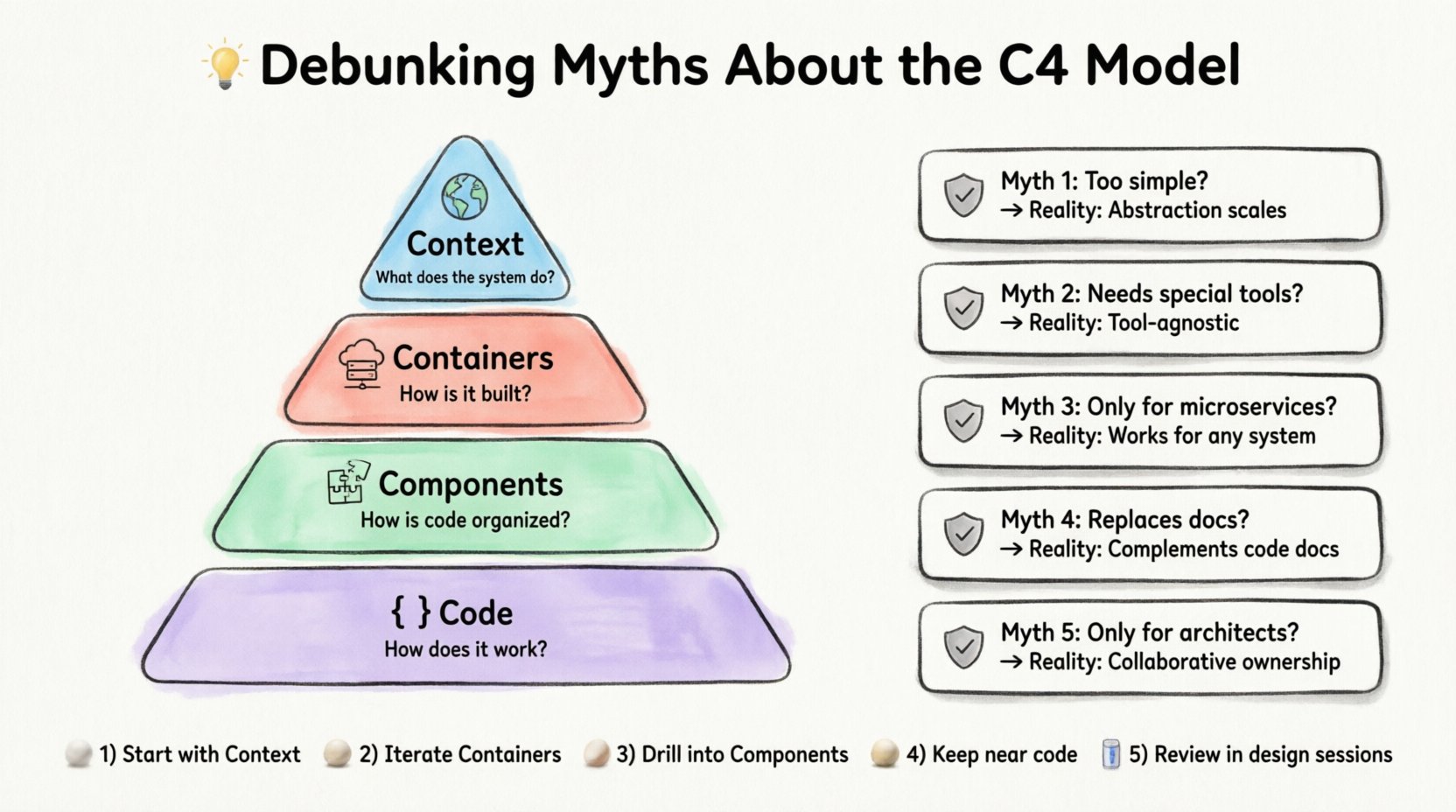
The C4 Model is a hierarchy of software architecture diagrams. It provides a structured way to describe the structure of a software system at different levels of abstraction. The acronym stands for four levels:
- Context: The system as a whole within its environment.
- Containers: The high-level runtime environment (e.g., web apps, databases).
- Components: The building blocks within a container (e.g., modules, libraries).
- Code: The internal structure of specific classes or functions.
Each level answers a specific set of questions for a specific audience. This hierarchical approach prevents information overload. Instead of cramming every detail into a single diagram, the model encourages splitting information across multiple views. This separation ensures that stakeholders can find the information relevant to their role without getting lost in irrelevant technical specifics.
🚫 Myth 1: The C4 Model Is Too Simple for Complex Systems
One of the most persistent myths is that the C4 Model is only suitable for small applications or simple monoliths. Critics argue that modern distributed systems, microservices architectures, and cloud-native environments require more granular modeling tools. They believe that reducing system structure to four boxes and lines oversimplifies the reality of complex interactions.
🛠 The Reality: Abstraction is a Feature, Not a Bug
Simplicity in modeling does not equate to a lack of depth. The C4 Model relies on the principle of progressive disclosure. You do not need to see the code level to understand the container level. By focusing on the right level of detail for the right audience, the model actually handles complexity better than dense, monolithic diagrams.
- Scalability: As a system grows, you add more containers or components. The hierarchy remains consistent.
- Clarity: Complex interactions become visible only when zoomed in. The Context diagram shows data flow between external users and the system, not the internal logic.
- Maintainability: When a change occurs, you only update the specific level affected. If a database schema changes, you update the Container diagram, not the Context diagram.
For highly complex systems, the model scales by adding more nodes to the diagrams, not by changing the rules. A large enterprise system might have dozens of containers, but the logic for diagramming them remains the same. This consistency reduces the cognitive load on the team creating and consuming the documentation.
🚫 Myth 2: You Need Specialized Software to Use It
Many organizations assume that adopting the C4 Model requires purchasing expensive enterprise modeling tools or specialized software platforms. This belief creates a barrier to entry, leading teams to stick with outdated practices or skip documentation entirely.
🛠 The Reality: It Is Tool-Agnostic
The C4 Model is a conceptual framework, not a software product. It does not dictate which markup language, drawing application, or platform you must use. The core requirement is adherence to the visual conventions and hierarchy.
This flexibility allows teams to integrate the model into their existing workflow:
- Whiteboards: During brainstorming sessions, the model can be sketched using pen and paper.
- Generic Diagramming Tools: Standard vector graphics editors can create compliant diagrams.
- Code-Based Tools: Some platforms allow diagrams to be generated from code comments or annotations.
By removing the dependency on specific vendors, teams avoid vendor lock-in. The documentation remains valid even if the tooling changes. This independence ensures that the value comes from the structure of the information, not the capabilities of the software used to render it.
🚫 Myth 3: It Is Only for Cloud-Native or Microservice Architectures
With the rise of cloud computing, there is a perception that the C4 Model is designed specifically for cloud-native environments. Some teams believe that traditional monolithic applications do not benefit from this structured approach to diagramming.
🛠 The Reality: Applicable to Any Software System
The C4 Model was developed to address the confusion in modern software architecture, but its principles apply universally. Whether the system runs on a single server or spans multiple cloud regions, the need to understand structure remains.
For monolithic applications, the model helps:
- Identify Boundaries: Even in a monolith, there are logical boundaries between modules. The Component level helps visualize these.
- Migration Planning: If a team plans to break a monolith into microservices, the C4 Model serves as a blueprint for the transition.
- Onboarding: New developers can understand the system’s scope quickly without reading the entire codebase.
The diagrams focus on the runtime environment and logical grouping, which are relevant regardless of deployment infrastructure. A legacy system benefits from the same clarity as a new cloud application. The goal is to communicate structure, not to dictate deployment strategy.
🚫 Myth 4: It Replaces Code Comments and Technical Documentation
A common fear is that creating diagrams will replace the need for code comments, API specifications, or detailed design documents. Teams worry that investing time in visual modeling means less time writing inline documentation.
🛠 The Reality: It Complements, Does Not Replace
Diagrams are not a substitute for code. They are a high-level map. Code comments and API documentation provide the specific instructions required for implementation. The C4 Model sits at a higher level of abstraction.
- What Diagrams Do: They show how components interact, data flows, and boundaries exist.
- What Code Docs Do: They explain specific algorithms, parameter inputs, and edge cases.
Using the C4 Model effectively means recognizing its place in the documentation ecosystem. It should be used alongside standard documentation practices. For example, a Context diagram explains that a system sends data to a third-party service. The API documentation explains the exact endpoints and authentication methods. Both are necessary for a complete understanding of the system.
When teams treat diagrams as the sole source of truth, they risk technical drift. When treated as a navigational aid, they enhance the utility of the technical documentation.
🚫 Myth 5: Only Architects Should Create These Diagrams
There is a belief that high-level architectural diagrams are the exclusive domain of senior architects or technical leads. This creates a bottleneck where only a few people understand the system, and others are left guessing.
🛠 The Reality: Collaborative Ownership
While architects often initiate the modeling process, the most effective teams encourage developers to contribute to the diagrams. The model is designed to be understood by a broad range of stakeholders, including product managers and testers.
Encouraging broader participation offers several benefits:
- Shared Understanding: When developers draw the components, they reinforce their own understanding of the architecture.
- Accuracy: The person writing the code often knows the best way to represent the component.
- Maintainability: If only one person updates the diagrams, they often become outdated. Shared ownership ensures the documentation evolves with the code.
The C4 Model provides a common language. When a junior developer asks about a container, they can look at the diagram and understand its role without needing to ask a senior architect. This democratization of knowledge accelerates development and reduces dependency on specific individuals.
📊 Comparing the Levels of Abstraction
To understand where the C4 Model fits, it helps to compare the levels of detail against the intended audience. The following table outlines the differences between the four levels.
| Level | Primary Audience | Key Question Answered | Typical Scope |
|---|---|---|---|
| Context | Stakeholders, Management, Users | What does the system do and who uses it? | Entire System |
| Container | Developers, DevOps, Product Owners | How is the system built and what technologies are used? | Applications, Databases, Servers |
| Component | Developers, QA Engineers | How is the code organized within the container? | Modules, Classes, Libraries |
| Code | Developers (Specific Modules) | How does this specific function work? | Classes, Functions, Methods |
This structure ensures that the information presented matches the knowledge level of the reader. A stakeholder does not need to see the component level, just as a developer does not need the context level to fix a bug. Matching the diagram to the audience prevents confusion and wasted time.
🛠 Implementation Strategies for Teams
Adopting a new modeling standard requires a shift in mindset. It is not a quick fix but a long-term investment in communication. Here are practical steps to integrate the model into your workflow without disrupting production.
1. Start with the Context Diagram
Begin with the highest level. Define the system boundary and the external users. This sets the stage for everything else. If the context is unclear, the lower levels will be confusing. Ensure that external dependencies, like third-party APIs or legacy systems, are clearly marked.
2. Iterate on Containers
Once the context is established, break the system down into containers. Identify the runtime environments. Are there web servers? Are there mobile apps? Are there background workers? Define the technology stack for each container. This step is often where the most value is found, as it clarifies the runtime architecture.
3. Drill Down into Components
Focus on critical containers first. Not every container needs a component diagram immediately. Prioritize the areas of the system that are complex or frequently changed. This targeted approach saves time and keeps the documentation relevant.
4. Keep Diagrams Close to Code
Documentation drifts when it is stored far away from the source. If you use a code-based tool, store the diagram files in the repository alongside the code. If you use external tools, link the diagrams in the README or documentation hub. The closer the documentation is to the code, the more likely it is to be updated.
5. Review During Design Sessions
Incorporate diagram reviews into your design discussions. When planning a new feature, update the relevant diagrams before writing code. This ensures the design is validated visually. It also catches architectural issues early, before they become technical debt.
🔄 The Lifecycle of C4 Documentation
One often overlooked aspect is the lifecycle of the documentation. Diagrams are not static assets; they are living artifacts. As the system evolves, the diagrams must evolve with it.
There are two main approaches to maintaining this lifecycle:
- Manual Updates: Developers update the diagrams manually as they work. This ensures the diagrams reflect the exact state of the code but relies on discipline.
- Automated Generation: Some tools can generate diagrams from code annotations. This reduces the maintenance burden but requires strict adherence to annotation standards.
Regardless of the method, the goal is to keep the documentation accurate. Outdated diagrams are worse than no diagrams at all, as they lead to incorrect assumptions. Teams should schedule regular reviews of the architecture diagrams during sprint planning or release retrospectives.
🏁 Final Thoughts on Architecture Visualization
The C4 Model offers a structured approach to visualizing software architecture. It addresses the need for clarity in an increasingly complex industry. By debunking the myths surrounding its simplicity, tooling requirements, and applicability, teams can focus on the core benefit: communication.
Effective architecture is not about creating the most detailed diagram possible. It is about creating the right diagram for the right person at the right time. Whether you are building a small internal tool or a global enterprise platform, the principles of the C4 Model provide a reliable framework for understanding and describing system structure.
Adopting this model requires discipline and a commitment to maintenance. However, the long-term payoff in reduced onboarding time, clearer communication, and better system understanding is substantial. By separating fact from fiction, teams can build stronger foundations for their software projects.