


Software architecture is often described as the backbone of any successful technology project. However, communicating this structure can be challenging. Different stakeholders—developers, managers, clients—need different levels of detail. This is where the C4 model shines. It provides a standardized way to create software architecture diagrams. But questions often arise about implementation, scope, and best practices. This guide addresses the most common inquiries regarding the C4 model, helping you visualize and document your system effectively.
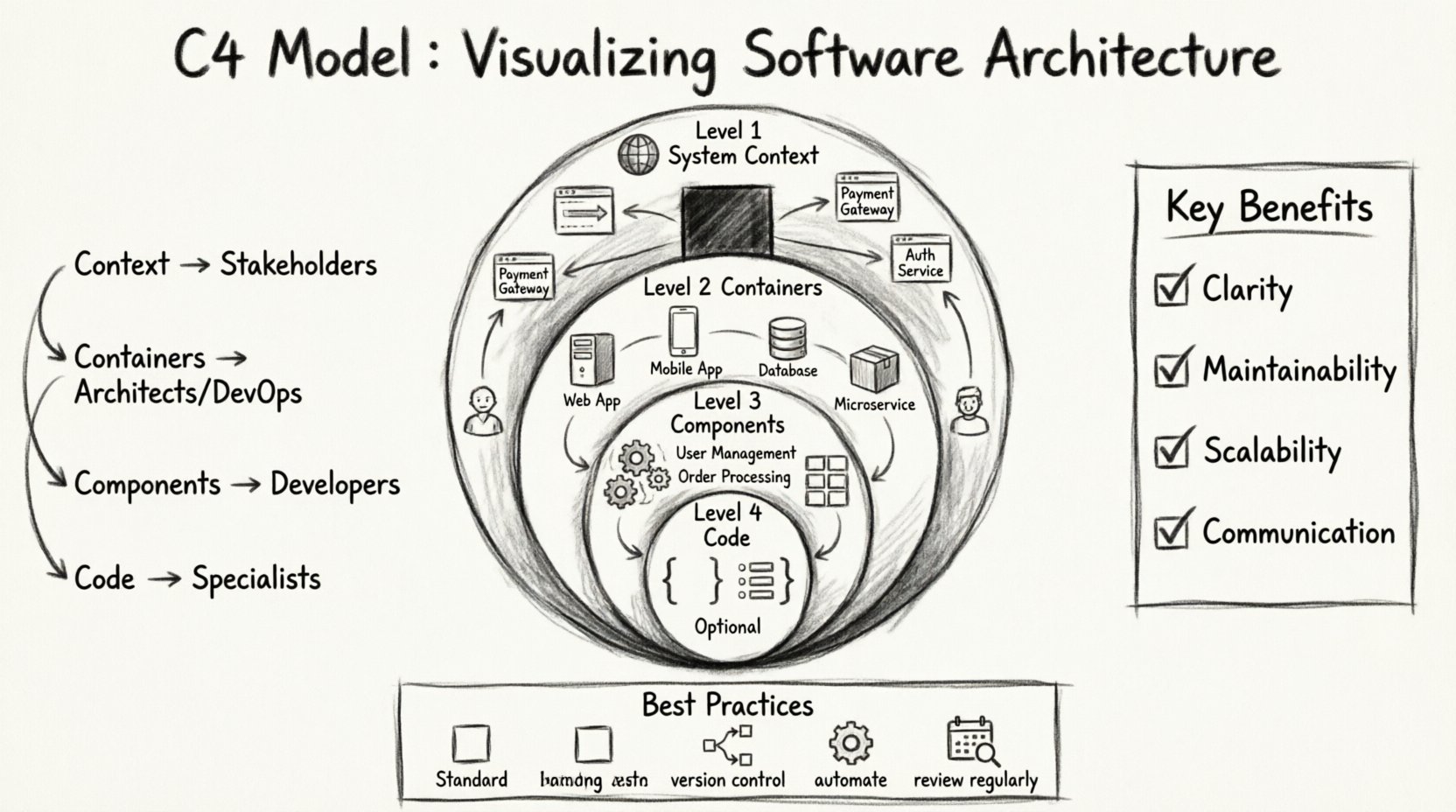
What Exactly Is the C4 Model? 🧩
The C4 model is a method for visualizing the software architecture of a system. It was developed to help teams create diagrams that are consistent, scalable, and useful for different audiences. The name “C4” stands for the four levels of detail it offers. Each level zooms in slightly more than the previous one, moving from the big picture down to the code.
- Level 1: System Context
- Level 2: Containers
- Level 3: Components
- Level 4: Code
Unlike other diagramming approaches, the C4 model emphasizes context and clarity. It avoids showing every single class or method, focusing instead on the structure that matters for communication. This makes it easier for teams to keep documentation up-to-date without getting bogged down in minutiae.
The Four Levels Explained 🔍
Understanding the hierarchy is crucial for using the model correctly. Each level serves a specific purpose and audience. Below, we break down what each level represents.
1. System Context Diagram 🌍
The System Context diagram is the starting point. It shows the system as a single box in the center. Surrounding this box are the people or systems that interact with it. This is often called a “black box” view.
- Focus: The high-level boundary of your system.
- Audience: Stakeholders, clients, new team members.
- Key Elements: Users, external systems, and data flows.
For example, if you are building an e-commerce platform, the context diagram shows the platform itself, the users (customers, admins), and external services like payment gateways or email providers.
2. Container Diagram 📦
The Container diagram zooms in one level. It breaks the system into high-level building blocks. In software terms, a container is a runtime environment. Examples include web applications, mobile apps, microservices, or databases.
- Focus: The technology stack and major runtime components.
- Audience: Developers, architects, DevOps engineers.
- Key Elements: Application types, databases, third-party services.
This level answers the question: “What technologies are we using?” It helps developers understand how different parts of the system talk to each other at a high level.
3. Component Diagram 🔧
The Component diagram goes deeper still. It shows the internal structure of a single container. A component is a logical grouping of functionality within a container. This is where you see the actual code organization, excluding implementation details like class names.
- Focus: Logical grouping of responsibilities.
- Audience: Developers, code maintainers.
- Key Elements: Services, modules, layers, interfaces.
This diagram helps developers understand where to place new code and how to avoid tight coupling between different parts of the application.
4. Code Diagram 💻
The Code level is rarely required for the C4 model. It shows the internal implementation of a single component, such as class diagrams or sequence diagrams. Because this level is too detailed for most architectural discussions, it is often omitted unless debugging a specific issue.
- Focus: Implementation details.
- Audience: Individual developers.
- Key Elements: Classes, methods, relationships.
Comparison of C4 Levels ⚖️
Understanding the differences between levels is key to maintaining clarity. The following table summarizes the scope and audience for each stage.
| Level | Scope | Typical Audience | Tooling Complexity |
|---|---|---|---|
| Context | System + External Interactions | Business Stakeholders | Low |
| Container | Applications + Data Stores | Architects, DevOps | Medium |
| Component | Internal Modules | Developers | High |
| Code | Classes + Methods | Specialized Developers | Very High |
Why Use This Methodology? 🚀
There are several reasons why teams choose this structured approach over ad-hoc diagramming. It brings consistency to documentation and ensures that everyone is speaking the same language.
- Clarity: It removes ambiguity about what is inside the system versus what is outside.
- Maintainability: It is easier to keep diagrams up-to-date because the scope is defined.
- Scalability: As the system grows, the model scales with it without losing meaning.
- Communication: It bridges the gap between technical and non-technical stakeholders.
When documentation is clear, onboarding new developers becomes faster. They can look at the Context diagram to understand the system’s place in the world, then drill down to the Container level to see how it is built.
Common Questions Answered ❓
We have compiled the most frequent questions asked by teams adopting this model. These answers provide practical guidance.
Q: Do I need to draw all 4 levels? 🤔
No. Most projects only require the first three levels. The Context, Container, and Component diagrams usually provide enough information for most tasks. The Code level is generally unnecessary unless you are debugging complex logic within a specific module.
Q: How often should I update the diagrams? 📅
Diagrams should be updated when the architecture changes. This means whenever you add a new container, change a major component, or alter how systems interact. Ideally, diagram updates should be part of your pull request process to ensure they remain accurate.
Q: Can I use this for legacy systems? 🏛️
Yes. Creating diagrams for legacy systems helps you understand the current state before refactoring. It is often easier to work backwards from the running system to create the diagrams rather than trying to remember the original design.
Q: What if my system is monolithic? 🏰
The model works for monolithic applications too. In this case, the Container level might only have one entry (the application itself), and the Component level will show the internal structure of that single application.
Q: Who is responsible for creating these diagrams? 🙋
Responsibility usually lies with the architects and lead developers. However, it is beneficial for all team members to contribute to the diagrams. This ensures shared understanding and ownership of the architecture.
Best Practices for Maintenance 🛠️
Maintaining diagrams can become a burden if not handled correctly. Follow these practices to keep your documentation valuable without it becoming a chore.
- Keep it simple: Avoid cluttering diagrams with too many details. If a diagram looks complex, simplify it.
- Use standard icons: Stick to the standard shapes defined by the model (e.g., cylinder for data store, hexagon for component).
- Version control: Store diagrams in your code repository. This allows you to track changes over time.
- Automate where possible: If your tooling allows, generate diagrams from code to reduce manual effort.
- Review regularly: Include diagram review in your sprint planning or architecture review meetings.
Integrating into Team Workflow 👥
Introducing a new documentation standard requires care. It should not slow down development. Here is how to integrate it smoothly.
- Start Small: Begin with just the Context and Container diagrams. Add Component diagrams only when necessary.
- Provide Training: Ensure everyone understands the rules. A shared understanding prevents confusion.
- Set Expectations: Clarify that diagrams are a tool for communication, not a goal in themselves.
- Encourage Collaboration: Allow team members to edit diagrams freely within reason.
Pitfalls to Avoid ⚠️
Even with a clear model, mistakes can happen. Being aware of common traps helps you stay on track.
- Over-documentation: Do not try to document every single class. Focus on the architecture.
- Outdated diagrams: Never use a diagram that does not match the current code. It is worse than no diagram at all.
- Ignoring the audience: Do not show code-level details to business stakeholders. Match the level to the viewer.
- Ignoring relationships: Always show how containers and components communicate. The arrows are as important as the boxes.
Implementation Strategy 💡
When you are ready to start, follow a structured approach. This ensures you build a solid foundation.
Step 1: Define the System Boundary
Identify what is in scope and what is out. Draw the Context diagram first. This sets the stage for everything else.
Step 2: Identify Containers
List the major applications, databases, and services. Draw the Container diagram. Ensure all connections are labeled with the protocol used (e.g., HTTP, TCP).
Step 3: Break Down Components
Choose one container to start. Draw its components. This helps you understand the internal logic without getting lost in the code.
Step 4: Review and Refine
Share the diagrams with the team. Get feedback. Make adjustments based on what works and what doesn’t.
Final Thoughts 🌟
Documenting architecture is an ongoing process. The C4 model provides a flexible framework that adapts to the needs of your team. By focusing on the right level of detail for the right audience, you can improve communication and reduce technical debt. Remember, the goal is not perfection, but clarity. Start with the basics, keep your diagrams current, and let them serve as a living map for your software journey.
As your systems evolve, so will your documentation. Embrace the changes, and use the C4 model to guide your team through the complexity of modern software development.