


Software architecture documentation often becomes a casualty of development velocity. Teams prioritize features over diagrams, or they create diagrams that become outdated the moment the code is deployed. The C4 model was introduced to solve this by providing a clear, hierarchical approach to visualizing software architecture. It breaks down complexity into manageable levels: System Context, Containers, Components, and Code.
However, even with a structured framework like C4, teams frequently stumble. Misapplying the model can lead to confusion, maintenance nightmares, and diagrams that fail to communicate the intended message. This guide explores the most frequent errors encountered during C4 modeling and provides actionable strategies to correct them. By understanding these pitfalls, you can ensure your architectural documentation remains a valuable asset rather than a burden.
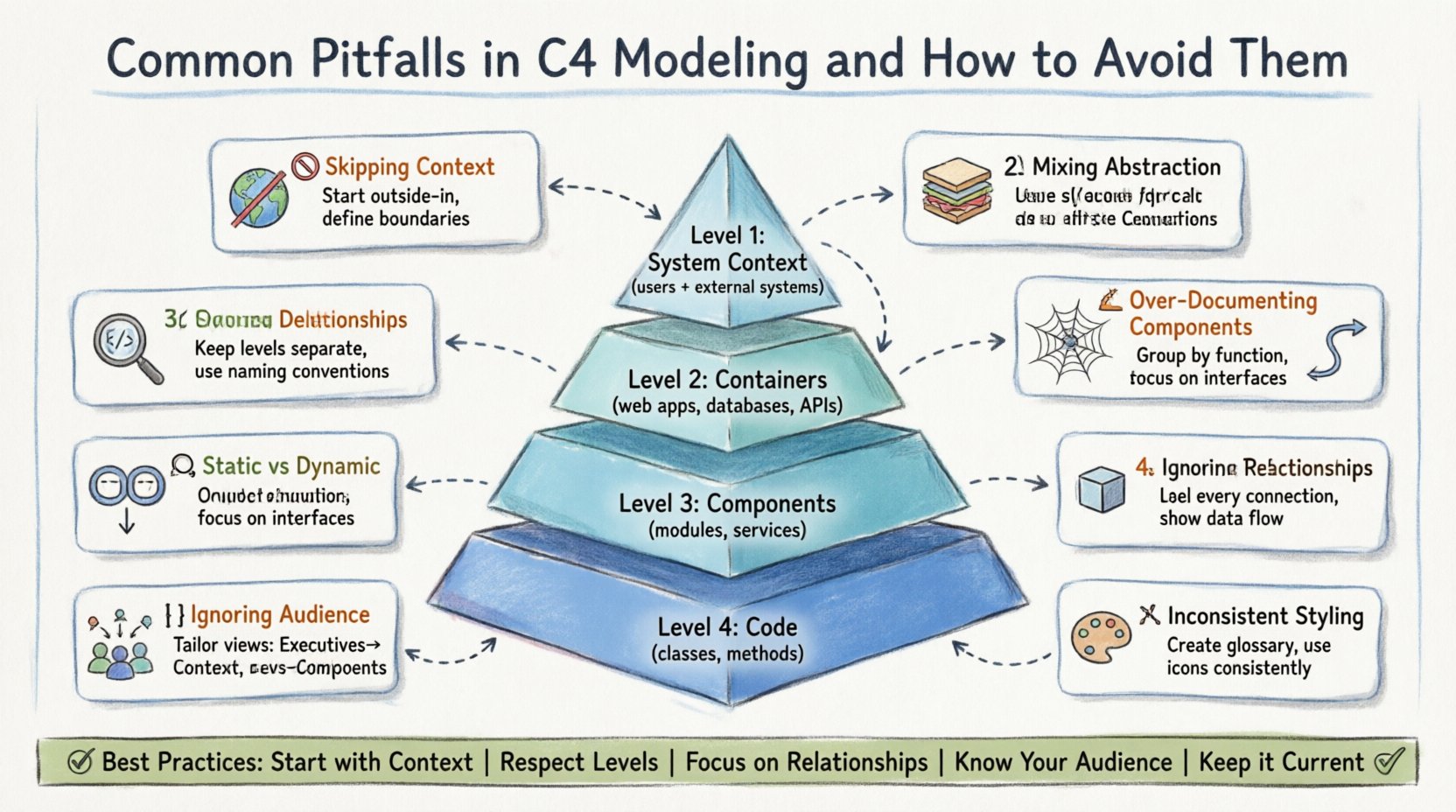
Understanding the C4 Hierarchy ⚙️
Before diving into the mistakes, it is essential to align on what the C4 model actually is. It is not a rigid standard but a flexible framework. The hierarchy consists of four levels, each designed for a specific audience and level of abstraction.
- Level 1: System Context 🌍
Shows your system as a single box and how it interacts with users and other systems. - Level 2: Containers 📦
Breaks the system down into high-level runtime technologies (e.g., web apps, databases, microservices). - Level 3: Components 🔧
Describes the logical structure within a container (e.g., modules, classes, services). - Level 4: Code 💻
Details the internal logic, typically mapping to classes and methods.
Each level serves a different purpose. Context is for stakeholders, Containers for architects and developers, Components for implementation teams, and Code for detailed technical reference. Confusion often arises when these boundaries are blurred.
Pitfall 1: Skipping the System Context 🚫
One of the most common oversights is jumping straight into the Containers or Components level without establishing the System Context diagram. This diagram acts as the anchor for the entire documentation set.
Why this happens
- Developers are focused on internal logic rather than external interactions.
- Teams assume the system boundaries are obvious to everyone.
- There is a belief that the Context diagram is too high-level to be useful.
The Consequence
Without a System Context diagram, new team members or external partners have no clear understanding of where the system fits in the broader ecosystem. They do not know what data is coming in or where it is going. This leads to integration errors and scope creep.
How to Avoid It
- Start from the Outside In: Always create the Context diagram first. Define the boundaries clearly.
- Identify Actors: List every user role and every external system that sends or receives data.
- Define Data Flows: Clearly label the direction of data flow. Is it read-only? Is it write-heavy?
Pitfall 2: Mixing Levels of Abstraction 🥪
Another frequent error is mixing elements from different levels within a single diagram. For example, showing a database table inside a Container diagram, or showing a high-level business process inside a Component diagram.
The Problem
When you mix levels, the cognitive load on the reader increases. A Container diagram should show technologies (e.g., PostgreSQL, React App), not database tables. A Component diagram should show logical groupings, not individual database rows.
Best Practices for Separation
| Level | What to Include | What to Exclude |
|---|---|---|
| Context | Users, External Systems | Internal servers, code structure |
| Containers | Web Apps, Databases, APIs | Classes, Database Tables, UI Screens |
| Components | Modules, Services, Logic Groups | Source Code Files, Database Rows |
| Code | Classes, Methods, Functions | High-level business goals, Users |
How to Avoid It
- Enforce Naming Conventions: Use specific icons for specific types. Don’t use a generic box for everything.
- Review Diagrams: Ask, “Does this diagram belong at Level 2 or Level 3?” If it contains both, split it.
- Link Diagrams: Use links to navigate between levels rather than combining them.
Pitfall 3: Over-Documenting Components 🔍
The Component level is where teams often get stuck. It is easy to fall into the trap of documenting every single class or method as a component. This creates a diagram that looks like a source code listing rather than an architectural map.
Why it Occurs
- A desire to be exhaustive and cover every detail.
- Lack of clarity on what constitutes a “component” in the C4 sense.
- Pressure to show progress or completeness.
The Impact
When a diagram is too detailed, it becomes unreadable. The purpose of a Component diagram is to show how high-level logic is grouped, not to document the API surface of every function. If the diagram is too dense, developers will stop reading it.
Strategies for Abstraction
- Group by Function: Group related classes into logical components (e.g., “Authentication Service”, “Reporting Module”).
- Focus on Interfaces: Document the input and output of the component, not the internal implementation.
- Hide Implementation Details: Do not list every method signature. Only show critical public interfaces.
Pitfall 4: Ignoring Relationships and Dependencies 🕸️
A diagram with boxes but no lines is merely a list. The value of C4 lies in understanding how parts interact. Many teams draw the boxes correctly but fail to define the relationships between them.
Common Errors
- Using generic lines without labels.
- Omitting the direction of data flow.
- Showing dependencies that do not exist (coupling).
Best Practices
- Label Every Relationship: Use labels like “Reads”, “Writes”, “Calls API”, or “Uses”.
- Define Protocols: If possible, indicate the technology used for the connection (e.g., HTTP, gRPC, SQL).
- Identify Bottlenecks: Highlight relationships that represent high data transfer or critical dependencies.
Pitfall 5: Confusing Static and Dynamic Models 🔄
The C4 model primarily focuses on static structure. However, teams often try to force dynamic behavior (like sequence flows or state changes) into C4 diagrams without understanding the distinction.
The Distinction
- Static Diagrams: Show structure (Boxes and Lines). Good for understanding architecture.
- Dynamic Diagrams: Show behavior (Sequence, State, Activity). Good for understanding flows.
How to Handle Both
Do not try to put sequence diagram details into a Component diagram. If you need to show a specific flow, create a separate dynamic diagram and link it to the relevant component in the C4 model. This keeps the C4 model clean and focused on structure.
- Keep Structure Separate: Use C4 for the “What”.
- Use Flow Diagrams for “How”: Use sequence diagrams for the “When” and “In What Order”.
- Link Them: Reference the flow diagram in the component description.
Pitfall 6: Over-Documenting the Code Level 📜
Level 4 (Code) is the most granular. Many teams skip this entirely, while others try to make it the main focus. The C4 model suggests that Code diagrams are rarely necessary for the whole system.
When to Use Level 4
- Complex algorithms that need explanation.
- Security-critical logic that requires auditing.
- Legacy systems where documentation is missing.
When to Skip It
- Standard CRUD operations.
- Well-known design patterns.
- Code that is self-explanatory.
Guidance
Do not generate a Code diagram for every component. This creates a documentation maintenance nightmare. Only document the Code level for the most complex or critical parts of your system. Treat the rest of the code as self-documenting via the code itself.
Pitfall 7: Ignoring Audience Awareness 👥
A common mistake is creating one “Master Diagram” intended for everyone. This rarely works. A stakeholder does not need to see database tables. A developer does not need to see high-level business goals.
The Audience Matrix
| Audience | Focus Area | Key Questions |
|---|---|---|
| Executives | Context | What does this system do? What is the business value? |
| Product Owners | Context & Containers | How does this support the roadmap? What are the dependencies? |
| Developers | Containers & Components | How do I build this? What are the interfaces? |
| Ops/Infra | Containers | How is this deployed? What are the resource needs? |
How to Avoid It
- Create Views: Create specific views for specific audiences.
- Curate Content: Remove irrelevant details from each view.
- Provide Context: Ensure the diagram title and description match the intended audience.
Pitfall 8: Inconsistent Naming and Styling 🎨
When multiple people contribute to the documentation, naming conventions often diverge. One person calls a service “Auth Service”, another calls it “Login Module”. This fragmentation makes navigation difficult.
The Cost of Inconsistency
If terms are not standardized, the documentation becomes a puzzle. You cannot easily search for a component if it is named differently across diagrams. This reduces trust in the documentation.
Establishing Standards
- Create a Glossary: Define standard terms for your domain.
- Use Icons Consistently: Use the same icon for the same technology across all diagrams.
- Review Before Publish: Have a designated reviewer check for naming conflicts.
Maintaining Your Models Over Time 🔄
Documentation decays. As the code changes, the diagrams become stale. This is the ultimate failure of architecture documentation. If the diagrams do not reflect reality, they are worse than no diagrams at all.
Strategies for Maintenance
- Link to Code: If possible, use tools that generate diagrams from code annotations. This keeps them in sync.
- Update on PR: Make diagram updates part of the Pull Request process for significant architectural changes.
- Regular Audits: Schedule a quarterly review to check for outdated diagrams.
- Mark as Draft: Clearly label diagrams that are out of date so users do not rely on them.
Building a Culture of Documentation 🏗️
Even the best model fails if the team resists it. Documentation should not be seen as a bureaucratic hurdle. It is a communication tool that saves time in the long run.
Encouraging Participation
- Keep it Simple: Don’t demand perfect diagrams. Good enough is better than nothing.
- Explain the Why: Help team members understand how documentation helps them personally (e.g., less context switching).
- Automate Where Possible: Reduce the manual effort required to create and update diagrams.
Summary of Best Practices ✅
To summarize, successful C4 modeling requires discipline and clarity. Avoid the traps of over-detailing, mixing levels, and ignoring audience needs. By adhering to the hierarchy and maintaining your diagrams, you create a living repository of knowledge.
- Start with Context: Always begin at Level 1.
- Respect the Levels: Do not mix abstraction levels in one diagram.
- Focus on Relationships: Lines and labels are as important as boxes.
- Know Your Audience: Tailor the view to the reader.
- Keep it Current: Update diagrams alongside code changes.
By avoiding these common pitfalls, you ensure that your architectural documentation remains a reliable source of truth. It becomes a tool for alignment, not a source of confusion. The C4 model provides the structure, but your team provides the discipline to make it work.