


Ever stared at a blank canvas, trying to mentally map out a complex software system’s structure, only to get overwhelmed by packages, dependencies, and layers? You’re not alone. And if you’re skeptical about AI tools promising to “just fix it,” you’re right to pause. Too many tools overpromise and underdeliver. But what if you could describe your system in plain English and have a professional UML package diagram appear—accurate, editable, and ready to use? That’s not a myth. That’s the reality of the Visual Paradigm AI diagram generator. This guide is for the thoughtful skeptic: we’ll show you exactly how this AI UML tool works, why it’s reliable, and how it puts you—not the algorithm—in control.
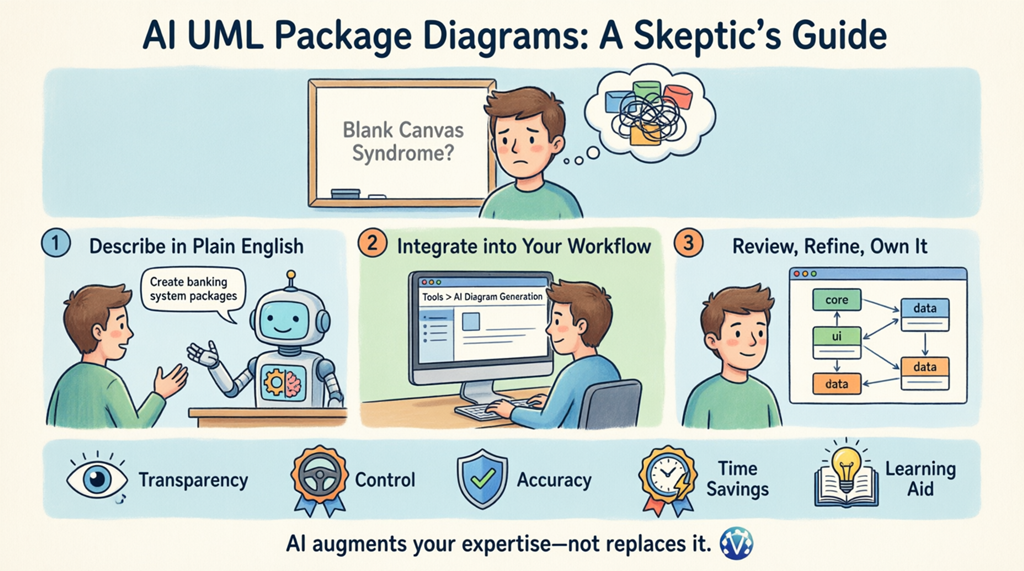
How AI Actually Works in This Software Tool (No Black Box)
Let’s be clear: this isn’t magic. The AI package diagram maker in Visual Paradigm uses natural language processing to understand your description, then applies UML modeling rules to structure packages, dependencies, and layers logically. You provide the intent; the online AI diagram generator handles the syntax. Think of it as a smart assistant that knows UML inside out, so you can focus on architecture, not notation.
Step 1: Start with a Conversation (No UML Syntax Required)
The first image shows the Visual Paradigm AI Chatbot, a conversational AI software architecture tool that acts like your personal modeling partner. You don’t need to memorize UML stereotypes or drag icons. Simply type a request like: “Create a Package Diagram for a banking system with Core Services, Customer Management, and Compliance modules.” The AI UML generator processes your plain English, identifies key components, and generates a clean, hierarchical diagram right in the chat. The result? A well-organized model with nested packages and clear dependency arrows—built from your words.
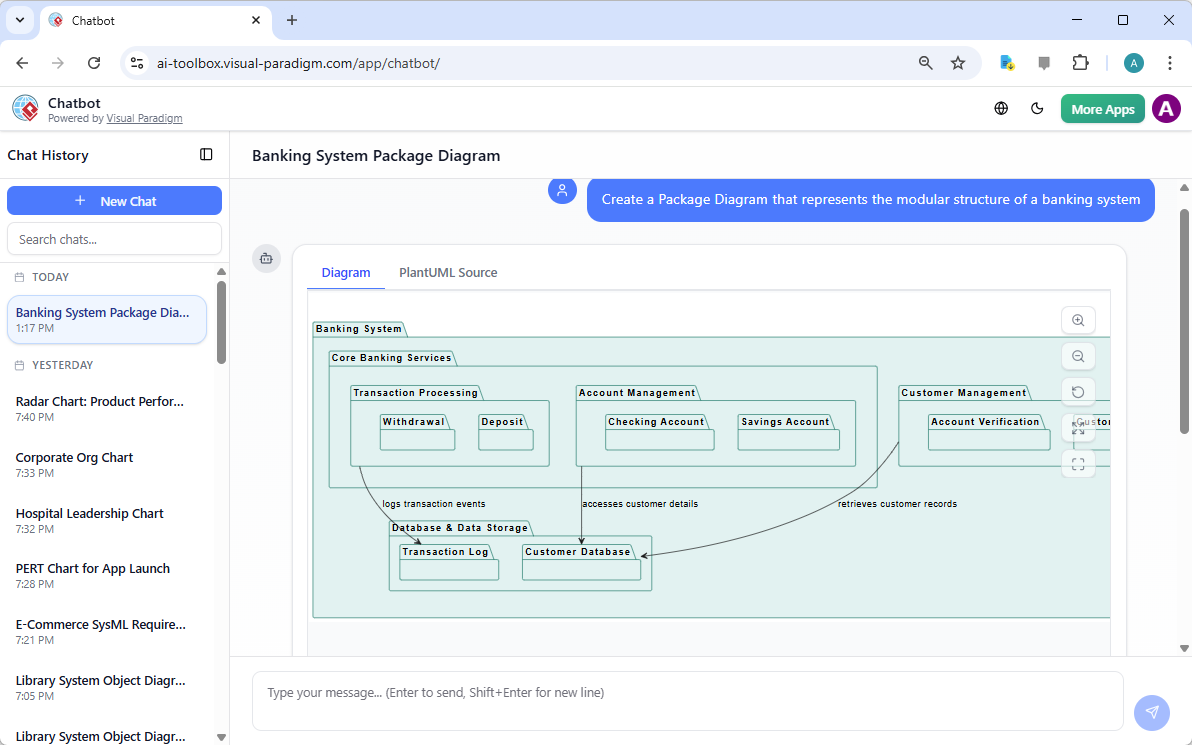
Why skeptics appreciate this: You see the AI’s reasoning in real time. If a package is misplaced, you can refine your prompt—”Move Authentication under Security Services”—and the AI diagram generator updates instantly. It’s iterative, transparent, and you remain the decision-maker.
Step 2: Integrate Directly Into Your Desktop Workflow
Already working in Visual Paradigm Desktop? The second image highlights the AI Diagram Generation feature built into the application. Access it via Tools > AI Diagram Generation, select “Package Diagram,” and describe your system: “Visualize the package structure of a content management system with Presentation, Business Logic, and Data Access layers.” This desktop AI UML tool generates a diagram that slots directly into your existing project. No copy-pasting, no format loss—just a seamless bridge from idea to model.
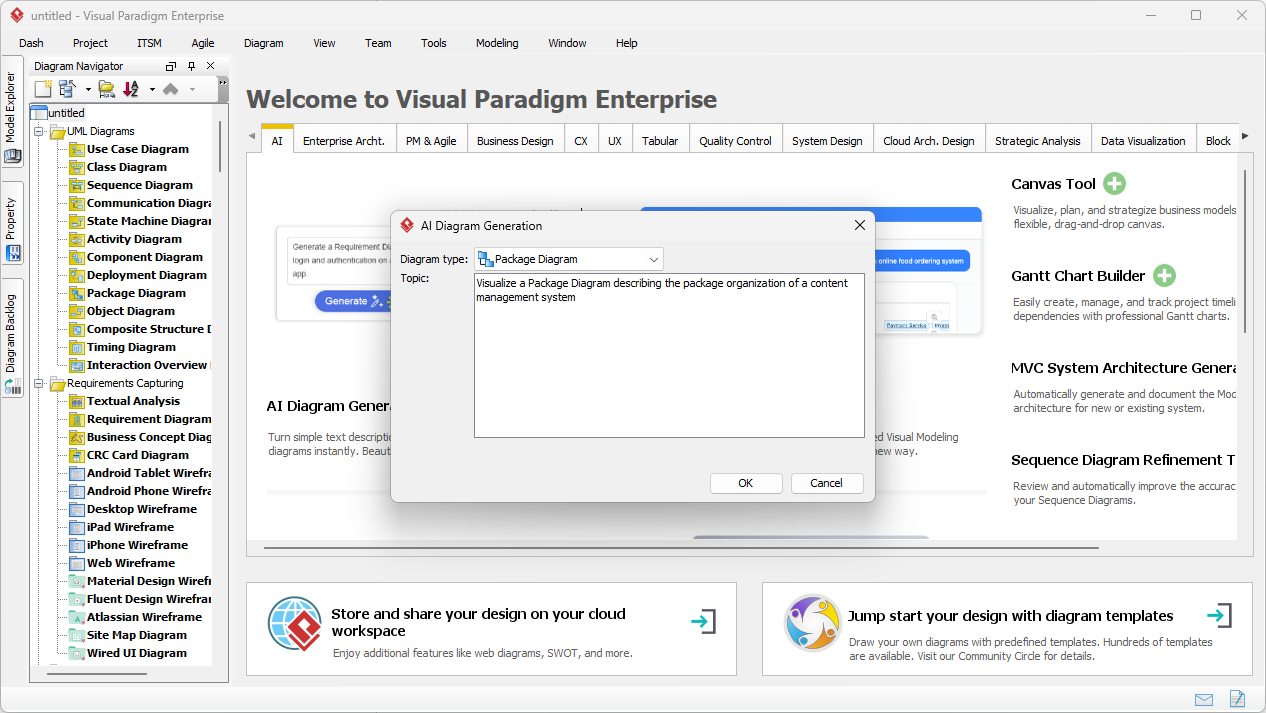
This addresses a common concern: “Will this work with my current tools?” Yes. The AI package diagram generator respects your project context, uses your naming conventions, and produces output that’s fully editable within the same environment you already trust.
Step 3: Review, Refine, and Own the Output
The final image shows the result: a professional, fully rendered UML Package Diagram inside Visual Paradigm Desktop. This isn’t a static image—it’s a live, editable model. You’ll see hierarchical packages like “Presentation Layer” and “Business Logic Layer,” with subpackages such as “Mobile Application” and “User Management,” all connected with accurate dependency lines. The AI software diagram maker has structured the elements logically, but you have full control to adjust layout, add details, or link to other diagrams.
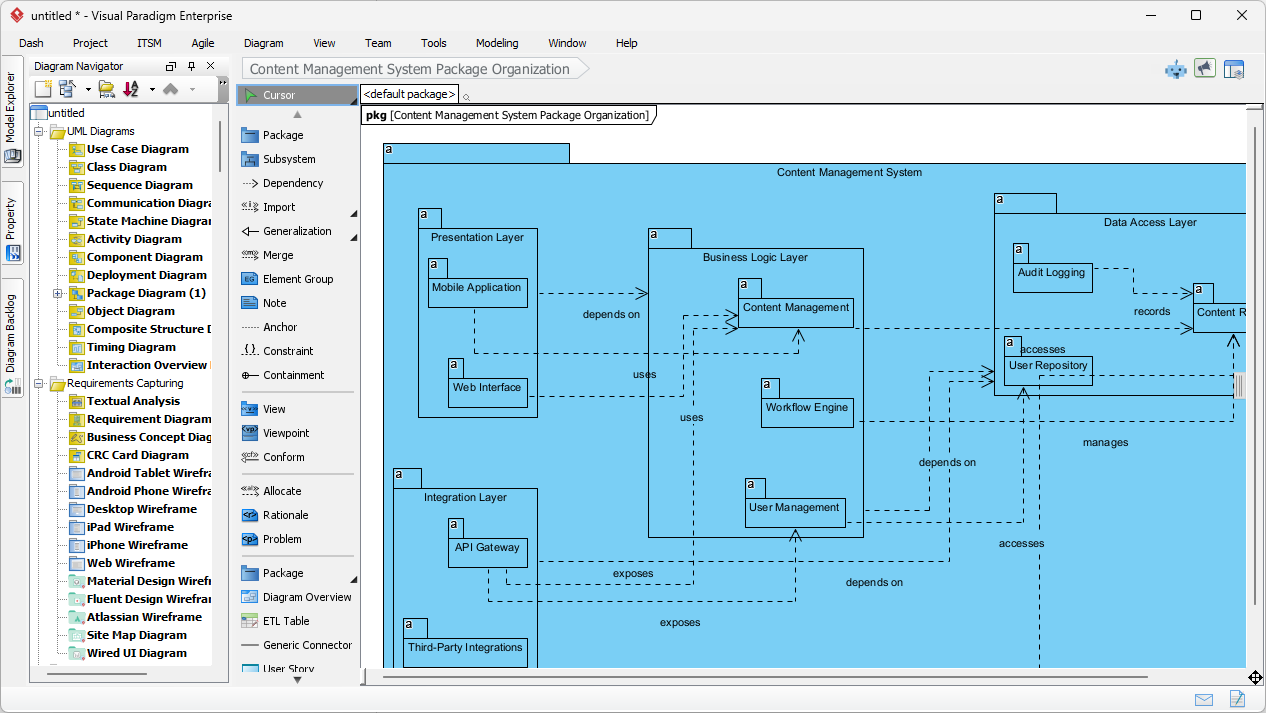
This is where skepticism turns to confidence: the AI accelerates the heavy lifting, but you curate the final architecture. It’s augmentation, not automation.
Why This AI Tool Earns Trust (Even from Skeptics)
- Transparency: See how your prompt translates to diagram elements. No hidden logic.
- Control: Every generated element is editable. You approve, adjust, or reject.
- Accuracy: Built on UML standards, ensuring diagrams are architecturally sound, not just pretty pictures.
- Time Savings: Reduce hours of manual diagramming to minutes of focused description.
- Learning Aid: New to UML? The AI UML package diagram tool demonstrates best practices as you work.
Beyond Package Diagrams: A Full AI-Powered Modeling Ecosystem
Visual Paradigm isn’t just a one-trick AI diagram generator. It supports a vast array of diagram types, from UML and SysML to C4 models and business frameworks. The AI understands context—whether you’re modeling microservices, enterprise architecture, or agile workflows—ensuring outputs are relevant and actionable. This makes it a true all-in-one online software architecture tool for teams who value precision over hype.
Ready to Try an AI Tool That Respects Your Expertise?
If you’ve been hesitant about AI, start small. Use the AI chatbot diagram maker to prototype one module. See how it interprets your language. Refine the output. Experience the time saved. You’ll likely find that this AI-powered visual modeling tool doesn’t replace your judgment—it amplifies it.
Try the Visual Paradigm AI Chatbot now and experience how a thoughtful AI UML package diagram generator can transform your workflow—without the hype.
Related Resources
UML package diagrams are essential for organizing complex software systems by grouping related elements into logical containers, helping teams visualize structural relationships, manage dependencies, and maintain scalable software architectures.
- What is a Package Diagram in UML? – Visual Paradigm Guide: Foundational introduction to organizing system components through logical grouping.
- UML Package Diagram Tutorial – CyberMedian: Step-by-step walkthrough for creating package diagrams in Visual Paradigm.
- Package Diagram Examples & Templates – Visual Paradigm Gallery: Curated real-world examples to inspire modular software design.
- Visual Paradigm User Guide: Package Diagrams: Official technical manual for creating and managing UML package diagrams.
- Modeling Software Architecture with UML Package Diagrams: Guide to using package diagrams for high-level architecture communication.
- AI Diagram Generator Now Supports Package Diagrams: Release notes on AI-powered generation for faster architecture visualization.
- UML Package Diagram: Structuring Your Codebase with AI: Definitive guide on using AI to manage dependencies and architectural scalability.
- Features of Package Diagram Software – Visual Paradigm Online: Overview of cloud-based features including collaboration and version control.
- Creating UML Package Diagrams with Visual Paradigm – Method Post: Comprehensive tutorial for improving software design organization.
- Free Package Diagram Templates – Visual Paradigm Online: Library of downloadable, customizable templates to streamline design efforts.