


In this beginner-friendly guide, we’ll walk you through exactly how to create a stunning process diagram using a solar energy workflow as our example. No prior experience? No problem. This step-by-step tutorial is designed specifically for first-time users of AI infographic tools.
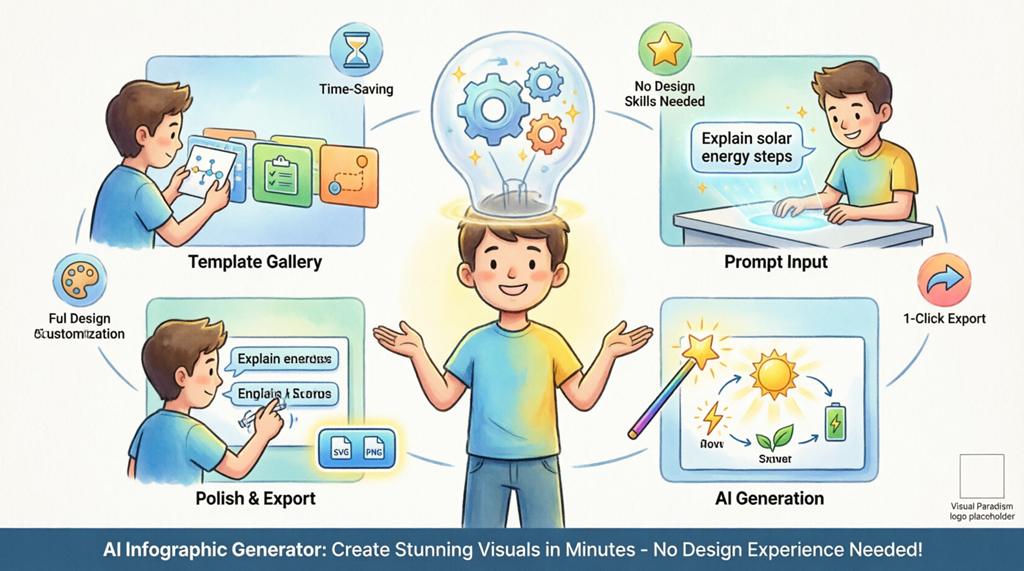
The AI infographic generator by Visual Paradigm is a revolutionary online tool that transforms simple text prompts into structured, visually appealing infographics. It’s built for people without graphic design backgrounds who still need to communicate ideas clearly—whether you’re a student, teacher, marketer, small business owner, or hobbyist. By simply describing your topic, the artificial intelligence researches content, selects relevant icons, and arranges everything into a polished, professional template. Think of it as your friendly design assistant that never gets tired.
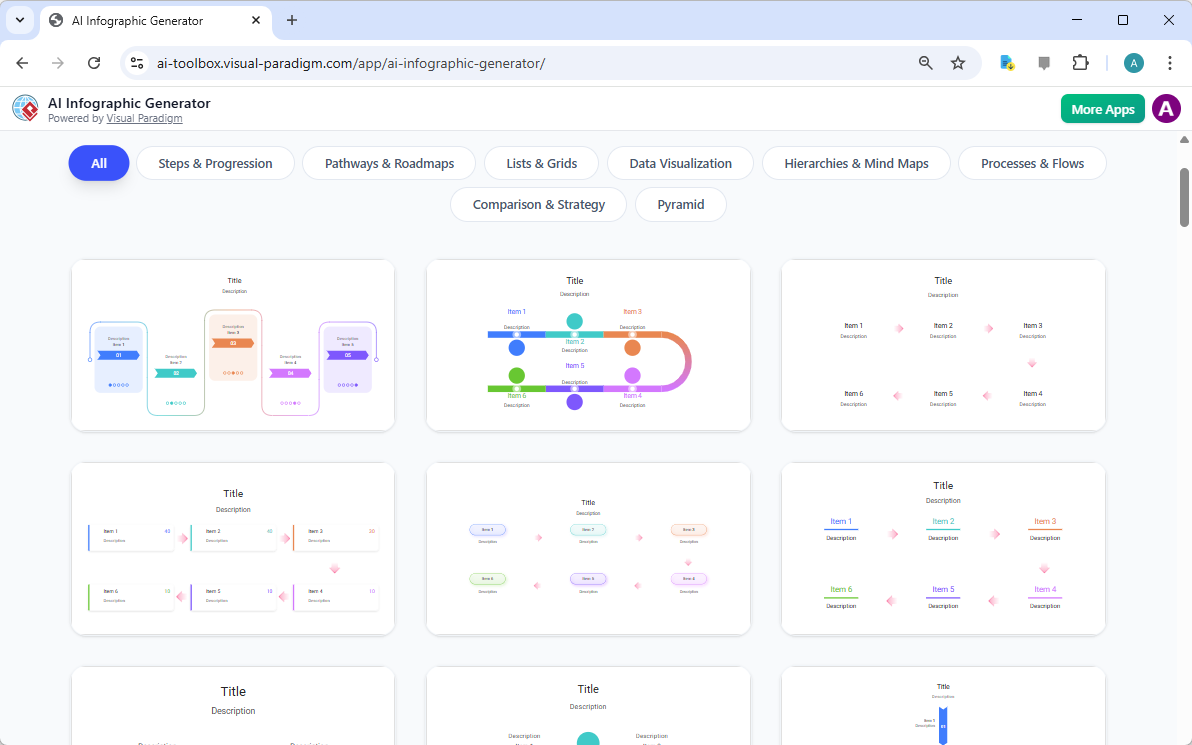
When you first open this online infographic maker, you’ll see a clean, intuitive Template Gallery. This is your starting point. Browse through dozens of professionally designed styles—from simple lists and timelines to detailed roadmaps and comparison charts. Every template is mobile-responsive and print-ready, so your final product looks great anywhere. Don’t stress about picking the “perfect” one; all templates are flexible and easy to customize later. This variety ensures that whether you’re explaining a business process, teaching a lesson, or sharing research, there’s a layout that helps your information shine.
Quick Wins: What You’ll Achieve with This AI Infographic Tool
- Zero Design Skills Needed: Create professional-grade visuals without learning complex software
- Save Hours of Work: This best AI infographic generator researches, writes, and designs your content in seconds
- Easy Customization: Adjust text, colors, icons, and layout with simple clicks—no coding required
- High-Quality Exports: Download as SVG, PNG, or PDF for crisp printing, web use, or presentations
- Beginner-Friendly Workflow: A simple sidebar-to-canvas interface keeps the process calm and focused
- Free to Start: Try this free infographic maker with no credit card required
Step 1: Launch the Online AI Infographic Maker and Pick Your Style
Ready to begin? Click to launch the AI Infographic Generator. You’ll land on the Template Gallery—a visual menu of ready-to-use designs. For beginners, we recommend starting with a “Process” or “Timeline” template since they’re straightforward and highly versatile.
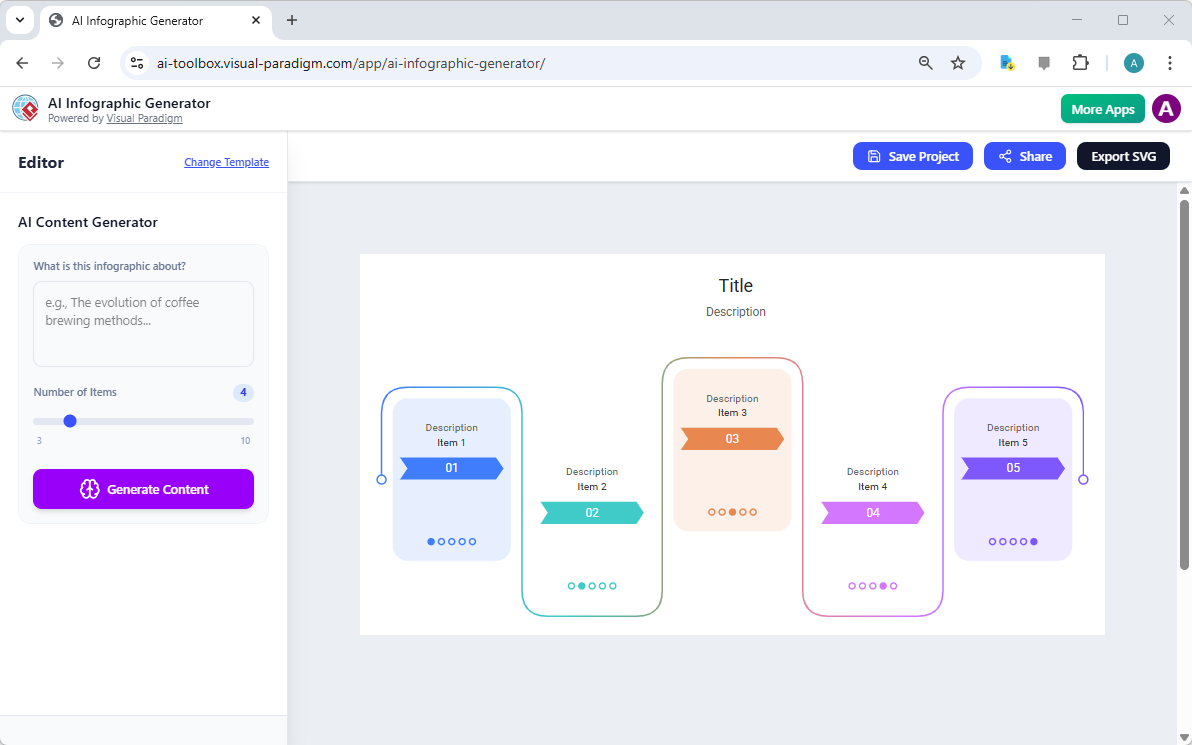
Once you select a style you like, the application opens the Editor page. This workspace is intentionally simple: on the left, you’ll find the AI prompt panel where you describe what you want; on the right, a live preview shows your infographic taking shape. This clear layout helps you stay oriented and confident as you create.
Step 2: Write Your First Prompt (It’s Easier Than You Think!)
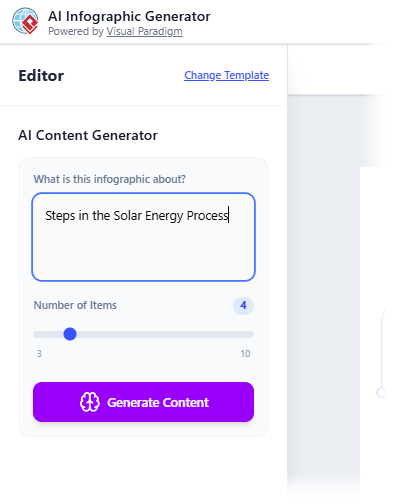
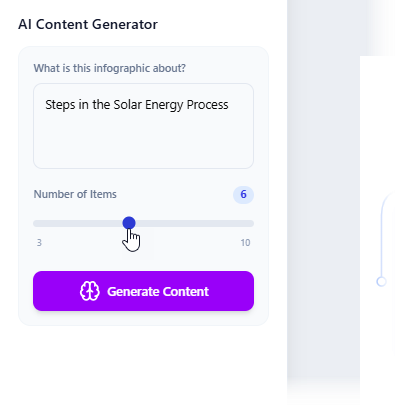
Now comes the fun part: telling the AI what you want to create. This is done through a “prompt”—just a clear, simple sentence describing your topic. For our example, we want to explain how solar energy works. Try typing: “Explain the 6 key steps in the solar energy process for beginners.”
Pro tip for beginners: Be specific but concise. Instead of “solar energy,” try “simple steps showing how solar panels convert sunlight into electricity for homes.” The more context you give, the smarter the AI infographic generator becomes. Don’t worry about perfect wording—you can always refine later.
Step 3: Fine-Tune Your AI-Generated Content
Before clicking “Generate,” you can control the detail level using the “Number of Items” slider. Want a quick overview? Choose 3-4 points. Need a detailed guide? Slide up to 8-10. For our solar energy example, 6 steps strike the perfect balance—enough detail to be helpful, not so much that it overwhelms beginners.
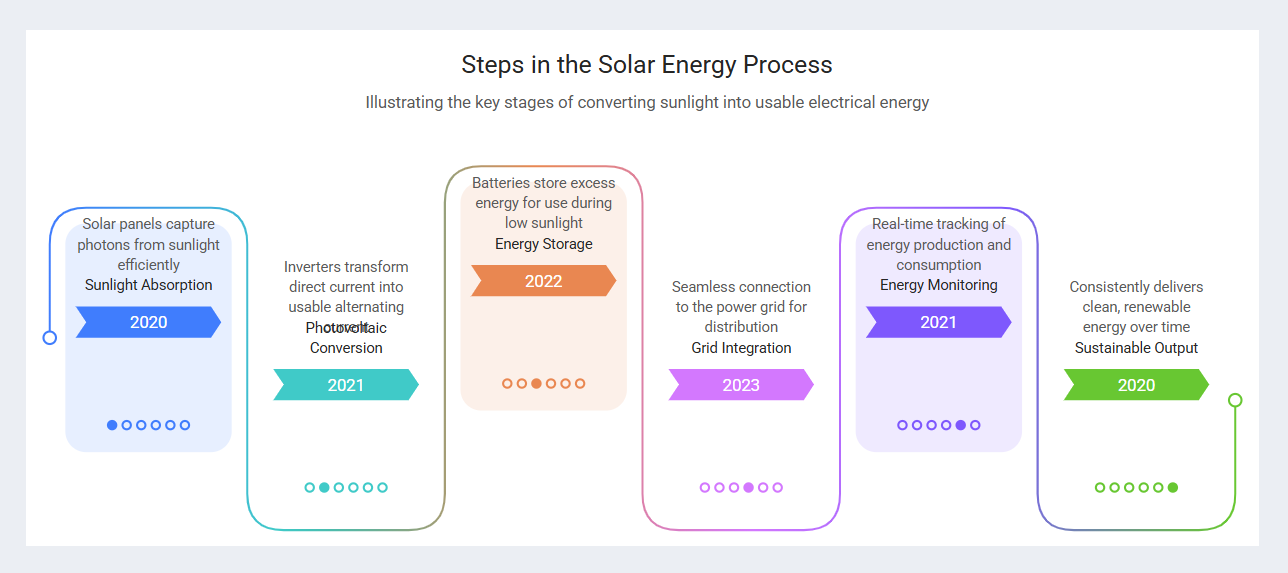
Click “Generate Content,” and watch the magic happen. The online AI-powered infographic maker analyzes your prompt, identifies key stages (like sunlight absorption, energy conversion, and grid integration), and automatically places them into your chosen template. In under a minute, your idea transforms into a visual story complete with titles, descriptions, icons, and even suggested dates or labels. This instantly solves the “blank page problem” that trips up so many new creators.
Step 4: Polish Your Infographic Like a Pro (No Experience Needed)
Sometimes the AI packs in great information but needs minor tweaks for perfect readability. Maybe text overlaps slightly, or a label feels too long. Don’t worry—this easy-to-use infographic software lets you make gentle adjustments with zero stress.
Simply click any text box to: resize it, reposition it, change the font size, or edit the wording. You can also swap icons, adjust colors to match your brand, or add your logo. These manual touch-ups are optional but powerful—they let you put your personal stamp on the AI’s work while keeping the process beginner-friendly.
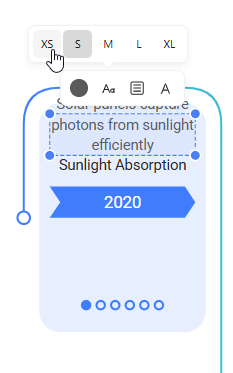
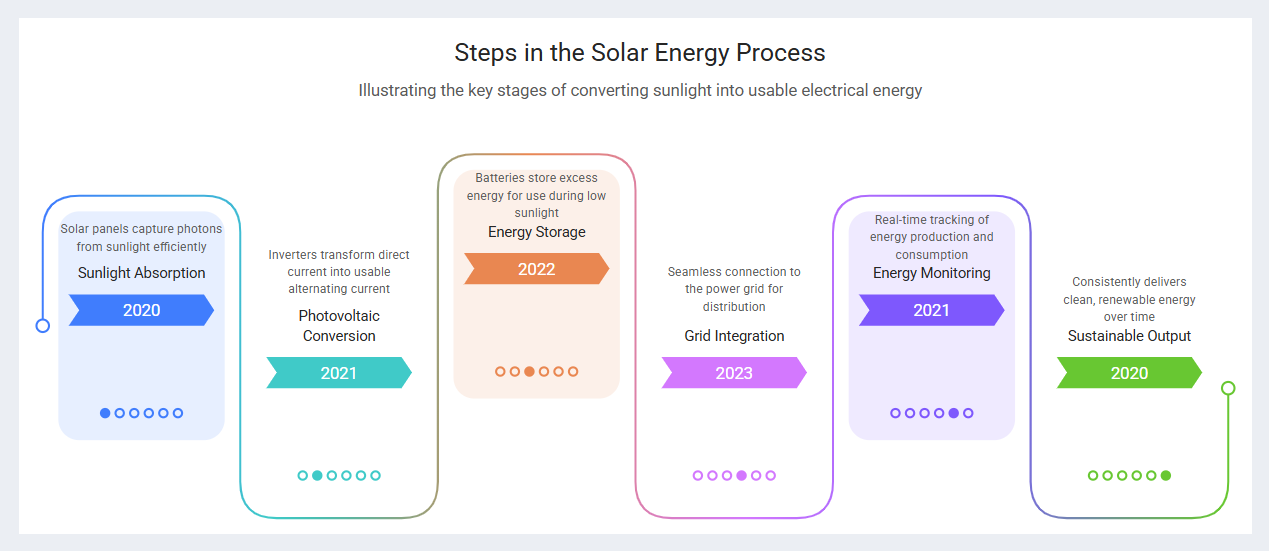
Changes appear instantly in your preview, so you see results in real time. Once everything looks crisp and clear, you’ve got a professional-quality asset ready to share. All created in minutes, not hours.
Why Beginners Love This AI-Powered Infographic Tool
Using an online AI infographic generator like Visual Paradigm’s offers unique advantages for new creators:
- Instant Confidence: Start with pro-designed templates so colors, fonts, and spacing always look cohesive
- Smart Data Visualization: The AI decides the clearest way to present each point—charts, icons, or timelines—so your audience “gets it” at a glance
- Flexible Output: Export as SVG (scalable for posters), PNG (great for social media), or PDF (perfect for reports). Or generate a shareable link to send instantly
- Learn as You Go: Each project teaches you subtle design principles—like visual hierarchy and whitespace—without overwhelming theory
- Iterate Fearlessly: Change your prompt, swap templates, or regenerate sections anytime. No “undo anxiety” with this forgiving AI infographic maker
Beginner FAQ: Your Top Questions Answered
Can I change my topic after starting? Absolutely! Just edit your prompt in the sidebar and click regenerate. The AI updates the content while keeping your chosen style.
Is the AI-generated text accurate? The tool uses reliable knowledge sources, but we always recommend a quick review. This keeps you in control and ensures the message matches your exact needs—perfect for classroom materials or client presentations.
What if I make a mistake? No worries. Every action is reversible. Use the undo button, regenerate a section, or start fresh with a new prompt. This free infographic maker is designed for experimentation.
Do I need to install anything? Nope! This is a fully online infographic maker. Just open your browser, sign in (free), and start creating. Works on laptops, tablets, and most smartphones.
Pro Tips for First-Time Users of AI Infographic Generators
- Start Small: Your first project? Try a 3-step process before tackling a 10-point timeline. Build confidence gradually.
- Use Keywords in Prompts: Include words like “simple,” “for beginners,” or “step-by-step” to guide the AI toward clearer explanations.
- Save Your Favorites: Loved a template or prompt? Bookmark it. Reuse and adapt for future projects to save even more time.
- Check Mobile Preview: Before exporting, toggle to mobile view. This ensures your infographic looks great on phones too—critical for social sharing.
- Add Your Voice: After AI generation, tweak one or two phrases to match your tone. This small edit makes the final piece feel authentically yours.
When to Use This Online AI Infographic Maker
This beginner-friendly tool shines for:
- Explaining complex processes (like our solar energy example)
- Creating classroom handouts or study guides
- Designing social media content that educates
- Preparing client reports or pitch decks
- Visualizing project timelines or workflows
- Summarizing research or blog posts into shareable graphics
Remember: You don’t need to be a designer to communicate visually. You just need a clear idea and the right AI-powered infographic tool to bring it to life.
Start Creating Beautiful Infographics Today—No Experience Required
Ready to turn your ideas into stunning visuals? There’s never been a better time to try AI-driven design. Visual Paradigm’s AI infographic generator is built for beginners like you: intuitive, forgiving, and powerful.
Launch the app now, pick a template that sparks joy, type your first prompt, and watch your idea transform. We can’t wait to see what you create!
Try the AI Infographic Generator now: Launch the AI Infographic Generator
Learn more about features and tutorials: Visit the Official Information Page
Explore More Beginner-Friendly Design Resources
Want to keep learning? These trusted resources expand your skills with online infographic makers and AI design tools:
- Free Infographic Maker – Create Professional Infographics Online: Start designing instantly with this web-based tool—no experience needed.
- InfoArt – All-in-One Infographic Design Platform: Create, share, and publish pro infographics using simple drag-and-drop tools.
- Step-by-Step Guide to Creating Infographics with Visual Paradigm Online: A detailed walkthrough for designing effective visuals with a beginner-friendly interface.
- AI-Powered Visual Tools for Creating Infographics, Charts, and Graphics: Discover how artificial intelligence speeds up design with smart suggestions and automation.
- Visual Paradigm Online: Create Stunning Infographics and Diagrams: See how this versatile platform handles both simple infographics and complex technical diagrams.
- Infographic Templates – Ready-to-Use Designs for Quick Creation: Browse hundreds of categorized templates to jumpstart your next project.
- Best Infographic Design Tools – Compare Features & Benefits: Compare top tools to find the perfect AI infographic generator for your needs.
- AI-Powered 3-Aspect Infographic Designer Tool: Learn about an advanced AI tool that uses three intelligent dimensions for instant, high-quality generation.
- Five Key Elements of Designing an Effective Infographic: Master the essentials for creating engaging, informative visual stories.
- InfoChart – Create Informative Charts and Infographics Easily: A specialized tool for clear, data-driven visuals perfect for reports and presentations.