


🚀 In the evolving landscape of software architecture, the boundary between technical execution and strategic oversight is becoming increasingly important. Artificial Intelligence has dramatically accelerated the act of drawing Data Flow Diagrams (DFDs). While AI tools can generate complex diagrams from natural language descriptions in seconds, human-led modeling remains the essential pillar for strategic alignment, accuracy, and long-term maintainability. This guide explores why human intervention is still non-negotiable when working with AI and how to effectively leverage tools like Visual Paradigm to bridge the gap between raw data and actionable business logic. 🤖✨
🧠 Why Modeling Still Matters in the Age of AI
It is a common misconception that AI can completely replace human modelers. 🛑 While AI excels as a powerful generator, it lacks the deep business intuition required to interpret complex organizational nuances. Modeling serves several critical functions that AI cannot yet fully replicate, ensuring that the final artifact is not just a visual diagram but a robust bridge between IT and business strategy. 💼📐
1. 🎯 Strategic Alignment
A primary role of the modeler is ensuring that technical designs align with high-level business goals and stakeholder requirements. AI may generate a technically correct diagram based on keywords, but it may miss the strategic intent behind specific data flows. For instance, an AI might connect two processes because they share a root concept, whereas a human modeler understands that the connection represents a specific policy or compliance rule that must be explicit. 🔄✅
2. 🛡️ Error Prevention and Data Integrity
Large Language Models (LLMs) can misinterpret ambiguous data requests or hallucinate connections that do not logically exist. 👁️ Human-led modeling identifies anomalies, redundancies, and inconsistencies early in the development lifecycle. Processing a diagram with errors is cheap; deploying a system based on a flawed model is costly. 💸 Humans act as quality engineers, verifying that data flows are consistent, that no circular dependencies exist without justification, and that every process item has a clear ownership. 🔍
3. 🗣️ Creating a Shared Understanding
The iterative process of creating a model fosters consensus among stakeholders. When everyone discusses the system architecture, it creates a “single source of truth” that AI-generated drafts often lack. AI provides a starting point, but the dialogue required to refine that draft—including debating edge cases and clarifying role definitions—is where the true understanding solidifies. 👥🤝
4. ⚖️ Ethical & Regulatory Compliance
Finally, humans must oversee data lineage and security to ensure models meet legal standards such as GDPR or HIPAA. 📜 AI tools can suggest risk factors, but a human expert must validate whether those risks actually exist in the proposed architecture and whether the controls implemented will withstand an audit. 🕵️♀️
⚡ Introducing Visual Paradigm AI Chatbot for DFDs
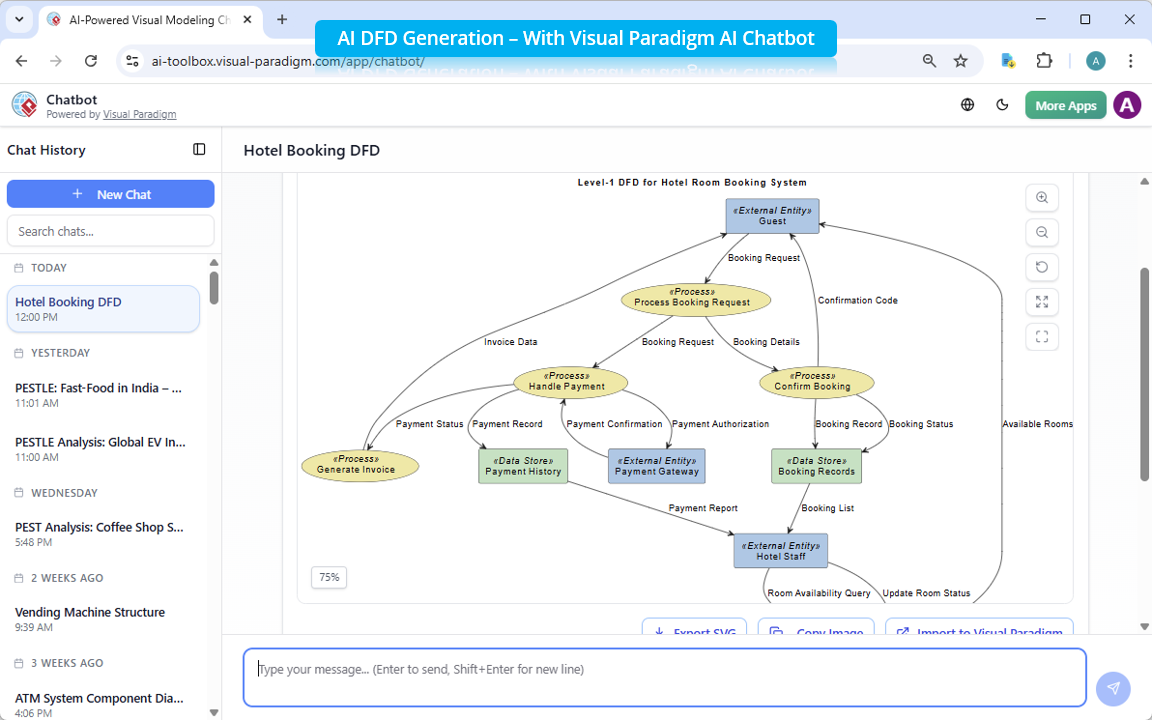
Visual Paradigm has addressed the need for both speed and structure by integrating an AI-powered Data Flow Diagram generator directly into its platform. 🌟 Available as of March 2026, this tool shifts the workflow from traditional manual drag-and-drop to a conversational interface, allowing developers to leverage the speed of generative AI without losing control of the output.
🚀 Key Capabilities of the AI Assistant
- 🤖 Instant Generation from Text: Users can describe a system in plain English, such as “Create a DFD for an online library system.” The AI understands this context and instantly builds a complete diagram, populating it with external entities, processes, data stores, and labeled data flows. This eliminates the initial blank-canvas paralysis often faced by modelers. ✨
- ✏️ Conversational Editing: Unlike static generation, the DFD generation tool supported by Visual Paradigm AI Chatbot allows for iterative refinement. Users can treat the generated diagram as a live document, using simple text commands to modify it. Requests like “Add a payment gateway between the user and the inventory system” or “Rename Customer to Buyer” are executed immediately, requiring no manual node dragging. ⚡
- 🧐 Intelligent Analysis: The tool goes beyond creation to support querying. Users can ask the diagram analysis engine direct questions, such as “What data enters the inventory process?” or “Identify potential security risks in this flow.” This capability turns the diagram into an interactive knowledge base. 📊
🛠️ A Practical Workflow: How to Use the Tool
To maximize the benefits of this hybrid approach, follow this structured workflow:
- 📝 Initiate the Conversation: Access the Visual Paradigm AI Chatbot. Instead of starting from scratch, provide a clear, context-rich prompt describing your system’s data flow and primary business logic.
- 🔍 Review and Refine: Examine the generated diagram critically. Does it match your mental model? Use follow-up prompts to tweak the layout, correct entity names, or adjust data flows.
- ✅ Final Human Audit: Conduct the necessary ethical review, regulatory check, and stakeholder alignment sessions now that the foundational visual is established. This significantly reduces the time spent on repetitive drawing while maintaining rigorous quality control. 🏆
By combining the generative speed of AI with the strategic oversight of human experts, teams can produce high-quality Data Flow Diagrams faster than ever before, without compromising the integrity of the software architecture. 🌟🚀
📚 References
- Visual Paradigm AI Chatbot – Generate & Edit Diagrams with Natural Language:
Introduces the cloud-based AI Chatbot (integrated in VP Online and Desktop) that instantly creates UML, SysML, ArchiMate, C4, mind maps, SWOT/PESTLE, and many other diagrams from text prompts, plus conversational editing, querying, and documentation generation. 🤖 - AI-Powered Data Flow Diagram (DFD) Generator Added to Visual Paradigm AI Chatbot:
Official announcement of the new AI feature that lets users generate professional DFDs instantly from natural language descriptions (e.g., “Generate a DFD for a warehouse management system”), with automatic elements, labeling, and follow-up refinement via conversation. 📢 - New in OpenDocs: AI-Powered Data Flow Diagram (DFD) Support:
Details the addition of AI-generated DFDs directly in OpenDocs (supporting notations like Yourdon DeMarco, Yourdon & Coad, Gane-Sarson), allowing fast creation from text, embedding in docs, and collaborative editing. 📄 - Key Features of the Visual Paradigm AI Chatbot:
In-depth look at core capabilities: instant diagram generation (UML, ArchiMate, etc.), conversational editing/refinement, automatic documentation/report generation, and intelligent querying/analysis of models (e.g., explaining elements, spotting issues). Includes practical prompt examples. ☝️ - How to Create Data Flow Diagrams from Text Using AI in Visual Paradigm:
Step-by-step tutorial showing how to describe a system in plain language (e.g., online shopping), let the AI generate a structured DFD (with entities, processes, stores, flows), choose notation, and then edit/refine the result in the full Visual Paradigm editor. 🗺️ - Generate UML Object Diagrams with AI – Visual Paradigm Tutorial (YouTube):
Video walkthrough demonstrating real-time use of the AI Chatbot to create and refine a UML Object Diagram (example: vehicle maintenance system), including adding objects, attributes, links, and importing the result into Visual Paradigm for further work. 🎥
💡 Pro Tip: Would you like a sample prompt you can use right now to test out a specific system in the Visual Paradigm AI Chatbot? Try asking: “Create a DFD for a hospital patient management system, including registration, diagnostics, and billing processes.” 🏥💉
