


Enterprise architecture demands precision. When managing complex IT landscapes, the ability to visualize how applications support business goals is critical. ArchiMate notation provides a standardized language for modeling this structure. By applying this framework correctly, architects can transform chaotic inventories into intelligible portfolios. This guide details the process of constructing clear, maintainable application models without relying on specific vendor tools.
Understanding the Application Layer 🧩
The Application Layer is the core of any IT architecture model. It represents the software systems, services, and components that deliver functionality to the business. Unlike a simple list of software assets, an ArchiMate portfolio describes the relationships and services these assets provide.
Clarity begins with defining boundaries. An application portfolio should not be a dump of every installed binary. Instead, it must focus on value delivery. Each entry in the portfolio represents a distinct unit of functionality that can be understood by stakeholders. This distinction separates the portfolio from a technical inventory.
Key principles for the Application Layer include:
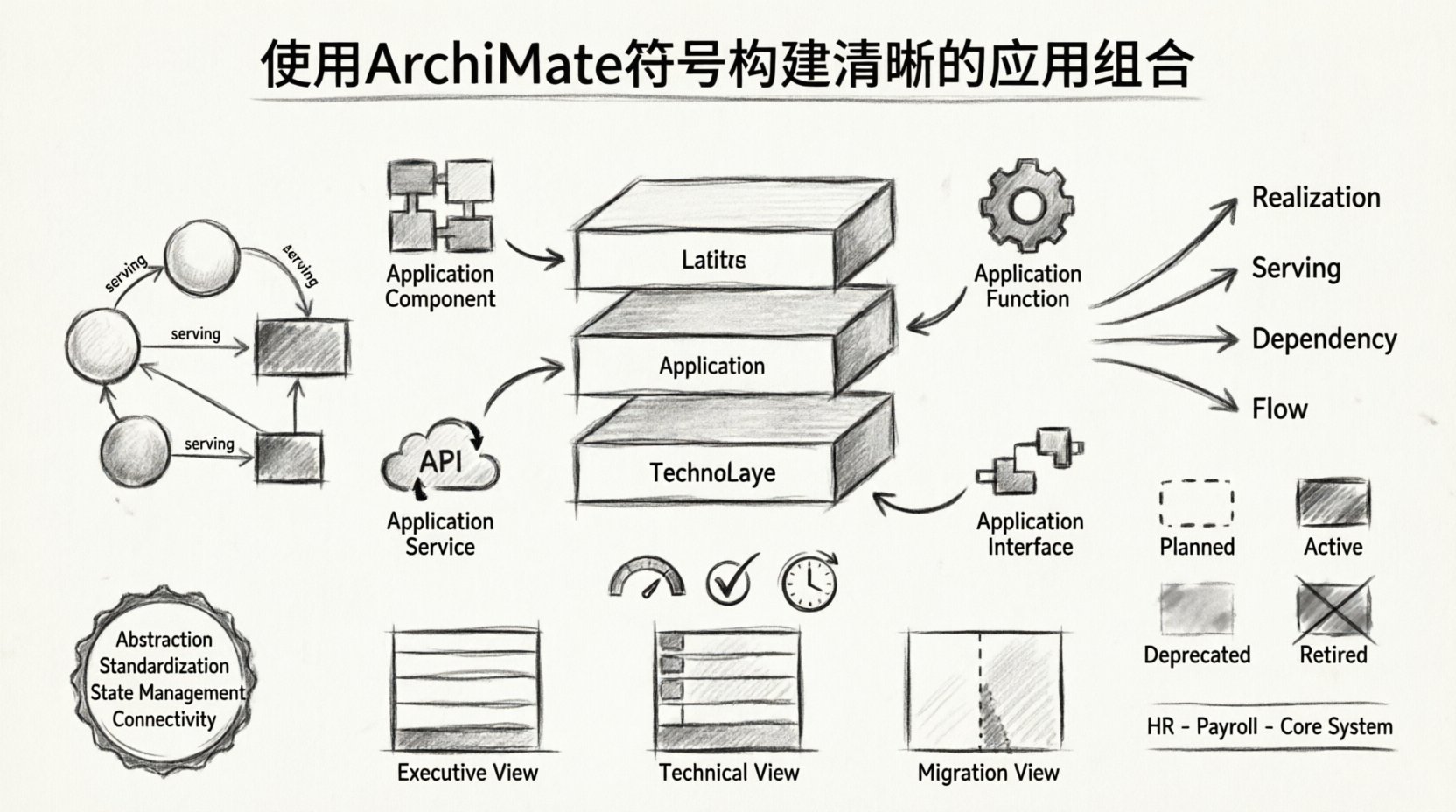
- Abstraction: Group related applications into logical domains or domains of responsibility.
- Standardization: Use consistent naming conventions across the model.
- State Management: Track the lifecycle state of each application (e.g., Planned, Active, Retired).
- Connectivity: Define how applications interact with one another and with the Business Layer.
Core ArchiMate Elements for Applications 📋
To build a robust portfolio, one must understand the specific building blocks available in the notation. Using the correct element types ensures the model remains semantically accurate.
| Element Type | Description | Use Case |
|---|---|---|
| Application Component | A modular part of an application that can be developed and deployed independently. | Microservices, internal modules, or distinct libraries. |
| Application Function | A specific behavior provided by an application component. | Reporting, User Management, Transaction Processing. |
| Application Service | A set of functions provided by an application to an actor or another application. | External API endpoints, shared data access. |
| Application Interface | The point of interaction between an application and an external system. | REST APIs, SOAP endpoints, file adapters. |
When populating the portfolio, avoid over-specifying. An Application Function is often too granular for a high-level portfolio view. An Application Service is usually the appropriate level for stakeholders to understand what they can consume. For example, a “Billing System” is an Application Component. “Generate Invoice” is an Application Function. “Provide Billing Data” is an Application Service.
Using the right level of detail prevents the model from becoming unreadable. A portfolio that lists every function will fail to communicate strategic intent. A portfolio that only lists components may miss critical dependencies.
Defining Relationships and Dependencies 🔗
Applications do not exist in isolation. Their value is derived from how they connect to business processes and other IT systems. ArchiMate defines specific relationship types to model these interactions accurately.
| Relationship | Direction | Meaning |
|---|---|---|
| Realization | Service → Function | The function realizes the service. |
| Access | Application Component → Application Function | The component accesses the function. |
| Serving | Application → Business Process | The application supports the process. |
| Dependency | Application A → Application B | A relies on B to function. |
| Flow | Data Object → Application | Data flows into or out of the application. |
Dependencies are often the most critical part of portfolio management. When assessing risk or planning migration, knowing which applications rely on which others is essential. A change in a core database application might impact five downstream reporting tools. Without mapping these dependencies, the impact analysis is guesswork.
Use the Dependency relationship sparingly. It should only be used when the failure of one application directly prevents another from working. Do not confuse this with data flow. If Application A sends data to Application B, use a Data Flow or Communication Flow. If Application A requires Application B to be running to function, use Dependency.
Aligning with Business Capabilities 🚀
A clear application portfolio must answer the question: “What business capability does this support?” This alignment is achieved by linking the Application Layer to the Business Layer.
Business Capabilities represent what the organization does, not how. Applications represent how the organization executes those capabilities. By mapping applications to capabilities, architects can identify gaps and redundancies.
Consider a scenario where two different departments use separate applications for “Customer Management.” If the business capability is simply “Manage Customer Relationships,” the existence of two applications suggests redundancy. This insight drives consolidation strategies.
Steps to align applications with capabilities:
- Identify Core Capabilities: Define the high-level business abilities required for the strategy.
- Map Applications: Draw a serving relationship from the application to the capability.
- Analyze Overlap: Look for multiple applications serving the same capability.
- Assess Health: Evaluate if the application supporting the capability is stable, outdated, or scalable.
This mapping provides context. An application without a business capability link is a liability. It is a cost center with no visible strategic value. Conversely, a capability without an application link represents a gap where manual processes or shadow IT may be operating.
Structuring for Clarity 📊
Visual organization is key to readability. A flat list of applications is difficult to analyze. Structuring the portfolio into views allows different stakeholders to see what matters to them.
Grouping Strategies
Group applications by logical domains. Common groupings include:
- Functional Domains: Finance, HR, Supply Chain.
- Technical Layers: Core Systems, Front-End, Data Layer.
- Ownership: Departmental boundaries.
Do not mix these groupings in a single view. Keep the architecture clean. Use sub-diagrams or views to separate concerns. For example, a “Front-End View” might show all user-facing applications, while a “Back-End View” shows the data stores and core engines.
Naming Conventions
Inconsistent naming creates confusion. Adopt a standard format for all application names. A recommended pattern is:
<Domain> – <Function> – <Type>
Example: HR - Payroll - Core System. This allows for easy filtering and searching. Avoid abbreviations that are not universally understood within the organization. If a team uses “CRM,” ensure the broader organization understands this refers to “Customer Relationship Management.”
Common Modeling Challenges ⚠️
Even with a solid framework, pitfalls exist. Architects often struggle with complexity management. Here are common issues and how to address them.
Over-Modeling
Attempting to model every single interface between applications leads to spaghetti diagrams. The model becomes unreadable. Focus on the critical paths. If Application A talks to Application B, but only for a background job that runs once a day, it may not need to be in the primary portfolio view. Document it in a separate technical specification.
Ignoring Lifecycle States
Portfolios change. Applications are retired, replaced, or paused. An ArchiMate model should reflect the current state. Use the Application Lifecycle attribute to mark applications as:
- Planned: Under consideration or development.
- Active: In production use.
- Deprecated: Scheduled for removal.
- Retired: No longer in use.
Stakeholders need to know if a system is active. A portfolio showing only active systems provides a clear picture of the current landscape. A portfolio mixing active and retired systems without clear labeling creates noise.
Lack of Business Context
Technical models that lack business context are ignored. If the model only shows technical dependencies, business leaders will not engage. Ensure every major application has at least one link to a Business Process or Business Function. This ensures the model speaks the language of the business.
Creating Effective Views 👁️
A single view cannot show everything. The power of the notation lies in creating specific views for specific audiences. A view is a filtered subset of the architecture that addresses a specific concern.
Executive View: Focus on the Application Layer and Business Layer. Show high-level applications and the capabilities they support. Hide technical interfaces and data flows. This view answers strategic questions about investment and capability coverage.
Technical View: Focus on the Application Layer and Technology Layer. Show interfaces, data flows, and deployment nodes. Hide business capabilities. This view answers implementation questions about integration and infrastructure.
Migration View: Show the current state and the target state. Use dashed lines or different colors to indicate planned changes. This view is essential for transformation projects.
When creating these views, use standard ArchiMate view conventions. Do not invent new symbols. If you need to indicate a specific status, use a standard stereotype or a color convention documented in your style guide.
Lifecycle Management and Maintenance 🔄
An architecture model is a living document. It requires maintenance to remain useful. A static model becomes obsolete within months. Establish a governance process for updates.
Change Management
When a new application is introduced, it must be added to the portfolio. When an old one is removed, it must be marked retired. The architecture team should be part of the Change Advisory Board (CAB). This ensures the model reflects reality.
Review Cycles
Schedule regular reviews. A quarterly review ensures the model stays current. During these reviews, validate:
- Are all active applications documented?
- Are relationships up to date?
- Are the business capability links accurate?
Automated discovery tools can help identify active applications. However, they cannot validate the business purpose. Human review is necessary to confirm the semantic relationships.
Integration with Technology and Data 🖥️
While the focus here is the Application Layer, it sits within a broader context. Understanding its connection to Technology and Data adds depth to the portfolio.
Technology Layer: Applications run on technology. Mapping applications to nodes, devices, or clouds provides insight into infrastructure requirements. If an application relies on a specific hardware component, this should be visible. This helps in capacity planning and disaster recovery.
Data Layer: Applications process data. Data Objects represent the information entities. Linking applications to Data Objects clarifies data ownership. If an application creates a “Customer Record,” it owns that data. Other applications consuming that record have a dependency on its schema and integrity.
Governance and Standards 📜
To maintain clarity, standards are mandatory. Without standards, every architect will model the portfolio differently, leading to fragmentation.
Define a style guide. This document should cover:
- Color Coding: Which colors represent which lifecycle states?
- Font Usage: Bold for components, italic for interfaces.
- Layout Rules: Left-to-right flow, grouping alignment.
- Notation Rules: When to use Composition vs. Association.
Training is also essential. Ensure all architects understand the semantics of the notation. Misusing a relationship type can lead to incorrect impact analysis. A Dependency is not the same as a Association. Precision matters.
Measuring Success 📏
How do you know the portfolio is clear? Look for feedback from stakeholders. If business leaders can look at the model and understand the investment, the portfolio is effective. If technical teams can use it to plan migrations, it is useful.
Key metrics for a healthy portfolio include:
- Completeness: Percentage of active applications documented.
- Accuracy: Number of reported discrepancies during audits.
- Usability: Time taken to answer a specific architecture question.
- Adoption: Frequency of model updates and stakeholder access.
A portfolio that sits on a shelf is a failure. It must be integrated into the daily workflow of the organization. This requires buy-in from management and accessibility for the teams building the systems.
Future Considerations 🌐
The landscape of enterprise architecture evolves. New paradigms like cloud-native architectures and microservices change how applications are structured. The ArchiMate notation is flexible enough to accommodate these changes.
For cloud environments, focus on the logical application rather than the physical instance. A microservice is an Application Component. A serverless function is also an Application Component. The relationship remains the same. The infrastructure changes, but the functional intent does not.
As organizations move toward API-led connectivity, the Application Interface becomes more critical. Ensure the portfolio highlights exposed services. This visibility supports the ecosystem of partners and developers who consume the architecture.
Final Thoughts on Modeling Discipline 🧘
Building a clear application portfolio is an exercise in discipline. It requires resisting the urge to include every detail. It requires making decisions about what to show and what to hide. It requires constant communication with stakeholders to ensure the model remains relevant.
By adhering to the ArchiMate notation and following these structural guidelines, you create a model that serves as a reliable source of truth. This clarity reduces risk, improves communication, and enables better strategic decision-making. The notation is not just a drawing tool; it is a method for thinking about complexity.