


Enterprise architecture often gets trapped in technical silos. Leaders make decisions based on value, risk, and strategy, yet they frequently encounter diagrams filled with boxes, arrows, and jargon that obscure the actual business impact. The gap between the architecture team and the C-suite is not a failure of intelligence; it is a failure of translation. 🗺️
ArchiMate provides a structured language to bridge this divide. It is not merely a diagramming standard but a modeling language designed to describe, analyze, and visualize business architecture. When applied correctly, it transforms abstract technical concepts into tangible business narratives. This guide explores how to leverage ArchiMate to communicate effectively with non-technical stakeholders, ensuring alignment without the confusion.
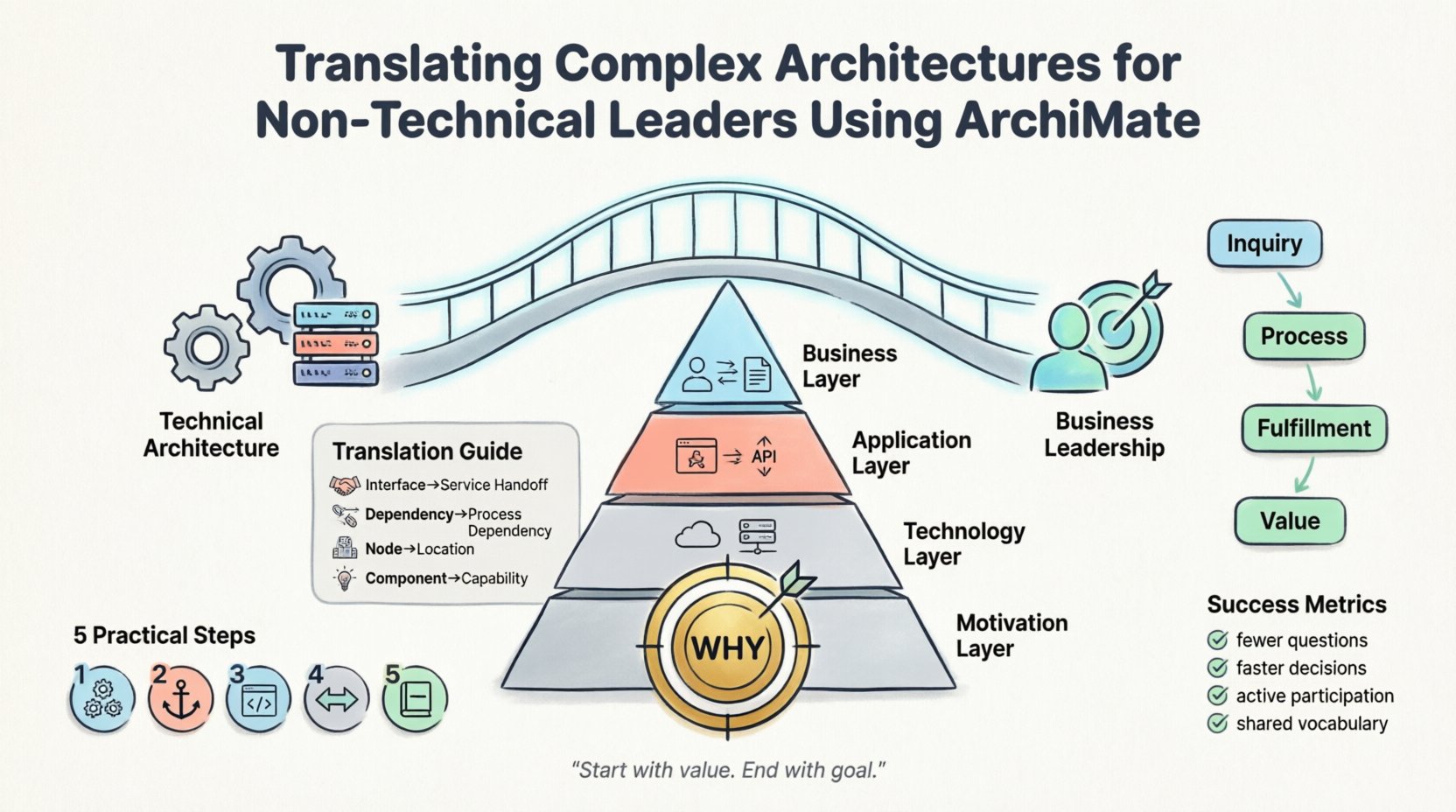
The Communication Chasm: Why Architecture Fails Leaders 📉
When an architect presents a technical roadmap to a business executive, the default reaction is often confusion or disengagement. This happens for several specific reasons:
- Abstraction Mismatch: Architects focus on components, interfaces, and protocols. Executives focus on capabilities, value streams, and outcomes.
- Information Overload: A single diagram containing fifty entities overwhelms cognitive load, preventing the viewer from seeing the forest for the trees.
- Lack of Context: Technical dependencies are shown, but the business drivers behind them are missing.
- Jargon Barriers: Terms like “interface,” “deployment,” or “service” have different meanings in IT compared to general business operations.
To fix this, we must shift the perspective. The goal is not to simplify the truth, but to translate it into a language that drives decision-making. ArchiMate offers the layers and relationships necessary to make this shift possible.
ArchiMate Fundamentals: A High-Level View 🧩
ArchiMate is an open and independent enterprise architecture modeling language. It allows for the description of enterprise architecture in a uniform way. It covers the business, application, and technology layers, as well as the motivation and strategy layers. For non-technical leaders, the focus should primarily be on the Business and Motivation layers, using the others only to support the narrative.
Think of ArchiMate as a grammar for architecture. Just as a sentence needs a subject, verb, and object to convey meaning, an architecture diagram needs actors, processes, and objects to convey value. Without this structure, diagrams are just doodles.
Decoding the Layers for Business Context 🏗️
Understanding the layers is the first step in translation. Each layer serves a different audience and purpose. When presenting to leaders, you must select the right layer to answer their specific questions.
1. The Business Layer
This is the most critical layer for non-technical stakeholders. It represents the organization’s structure and operations. It includes:
- Business Actors: People or organizations performing roles (e.g., “Customer,” “Sales Department,” not “John Smith” or “Server 01”).
- Business Processes: Logical flows of activities (e.g., “Order Processing,” “Claim Approval”).
- Business Functions: Groupings of activities (e.g., “Human Resources,” “Finance”).
- Business Objects: Key information entities (e.g., “Invoice,” “Product Catalog”).
- Business Services: Capabilities offered to internal or external actors (e.g., “Credit Check,” “Delivery Scheduling”).
When a CFO asks, “How will this change affect our cost structure?”, you look at Business Functions and the processes they support. When a COO asks, “Where is the bottleneck?”, you look at the Business Processes.
2. The Application Layer
While leaders may not care about the specific software, they care about the capabilities the software provides. The Application Layer describes the logical software components that support the Business Layer.
- Application Components: Logical software units (e.g., “Inventory Management System”).
- Application Services: The functions provided by the software (e.g., “Search Product,” “Update Status”).
The translation strategy here is to map the Application Service directly to the Business Service. If the business service is “Real-time Delivery Tracking,” the application service is “API Gateway for Logistics.” The leader hears the business service; the architect understands the application service.
3. The Technology Layer
This layer describes the physical hardware and infrastructure. For most business leaders, this is invisible. However, it becomes relevant during cost discussions or risk assessments.
- Technology Nodes: Hardware or environments (e.g., “Cloud Infrastructure,” “Data Center”).
- Network: Communication paths.
Only introduce this layer when discussing specific risks, such as single points of failure or compliance requirements.
The Power of the Motivation Layer 🎯
This is the differentiator. Most technical diagrams stop at “what is happening.” ArchiMate includes a Motivation Layer that explains “why it is happening.” This is the native language of leadership.
Stakeholders in the Motivation Layer include:
- Goal: A specific target the organization wants to reach (e.g., “Reduce Operational Costs by 10%”).
- Principle: A rule that guides decision-making (e.g., “Data Privacy First”).
- Requirement: A condition that must be met (e.g., “Compliance with GDPR”).
- Assessment: An evaluation of a situation or performance.
By linking a technical change to a Goal, you make the change relevant. A new server is just hardware. A new server that supports the “Reduce Operational Costs” goal is a strategic investment.
Visualizing Value Streams for Stakeholders 🔄
Value Streams are the backbone of business architecture. They describe the sequence of activities that create value for a specific stakeholder. Using ArchiMate to map these streams helps leaders see the end-to-end picture.
A Value Stream consists of:
- Value Stream Stage: A distinct phase in the stream (e.g., “Customer Inquiry,” “Order Fulfillment”).
- Value Stream Node: The specific capability or actor involved in that stage.
When presenting a Value Stream map, focus on the flow of value. Do not show every system touchpoint. Show the stages that matter to the customer or the employee. This highlights where value is created and where waste occurs.
Example Translation Table:
| Technical Concept | Business Translation | Leader Question Answered |
|---|---|---|
| Application Interface | Service Handoff | How do departments work together? |
| Component Dependency | Process Dependency | What happens if this process fails? |
| Deployment Node | Location or Environment | Where does this run and what is the risk? |
| Software Component | Business Capability | Can we do this function? |
Practical Steps for Effective Translation 🛠️
Creating the model is one thing; presenting it is another. The following steps ensure the architecture resonates with non-technical audiences.
1. Start with the Business Layer
Always begin your presentation with Business Architecture. Establish the “What” before the “How.” Show the capabilities and processes first. Only drill down into the Application or Technology layers if the business layer raises a question about feasibility or cost.
2. Use the Motivation Layer to Anchor Decisions
Every diagram should be linked to a Goal or a Principle. If a diagram exists without a clear “why,” it is likely noise. Ensure every proposed change traces back to a business driver.
3. Limit Diagram Complexity
One diagram should tell one story. Do not try to show the entire enterprise in a single view. Break it down into:
- Capability Maps: What can the organization do?
- Value Stream Maps: How does value flow?
- Process Maps: How is work done?
4. Focus on Change and Impact
Leaders care about the future state. Show the “As-Is” state briefly to establish context, then focus heavily on the “To-Be” state. Highlight the gaps between the two. Use the gap analysis feature of ArchiMate to show exactly what needs to change.
5. Define Terms Explicitly
Even with ArchiMate, definitions vary. Create a legend or a glossary for your presentation. Define what you mean by “Service” or “Process” in the context of your specific organization.
Common Pitfalls in Executive Presentations ⚠️
Even with the right tools, mistakes happen. Avoid these common errors to maintain credibility.
- Showing Everything: Dumping a full model onto a screen. Executives need highlights, not raw data.
- Ignoring the Audience: Using technical constraints as the primary argument. Instead, frame constraints as risks or enablers.
- Static Models: Presenting a diagram that never changes. Architecture is living. Show how the model evolves over time.
- Missing the Business Owner: If a Business Actor is not represented by a stakeholder in the room, the diagram lacks accountability.
- Over-Engineering: Creating relationships that are not necessary for the decision at hand. Simplicity is authority.
The Narrative Arc of Architecture 📖
A model is a visual aid, but the narrative is the message. You must weave the ArchiMate elements into a story. The story should follow a logical flow:
- The Context: Where are we now? (Current State)
- The Goal: Where do we want to go? (Motivation Layer)
- The Gap: What stands in the way? (Gap Analysis)
- The Solution: How do we get there? (Target Architecture)
- The Journey: What are the steps to get there? (Roadmap)
Each step corresponds to ArchiMate concepts. The Context is the Business Process map. The Goal is the Motivation Layer. The Gap is the comparison of layers. The Solution is the Target Business Architecture. The Journey is the Roadmap.
When you present this way, you are not showing a diagram; you are guiding a decision. The ArchiMate standard ensures that the diagram remains accurate to the business reality, but the narrative ensures it remains relevant to the human reality.
Iterative Refinement and Feedback Loops 🔄
Translation is not a one-time event. It is a continuous process. As leaders make decisions, the architecture must evolve. ArchiMate supports this through its traceability features.
Key practices include:
- Regular Reviews: Schedule quarterly reviews of the Business Layer models with leadership.
- Feedback Integration: If a leader changes a Goal, update the related Requirements and Processes immediately.
- Validation: Ask non-technical stakeholders to interpret the diagrams. If they misunderstand a symbol, change the symbol or the label.
This feedback loop ensures that the architecture remains a useful tool rather than a museum exhibit. It proves that the architecture function is aligned with the business rhythm.
Measuring Success in Communication 📊
How do you know if your translation is working? Look for these indicators:
- Reduced Questions: Stakeholders ask fewer clarifying questions about the basic structure.
- Faster Decisions: Budget approvals happen quicker because the value is clear.
- Active Participation: Leaders contribute to the model updates or suggest new capabilities.
- Shared Vocabulary: The team starts using terms like “Capability” and “Value Stream” naturally in meetings.
When the architecture language becomes the business language, you have achieved alignment. This is the true measure of success, not the number of diagrams produced.
Final Thoughts on Strategic Alignment 🤝
The challenge of translating complex architectures is not a technical hurdle; it is a communication discipline. ArchiMate provides the structure to organize thoughts, but the architect provides the clarity. By focusing on the Business and Motivation layers, using Value Streams to show flow, and avoiding technical overload, you empower leaders to make informed decisions.
Remember, the goal is not to teach leaders how to read architecture. The goal is to ensure they understand the implications of the architecture on their business objectives. When the model serves the strategy, the diagram becomes a tool for leadership rather than a barrier to understanding.
Start with the value. End with the goal. Use the standard to maintain consistency. This approach ensures that your architecture work delivers tangible business impact.