


Enterprise architecture relies on clear structures to represent how an organization operates. One of the most critical aspects of this representation is the value stream. A value stream maps the sequence of activities that deliver value to a customer. In the context of the ArchiMate framework, modeling these streams requires a deep understanding of the Business Layer concepts. This guide explores the technical nuances of constructing value streams using standard ArchiMate elements. We will examine relationships, structural patterns, and validation techniques without relying on specific tooling.
🧠 Understanding the Business Layer Foundation
Before drawing a single line or connecting a node, it is essential to grasp the building blocks available within the Business Layer. ArchiMate defines specific elements that function together to describe business functionality. When modeling value streams, you primarily interact with processes, actors, and objects. However, supporting elements like roles and functions provide necessary context.
🔑 Core Business Layer Elements
- Business Actor: Represents an entity capable of performing activities. This could be a department, a company, or an individual. In value streams, the actor is often the initiator or the beneficiary.
- Business Process: The core of the value stream. It represents a sequence of activities that achieve a specific goal. A value stream is essentially a chain of business processes.
- Business Object: Represents data or information objects. Value streams transform input objects into output objects. Tracking these objects is vital for understanding data flow.
- Business Service: A behavioral description of a business function. Services expose functionality to other elements. They act as the interface between processes and actors.
- Business Role: Defines the function of an actor. Roles clarify who is responsible for specific parts of the value stream.
- Business Function: A grouping of business processes. Functions organize processes into logical categories, often aligned with business domains.
Understanding the distinction between these elements prevents modeling errors. For instance, a Business Actor performs a Business Process, but a Business Process does not perform an Actor. These semantic rules ensure the model remains logically consistent.
🚀 Defining the Value Stream Concept
A value stream is not merely a list of tasks. It is a structured flow that starts with a trigger and ends with a delivered value. In ArchiMate, this flow is represented through a sequence of Business Processes. Each process contributes to the overall outcome. The start of a value stream is typically marked by a specific event or requirement. The end is defined by the completion of a service that satisfies a customer need.
When constructing these flows, consider the following characteristics:
- Sequential Logic: Processes usually follow a logical order. One activity must complete before the next begins.
- Value Addition: Every step in the stream should add value. If a process does not contribute to the final output, it may be a candidate for elimination.
- Traceability: The model should allow tracing from the initial trigger to the final deliverable. This ensures alignment with strategic goals.
🔗 Key Relationships in Value Streams
The power of ArchiMate lies in its relationship definitions. These relationships define how elements interact. In value stream modeling, three primary relationships dominate the structure. Understanding their semantics is crucial for accurate representation.
1. Triggering Relationship
This relationship indicates that one process initiates another. It defines the control flow. If Process A triggers Process B, the completion of A leads to the start of B. This is the backbone of the value stream sequence.
- Direction: From the preceding process to the succeeding process.
- Usage: Use this to map the chronological order of activities.
- Constraint: Avoid creating loops unless they represent specific feedback mechanisms.
2. Accessing Relationship
Accessing defines how one element uses the data or information provided by another. In value streams, this often applies to Business Objects. A process accesses an object to read or update its state. This relationship clarifies the data flow within the stream.
- Direction: From the element using the data to the element providing the data.
- Usage: Essential for mapping information flow alongside activity flow.
- Constraint: Ensure that the object exists before the process attempts to access it.
3. Serving Relationship
This relationship connects a Business Process to a Business Service. It indicates that the process provides a service to an actor or another process. This is often used to show the output of a value stream step.
- Direction: From the process to the service.
- Usage: Demonstrates capability delivery.
- Constraint: A process can serve multiple services, and a service can be served by multiple processes.
| Relationship | Source Element | Target Element | Purpose |
|---|---|---|---|
| Triggering | Business Process | Business Process | Defines sequence and control flow |
| Accessing | Business Process | Business Object | Defines data consumption and updates |
| Serving | Business Process | Business Service | Defines output delivery |
| Realization | Business Process | Business Function | Shows which function supports the process |
🛠️ Step-by-Step Modeling Approach
Creating a robust value stream model requires a methodical approach. Rushing into connections without a plan leads to cluttered diagrams. Follow this structured workflow to ensure clarity and maintainability.
Step 1: Identify the Scope and Boundaries
Define what the value stream covers. Is it an end-to-end process like Order to Cash? Or is it a specific departmental flow like Hiring? Clearly define the start and end points. This prevents scope creep during modeling.
Step 2: Define the Triggering Events
Identify what starts the stream. This could be a Business Event or a specific requirement from a Business Actor. Document the initial condition that necessitates the flow.
Step 3: Map the Sequence of Processes
List the business processes involved. Arrange them in logical order. Use the Triggering relationship to connect them. Ensure every process has a clear predecessor, except for the first one.
Step 4: Assign Actors and Roles
Attach Business Actors to the processes. Specify which actor performs which process. Use Business Roles to add granularity. This clarifies responsibility and accountability.
Step 5: Incorporate Data Objects
Identify the Business Objects that move through the stream. Link them to processes using Accessing relationships. This highlights where information is created, modified, or consumed.
Step 6: Validate Consistency
Review the model for logical errors. Check for orphaned processes or disconnected actors. Ensure that the flow matches the actual business operation.
📊 Common Patterns and Best Practices
Certain patterns emerge frequently in enterprise architecture. Recognizing these patterns helps in creating models that are intuitive to stakeholders. Below are common structures used in value stream modeling.
Linear Flow
This is the simplest pattern. Process A leads to Process B, which leads to Process C. It represents a straight line of activities. This is common in manufacturing or transactional processes.
Parallel Flow
Sometimes, multiple processes happen simultaneously. Process A triggers both Process B and Process C. These processes run in parallel and may converge later. This pattern is useful for independent tasks that share a common start.
Conditional Flow
Not all paths are taken. A decision point determines the next step. In ArchiMate, this is often modeled using specific processes that represent decision logic. One process may trigger Process B, while another triggers Process C based on conditions.
Feedback Loop
Some value streams require review and correction. A process may trigger a previous step if an error is detected. Use the Triggering relationship carefully to represent these loops. Avoid infinite loops in the static model.
📝 Naming Conventions
Consistent naming improves readability. Use the following guidelines:
- Verb-Noun Format: Name processes with a verb and a noun (e.g., “Process Order”).
- Clear Scope: Include the context if necessary (e.g., “Verify Customer Identity”).
- Avoid Jargon: Use terms understood by business stakeholders.
- Uniqueness: Ensure no two processes share the exact same name within the same layer.
🔗 Integration with Other Layers
A value stream does not exist in isolation. It connects to the Strategy Layer and the Application Layer. These connections provide context and implementation details.
Linking to the Motivation Layer
The Motivation Layer contains Goals, Principles, and Requirements. A value stream should directly support specific Business Goals. Use the Motivation Relationship to link processes to goals. This ensures that every activity in the stream contributes to strategic objectives.
- Alignment: Map each major process to a relevant goal.
- Justification: If a process does not link to a goal, question its necessity.
Linking to the Application Layer
Processes are often supported by applications. An Application Service provides functionality to a Business Process. This relationship is crucial for understanding the IT landscape.
- App Service: Connects the Business Process to the technology.
- App Component: Represents the actual software implementation.
- Dependency: Shows which applications are critical for the value stream.
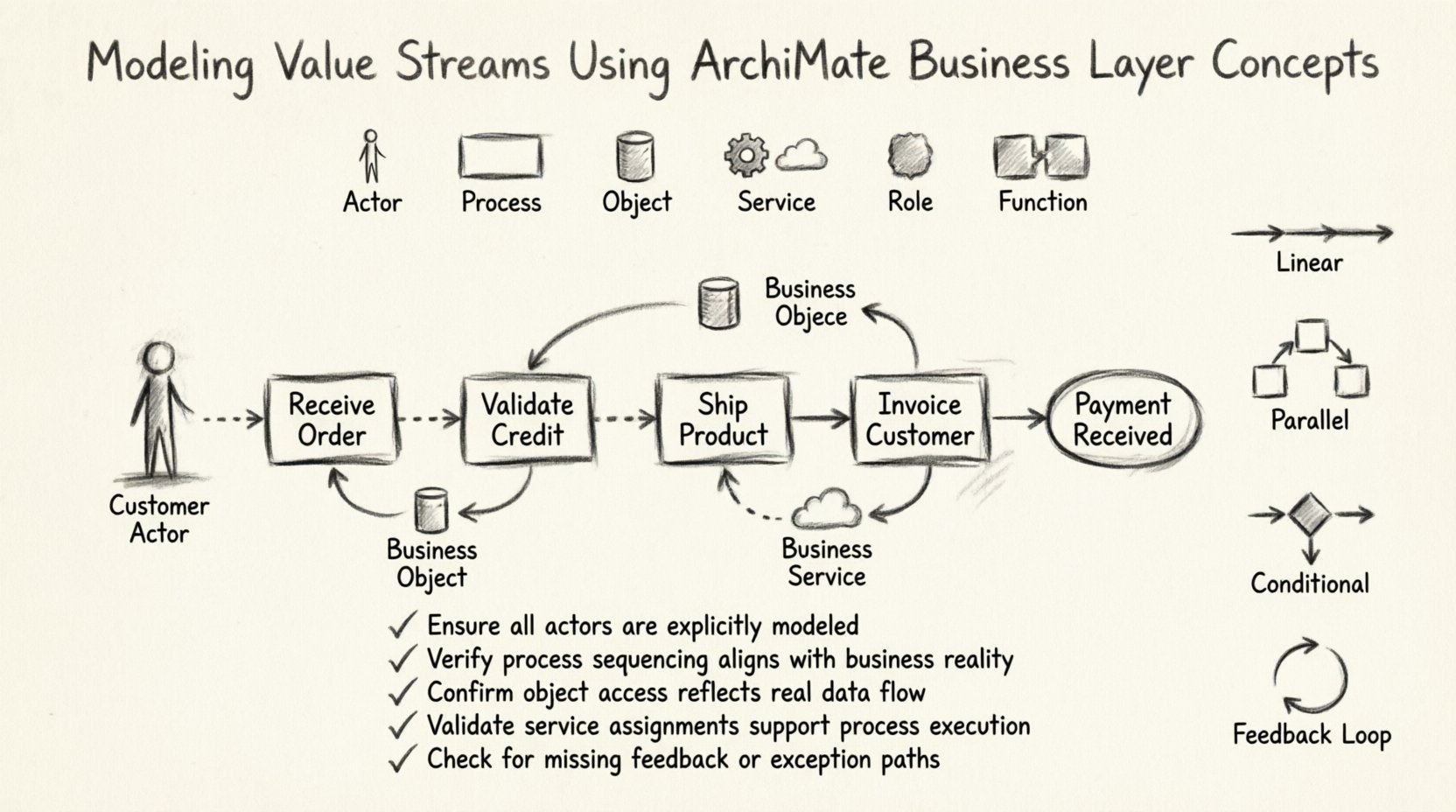
🧩 Practical Example: Order to Cash
To illustrate these concepts, consider the Order to Cash value stream. This is a standard example used in many enterprises.
- Start: A Business Actor (Customer) places an order (Event).
- Process 1: Receive Order (Business Process).
- Process 2: Validate Credit (Business Process).
- Process 3: Ship Product (Business Process).
- Process 4: Invoice Customer (Business Process).
- End: Payment Received (Event).
In this flow:
- The Customer Actor triggers the “Receive Order” process.
- The “Receive Order” process accesses the “Customer Order” Business Object.
- The “Validate Credit” process is triggered by “Receive Order”.
- The “Invoice Customer” process serves the “Billing Service”.
This example demonstrates how multiple concepts combine to form a complete picture. It highlights the interaction between actors, processes, and objects.
✅ Validation and Quality Checks
Once the model is complete, perform a thorough validation. A model that looks good on paper may fail in practice. Use the following checklist to ensure quality.
- Connectivity: Is every process reachable from the start?
- Completeness: Are all required Business Objects included?
- Consistency: Do the names match across layers?
- Logic: Does the flow match the actual business operation?
- Redundancy: Are there duplicate processes that serve the same purpose?
Validation is not a one-time task. As the business evolves, the model must evolve. Regular reviews ensure the architecture remains relevant.
🎯 Addressing Common Challenges
Modeling value streams often encounters specific hurdles. Recognizing these challenges early helps in mitigation.
Challenge 1: Over-Granularity
It is tempting to model every single step. This creates noise. Focus on the high-level processes. Drill down only when necessary for specific analysis. Keep the model at a level that stakeholders can understand.
Challenge 2: Ambiguous Boundaries
Deciding where one value stream ends and another begins can be difficult. Use clear triggers and outputs to define boundaries. If a process belongs to multiple streams, model it as a shared resource.
Challenge 3: Dynamic Changes
Business processes change frequently. Maintain version control for your models. Document changes clearly. This preserves the history of the architecture.
📈 Impact on Business Analysis
A well-modeled value stream provides significant benefits to business analysis. It clarifies the flow of work and identifies bottlenecks. Stakeholders can see where delays occur and where resources are wasted.
- Efficiency: Identify redundant steps that slow down the process.
- Compliance: Ensure critical regulatory steps are included in the flow.
- Automation: Highlight steps suitable for automation technologies.
- Communication: Provide a common language for business and IT teams.
The value stream acts as a bridge between strategy and execution. It translates high-level goals into actionable steps. This alignment is essential for successful transformation initiatives.
🔍 Summary of Key Takeaways
Modeling value streams using ArchiMate Business Layer concepts requires precision and clarity. By utilizing core elements like Business Processes, Actors, and Objects, architects can create accurate representations of organizational flow. Relationships such as Triggering, Accessing, and Serving provide the structure needed to define the sequence and data movement.
Adhering to best practices ensures the model remains maintainable. Focus on scope, naming, and consistency. Integrate with other layers to provide a holistic view. Regular validation keeps the model relevant. With these techniques, value streams become powerful tools for enterprise architecture.
Remember that the goal is not just to create a diagram. The goal is to enable better decision-making. A clear model supports strategic planning and operational improvement. Use the concepts outlined here to build robust architectures that drive value.