


The landscape of Enterprise Architecture relies on structured frameworks to guide complex organizational change. Two standards dominate this space: TOGAF and ArchiMate. While TOGAF provides the process framework, ArchiMate offers the modeling language. Integrating ArchiMate viewpoints into the TOGAF Architecture Definition phase is essential for creating clear, actionable blueprints. This guide explores the mechanics of this integration without relying on specific tools, focusing on principles and practices.
Understanding the Framework Relationship 🧩
TOGAF (The Open Group Architecture Framework) defines the Architecture Development Method (ADM). It is a cyclical process that ensures architecture aligns with business goals. ArchiMate, conversely, is a modeling language. It provides the syntax and semantics to describe, analyze, and visualize the relationships between different architecture domains.
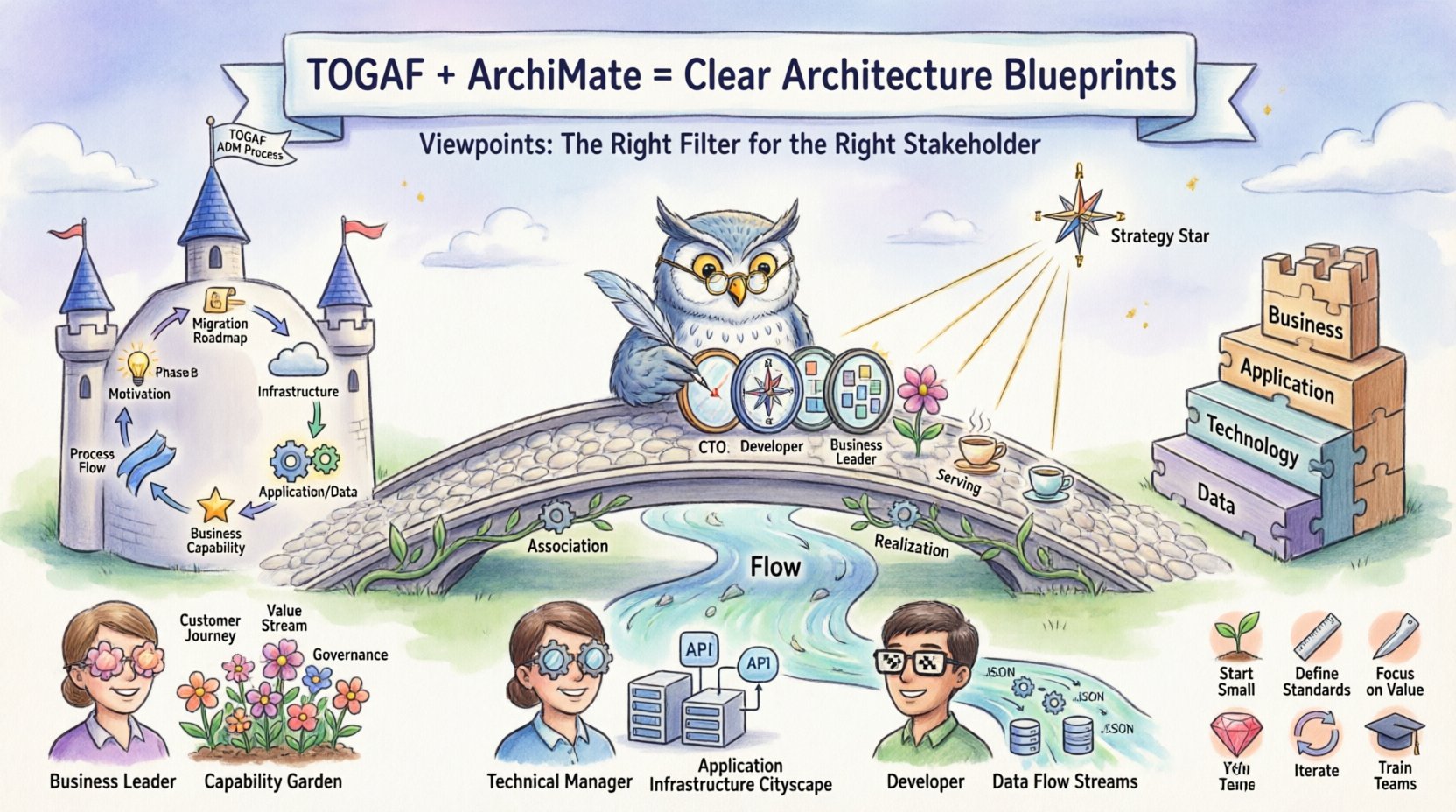
When integrating these standards, the goal is clarity. Architects must ensure that the models created during the ADM phases communicate effectively to stakeholders. Viewpoints act as the bridge. They define the concerns, languages, and conventions used to create a specific view for a specific audience.
- TOGAF ADM: The process engine. It dictates the steps taken.
- ArchiMate: The visual language. It dictates how the output is represented.
- Viewpoints: The filters. They ensure the right information reaches the right person.
Without proper viewpoint integration, architecture models become generic artifacts. They fail to address specific stakeholder concerns, leading to confusion during implementation. Effective integration ensures that every model produced serves a defined purpose within the broader architectural governance.
Defining Viewpoints and Views 🧭
To integrate effectively, one must distinguish between a View and a Viewpoint. These terms are often used interchangeably but have distinct meanings in the context of the Architecture Definition Document (ADD).
- Viewpoint: A specification of conventions for constructing and using a view. It addresses specific stakeholder concerns. For example, a security viewpoint defines how security risks are modeled.
- View: The representation of a set of related architecture elements as seen from a specific perspective. It is the actual diagram or document produced.
In the context of TOGAF, the Architecture Definition Document is the container for these views. By mapping ArchiMate viewpoints to TOGAF phases, architects ensure that the ADD contains relevant, structured information.
Key Components of a Viewpoint
- Stakeholders: Who is the view intended for? (e.g., CTO, Business Analyst, Developer)
- Concerns: What questions must the view answer? (e.g., Cost, Risk, Performance)
- Language: What modeling syntax is used? (e.g., ArchiMate 3.1)
- Methods: How is the view constructed? (e.g., Top-down decomposition)
Mapping TOGAF ADM Phases to ArchiMate Viewpoints 📅
The core of integration lies in mapping specific TOGAF phases to appropriate ArchiMate viewpoints. Each phase of the ADM produces specific deliverables. Aligning these with ArchiMate modeling ensures consistency.
Phase A: Architecture Vision
This phase defines the scope and high-level direction. The focus is on the Business Architecture layer of ArchiMate.
- Primary Viewpoint: Business Capability View.
- Focus: Strategic alignment and scope definition.
- Key Elements: Business Actors, Business Roles, Business Functions.
- Goal: Ensure the vision is grounded in actual business capabilities.
Phase B: Business Architecture
Here, the business model is detailed. This is the most intensive modeling phase for ArchiMate.
- Primary Viewpoint: Business Process View.
- Focus: Workflow, organization, and strategy.
- Key Elements: Business Processes, Business Roles, Business Objects.
- Goal: Create a baseline and target business architecture.
Phase C: Information Systems Architectures
This phase covers Application and Data architectures. The integration becomes technical but remains business-centric.
- Primary Viewpoint: Application Service View and Data Object View.
- Focus: How applications support business processes and data.
- Key Elements: Application Services, Application Components, Data Objects.
- Goal: Define the logical application structure required.
Phase D: Technology Architecture
The infrastructure layer is defined here. This viewpoint focuses on deployment.
- Primary Viewpoint: Infrastructure View.
- Focus: Hardware, software, and network topology.
- Key Elements: Technology Services, Nodes, Devices.
- Goal: Specify the technical infrastructure.
Phase E: Opportunities and Solutions
This phase considers gaps and migration. The Motivation Extension is crucial here.
- Primary Viewpoint: Motivation View.
- Focus: Drivers, Goals, and Requirements.
- Key Elements: Motivation Elements, Requirements.
- Goal: Link technical changes back to business drivers.
Phase F: Migration Planning
Planning the transition. The Implementation and Migration viewpoint is used.
- Primary Viewpoint: Implementation and Migration View.
- Focus: Projects, Phases, and Work Packages.
- Key Elements: Work Packages, Projects, Deliverables.
- Goal: Create a realistic roadmap.
Layer-Specific Modeling Strategies 🛠️
ArchiMate divides architecture into layers. Each layer has specific modeling requirements when integrated with TOGAF. Understanding these nuances prevents data overload.
Business Layer
This layer is the anchor. If the business layer is unclear, the technical layers will drift. When modeling this layer within TOGAF Phase B, architects should focus on:
- Business Capabilities: What the organization can do.
- Business Processes: How work is performed.
- Business Roles: Who performs the work.
- Business Objects: What is being processed.
It is vital to maintain traceability between business capabilities and the strategic goals defined in Phase A.
Application Layer
This layer supports the business. In Phase C, the focus shifts to services.
- Application Services: Functional units exposed to the business.
- Application Components: Logical software modules.
- Usage: How applications interact with business processes.
Avoid over-modeling. Only include applications that directly support the business processes defined in Phase B.
Technology Layer
This layer supports the application. It is often the least abstract. In Phase D, clarity is key.
- Technology Services: Infrastructure capabilities.
- Nodes: Logical processing units.
- Devices: Physical hardware.
Use standard naming conventions to ensure consistency across the architecture repository.
Data Layer
Data is often treated as a separate domain but fits within the Information Systems Architecture. In Phase C, data must be modeled alongside applications.
- Data Objects: Information entities.
- Access: How applications access data.
- Flow: How data moves between systems.
The Motivation Extension: Connecting Goals to Actions 🎯
One of the strongest integration points is the ArchiMate Motivation Extension. TOGAF places heavy emphasis on requirements and drivers. The Motivation Extension provides the elements to model this.
- Drivers: Factors that drive change.
- Goals: Desired states.
- Principles: Rules to guide design.
- Requirements: Needs that must be met.
- Assessments: Evaluations of current status.
By linking Motivation elements to Business and Application layers, architects create a traceable line from high-level strategy to technical implementation. This reduces the risk of implementing features that do not serve a business purpose.
Stakeholder Management and Concerns 👥
TOGAF requires a detailed stakeholder analysis. ArchiMate viewpoints are the mechanism to address these stakeholders. A single model cannot satisfy everyone.
Identifying Stakeholders
- Business Leaders: Need high-level capability and process views.
- Technical Managers: Need application and infrastructure views.
- Developers: Need detailed interface and data views.
- Security Officers: Need security and compliance views.
Addressing Concerns
Each stakeholder group has specific concerns. Viewpoints filter the architecture to address these.
- Cost Concerns: Show investment in technology and resources.
- Risk Concerns: Highlight dependencies and single points of failure.
- Performance Concerns: Map data flow and processing loads.
- Compliance Concerns: Indicate regulatory requirements.
Common Modeling Patterns and Relationships 🔗
Consistency in modeling is critical for integration. ArchiMate defines specific relationships that should be used consistently.
| Relationship Type | Description | TOGAF Usage |
|---|---|---|
| Association | Logical link between elements. | General mapping in ADD. |
| Flow | Directional movement of data. | Process and Data architecture. |
| Access | One element accesses another. | Application and Data mapping. |
| Communication | Physical or logical connection. | Infrastructure and Network. |
| Realization | Implementation of an element. | Technology to Application. |
| Aggregation | Whole-part relationship. | Process decomposition. |
| Composition | Strict whole-part relationship. | Service composition. |
| Triggering | Event-based activation. | Process initiation. |
| Serving | Service provision. | Application Service to Process. |
Governance and Consistency 📜
Once the integration is established, governance ensures it remains valid. Architecture repositories must be maintained. Changes in TOGAF phases must trigger updates in ArchiMate models.
- Version Control: Track changes to viewpoints over time.
- Review Cycles: Schedule regular reviews of architecture models.
- Approval Processes: Define who approves changes to models.
- Metadata: Tag elements with metadata for searchability.
Consistency checks are vital. A change in a Business Process should reflect in the Application Layer. If not, the integration is broken. Automated validation rules can assist in this, though manual review remains essential.
Challenges and Best Practices ⚠️
Integration is not without difficulties. Common challenges include complexity, maintenance, and tooling limitations.
Common Challenges
- Over-Modeling: Creating too many views that confuse stakeholders.
- Inconsistency: Different models using different naming conventions.
- Lack of Traceability: Failing to link business goals to technical specs.
- Stale Models: Models that are not updated as the enterprise changes.
Best Practices
- Start Small: Begin with core viewpoints before expanding.
- Define Standards: Establish naming and modeling conventions early.
- Focus on Value: Ensure every view answers a specific stakeholder question.
- Iterate: Treat architecture as a living document, not a one-time task.
- Train Teams: Ensure all architects understand the integration standards.
Final Considerations on Architecture Integration 🔄
The integration of ArchiMate viewpoints into the TOGAF Architecture Definition creates a robust framework for enterprise change. It aligns the process of development with the language of modeling. This alignment reduces ambiguity and increases the likelihood of successful implementation.
Success depends on discipline. Architects must resist the urge to model everything. Instead, they must select viewpoints that address specific concerns within specific ADM phases. By maintaining strict governance and traceability, the architecture remains a useful asset rather than a burden.
Organizations that adopt this integrated approach gain a clearer picture of their capabilities. They can identify gaps more easily. They can plan migrations with greater confidence. The combination of TOGAF structure and ArchiMate precision provides a solid foundation for long-term strategic planning.
Remember that the framework serves the enterprise, not the other way around. If a viewpoint does not add value, it should be removed. If a phase does not require a specific model, it should be skipped. Flexibility within the structure is key to maintaining relevance.
Summary of Integration Steps
- Define Viewpoints: Map concerns to specific views.
- Align Phases: Match ADM phases to ArchiMate layers.
- Model Relationships: Use standard ArchiMate relationships.
- Link Motivation: Connect drivers to technical elements.
- Govern Changes: Maintain consistency over time.
By following these principles, architects can deliver high-quality architecture definitions that drive organizational success. The effort required for integration pays off in reduced risk and improved alignment between business strategy and IT execution.