
AI Chatbot Auth Flows: Modeling API Security with Mermaid & VPasCode
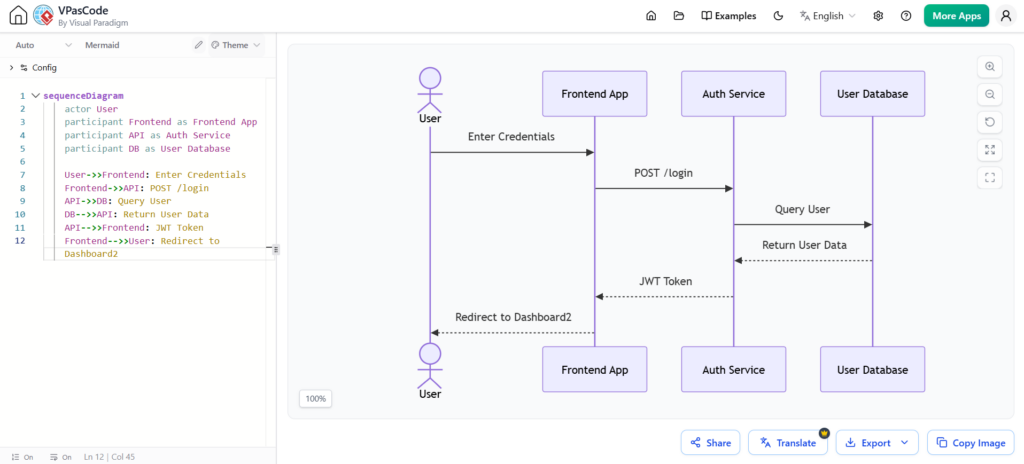
Modern software architecture relies heavily on clear communication between different system components. One of the most effective ways to visualize these interactions is through Sequence Diagrams. In the context of web development, understanding how a user logs in, how tokens are exchanged, and how data flows between the frontend, backend, and database is crucial for developers and architects alike.
This tutorial provides a comprehensive guide to modeling an API Authentication Flow using Mermaid.js. We will break down the system architecture, explain the specific Mermaid syntax required to generate these diagrams, and walk through a practical example of a token-based login process.
Understanding Sequence Diagrams
A sequence diagram is a type of interaction diagram. It shows how processes operate with one another and in what order. The diagram emphasizes the time order of the messages exchanged. In a standard sequence diagram:
- Participants are represented as vertical lines (lifelines) extending downwards from a box or symbol.
- Messages are horizontal arrows pointing from the sender to the receiver.
- Activation Bars (often seen as rectangles on the lifeline) indicate when an object is performing an action.
When modeling an authentication system, this visual format allows us to see exactly when the Frontend requests data, when the Auth Service queries the Database, and when the User receives their session token.
System Architecture: The Authentication Flow
Before writing the code, we must define the actors and participants involved in the scenario. For a standard token-based authentication flow (like OAuth2 or JWT), we typically identify four key components:
- User (Actor): The human initiating the login process.
- Frontend App (Client): The web application or mobile app that collects credentials.
- Auth Service (API): The backend server responsible for validating credentials and issuing tokens.
- User Database (Data Store): The storage system where user credentials and profiles are kept.
Step-by-Step Mermaid Syntax Guide
To translate this architecture into a diagram, we use the Mermaid syntax language. Below is the breakdown of the specific commands used to construct our example.
1. Defining the Diagram Type and Participants
First, we declare that we are creating a sequence diagram and define our participants. In Mermaid, you can assign a custom label to a participant (e.g., “Frontend as Frontend App”).
sequenceDiagram
    actor User
    participant Frontend as Frontend App
    participant API as Auth Service
    participant DB as User Database
2. Drawing Messages (Arrows)
Messages are drawn using arrows. There are three main types of arrows you will use:
- Standard Arrow (
->>): Used for synchronous requests (e.g., “Enter Credentials”). - Return Arrow (
-->>): Used for responses or data returning to the sender (e.g., “Return User Data”). - Dashed Arrow (
-->>): Often used for asynchronous messages or return flows in some styles, but in Mermaid,-->is the standard return arrow.
Let’s look at the syntax for the login request:
User->>Frontend: Enter Credentials
Frontend->>API: POST /login
3. The Complete Code
Here is the full, verified code block for the authentication flow. You can copy this directly into any Mermaid-supported editor or Visual Paradigm VPasCode.
sequenceDiagram
    actor User
    participant Frontend as Frontend App
    participant API as Auth Service
    participant DB as User Database

    User->>Frontend: Enter Credentials
    Frontend->>API: POST /login
    API->>DB: Query User
    DB-->>API: Return User Data
    API-->>Frontend: JWT Token
    Frontend-->>User: Redirect to Dashboard
How to Render This Diagram
If you are using Visual Paradigm VPasCode, simply paste the code above into the left-hand editor pane. The software will automatically parse the text and render the diagram on the right-hand canvas. You can then modify the visual theme, colors, or layout using the properties panel.
For standard Markdown files (like in GitHub or GitLab), you can wrap the code in a mermaid block:
```mermaid
sequenceDiagram
    actor User
    ...
```Conclusion
By mastering Mermaid syntax, you can document complex system architectures directly within your text files. The sequence diagram for API Authentication is a fundamental pattern that ensures all stakeholders—from developers to product managers—have a shared understanding of how data moves through the system.