
Mastering the AI Presentation Studio Workflow: From Concept to Cinematic MP4
In the realm of modern content creation, the bottleneck is rarely the creation of the idea itself, but rather the technical friction of assembling a high-quality presentation. Traditional tools often force users into a linear “dump” workflow: you input data, and the AI generates a flat HTML page or a static image that is difficult to edit further. If the output misses the mark, the user is often forced to restart the entire process.
AI Presentation Studio by Visual Paradigm introduces a paradigm shift: an interactive, step-by-step cinematic workflow. This tutorial breaks down the system architecture and modeling concepts behind this tool, guiding you through the iterative process of transforming a raw topic into a polished, lip-synced video presentation.
1. The Iterative Content Workflow
The foundation of this system is the Iterative Workflow. Unlike tools that generate a final output immediately, this studio treats the presentation as a living document during the generation phase. This ensures you maintain creative control over the narrative arc.
The Process Chain
- Contextual Input: The process begins with defining the topic and the specific audience context. This metadata is crucial for the underlying Large Language Model (LLM) to tailor the complexity and tone of the content.
- Visual Outline Refinement: Once the AI generates a draft, you do not simply accept it. You utilize a highly visual content editor to refine the outline. This step acts as a “human-in-the-loop” validation layer, ensuring the logic holds up before design is applied.
- Design Theme Application: With the content locked, professional design themes are applied. This separates the data layer from the presentation layer.
- Cinematic Animation: The final structural step involves inserting dynamic animations. The system leverages over 60 cinematic transitions to ensure the visual flow is engaging, moving away from static bullet points.
2. System Architecture: Humanless Narration & Avatars
The most advanced feature of AI Presentation Studio is its ability to function as a standalone production studio, eliminating the need for human voice actors or on-camera talent. This is achieved through a modular architecture combining Text-to-Speech (TTS) and Generative Avatar technology.
Audio Generation Logic
The system utilizes an automated text-to-speech engine. The architecture supports two primary input modes for audio:
- AI Voice Profiles: The system selects from dozens of diverse voice profiles, adjusting pitch, speed, and tone based on the presentation’s context.
- Custom Audio Upload: For a personal touch, the system allows users to upload their own audio tracks, which are then synchronized to the slide timeline.
Visual Generation: The Avatar Pipeline
To create a human presence without a camera, the studio offers a robust pipeline for avatar generation:
- Avatar Selection: Users can choose from over 600 pre-trained AI Avatars. These are optimized for professional presentation contexts.
- Lip-Syncing Engine: The core technical capability is the lip-sync engine. It analyzes the phonemes of the generated audio and maps them to the avatar’s facial mesh in real-time.
- AI Face Swap: A unique feature allows users to upload a photo of themselves. The system maps the user’s facial geometry onto a professional narrator avatar, preserving the user’s likeness while leveraging the stability and lighting of the AI avatar.
3. Export and Distribution
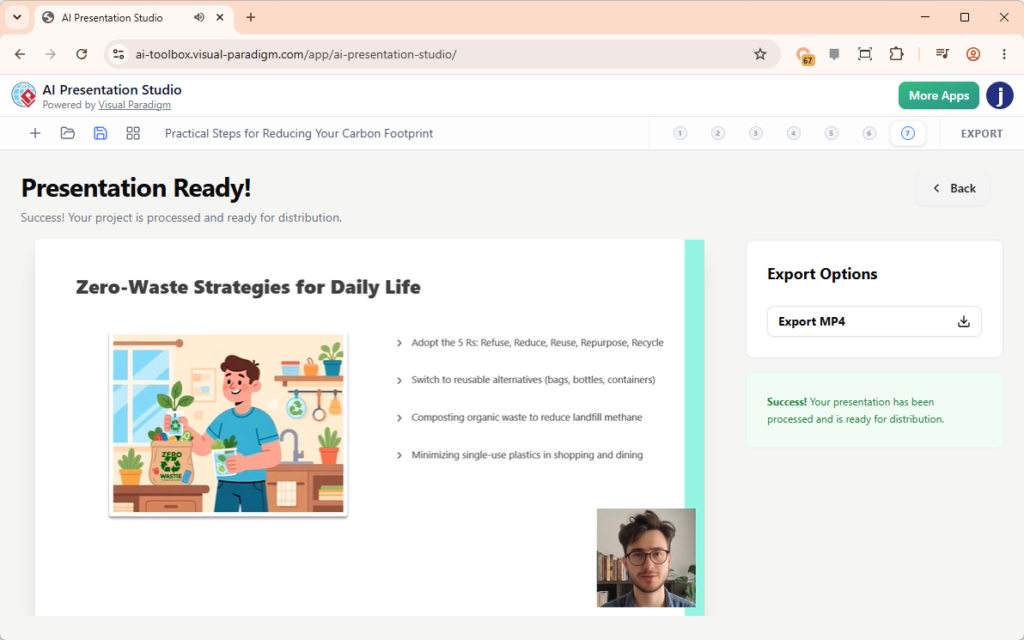
Once the iterative workflow is complete and the visual/audio layers are synchronized, the system moves to the rendering phase. The goal is to produce a standalone video file, removing the dependency on a web browser to view the content.
The final output is an MP4 video file. This format ensures that the presentation is “production-ready,” meaning it can be uploaded directly to video hosting platforms, embedded in learning management systems (LMS), or played on digital signage without requiring internet access or specific software plugins.
Summary
AI Presentation Studio represents a shift from static slide generation to dynamic video production. By decoupling content creation, design, and narration into distinct, manageable steps, it allows users to iterate on their ideas without the fear of “breaking” the final output. Whether you are creating training materials, marketing pitches, or educational content, this workflow provides the technical infrastructure to deliver a professional, cinematic result.