
Mastering PlantUML Class Diagrams with VPasCode: A Technical Deep Dive
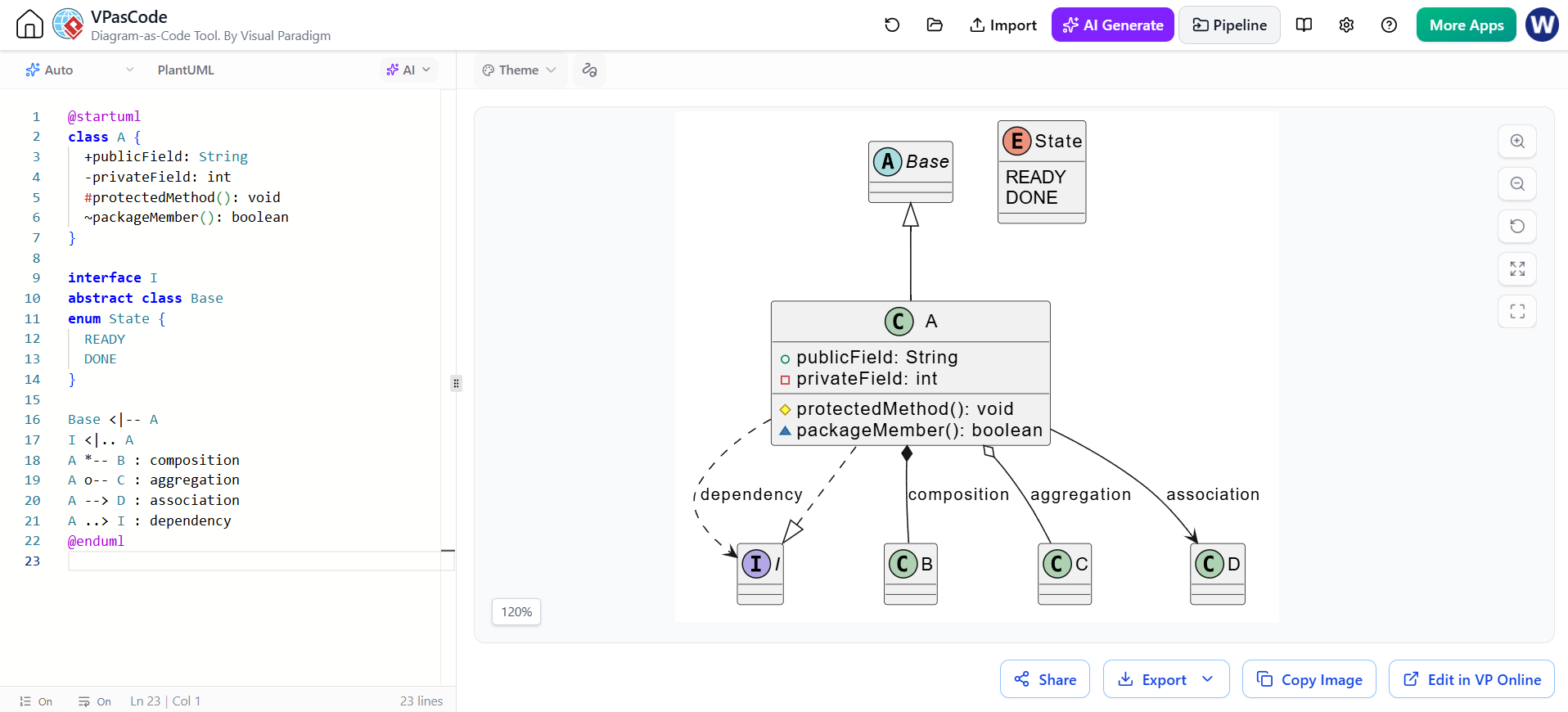
In modern software architecture, visual communication is just as critical as the code itself. PlantUML has established itself as a leading tool for “Diagrams as Code,” allowing developers to define complex system structures within plain text files. When integrated with Visual Paradigm VPasCode, this tool becomes a powerful IDE, offering real-time rendering, syntax highlighting, and AI-assisted generation.
This tutorial explores the anatomy of a PlantUML Class Diagram, analyzing the specific syntax used to define structure, relationships, and data types. We will deconstruct the example provided in the VPasCode environment, ensuring you understand not just how to draw a diagram, but how to architect it.
1. Defining Class Structure and Members
The foundation of any class diagram is the definition of the classes themselves. In PlantUML, the class keyword initiates the structure. The example code demonstrates the use of visibility modifiers, which are crucial for encapsulating data and controlling access patterns.
Consider the syntax used in the snippet below:
class A {
  +publicField: String
  -privateField: int
  #protectedMethod(): void
  ~packageMember(): boolean
}
Each line within the class definition follows a strict pattern: VisibilityModifier + MemberName + Type + Arguments (optional).
- Public (+): The
+symbol indicates a public member, accessible from any other class. For example,+publicField. - Private (-): The
-symbol restricts access to within the class itself. This is standard forprivateField. - Protected (#): The
#symbol allows access to the class itself and its subclasses, ideal forprotectedMethod. - Package (~): The
~symbol denotes package-private visibility, accessible only by classes in the same package.
2. Advanced Types: Interfaces, Abstract Classes, and Enums
Real-world systems are rarely composed of simple concrete classes. They require abstractions and specific state management. The example code illustrates three key concepts:
Interfaces
Using the interface keyword creates a contract for implementation. In the diagram, interface I acts as a blueprint that class A adheres to.
Abstract Classes
The abstract class keyword defines a class that cannot be instantiated directly. It serves as a base for other classes. Here, Base acts as a parent class providing common functionality.
Enumerations
The enum keyword is used to define a fixed set of constants. The State enum is a perfect example of modeling system states (e.g., READY, DONE) in a type-safe manner.
3. Modeling Relationships and Dependencies
The true power of a class diagram lies in how elements interact. PlantUML uses distinct arrow styles to represent the strength and nature of these relationships.
Generalization (Inheritance)
Use a solid line with a hollow triangle arrowhead to denote inheritance.
Base <|-- A implies that A inherits from Base.
Realization (Implementation)
Use a dashed line with a hollow triangle arrowhead to show that a class implements an interface.
I <|.. A indicates that A implements interface I.
Association and Dependency
These relationships represent usage.
- Association (
A --> D): A structural link where objects interact. - Dependency (
A ..> I): A usage relationship where one class depends on another for functionality, often temporary.
Composition and Aggregation
These are specialized forms of association representing ownership.
- Composition (
A *-- B): Represented by a filled diamond. This indicates a strong “part-of” relationship where the lifecycle of the part (B) is dependent on the whole (A). - Aggregation (
A o-- C): Represented by a hollow diamond. This is a weaker relationship where the part (C) can exist independently of the whole (A).
4. Best Practices with VPasCode
While PlantUML provides the syntax, tools like VPasCode enhance the workflow. The platform allows you to visualize these relationships instantly, helping you spot architectural flaws early.
Conclusion
Mastering these syntax rules transforms your diagramming from a manual chore into an efficient, automated asset. By leveraging the precise definitions of visibility and relationship types, you create documentation that is not only visually accurate but semantically robust.
Whether you are defining simple service names or managing intricate JSON configurations, these techniques empower you to create diagrams that are as robust and adaptable as the systems they represent. Start integrating these practices into your daily workflow today.