
From Text to Diagramming: Mastering AI-Powered Process Mapping in Visual Paradigm
In the modern landscape of business analysis and software architecture, clarity is the ultimate currency. Whether you are a product manager mapping a user journey, a developer documenting complex logic, or an operations lead optimizing supply chains, visualizing processes is essential. However, traditional flowchart creation has long been a bottleneck. The manual drag-and-drop of shapes, the frustration of misaligned arrows, and the time spent on formatting often distract from the actual process design.
This tutorial explores the paradigm shift brought about by AI-powered workflow diagrams. By leveraging generative artificial intelligence within tools like Visual Paradigm, professionals can now transform plain-text descriptions into clean, structured, and standards-compliant diagrams instantly. We will walk through the system architecture of this workflow and how to automate your business process mapping.
The Three-Stage Architecture of AI Workflow Generation
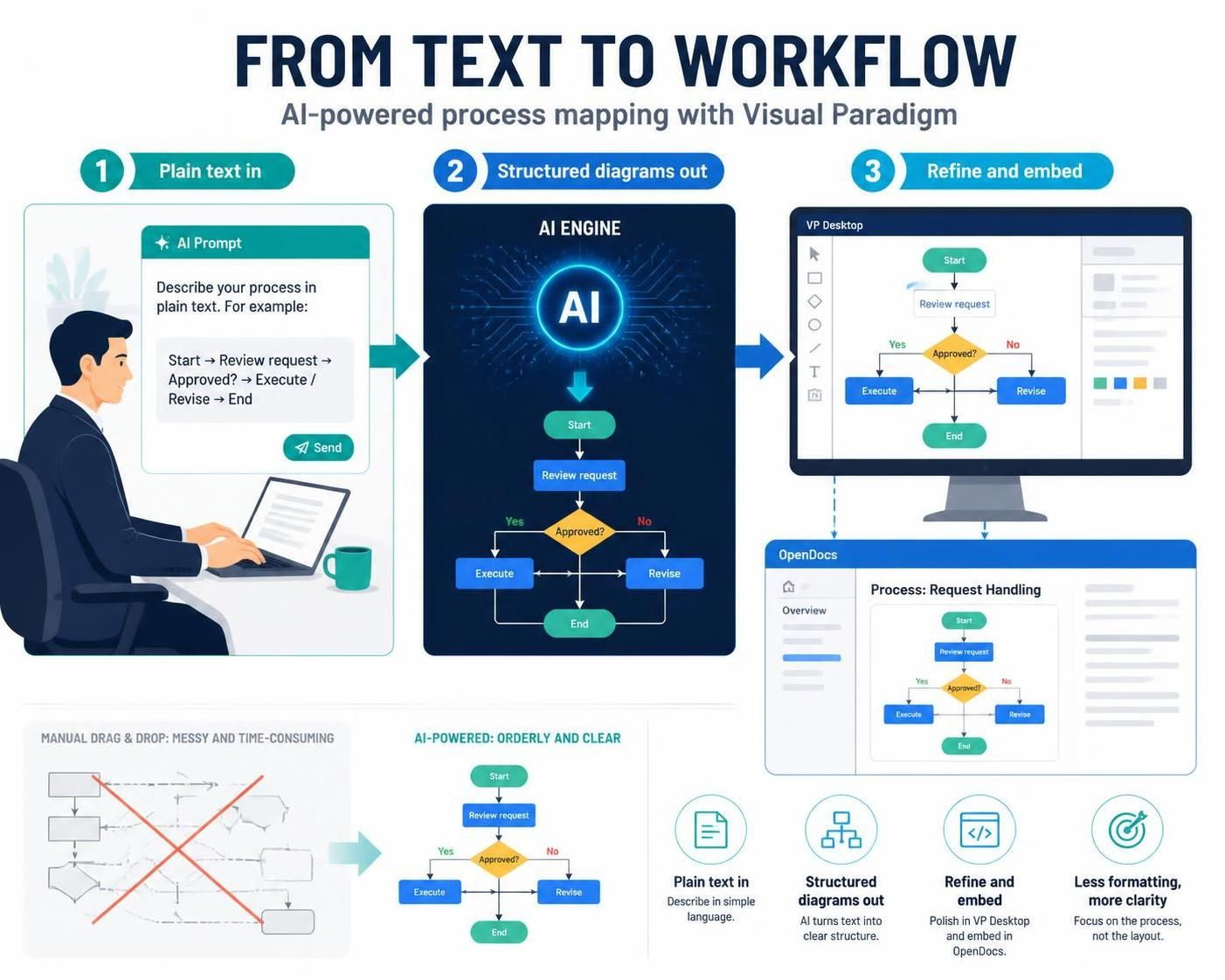
The process of converting unstructured text into structured diagrams follows a specific architectural pipeline. As illustrated in the “From Text to Workflow” model, the system operates on a linear progression: Input, Processing, and Output.
1. The Input Layer: Plain Text Descriptions
The journey begins with the user interface, where the barrier to entry is significantly lowered. Instead of navigating complex menus to select shapes, the user provides a natural language prompt. The system accepts text that describes the logical flow of a process.
For example, a prompt might look like this:
Start → Review request → Approved? → Execute / Revise → EndThis input layer is designed to be flexible. It accepts standard process steps (Start, End) and decision points (Approved?), allowing the AI to infer the intent without requiring strict syntax adherence.
2. The Processing Layer: The AI Engine
Once the text is submitted, it is passed to the AI Engine. This is the core of the architecture where the “magic” happens. The engine performs two critical functions:
- Semantic Analysis: It parses the text to identify the type of nodes required. For instance, it recognizes “Approved?” as a decision diamond and “Execute” as a process rectangle.
- Structural Generation: It constructs the logical graph. It creates the necessary connections (edges) between the nodes and assigns the correct directional flow (e.g., “Yes” vs. “No” branches for a decision).
This backend processing happens in milliseconds, effectively bypassing the manual layout phase. The engine ensures that the resulting diagram adheres to the visual standards of the tool (such as Visual Paradigm), maintaining consistent styling and alignment automatically.
3. The Output Layer: Refinement and Embedding
The final stage involves rendering the generated model into the user’s workspace. The system outputs the diagram into two primary environments:
- VP Desktop: The full modeling environment where the diagram is rendered as a fully editable object. Users can immediately see the generated flowchart and refine it using standard tools.
- OpenDocs: The collaborative documentation platform. The generated diagram is embedded directly into the documentation, ensuring that the process map stays synchronized with the text description.
Technical Modeling Concepts: The Decision Logic
To understand how the AI translates the text “Approved? → Execute / Revise” into a diagram, we must look at the underlying modeling logic. The AI engine essentially translates natural language into a formal structure often represented in pseudo-code or diagramming syntax.
In the generated diagram, the decision node (diamond shape) acts as a branching point. The AI recognizes the condition and the two distinct paths:
- Condition: Is the request approved?
- Path A (Yes): Moves to the “Execute” process block.
- Path B (No): Moves to the “Revise” process block.
Both paths eventually converge back into the main flow, leading to the “End” node. This logic ensures that the resulting diagram is not just a visual representation but a valid, executable process map that follows standard flowchart conventions.
Comparative Analysis: Manual vs. AI-Driven
The efficiency gains of this architecture are best understood through a comparison of the two workflows.
The Manual Approach (Legacy)
When creating a flowchart manually, the user must:
- Select a shape from a toolbar.
- Drag it to the canvas.
- Double-click to edit the text.
- Select a connector tool.
- Manually align arrows to ensure they are straight and orthogonal.
- Repeat this for every single step.
This process is time-consuming and prone to “messy” layouts, as seen in the “Manual Drag & Drop” section of the illustration. The focus shifts from the content of the process to the layout of the document.
The AI-Powered Approach
By automating the structural generation, the AI-powered workflow offers “Orderly and Clear” results instantly. The user focuses entirely on the content and the logic of the process, while the system handles the formatting and alignment. This shift allows for rapid iteration and clearer communication of complex business rules.
Conclusion
The transition from manual drawing to AI-assisted modeling represents a significant leap forward in business process mapping. By integrating the AI engine directly into the modeling ecosystem, Visual Paradigm allows professionals to bypass the tedious aspects of diagramming. The result is a faster, more accurate, and cleaner representation of business logic, enabling teams to focus on optimization rather than formatting.