
AI Diagramming: Architecting Student Registration Workflows in Visual Paradigm
In the rapidly evolving landscape of software engineering and business process management, the barrier between abstract conceptualization and concrete system modeling is being dismantled by Artificial Intelligence. Visual Paradigm’s integration of AI into its core desktop application represents a paradigm shift in how we approach system architecture. No longer must analysts spend hours manually dragging and dropping shapes to construct a basic process map. Instead, they can focus on the semantic logic of the system, prompting the AI to render a native, fully editable flowchart based on natural language descriptions.
This tutorial explores the technical underpinnings of AI-driven diagram generation, specifically focusing on the architecture of a Student Course Registration process. We will walk through the interaction between the user’s intent (prompt engineering) and the system’s output (structured data flow), analyzing how the AI interprets business rules to construct a robust UML Activity Diagram.
1. The Interface: From Prompt to Parameter
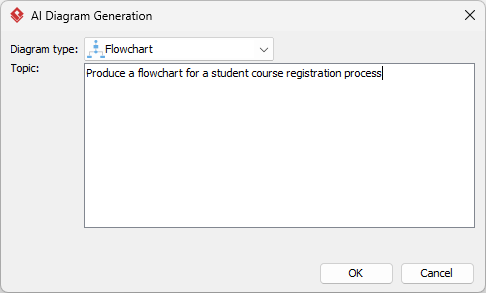
The entry point for this workflow is the AI Diagram Generation utility within the Visual Paradigm desktop environment. This tool acts as a bridge between natural language processing (NLP) and the proprietary object model of the diagramming engine. When a user accesses Tools > AI Diagram Generation, they are presented with a structured interface designed to constrain the generative model’s output into valid technical diagrams.
The interface requires two primary inputs:
- Diagram Type: The selection of Flowchart (or Activity Diagram) tells the AI to utilize specific UML notation standards, such as the standard for initial nodes, action states, and decision nodes.
- Topic/Prompt: This is the semantic input. The text box acts as the context window for the AI, requiring a clear description of the process scope, actors, and logic.
Case Study: The Registration Workflow
Consider the following prompt entered into the system:
"Produce a flowchart for a student course registration process"
This simple instruction triggers a complex backend sequence. The AI interprets “Student,” “Course,” and “Registration” as entities. It infers a temporal sequence (Start → Action → End) and identifies that a registration process inherently involves checks for prerequisites, availability, and schedule conflicts.
2. System Architecture & Logic Inference
When the AI generates the diagram, it does not merely draw lines; it constructs a graph of connected nodes. In the context of the registration process, the AI infers a standard “Guard Condition” architecture. This is where the logical rigor of the system is established.
The system typically decomposes the prompt into the following architectural components:
- The Trigger: The process begins with an initial node, representing the student initiating the login or session.
- The Action State: A process block representing the core action, such as “Select Courses.”
- The Decision Diamond: A critical branching point where the system logic evaluates a condition (e.g., “Are there Prerequisites Met?”).
- The Exception Path: If the condition is false (No), the flow diverges to an error state or a feedback loop (e.g., “Contact Advisor”).
- The Terminal State: The process concludes with a final node (e.g., “Registration Complete”).
3. Technical Analysis of the Generated Flowchart
Upon clicking OK, Visual Paradigm renders the diagram using its native vector engine. The resulting artifact is not an image file (like a PNG), but a live object model. This allows for immediate editing and analysis.
Decoding the Logic Flow
Let us analyze the specific logic that the AI likely inferred for a course registration system:
- Input Validation: The AI inserts a decision node early in the flow to validate user credentials. This represents a standard security protocol in system architecture.
- Concurrency (Fork/Join): Advanced registration flows often involve parallel processes. The AI might introduce a fork node to check for “Course Availability” and “Financial Clearance” simultaneously, joining them before the final commit.
- Feedback Loops: A key feature of process modeling is the ability to iterate. If a course is full, the AI generates a loop back to the “Select Courses” action, instructing the user to choose an alternative.
The AI translates these inferred concepts into standard UML Activity Diagram syntax. The flow lines carry control flow tokens, ensuring that the logic is strictly sequential unless explicitly branched by a decision node.
4. Post-Generation Refinement
While the AI provides a robust skeleton, the role of the System Architect remains crucial for refinement. The generated flowchart serves as a “First Draft” of the system logic. The user should now engage in a process of verification:
- Review Decision Nodes: Ensure that every diamond has exactly two outgoing paths (True/False) or that multiple paths are explicitly labeled.
- Verify Edge Labels: Check the labels on the connecting lines. The AI may default to generic labels like “Yes/No.” In a professional context, these should be changed to specific conditions like “Budget Exceeded” or “Credit Limit Met.”
- Refine Notation: Ensure that the “Start” and “End” shapes are actual UML Initial and Final nodes, not just generic ovals, to maintain diagrammatic accuracy.
Conclusion
The integration of AI into Visual Paradigm transforms the creation of technical diagrams from a manual drafting exercise into a strategic modeling task. By defining the problem space through precise prompts, engineers can leverage the AI to render the structural complexity of systems like course registration instantly. This efficiency allows teams to spend more time validating the business logic and less time drawing the boxes.