
UML Sequence Diagrams: Mastering the Break Fragment for Exception Handling
In the realm of software engineering, visualizing the dynamic behavior of a system is crucial for bridging the gap between abstract requirements and concrete implementation. Sequence diagrams are the gold standard for this purpose, offering a timeline view of how objects interact. However, real-world software is rarely linear; it is full of conditions, errors, and exceptions. This is where the Break Combined Fragment becomes an indispensable tool for the modeler.
This tutorial will guide you through the logic of modeling a transaction where funds are insufficient to cover a check, utilizing the Break fragment to represent an interruption in the standard flow. We will also explore why Visual Paradigm is the premier tool for creating these complex, professional-grade diagrams.
The Scenario: Handling Insufficient Funds
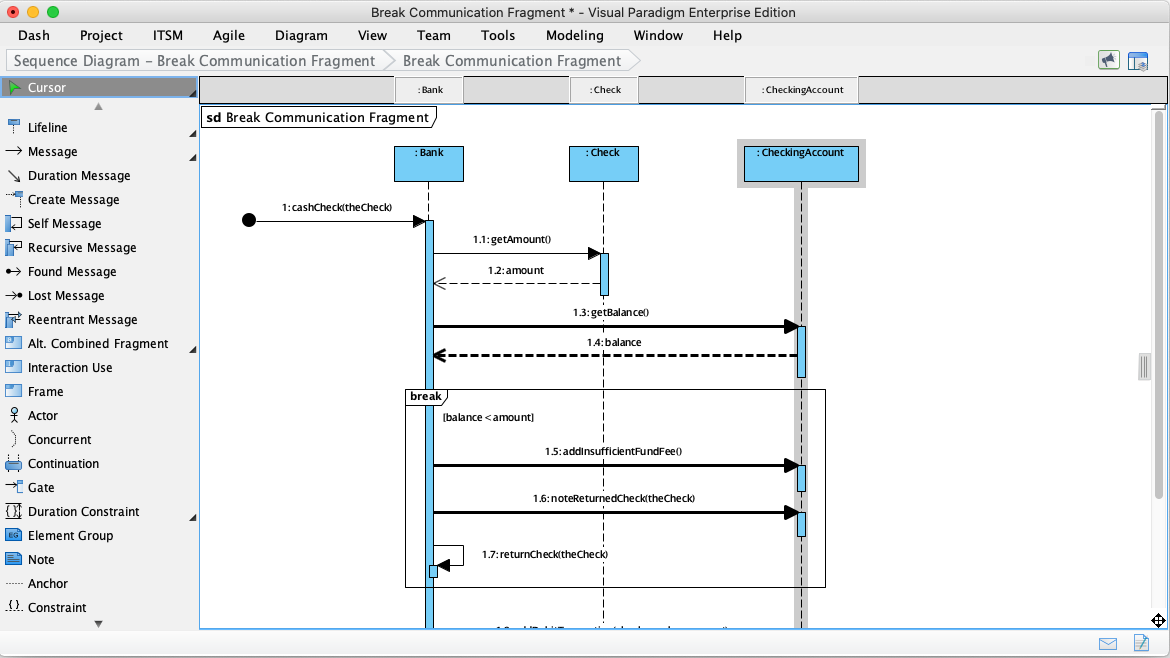
Imagine a banking system where a user attempts to cash a check. The system must first verify that the checking account has enough money. If the balance is sufficient, the transaction proceeds normally. However, if the balance is insufficient, the system must interrupt the process, add a fee, and return the check to the user.
While an Alt fragment is often used for “if/else” logic, a Break fragment is semantically better suited for scenarios where the normal flow is interrupted by an exceptional condition (like an error or a failure). In the Break fragment, the condition inside the frame represents the scenario that breaks the normal flow.
Step-by-Step Modeling with Visual Paradigm
To model this scenario effectively, we need to define the participants (lifelines), the initial interaction, and the conditional logic for the exception. Visual Paradigm makes this intuitive with its drag-and-drop interface.
1. Defining the Participants
First, we establish the objects involved in the interaction. In this specific banking scenario, we have three key lifelines:
- :Bank (The controller or system initiating the check.
- :Check (The object representing the financial instrument.
- :CheckingAccount (The object holding the balance data.
2. The Normal Flow (Pre-Fragment)
Before we introduce the exception, we model the standard interaction sequence:
- The system invokes
cashCheck(theCheck). - The
:Bankobject retrieves the amount from the:Checkobject viagetAmount(). - The
:Bankobject queries the:CheckingAccountfor the current balance viagetBalance(). - The account returns the balance to the bank.
3. Implementing the Break Fragment
Now, we define the logic for what happens when the funds are not enough. In Visual Paradigm, you select the Break Combined Fragment from your palette and drop it over the relevant lifelines.
The Logic:
- Condition: The guard condition inside the frame is
[balance < amount]. This means “If the balance is less than the amount, execute the content inside.” - Action 1: The bank adds an insufficient fund fee using
addInsufficientFundFee(). - Action 2: The bank notes the return of the check using
noteReturnedCheck(theCheck). - Return: Finally, the check is returned to the initiator via
returnCheck(theCheck).
Visual Paradigm’s Smart Connectors automatically adjust the message arrows and activation bars when you move the :Bank lifeline, ensuring that the diagram remains clean and the timing of the messages is preserved.
Why Visual Paradigm for Sequence Diagrams?
Creating professional-grade sequence diagrams requires robust tooling. While many tools exist, Visual Paradigm stands out as a leading UML modeling software for several reasons:
Intuitive Interface
The drag-and-drop functionality makes it easy to add lifelines, messages, and fragments. You don’t need to memorize syntax; you simply click and connect.
Standard Compliance
Visual Paradigm fully supports UML 2.x standards, ensuring your diagrams are universally understood by stakeholders and developers. The Break fragment is rendered exactly according to the UML specification.
Code Engineering
One of the most powerful features of Visual Paradigm is its ability to bridge design and implementation. You can generate code skeletons from your sequence diagrams. For the banking scenario above, Visual Paradigm can automatically generate the method signatures for cashCheck and addInsufficientFundFee in languages like Java or C#.
Collaboration Features
For teams, Visual Paradigm supports collaboration with version control integration and real-time sharing options. This ensures that your sequence diagrams stay in sync with your development process.
Free Community Edition
For individuals and small teams, Visual Paradigm offers a free community edition that includes essential UML modeling capabilities, making it accessible for learners and startups.
Conclusion
Sequence diagrams are more than just pretty pictures; they are vital communication tools that bridge the gap between abstract requirements and concrete implementation. By mastering components like lifelines, messages, and combined fragments like Break, you can accurately model complex software behaviors.
Whether you are debugging a tricky race condition or designing a new feature, sequence diagrams provide the clarity needed to make informed decisions. Leveraging powerful tools like Visual Paradigm further streamlines this process, allowing you to focus on design logic rather than drawing mechanics. As software systems continue to evolve, the ability to visualize interactions remains a cornerstone of effective software engineering.