Project plans are easiest to use when people can both understand them at a glance and update them without wrestling with a drawing tool. A Gantt chart provides the visual schedule; diagram-as-code makes that chart editable as text, reviewable in version control, and straightforward to regenerate as plans change.
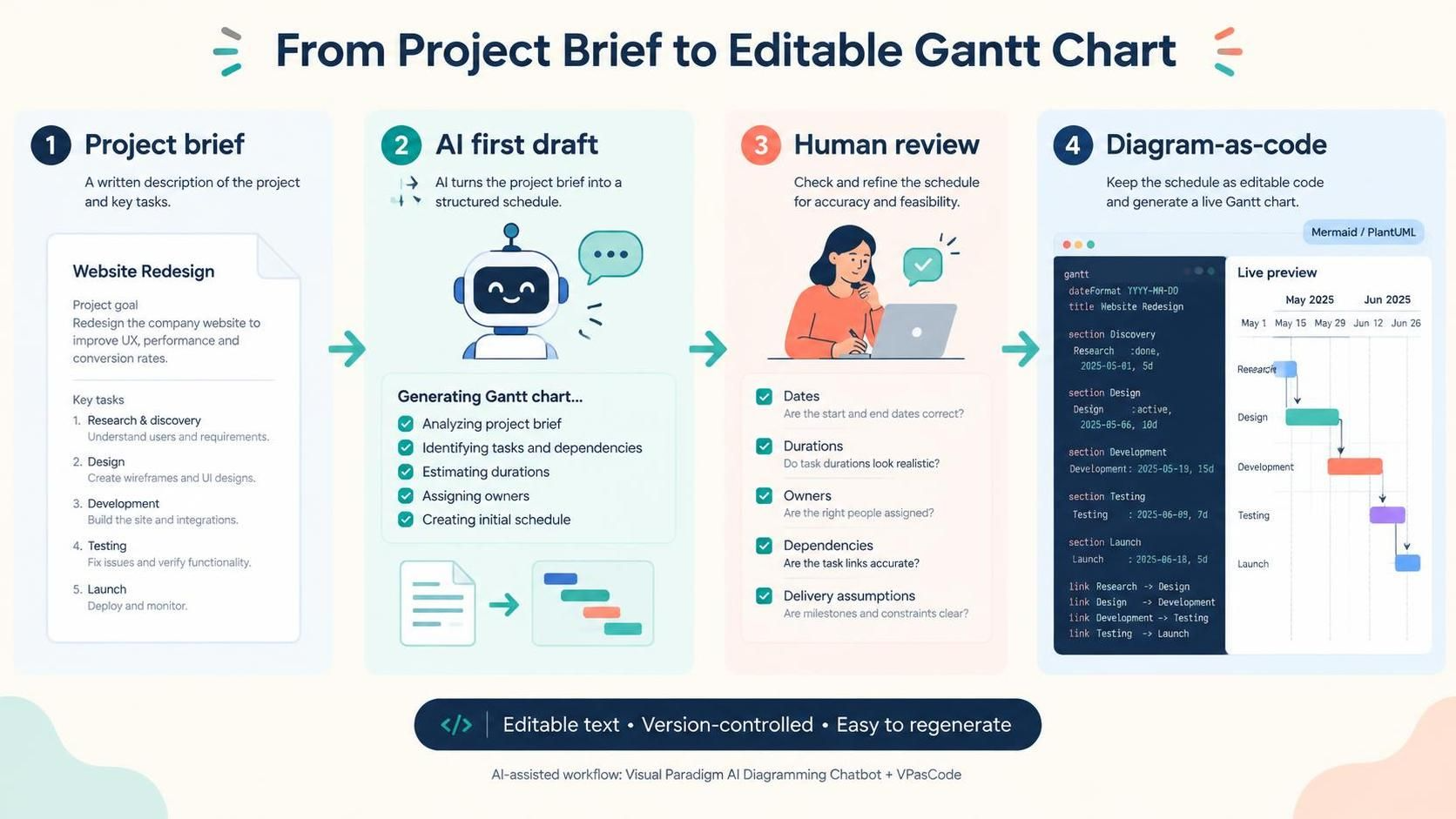
An AI chatbot can turn a written project brief into a first-draft schedule. The draft still needs human review: dates, durations, task ownership, dependencies, and delivery assumptions must reflect the real project. A workflow that combines AI generation with a code editor—such as Visual Paradigm’s AI Diagramming Chatbot and VPasCode—offers a practical path from natural-language plan to editable diagram. VPasCode supports Mermaid and PlantUML, among other diagram syntaxes, with code editing and a live preview.
What “Gantt Chat” means
“Gantt Chat” describes a conversational way to start building a project schedule: instead of entering each task into a chart by hand, you describe the project and ask an AI assistant to organize it into phases, tasks, durations, dependencies, and milestones.
For example, a team might prompt:
Create a 12-week IT delivery Gantt chart. Include Sprint 0 for discovery and environment setup, four two-week delivery sprints, integration testing, user acceptance testing, training, and Go-Live. Show dependencies and mark Go-Live as a milestone. Use placeholder dates that I can replace.
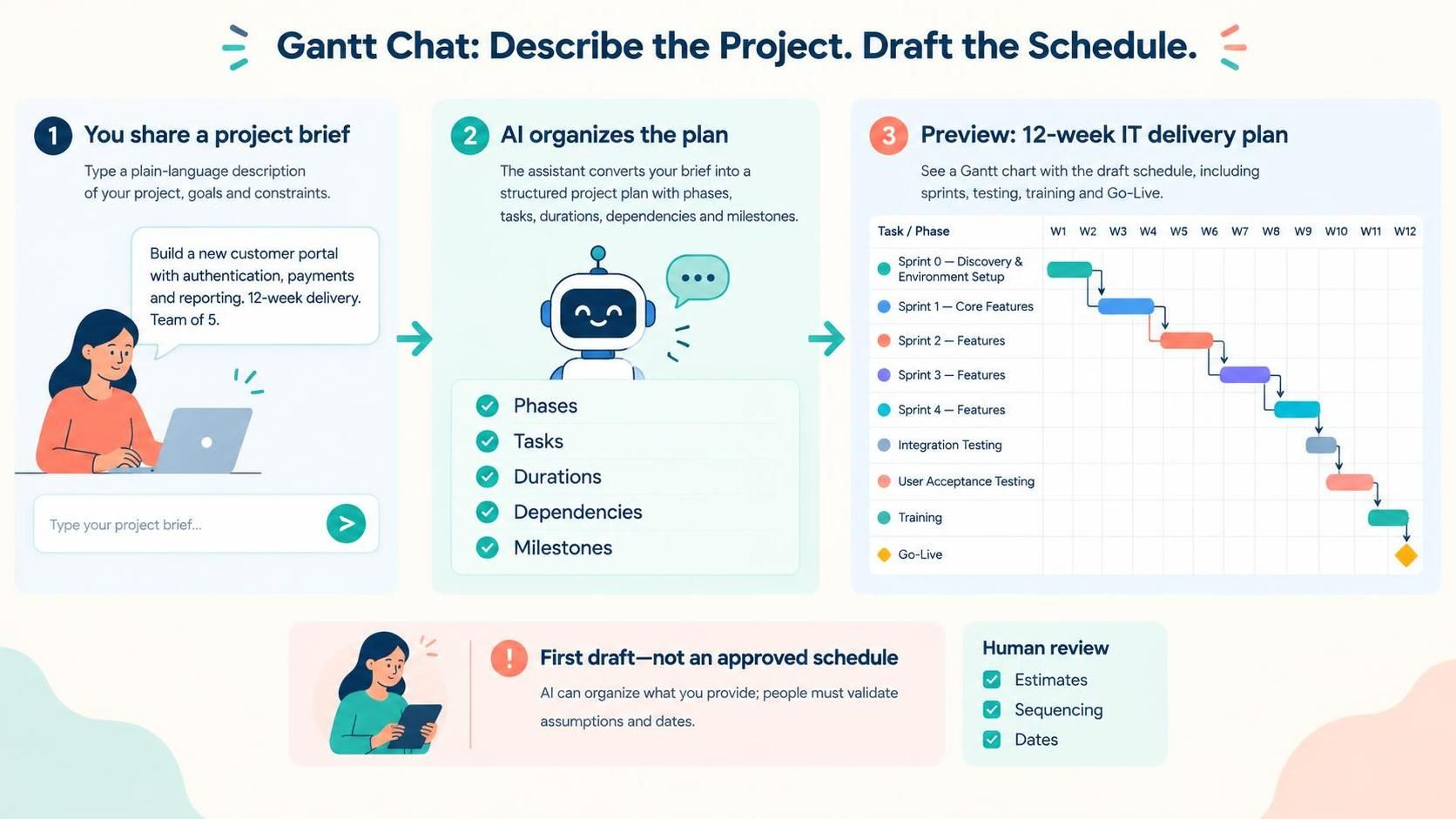
The chatbot can produce a useful first draft, but it cannot know whether the estimates, sequencing, or dates are correct unless you provide those details. Treat its output as a planning aid—not as an approved project schedule.
Why use diagram-as-code for planning?
In diagram-as-code, a diagram is defined by plain-text instructions rather than only by moving shapes around a canvas. That can make changes easier to compare and discuss: a reviewer can see that testing moved, a dependency changed, or a milestone date was updated. The source can also sit alongside project documentation or code in a version-controlled workflow.
Gantt charts are particularly useful when the plan needs to communicate task duration, approximate sequencing, dependencies, and milestone dates. They are not a substitute for a living backlog or team-level sprint board: detailed estimates and priorities will often change during Agile delivery. Use the chart to communicate the roadmap and key coordination points, and keep execution status in the team’s operational tools.
Mermaid example: a 12-week IT delivery plan
Mermaid Gantt diagrams start with gantt. A dateFormat setting describes how dates are written, and section groups tasks. Task metadata can include a task ID, a start date or dependency, and a duration. Mermaid also recognizes task-status markers such as done, active, crit, and milestone.
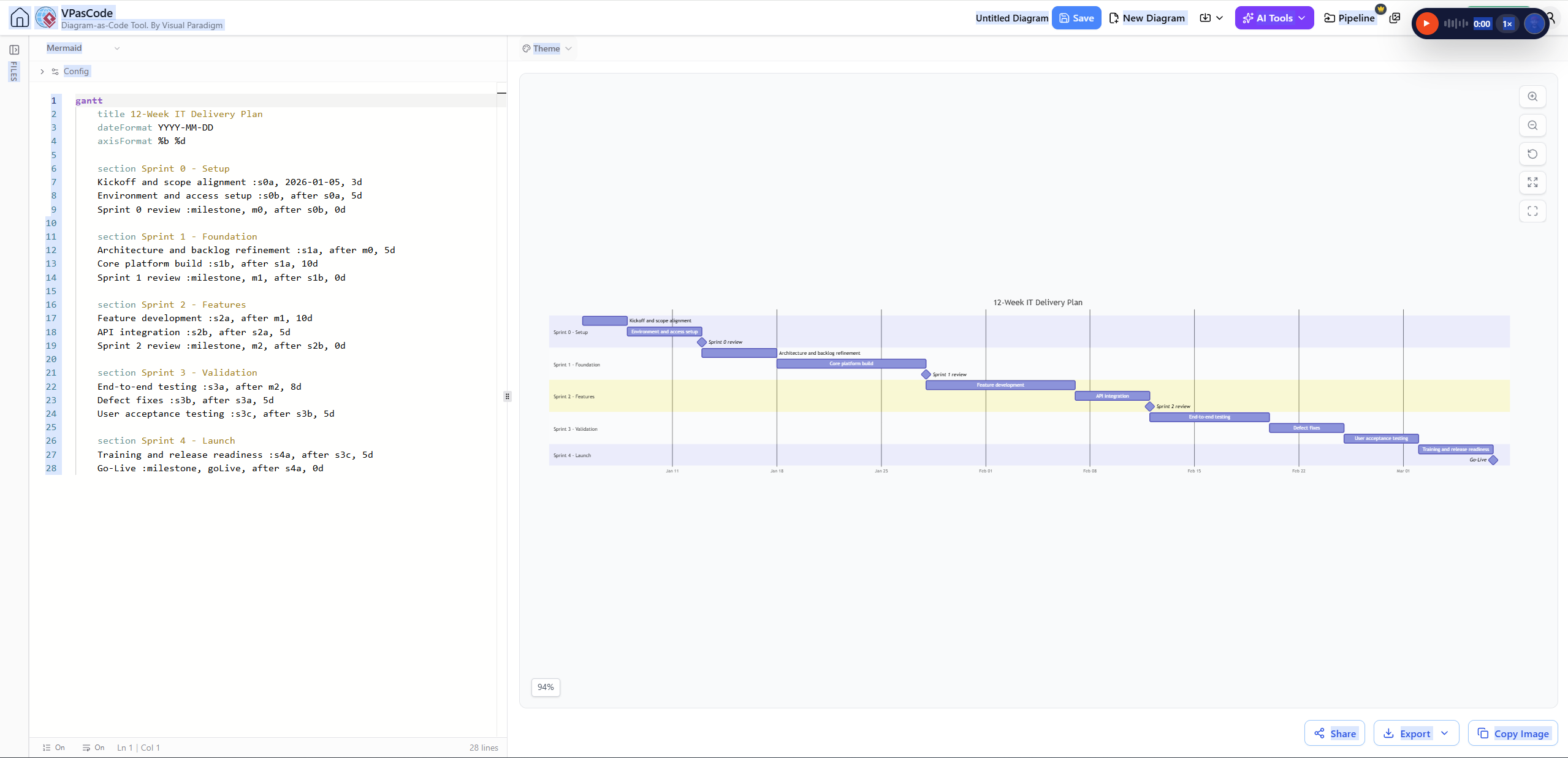
The Gantt Chart is Rendered by VPasCode Tool using Mermaid Code:
gantt
    title 12-Week IT Delivery Plan
    dateFormat YYYY-MM-DD
    axisFormat %b %d

    section Sprint 0 - Setup
    Kickoff and scope alignment :s0a, 2026-01-05, 3d
    Environment and access setup :s0b, after s0a, 5d
    Sprint 0 review :milestone, m0, after s0b, 0d

    section Sprint 1 - Foundation
    Architecture and backlog refinement :s1a, after m0, 5d
    Core platform build :s1b, after s1a, 10d
    Sprint 1 review :milestone, m1, after s1b, 0d

    section Sprint 2 - Features
    Feature development :s2a, after m1, 10d
    API integration :s2b, after s2a, 5d
    Sprint 2 review :milestone, m2, after s2b, 0d

    section Sprint 3 - Validation
    End-to-end testing :s3a, after m2, 8d
    Defect fixes :s3b, after s3a, 5d
    User acceptance testing :s3c, after s3b, 5d

    section Sprint 4 - Launch
    Training and release readiness :s4a, after s3c, 5d
    Go-Live :milestone, goLive, after s4a, 0d
The dates are illustrative placeholders, and the durations are not estimates for a real project. Replace them with the approved project calendar and team estimates. The example uses task IDs such as s0a and m1 so later tasks can refer to earlier tasks with after. A reference must match a defined task ID; an incorrect or missing ID can prevent the chart from rendering.
Exported by VPasCode Tool (Gantt Chart in Full Size):

For a fixed start date, update the date on the first task and check whether subsequent tasks should follow dependencies or use explicit dates. Also confirm how your renderer treats weekends, holidays, and duration units before interpreting the chart as a working-day schedule.
PlantUML example: the same plan
PlantUML uses a different Gantt syntax. The diagram is wrapped in @startgantt and @endgantt; tasks are described in readable statements, and dependencies can be expressed with phrases such as starts at [Task]'s end.
Rendered by VPasCode Tool using PlantUML Code for the Gant Chart:
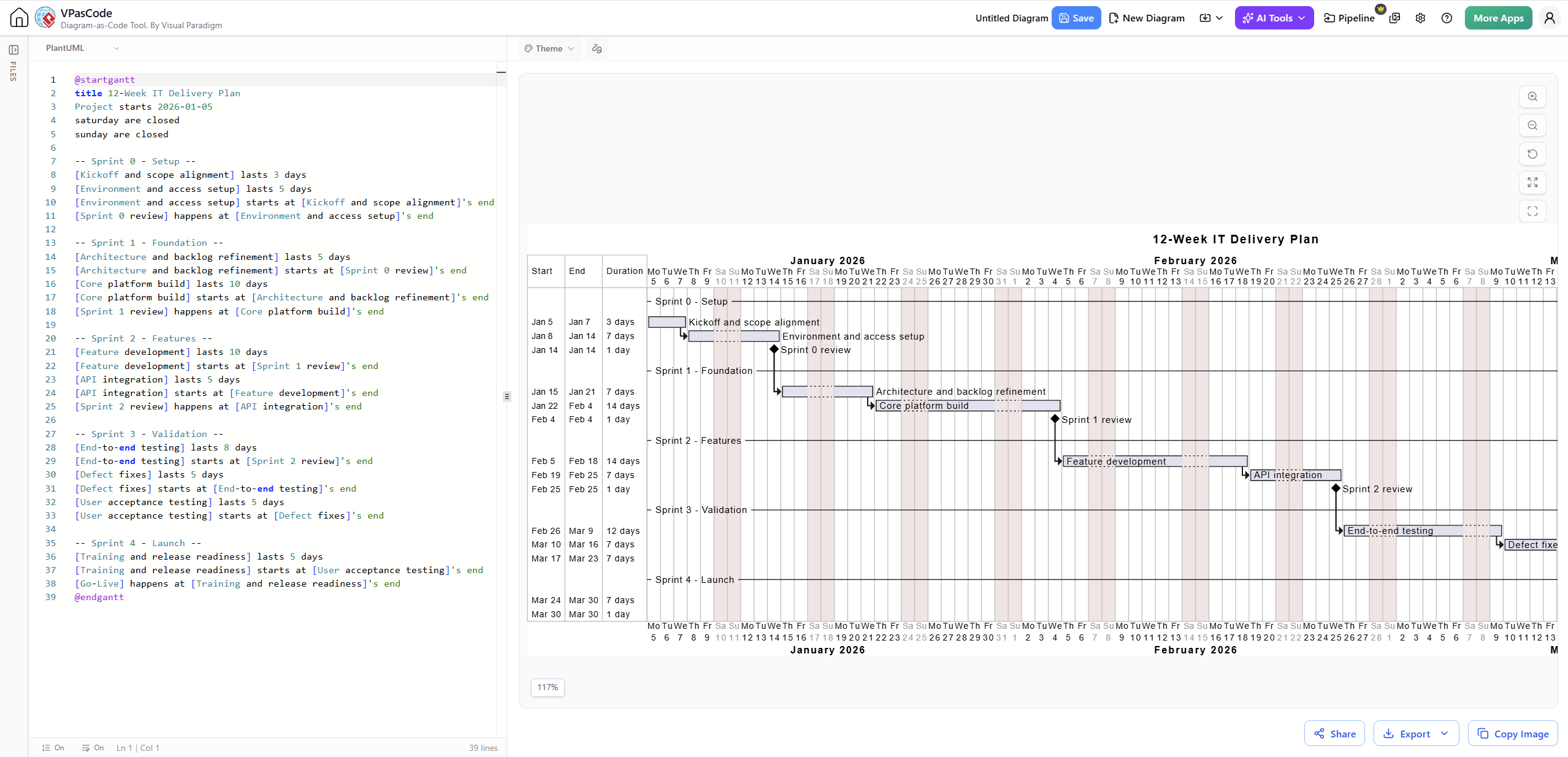
@startgantt
title 12-Week IT Delivery Plan
Project starts 2026-01-05
saturday are closed
sunday are closed

-- Sprint 0 - Setup --
[Kickoff and scope alignment] lasts 3 days
[Environment and access setup] lasts 5 days
[Environment and access setup] starts at [Kickoff and scope alignment]'s end
[Sprint 0 review] happens at [Environment and access setup]'s end

-- Sprint 1 - Foundation --
[Architecture and backlog refinement] lasts 5 days
[Architecture and backlog refinement] starts at [Sprint 0 review]'s end
[Core platform build] lasts 10 days
[Core platform build] starts at [Architecture and backlog refinement]'s end
[Sprint 1 review] happens at [Core platform build]'s end

-- Sprint 2 - Features --
[Feature development] lasts 10 days
[Feature development] starts at [Sprint 1 review]'s end
[API integration] lasts 5 days
[API integration] starts at [Feature development]'s end
[Sprint 2 review] happens at [API integration]'s end

-- Sprint 3 - Validation --
[End-to-end testing] lasts 8 days
[End-to-end testing] starts at [Sprint 2 review]'s end
[Defect fixes] lasts 5 days
[Defect fixes] starts at [End-to-end testing]'s end
[User acceptance testing] lasts 5 days
[User acceptance testing] starts at [Defect fixes]'s end

-- Sprint 4 - Launch --
[Training and release readiness] lasts 5 days
[Training and release readiness] starts at [User acceptance testing]'s end
[Go-Live] happens at [Training and release readiness]'s end
@endgantt
Export the Gantt Chart in Full Size of PNG using the VPasCode Tool:
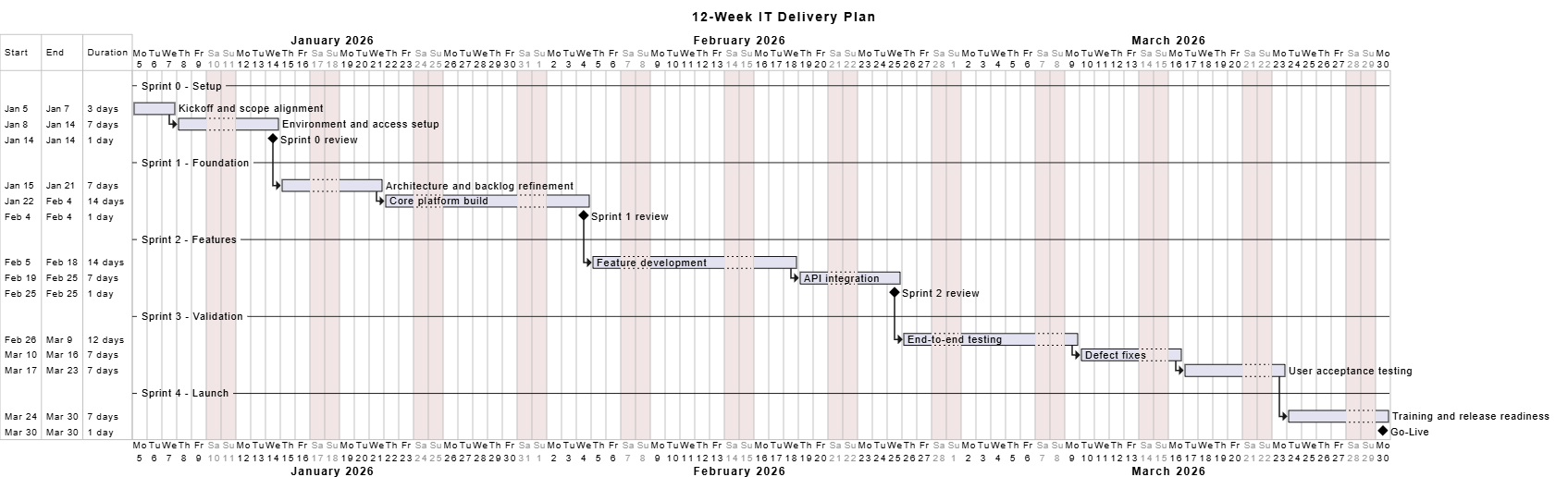
This version establishes an explicit project start and marks Saturdays and Sundays as closed. As with the Mermaid sample, the schedule is only illustrative. Verify that the renderer you use supports the syntax and calendar behavior you need.
Mermaid or PlantUML?
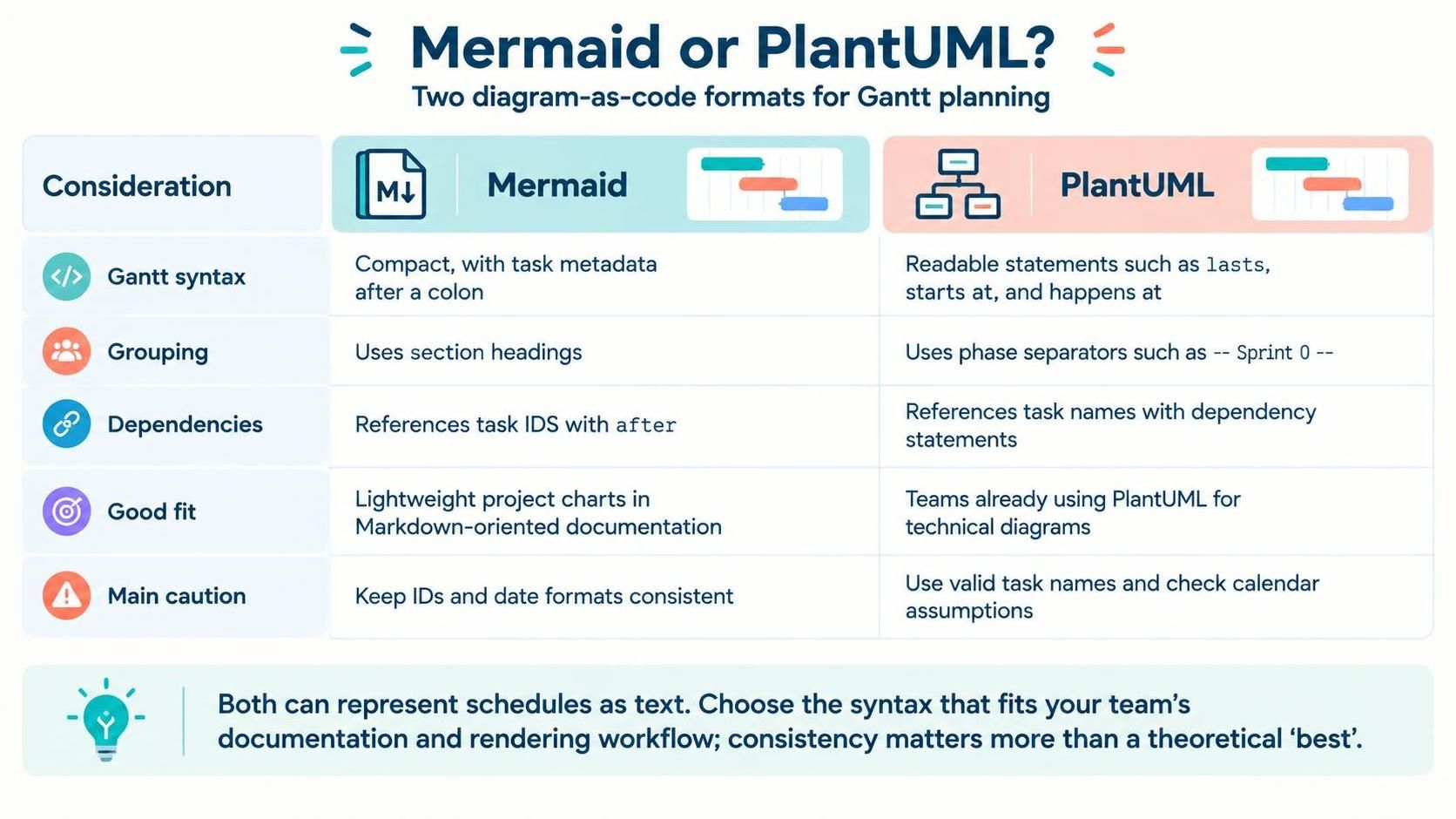
| Consideration | Mermaid | PlantUML |
|---|---|---|
| Gantt syntax | Compact, with task metadata after a colon | Readable statements such as lasts, starts at, and happens at |
| Grouping | Uses section headings |
Uses phase separators such as -- Sprint 0 -- |
| Dependencies | References task IDs with after |
References task names with dependency statements |
| Good fit | Lightweight project charts in Markdown-oriented documentation | Teams already using PlantUML for technical diagrams |
| Main caution | Keep IDs and date formats consistent | Use valid task names and check calendar assumptions |
Both can represent project schedules as text. Choose the syntax that fits your team’s existing documentation and rendering workflow; using one format consistently usually matters more than choosing a theoretical “best” language.
From AI Chatbot to VPasCode
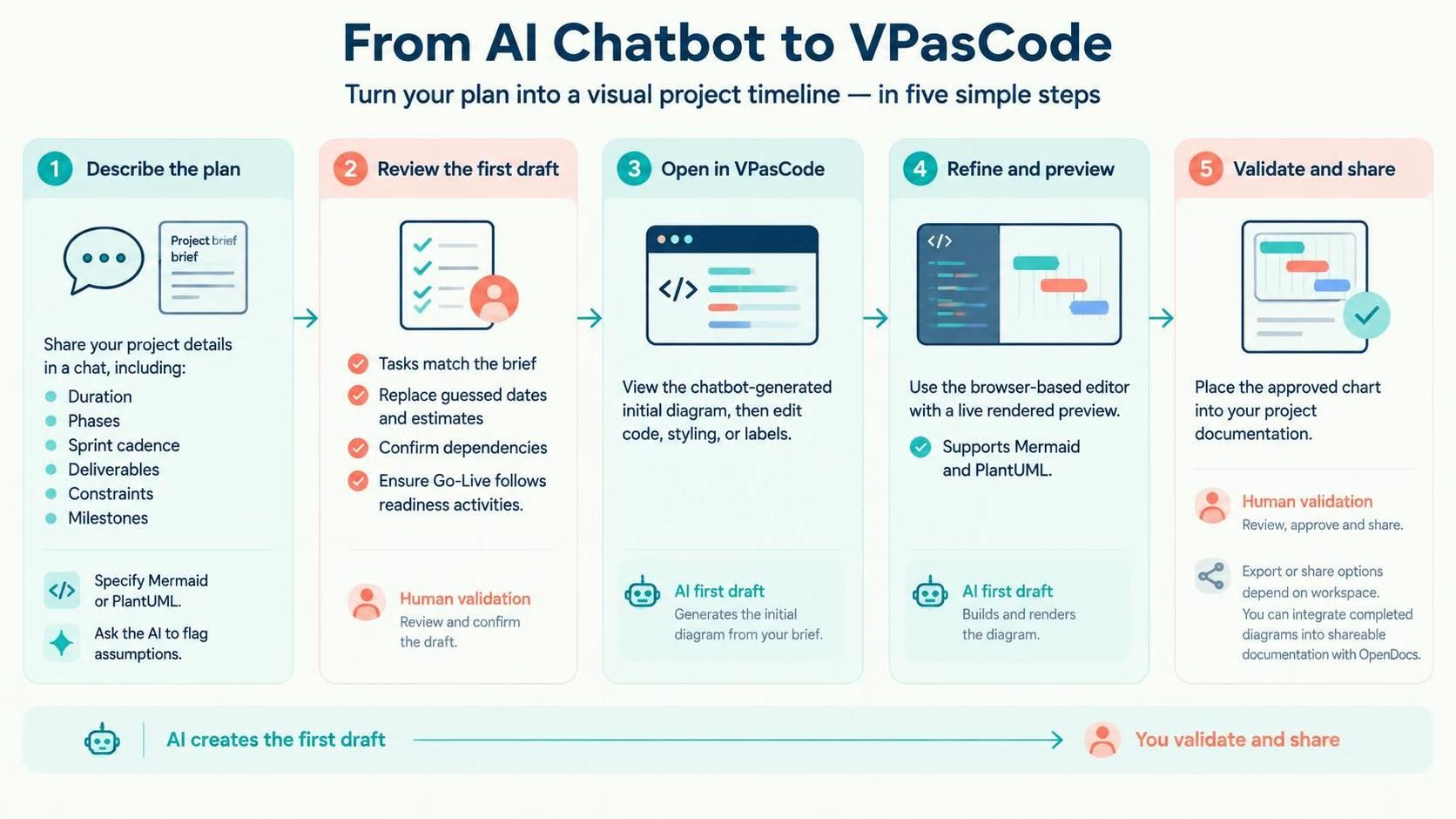
A practical Visual Paradigm workflow separates fast drafting from careful editing:
-
Describe the plan. Give the chatbot the project duration, phases, sprint cadence, key deliverables, constraints, and milestones. Ask it to use a specific syntax—Mermaid or PlantUML—and to flag assumptions.
-
Review the first draft. Check that the phases and tasks match the project brief. Replace guessed dates and estimates, confirm the dependency chain, and ensure Go-Live follows the required readiness activities.
-
Open the diagram in VPasCode. Visual Paradigm describes the chatbot-to-VPasCode workflow as a way to generate an initial diagram and then edit its code, styling, or labels in the editor.
-
Refine and preview. Use the editor to make changes and inspect the rendered result. VPasCode is browser-based and provides a code editor with a rendered preview; its supported diagram formats include Mermaid and PlantUML.
-
Validate and share. Export or share the reviewed diagram using the options available in your workspace, or incorporate it into project documentation. Visual Paradigm describes integration with OpenDocs for sending completed diagrams into shareable documentation.
Getting more reliable AI output
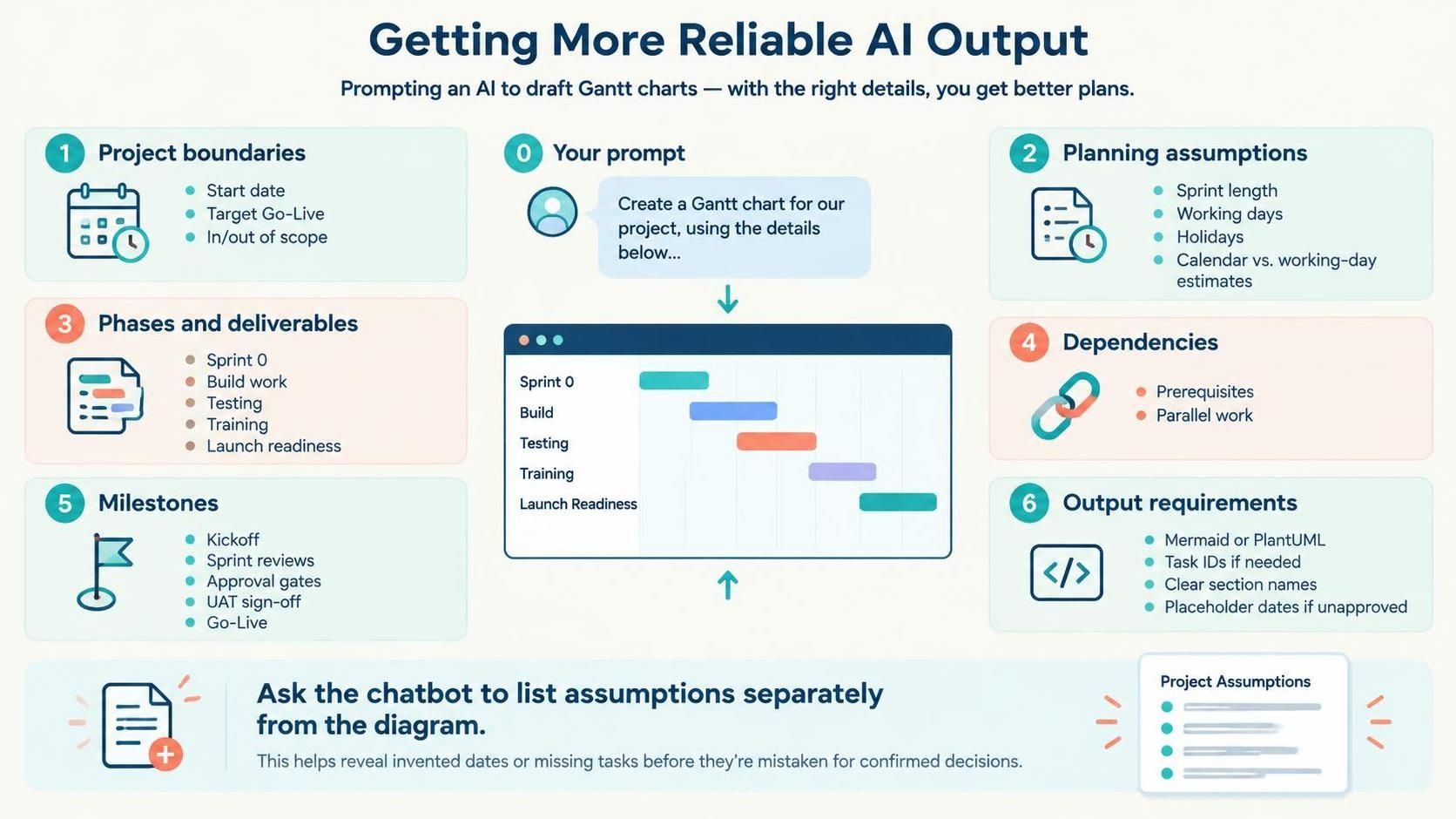
A detailed prompt usually produces a more useful draft than a short request like “make a Gantt chart.” Include:
-
Project boundaries: start date, target Go-Live, and what is in or out of scope.
-
Planning assumptions: sprint length, working days, holidays, and whether duration estimates use calendar or working days.
-
Phases and deliverables: Sprint 0, build work, testing, training, and launch readiness.
-
Dependencies: which tasks must finish before others can begin, and which work can happen in parallel.
-
Milestones: kickoff, sprint reviews, approval gates, UAT sign-off, and Go-Live.
-
Output requirements: Mermaid or PlantUML, task IDs if needed, clear section names, and placeholder dates if the schedule is not yet approved.
Ask the chatbot to state assumptions separately from the diagram. That makes it easier to identify invented dates or missing tasks rather than mistaking them for confirmed project decisions.
Syntax checks that prevent common problems
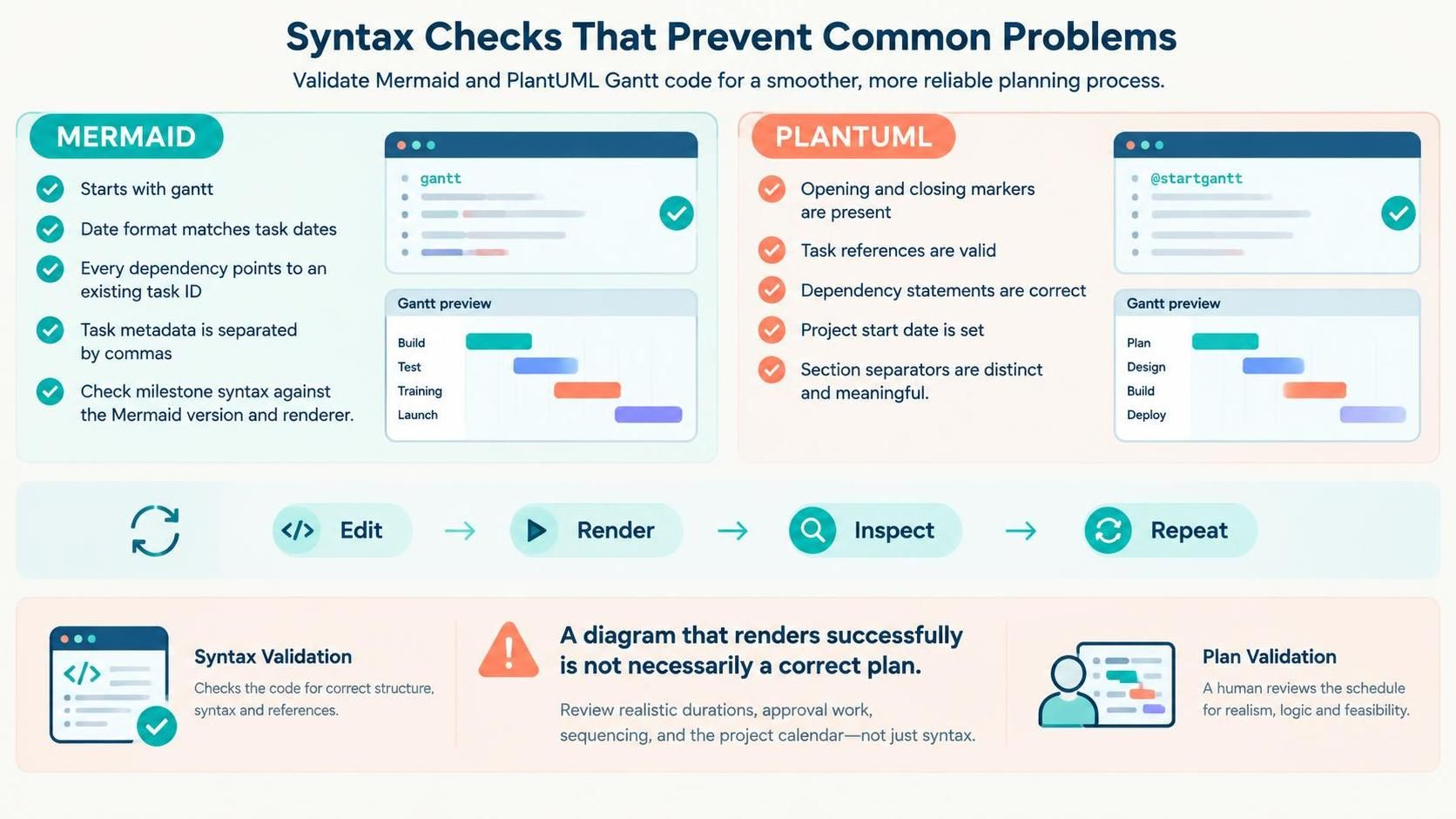
For Mermaid, confirm that the chart starts with gantt, the date format matches the dates in the tasks, and each dependency points to an existing task ID. Task metadata is separated by commas, and milestone syntax should be checked against the Mermaid version and renderer in use.
For PlantUML, check the opening and closing markers, task references, dependency statements, and project start date. If you label sections with separators, keep them distinct and meaningful. In either format, render the code after each significant edit rather than waiting until the end.
AI-assisted error correction can help find syntax issues, but a successfully rendered diagram is not necessarily a correct plan. The chart may still contain unrealistic durations, omitted approval work, invalid sequencing, or a date that does not match the project calendar. Review both the code and the project logic.
Why the Visual Paradigm ecosystem can help
The main benefit of combining the AI chatbot and VPasCode is the division of labor: natural language helps get the structure started, while editable source code gives the project team control over details. The live preview makes it easier to catch visual problems while editing, and working in one environment that supports Mermaid and PlantUML can reduce the need to switch tools just to inspect or revise those diagrams.
This approach is especially useful when a team wants to:
-
Move from brief to draft quickly without drawing every task manually.
-
Keep control of the final schedule by editing dates, dependencies, and labels directly.
-
Reuse a consistent structure by saving a reviewed chart as a starting point for future plans.
-
Connect diagrams to documentation through available Visual Paradigm integrations such as OpenDocs.
AI is not the project manager: it cannot approve scope, negotiate team capacity, or guarantee that a schedule is feasible. The standout value is a workflow that makes drafting and editing more accessible while keeping the plan inspectable as code.
Conclusion
A conversational Gantt workflow can make project planning easier to start, but reliable schedules still depend on clear assumptions and human review. Use AI to draft the structure, Mermaid or PlantUML to express it as editable diagram code, and VPasCode to refine and preview the result. Before sharing the chart, validate the dates, dependencies, working calendar, and delivery logic with the people responsible for execution.