In the complex landscape of Enterprise Architecture, clarity is the most valuable asset. When organizations embark on digital transformation or major structural changes, the path forward often remains obscured by legacy complexity. This is where the ArchiMate modeling language proves its worth. It provides a standardized framework for describing, analyzing, and visualizing the business, application, and technology layers of an enterprise.
At the heart of any successful architectural initiative lies the ability to clearly distinguish between the current state and the desired future state. These are formally known as the Baseline Architecture and the Target Architecture. This guide explores how to effectively model and visualize these states using ArchiMate principles, ensuring stakeholders understand the scope of change and the strategic value of the initiative.
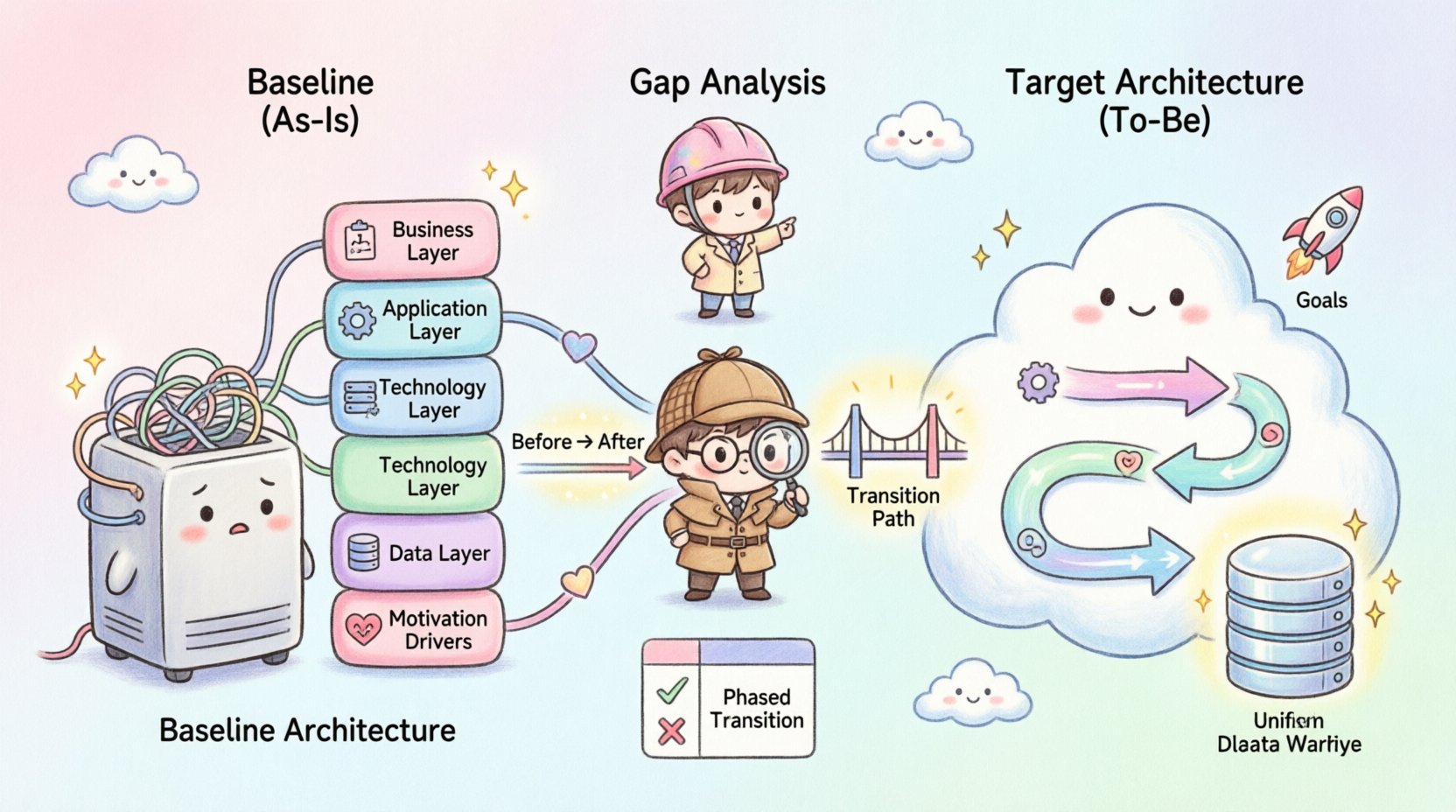
Understanding the Baseline Architecture 📊
The Baseline Architecture represents the current reality of the organization. It is the “As-Is” view, capturing how the enterprise operates at a specific point in time. While it may seem intuitive to simply document what exists, creating a formal Baseline Architecture requires discipline and precision.
- Scope and Boundaries: Defining what is in scope for the current state is critical. Does the Baseline include legacy systems that are no longer in use but still maintain data? Does it cover all departments or only those involved in the immediate project?
- Accuracy and Completeness: A Baseline that is outdated or incomplete leads to flawed analysis. It must reflect the actual operational environment, including dependencies, integrations, and data flows.
- Stakeholder Alignment: Different departments often have conflicting views of the current state. The Baseline Architecture serves as a single source of truth to align these perspectives.
Key Components of the Baseline
When modeling the Baseline in ArchiMate, specific layers and elements come into play:
- Business Layer: Includes business processes, roles, and organizational structures. For example, the “Order Fulfillment” process and the “Sales Manager” role.
- Application Layer: Covers the software systems supporting the business. This includes Customer Relationship Management (CRM) tools, Enterprise Resource Planning (ERP) systems, and custom internal applications.
- Technology Layer: Represents the infrastructure. Servers, networks, cloud environments, and middleware fall into this category.
- Data Layer: Although often grouped with the Application or Technology layers, data objects and information flows are crucial for understanding how information moves through the current state.
- Motivation Layer: Captures the drivers, goals, and principles that currently govern the organization’s operations.
Visualizing the Baseline is not merely about drawing boxes and lines. It is about capturing the relationships. How does a specific application support a business process? Which technology node hosts a critical service? These connections reveal bottlenecks, redundancies, and single points of failure.
Defining the Target Architecture 🚀
The Target Architecture is the “To-Be” view. It represents the desired state of the enterprise after the transformation is complete. Unlike the Baseline, which documents reality, the Target Architecture documents intent and strategy.
- Strategic Alignment: The Target Architecture must align with the organization’s strategic goals. If the strategy is to become customer-centric, the Target Architecture should reflect streamlined customer-facing processes and unified data views.
- Feasibility: While visionary, the Target Architecture must remain grounded in technical and business feasibility. It should not propose technologies or structures that the organization cannot support.
- Stability: The Target Architecture should be stable enough to guide investment decisions but flexible enough to accommodate future changes.
Key Components of the Target
Similar to the Baseline, the Target Architecture utilizes the ArchiMate layers, but with a forward-looking focus:
- Business Capabilities: Focuses on what the business can do, rather than specific processes. This allows for more flexibility in how processes are implemented in the future.
- Application Services: Defines the services the application portfolio will offer, abstracting away specific software implementations where possible.
- Infrastructure Services: Describes the technological capabilities required to support the application services, such as compute power, storage, and network availability.
- Business Principles: New principles may be introduced to guide the future state, such as “Cloud First” or “Data Privacy by Design”.
The Gap Analysis: Bridging the Two States 🌉
Once the Baseline and Target Architectures are defined, the next critical step is Gap Analysis. This process identifies the differences between the current state and the desired state. It is the foundation for planning the transition.
Types of Gaps
- Capability Gaps: Areas where the organization lacks the necessary business capabilities to achieve its goals.
- Technology Gaps: Missing or outdated infrastructure and applications that prevent the realization of the Target Architecture.
- Process Gaps: Processes that exist in the Baseline but do not align with the efficiency or compliance requirements of the Target.
- Information Gaps: Discrepancies in data quality, availability, or flow between the current and future states.
Visualizing the Gap
ArchiMate supports the visualization of gaps through specific relationship types. For instance, the Realization relationship can show how a Target Business Process is realized by a new Application Service. The Assignment relationship can map a Target Role to a specific capability.
Tables are an excellent tool for summarizing gap analysis findings alongside architectural diagrams.
| Layer | Baseline Element | Target Element | Gap Description | Impact |
|---|---|---|---|---|
| Business Process | Manual Order Entry | Automated Order Processing | Dependency on human input is removed | Reduces error rate by 90% |
| Application | Legacy CRM v1.0 | Cloud-based CRM SaaS | Migration from on-premise to cloud | Improves scalability and accessibility |
| Technology | On-Premise Servers | Virtualized Cloud Infrastructure | Hardware replacement required | Reduces maintenance costs |
| Data | Siloed Databases | Centralized Data Warehouse | Integration of data sources | Enables unified reporting |
Transition Architecture: The Path Forward 🛣️
Jumping directly from Baseline to Target is rarely feasible in large enterprises. The Transition Architecture acts as a bridge, defining intermediate states that allow for incremental change. This approach mitigates risk and allows for continuous value delivery.
- Phased Implementation: Breaking down the Target Architecture into logical waves or phases. Each phase delivers a subset of capabilities.
- Dependency Management: Identifying which changes must occur before others. For example, the Data Layer might need to be standardized before the Application Layer can be fully migrated.
- Risk Mitigation: Smaller transitions allow for testing and validation at each step, reducing the impact of potential failures.
In ArchiMate, the Association and Realization relationships are often used to depict how a Transition Architecture realizes the Target Architecture while being supported by the Baseline infrastructure during the interim period.
Visualization Best Practices 🎨
Effective visualization is not just about aesthetics; it is about communication. Architects must create diagrams that are understandable by technical teams, business leaders, and external partners.
1. Viewpoints and Viewpoints
Not every stakeholder needs to see every detail. ArchiMate defines specific viewpoints to tailor the model to the audience.
- Business Viewpoint: Focuses on the Business Layer. Used by business executives to understand process changes and value streams.
- Application Viewpoint: Focuses on the Application and Data layers. Used by IT managers and developers to understand system interactions.
- Technology Viewpoint: Focuses on the Infrastructure. Used by system administrators and infrastructure engineers.
- Implementation & Migration Viewpoint: Focuses on the Transition Architecture. Used by project managers to plan rollout strategies.
2. Layering and Abstraction
Overloading a diagram with too much detail can obscure the main message. Use layering to abstract complexity.
- High-Level Overview: Show the major business capabilities and their supporting application domains without detailing specific servers or database tables.
- Deep-Dive Diagrams: Zoom into specific areas where complexity exists, such as a specific integration point or a critical migration path.
- Consistency: Ensure that naming conventions and element types are consistent across all diagrams. A “Process” in one view should not be labeled as a “Function” in another.
3. Color and Shape Semantics
Even without CSS, the visual structure of the HTML and the logical use of shapes in the model matters.
- Baseline vs. Target: A common convention is to use distinct shapes or borders to differentiate between Baseline and Target elements within the same diagram. For example, solid lines for Baseline and dashed lines for Target.
- Change Indicators: Use specific symbols to mark elements that are being added, removed, or modified. This helps stakeholders quickly identify the scope of change.
- Flow Direction: Ensure that arrows clearly indicate the direction of data flow or process sequence. Ambiguity here can lead to misinterpretation of system behavior.
Common Challenges in Visualization ⚠️
Creating Baseline and Target Architectures is fraught with challenges. Recognizing these early can save significant time and effort.
- Outdated Baseline Data: Often, the current state is poorly documented. Relying on interviews and observations is necessary, but this can introduce bias or inaccuracies.
- Scope Creep: As the Target Architecture is defined, it is common for requirements to expand. Keeping the scope tight is essential for a successful transformation.
- Stakeholder Disagreement: Different departments may have conflicting views of the Baseline. Facilitating workshops to agree on the “As-Is” state is crucial before defining the “To-Be”.
- Complexity Management: Large enterprises have thousands of elements. Simplification techniques, such as aggregation or grouping, are required to keep diagrams readable.
The Role of Motivation in Architecture 🎯
Architecture is not just about structure; it is about purpose. The Motivation Layer in ArchiMate connects the technical artifacts to business drivers.
- Drivers: External or internal factors pushing for change. For example, new regulatory requirements or market competition.
- Goals: The specific objectives the architecture aims to achieve. For example, “Reduce Operational Costs by 20%”.
- Principles: Rules that guide decision-making. For example, “Standardize Technology Stack”.
- Requirements: Specific conditions that the architecture must satisfy. For example, “System must be available 99.9% of the time”.
Linking the Baseline and Target architectures to the Motivation Layer ensures that every architectural decision can be traced back to a business need. This traceability is vital for justifying investment and maintaining alignment.
Ensuring Consistency Across Views 🔍
When visualizing Baseline and Target architectures, consistency is key to maintaining trust in the model.
- Single Source of Truth: The underlying model should be the single source of truth. Diagrams should be generated from this model, not created in isolation.
- Version Control: Architectures evolve. Version control mechanisms must be in place to track changes to the Baseline and Target models over time.
- Review Cycles: Regular reviews with stakeholders ensure that the visualizations remain accurate and relevant as the project progresses.
Final Thoughts on Architectural Visualization 🤝
The visualization of Baseline and Target Architectures is a foundational practice in Enterprise Architecture. It transforms abstract strategy into concrete, actionable plans. By clearly defining the current state and the desired future state, organizations can navigate the complexities of change with confidence.
Success depends on accurate data, clear communication, and a disciplined approach to modeling. The ArchiMate language provides the necessary structure, but the value comes from the insights derived from the visualizations. Whether identifying gaps, planning transitions, or securing stakeholder buy-in, these models serve as the roadmap for organizational evolution.
Remember that architecture is a living discipline. The Baseline and Target are not static endpoints but dynamic references that guide the organization through continuous improvement. Regularly updating these models ensures that the architecture remains relevant in an ever-changing business environment.