Software architecture relies heavily on precise modeling to communicate complex systems. Two fundamental tools in the Unified Modeling Language (UML) toolkit are the Standard Class Diagram and the Composite Structure Diagram. While both represent structural information, they serve distinct purposes. Understanding the nuances between them ensures that your documentation remains clear, accurate, and useful for developers and stakeholders alike.
This guide explores the specific scenarios where each diagram type shines. We will dissect their components, analyze their structural differences, and provide practical guidance on selection. By the end, you will know exactly which visual language to apply when modeling your software architecture.
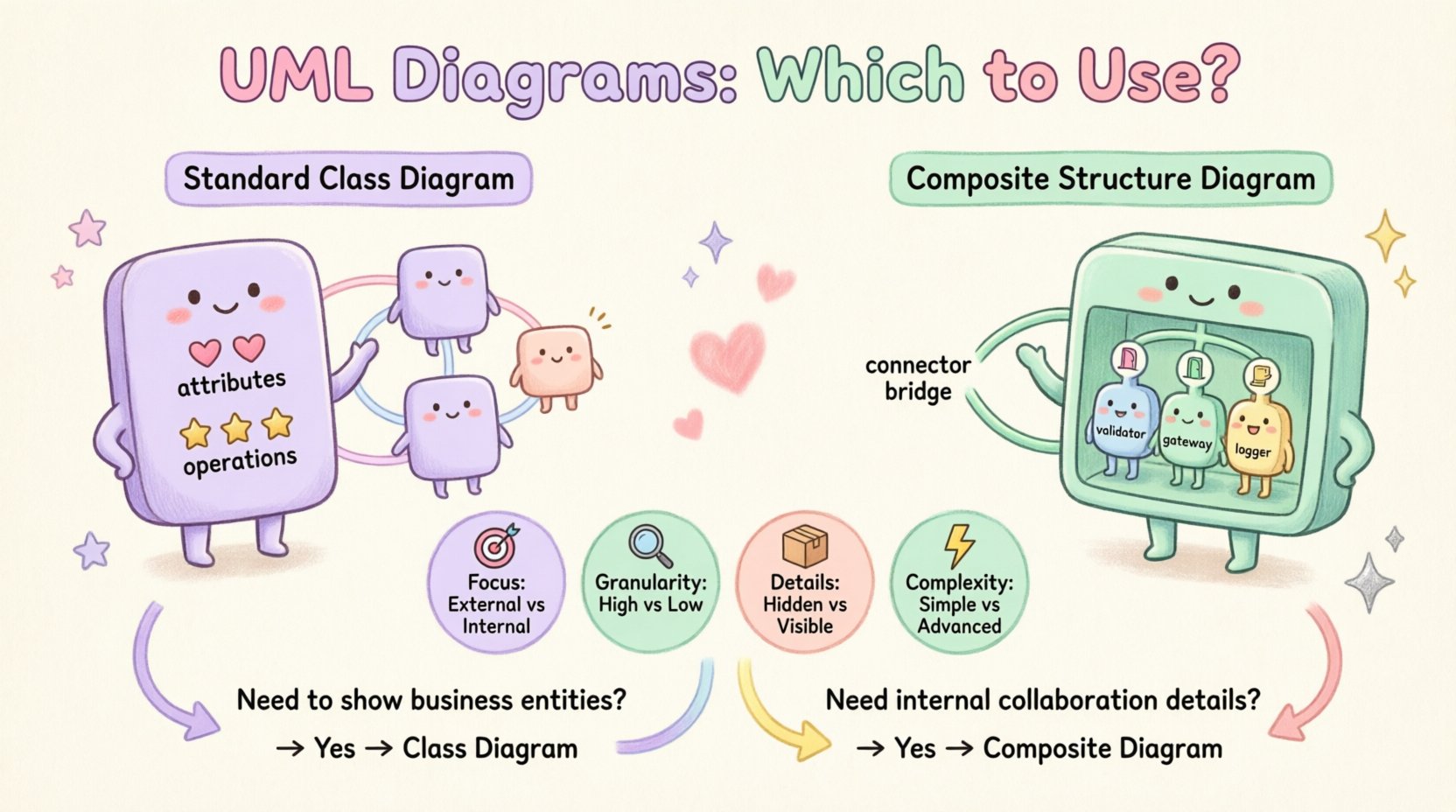
🏗️ Understanding the Standard Class Diagram
The Standard Class Diagram is the backbone of object-oriented modeling. It describes the static structure of a system by showing its classes, attributes, operations, and relationships. It is the most common diagram used in software design.
🔹 Core Components
- Classes: Blueprints for objects containing data and behavior.
- Attributes: Data fields stored within the class.
- Operations: Methods or functions the class can execute.
- Associations: Links between classes indicating relationships.
- Inheritance: Hierarchical relationships where one class extends another.
- Aggregations: “Whole-part” relationships without shared lifecycle.
- Compositions: Stronger “whole-part” relationships with shared lifecycle.
🔹 Primary Use Cases
Standard Class Diagrams are ideal for defining the logical layer of an application. They map directly to code structures, making them essential for:
- Designing the database schema.
- Defining API interfaces.
- Establishing inheritance hierarchies.
- Documenting business entities.
When your focus is on the what of the system (entities and their data), the standard class diagram is the default choice. It provides a high-level view of the system’s topology without diving into the internal mechanics of complex components.
🧩 Understanding the Composite Structure Diagram
The Composite Structure Diagram offers a deeper level of detail. It illustrates the internal structure of a class or component. Instead of showing a class as a solid block, it opens it up to reveal how its internal parts collaborate to fulfill its responsibilities.
🔹 Core Components
- Structured Class: The container or component being analyzed.
- Parts: The internal classifiers that make up the structured class.
- Roles: The responsibilities a part plays within the structure.
- Ports: Interaction points where the class communicates with the outside world.
- Connectors: Links between ports and internal parts.
- Interfaces: Provided and required interfaces that define contracts.
🔹 Primary Use Cases
This diagram is specialized for complex components that have significant internal logic or multiple collaborating sub-structures. It is used when:
- You need to specify how a component is built from other components.
- Communication between internal parts must be explicit.
- Ports and interfaces are critical for integration.
- Modeling middleware or framework layers.
While a standard class diagram says a component exists, the composite structure diagram explains how it functions internally. It bridges the gap between high-level design and low-level implementation details.
📋 Comparison Table
To clarify the distinctions, consider the following comparison of features and capabilities.
| Feature | Standard Class Diagram | Composite Structure Diagram |
|---|---|---|
| Focus | External relationships and logical structure | Internal organization and collaboration |
| Granularity | High-level (Class level) | Low-level (Component level) |
| Internal Details | Hidden (attributes and operations listed only) | Visible (parts, ports, and connectors shown) |
| Complexity | Simple to Moderate | High |
| Best For | Domain modeling, Database design | System architecture, Component design |
| Readability | Easy for developers to understand | Requires specific architectural knowledge |
🎯 When to Choose Standard Class Diagrams
There are specific situations where the simplicity of the standard class diagram outweighs the detail of the composite structure diagram. Use this diagram type when clarity and broad understanding are the priorities.
🔹 1. Defining Domain Models
When mapping business concepts to software entities, you need to show relationships between customers, orders, and products. A standard class diagram effectively displays these associations without cluttering the view with internal implementation details.
🔹 2. Database Schema Design
Relational database structures rely on tables, keys, and foreign keys. Standard class diagrams map naturally to this structure. They help developers understand the data model before writing SQL or ORM configurations.
🔹 3. API Contract Documentation
If you are defining a public interface for a service, the internal workings are irrelevant. The class diagram shows the methods and data types exposed to the client, which is sufficient for API consumers.
🔹 4. Inheritance Hierarchies
When analyzing polymorphism and inheritance trees, the standard class diagram is superior. It clearly visualizes parent and child classes, allowing teams to understand the hierarchy of behavior and data.
🔹 5. Initial Project Kickoff
During the early phases of development, teams need a shared vision. A complex composite structure diagram can overwhelm stakeholders. The standard class diagram provides a manageable entry point for discussion.
🔗 When to Choose Composite Structure Diagrams
As systems grow in complexity, the standard class diagram becomes insufficient. It treats components as black boxes. When the internal collaboration matters, the composite structure diagram is necessary.
🔹 1. Complex Middleware Components
Middleware often acts as a bridge between different systems. It requires internal routing logic, caching mechanisms, and protocol adapters. A composite structure diagram shows how these internal parts connect to handle traffic.
🔹 2. Component-Based Architecture
In architectures like Enterprise JavaBeans or Microservices, components are self-contained units. Defining the ports and interfaces clearly helps teams understand how to deploy and integrate these units without breaking dependencies.
🔹 3. Hardware-Software Interfaces
When software interacts with physical hardware, the internal mapping is critical. Ports represent the physical connection points. The diagram ensures that the software correctly interfaces with the hardware drivers.
🔹 4. Collaborative Internal Logic
Some classes are merely aggregators of other objects. For example, a “Payment Processor” might contain a “Validator”, a “Gateway”, and a “Logger”. A composite structure diagram shows how these parts work together to process a single transaction.
🔹 5. Interface Implementation Details
If a class implements multiple interfaces, a standard diagram might just list them. A composite structure diagram can show which specific part of the internal structure satisfies which interface requirement.
🛠️ Modeling Internal Structure: A Deep Dive
The power of the Composite Structure Diagram lies in its ability to expose the collaboration within a classifier. This is often where the most critical architectural decisions are made.
🔹 Ports and Connectors
Ports are the interaction points. They define the boundary between the internal structure and the environment. Connectors link these ports to other parts. This explicit modeling prevents loose coupling issues by forcing the designer to define every connection point.
🔹 Provided vs. Required Interfaces
Components often need to know what they offer and what they need. The diagram distinguishes between interfaces the component provides to the outside world and interfaces it requires from other components. This separation of concerns is vital for maintaining modularity.
🔹 Part Multiplicity
A structured class can contain multiple instances of a part. The diagram allows you to specify multiplicity (e.g., one-to-many). This clarifies resource allocation and lifecycle management within the component.
🔄 Interaction with Other Diagrams
Neither diagram exists in isolation. They are part of a larger ecosystem of UML diagrams.
🔹 Sequence Diagrams
Sequence diagrams show the flow of messages over time. The Composite Structure Diagram complements this by showing the static structure that handles those messages. If a sequence diagram shows a message going to a specific port, the composite structure diagram defines where that port leads internally.
🔹 Deployment Diagrams
Deployment diagrams show physical nodes. Composite structure diagrams define the software artifacts that run on those nodes. Together, they describe the full system from code to hardware.
🔹 Object Diagrams
Object diagrams show specific instances at a point in time. Composite structure diagrams define the template for how those instances are organized internally.
⚠️ Common Modeling Mistakes
Using the wrong diagram type can lead to confusion. Here are common pitfalls to avoid.
- Overcomplicating Simple Classes: Do not use composite structure diagrams for simple data holders. It adds unnecessary visual noise.
- Ignoring Internal Dependencies: When using class diagrams for complex components, failing to show internal dependencies can lead to circular reference errors in code.
- Mixing Levels of Abstraction: Do not show internal ports on a diagram that is meant for high-level business stakeholders. Keep the views distinct.
- Neglecting Lifecycle Management: Composite structures often imply shared lifecycles between parts. Ensure this is modeled correctly to prevent memory leaks or resource errors.
- Redundancy: If a class diagram and composite structure diagram show the same information, remove the redundancy. The composite diagram should add value, not repeat.
🤝 Collaboration and Team Dynamics
Documentation is a communication tool. The choice of diagram affects how different team members understand the system.
🔹 Frontend vs. Backend
Frontend developers might prefer standard class diagrams to understand data models. Backend engineers often need composite structure diagrams to understand how services interact internally.
🔹 Architects vs. Developers
System architects use composite structure diagrams to validate the modularity of the design. Developers use class diagrams to implement the specific logic within those modules.
🔹 Maintenance and Onboarding
When new developers join a project, they need a map. A standard class diagram provides the map. A composite structure diagram provides the blueprint for the rooms. Both are needed for a complete understanding.
📈 Evolution and Refactoring
Software is not static. It evolves. This choice of diagram impacts how easily you can refactor the system.
🔹 Modular Refactoring
If you plan to split a large class into smaller components, the composite structure diagram is the starting point. It defines the boundaries for extraction.
🔹 Interface Stability
Changing the internal structure without changing the provided interface is a key goal in software engineering. The composite structure diagram helps visualize this stability. You can change internal parts as long as the ports remain the same.
🔹 Documentation Consistency
Maintain consistency across your documentation. If you switch between diagrams randomly, the documentation becomes fragmented. Establish a standard: use class diagrams for data models and composite diagrams for service components.
🏁 Final Thoughts on Structural Modeling
Selecting between a UML Composite Structure Diagram and a Standard Class Diagram is a decision based on the level of detail required and the audience for the documentation. The standard class diagram remains the workhorse for general object-oriented modeling. It is versatile, widely understood, and effective for defining logical structures.
The Composite Structure Diagram is the specialist tool for deep architectural analysis. It shines when internal collaboration, ports, and interfaces define the system’s behavior. By understanding the strengths and limitations of each, you can produce documentation that truly supports the development lifecycle.
Remember that the goal is clarity. If a diagram confuses more than it clarifies, simplify it. Choose the tool that best fits the problem at hand. Whether you are mapping a database or designing a complex middleware component, the right structural model makes the difference between a fragile system and a robust one.