Creating a robust Architecture Vision Document is a foundational task in enterprise architecture. It defines the destination and the strategic intent of an organization’s transformation. When leveraging ArchiMate notation, clarity becomes paramount. The notation provides a standardized language to describe business, application, and technology layers. This guide details how to structure these documents effectively, ensuring stakeholders understand the proposed direction without ambiguity. We will explore the layers, relationships, and documentation standards required for a successful vision.
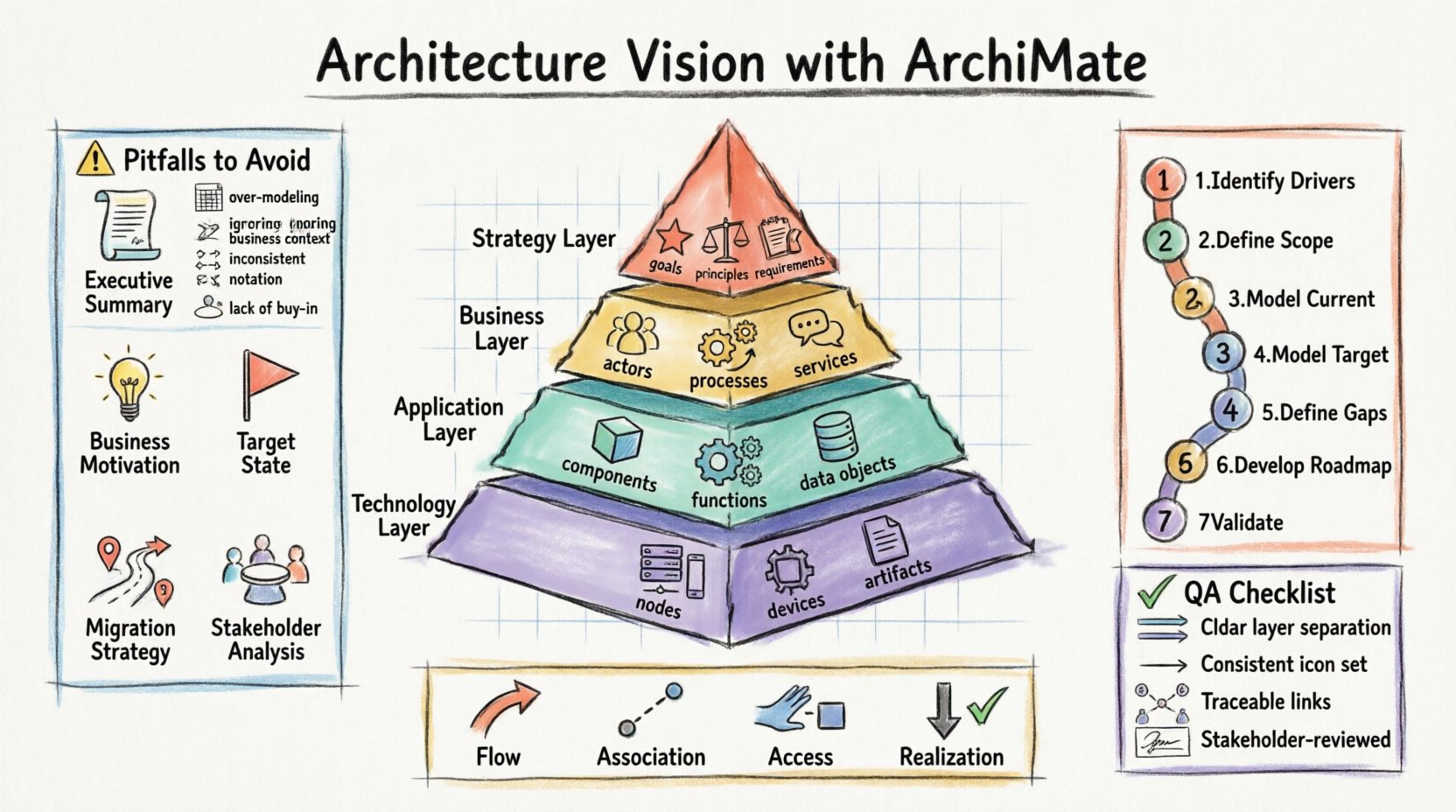
📋 Core Components of the Architecture Vision
An Architecture Vision Document is not merely a collection of diagrams. It is a narrative supported by visual models. The document must articulate the current state, the target state, and the gap between them. It serves as a contract between the architecture team and the business leadership. Below are the essential sections that form the backbone of this document.
- Executive Summary: A high-level overview for decision-makers who may not read the technical details.
- Business Motivation: The drivers for change, including business goals and strategic objectives.
- Current State Assessment: A description of the existing architecture and its limitations.
- Target State Definition: The desired future architecture described using ArchiMate constructs.
- Migration Strategy: A roadmap for transitioning from the current to the target state.
- Stakeholder Analysis: Identification of who is affected and how they are engaged.
Each section requires specific attention to detail. The Business Motivation element is particularly critical. It links the architecture work to tangible business value. Without this link, the architecture risks becoming an isolated technical exercise.
🧩 Understanding ArchiMate Layers
ArchiMate organizes enterprise architecture into distinct layers. This separation of concerns allows architects to focus on specific domains without losing sight of the whole. When structuring the Vision Document, you must ensure each layer is addressed appropriately. The layers are hierarchical, with the Business layer at the top and the Technology layer at the bottom.
| Layer | Focus Area | Key Elements |
|---|---|---|
| Business | Organizational structure and processes | Business Actor, Business Process, Business Service |
| Application | Software systems and data | Application Component, Application Function, Data Object |
| Technology | Infrastructure and hardware | Node, Device, System Software, Artifact |
| Strategy | Goals and drivers | Goal, Principle, Requirement |
Using this table as a reference ensures comprehensive coverage. Do not neglect the Strategy layer. It provides the context for why the Business layer is changing. The motivation elements drive the entire architecture.
🔄 Defining Relationships and Views
Diagrams alone do not constitute a document. The relationships between elements tell the story of how the enterprise functions. ArchiMate defines several relationship types. These include flow, association, access, and realization. Understanding when to use which relationship is key to accurate modeling.
- Flow: Indicates a sequence or movement of information or materials.
- Association: Represents a structural link between elements.
- Access: Shows how one element uses or accesses another.
- Realization: Demonstrates how a lower-level element implements a higher-level concept.
When structuring the Vision, group these relationships into views. A view is a representation of a part of the architecture tailored to a specific stakeholder group. For example, a Business View focuses on processes and actors, while a Technical View focuses on infrastructure. Mixing too many views in a single diagram leads to confusion.
📝 Step-by-Step Structuring Guide
To build the document, follow a logical progression. This ensures the narrative flows from problem to solution. The process involves gathering requirements, modeling the target state, and validating with stakeholders.
- Identify Strategic Drivers: Start with the business goals. What problem are we solving?
- Define the Scope: Determine which parts of the enterprise are in scope for the vision.
- Model the Current State: Document the as-is architecture to establish a baseline.
- Model the Target State: Design the to-be architecture using ArchiMate notation.
- Define the Gaps: Highlight the differences between current and target states.
- Develop the Roadmap: Sequence the changes into manageable projects.
- Review and Validate: Ensure stakeholders agree with the vision and the path forward.
This sequence prevents skipping critical steps. For instance, skipping the current state model makes it difficult to quantify the effort required for migration. Validation is also non-negotiable. A vision that stakeholders do not own will fail during implementation.
👥 Stakeholder Communication
The Architecture Vision Document is a communication tool. It must be understandable to the people who authorize the work. Technical jargon should be minimized or explained. Use the layers to segment information. Executives may only need the Business and Strategy layers. IT managers might require the Application and Technology layers.
Consider creating a glossary for specialized terms. This ensures everyone interprets the notation consistently. ArchiMate is a standard, but implementation details can vary. A shared vocabulary reduces friction.
Engage stakeholders early. Do not present a finished document and expect immediate approval. Iterate on the vision based on feedback. This collaborative approach builds trust and ensures the architecture aligns with actual business needs.
🛠️ Maintenance and Evolution
An architecture vision is not a static artifact. It evolves as the business environment changes. The document must support continuous improvement. Establish a process for reviewing the vision periodically. Update the models when significant changes occur in the business or technology landscape.
- Version Control: Maintain clear version history of the document and models.
- Change Management: Define how changes to the vision are requested and approved.
- Traceability: Ensure requirements trace back to specific architectural decisions.
- Knowledge Transfer: Keep documentation updated so new team members can understand the context.
Without maintenance, the vision becomes obsolete. An outdated vision leads to poor decisions and misaligned investments. Regular reviews keep the architecture relevant and useful.
⚖️ Common Pitfalls to Avoid
Even experienced architects make mistakes. Recognizing common pitfalls helps prevent them. Below is a table outlining frequent errors and their solutions.
| Pitfall | Consequence | Solution |
|---|---|---|
| Over-Modeling | Creates unnecessary complexity | Focus on the relevant scope for the vision |
| Ignoring Business Context | Architecture lacks strategic alignment | Link every element to a business goal |
| Inconsistent Notation | Confuses readers and stakeholders | Enforce a modeling standard across the team |
| Lack of Stakeholder Buy-in | Project resistance and delays | Involve stakeholders in the modeling process |
Adhering to these best practices increases the likelihood of success. The goal is clarity and actionability, not completeness for completeness’ sake.
✅ Checklist for Quality Assurance
Before finalizing the document, run through this checklist. It ensures all critical aspects have been addressed.
- ☐ Is the Business Motivation clearly defined?
- ☐ Are all relevant ArchiMate layers included?
- ☐ Are relationships between elements accurate and labeled?
- ☐ Is the target state distinct from the current state?
- ☐ Is the migration roadmap realistic and phased?
- ☐ Have key stakeholders reviewed the content?
- ☐ Is the terminology consistent throughout?
- ☐ Are diagrams legible and properly annotated?
- ☐ Is the version history up to date?
- ☐ Is the document free of proprietary software names?
This list serves as a final gate before distribution. It helps maintain the integrity of the architecture work. A high-quality document reflects a high-quality architecture process.
🔍 Deep Dive into ArchiMate Relationships
Understanding the nuances of relationships is vital for accurate modeling. Let’s explore how specific relationships function within the Vision Document.
Realization is often the most critical relationship. It connects the abstract to the concrete. For example, a Business Goal is realized by a Business Process. That Process is realized by an Application Service. This chain of realization shows how the goal is achieved technically.
Access is used when one element consumes or uses another. An Application Component accesses a Data Object. This indicates data flow and dependency. In the Vision, this helps identify integration points.
Association is the most generic relationship. Use it when the specific type of interaction is not critical. It shows a link exists without defining the nature of that link. This is useful for high-level views where detail is not required.
Choosing the correct relationship prevents misinterpretation. If a relationship is ambiguous, the stakeholder may assume a dependency that does not exist. Precision in notation is a form of risk management.
🌐 Integrating with Frameworks
ArchiMate is often used alongside other frameworks. It complements methodologies like TOGAF. When integrating, ensure the Vision Document aligns with the broader governance structure. The ArchiMate models should support the artifacts defined in the methodology.
For instance, if a methodology requires a specific type of business case, the ArchiMate model should provide the evidence to support that case. Do not create isolated models. They must feed into the decision-making process. The architecture work must be visible and actionable.
Consistency across frameworks is essential. Terminology should match. If TOGAF uses “Capability” and ArchiMate uses “Business Function,” map them clearly. This alignment prevents confusion when moving between different architectural artifacts.
🚀 Final Thoughts on Implementation
The ultimate goal is to guide the organization toward its strategic objectives. The Architecture Vision Document is the compass. It does not drive the vehicle, but it points the way. The structure of the document and the fidelity of the models determine how well the organization follows that direction.
Focus on clarity above all else. If a stakeholder cannot understand the diagram, the model has failed. Simplify where possible. Remove unnecessary elements. Use color and layout to highlight critical information. The notation is a tool, not a constraint. Use it to communicate effectively.
Remember that architecture is a practice. It requires discipline and consistency. By following the structure outlined here, you create a foundation for sustainable change. The Vision Document becomes a living reference point for future decisions. It anchors the transformation effort in a clear, agreed-upon reality.
Invest time in the structure. It pays dividends in execution. A well-structured document reduces ambiguity, accelerates decision-making, and fosters alignment. This is the essence of effective enterprise architecture.