- What a decision table is and why it matters for managing business rules
- How an AI decision table maker transforms plain English into structured logic
- A simple 3-step walkthrough using Visual Paradigm’s online decision table generator
- How to test, refine, and share your rules with confidence
- Related AI-powered business analysis tools to explore next
What Is a Decision Table? (And Why Should You Care?)
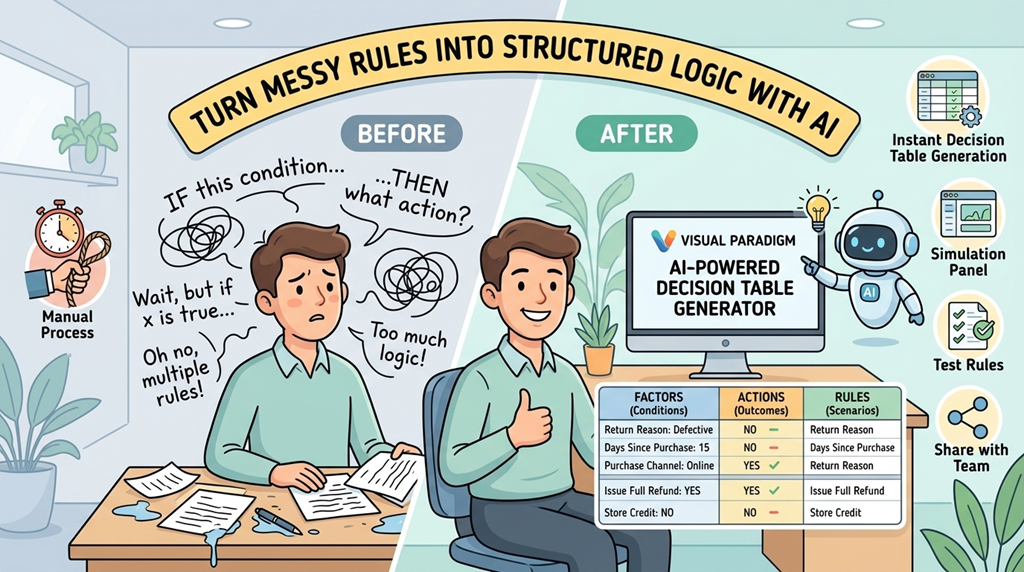
Imagine you’re creating a return policy for an online store. You need to decide: When do we offer a full refund? When do we require a manager’s approval? When do we deny a return? Writing these rules in paragraphs leads to ambiguity. A decision table solves this by organizing logic into a clean grid:
- Conditions (Factors): The “if” parts—like “Return Reason” or “Days Since Purchase”
- Actions (Outcomes): The “then” parts—like “Issue Full Refund” or “Escalate to Manager”
- Rules (Columns): Each column shows one complete scenario and its outcome
For beginners, this visual format eliminates guesswork. Everyone—business teams, developers, stakeholders—can see exactly how decisions should be made. And with an AI-powered rule generator, you don’t need to be a logic expert to build one.
Why Manual Rule Management Fails (And How AI Helps)
Before AI tools, creating decision tables meant manually listing every condition, value, and outcome—a tedious process prone to human error. Miss one combination, and your business logic has a gap. Visual Paradigm’s online AI decision table tool changes the game by:
- Using natural language processing to extract key factors and actions from your description
- Automatically generating all possible rule combinations to ensure completeness
- Providing an intuitive interface to refine logic without technical jargon
- Offering simulation to test scenarios before implementation
This cloud-based decision table maker is designed for non-technical users while delivering professional-grade results.

Step 1: Describe Your Scenario in Plain English
Start simple. In the Domain Description section of Visual Paradigm’s AI decision table generator, type what you want to model. For example:
“Product return and refund policy for an e-commerce store”
Don’t worry about perfect wording. The AI rule extraction tool analyzes your text and suggests core components. New to this? Use the built-in “Quick Start Examples” like “Employee onboarding checklist” or “Loan approval workflow” to see how it works. This first step demystifies the process—you’re just having a conversation with the tool.
Step 2: Review and Refine Factors & Actions
After AI generates initial suggestions, you’ll see two panels:
- Factors (Conditions): Like “Return Reason,” “Purchase Channel,” or “Customer Loyalty Tier”
- Actions (Outcomes): Like “Process Full Refund,” “Offer Store Credit,” or “Request Manager Approval”
This is where you take control. Add, edit, or remove items using simple buttons. Maybe you realize “International Orders” needs special handling—just click “+ Add Factor.” This interactive refinement ensures the business rules management tool matches your exact needs, not just generic suggestions.

Step 3: Generate Your Complete Decision Table Instantly
Click “Generate Decision Table,” and watch the magic happen. The automated decision table creator builds a comprehensive grid showing every possible combination of your conditions and their corresponding actions. No more manual cross-referencing or missed edge cases.
Why this matters for beginners:
- Visual clarity: See all rules in one glance—no decoding paragraphs of text
- Gap identification: Empty cells highlight scenarios you haven’t defined yet
- Team alignment: Share a single source of truth with developers, managers, and stakeholders

Test Your Logic with Real-World Simulations
Creating rules is one thing; ensuring they work is another. Visual Paradigm’s online decision table tool includes a Simulation Panel where you can:
- Select values for each factor (e.g., Return Reason = “Defective”, Days Since Purchase = “15”)
- Click “Run Simulation” to see which rule applies
- If no rule matches, get an option to “Add New Rule with Current Conditions”
This AI-powered scenario testing feature is invaluable for beginners. It turns abstract logic into tangible outcomes, helping you catch oversights before they become real-world problems.


Save, Share, and Scale with Flexible Project Management
Your decision logic is valuable. Visual Paradigm’s cloud-based decision table generator offers two secure options:
- Cloud Save: Access your projects from any device, collaborate with team members, and maintain version history
- Local JSON Export: Download your rules for offline use, backup, or integration with other systems
Whether you’re a solo entrepreneur or part of a large organization, this flexibility ensures your business rules stay accessible and protected.
Real-World Use Cases for Beginners
Not sure where to start? Here are beginner-friendly applications for an AI decision table maker:
- Customer Support: Define escalation paths based on issue type and customer tier
- E-commerce: Automate discount eligibility, shipping rules, or return policies
- HR Processes: Streamline onboarding steps, promotion criteria, or leave approvals
- Personal Projects: Plan event budgets, travel decisions, or home renovation priorities
The key is starting small. Model one process, validate it with simulation, then expand. Visual Paradigm’s visual business rules maker grows with your needs.
Why Choose Visual Paradigm’s AI-Powered Tool?
With many online business logic tools available, Visual Paradigm stands out for beginners because it:
- Requires no prior knowledge of decision tables or formal logic
- Uses conversational AI to lower the entry barrier
- Provides immediate visual feedback at every step
- Integrates with a broader suite of AI-powered business analysis tools for future growth
It’s not just about creating a table—it’s about building confidence in your decision-making process.
Ready to Transform Your Business Rules?
Stop wrestling with ambiguous documentation. Start creating clear, testable, and shareable logic with Visual Paradigm’s AI-Powered Decision Table Generator. Whether you’re documenting your first process or scaling complex workflows, this online AI rule generator puts professional-grade decision modeling within reach.
Try the AI-Powered Decision Table Generator now—no experience required.
Expand Your Toolkit: Related Visual Paradigm Resources
Once you master decision tables, explore these complementary AI-powered business analysis tools to deepen your strategic planning:
- Decision Tree Software for Visual Modeling: Build hierarchical models to map outcomes and events visually.
- Interactive Decision Tree Tool for Structured Planning: Design decision-based models for strategic analysis with a user-friendly interface.
- Decision Tree Templates for Clear Problem-Solving: Access online templates to map decisions, events, and outcomes in a structured format.
- Mastering AI Tree Diagram Maker: Learn how AI transforms natural language into professional tree structures, including decision trees.
- Business Rules Management Software and Grids: Discover the business rule grid for scalable management of structured business constraints.
- Strategic Analysis Tool for Data-Driven Decisions: Use SWOT, PEST, and Five Forces frameworks to support informed business decision-making.
- Using Viewpoints to Support Managerial Decision-Making: Select appropriate ArchiMate viewpoints to support strategic choices by management.
- AI-Powered Scenario Analysis for Strategic Planning: Model future outcomes and evaluate risks with AI as a powerful decision-support tool.
- PESTLE Analysis Template for Strategic Decision-Making: Assess external factors to inform long-term business strategy with a structured template.
- AI-Powered SWOT Analysis for Strategic Insights: Leverage artificial intelligence to automate identification of strengths and threats for faster strategic planning.