Software architecture documentation often feels like a chore. Teams spend hours drawing diagrams that no one reads, or they write lengthy documents that become outdated the moment code changes. The goal is always clarity, but the path to get there varies significantly depending on the methodology chosen. Today, we examine two dominant approaches: the C4 Model and Traditional Methods. This comparison aims to provide a clear view of how each handles complexity, audience communication, and maintenance.
Understanding the nuances between these styles helps teams select the right tool for their specific context. Whether you are building a microservices platform or maintaining a monolithic application, the way you visualize your system impacts how developers understand, contribute, and evolve the software. We will explore the strengths and weaknesses of each without hype, focusing on practical application and long-term sustainability.
What is the C4 Model? 🧱
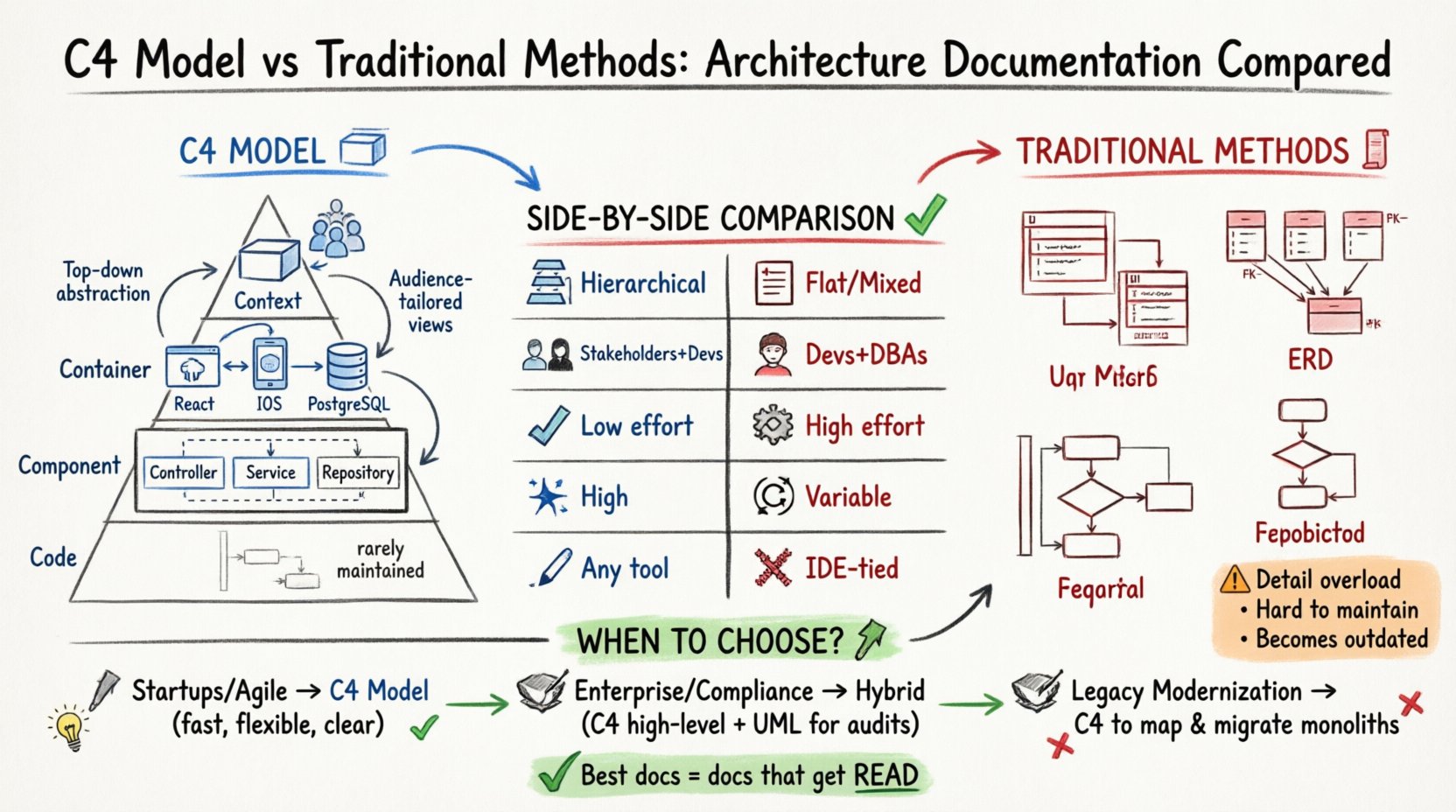
The C4 Model is a hierarchical approach to software architecture documentation. It was designed to help developers communicate their system designs at different levels of detail. The name comes from the four levels of abstraction it offers: Context, Container, Component, and Code. Each level provides a specific view that answers different questions for different stakeholders.
Unlike traditional methods that often jump straight into technical specifics, the C4 Model starts with the big picture. This top-down approach ensures that everyone understands the boundaries of the system before diving into the implementation details. It treats architecture as a communication tool rather than a rigid specification.
- Context Level: Shows the system as a single box and its users or external systems.
- Container Level: Breaks the system into major deployable units like web apps or databases.
- Component Level: Dives into the internal parts of a container, such as controllers or services.
- Code Level: Shows the actual class diagrams or code structure, though this is rarely maintained.
This structure allows teams to tailor the documentation to the audience. A project manager might only need the Context diagram, while a new developer joining the team needs the Container and Component diagrams to understand how to contribute.
Traditional Documentation Methods 📜
Before the C4 Model gained popularity, teams relied heavily on the Unified Modeling Language (UML) and various database schemas. These traditional methods were born in the era of waterfall development, where detailed specifications were required before any code was written. While they served a purpose in their time, they often struggled to adapt to the rapid pace of modern agile and DevOps environments.
Traditional methods often focus on static structure or detailed behavioral flows. A Class Diagram might show every attribute and method relationship, while an Entity-Relationship Diagram (ERD) maps out every table and foreign key. Sequence diagrams depict interactions over time, and Activity diagrams show logic flows.
- UML Class Diagrams: Focus on static structure, data types, and relationships between classes.
- ERDs: Focus entirely on data storage, tables, and keys.
- Sequence Diagrams: Focus on the order of messages exchanged between objects.
- Flowcharts: Focus on decision logic and process steps.
While these diagrams are technically precise, they often suffer from information overload. A single diagram can become so complex that it loses its value as a communication aid. Furthermore, keeping them synchronized with the codebase is notoriously difficult, leading to documentation that is frequently obsolete.
Side-by-Side Comparison 📊
To understand the practical differences, we can look at how these approaches handle key aspects of software architecture. The following table highlights the primary distinctions.
| Feature | C4 Model | Traditional Methods |
|---|---|---|
| Abstraction Level | Hierarchical (Context to Code) | Often Flat or Mixed |
| Audience Focus | Stakeholders, Developers, Architects | Developers, Database Admins |
| Maintenance Effort | Low (High-level focus) | High (Detailed code mapping) |
| Readability | High (Simplified views) | Variable (Often complex) |
| Tool Agnostic | Yes (Works with any drawing tool) | Often tied to specific IDEs |
| Focus on Tech Stack | Yes (Containers show tech) | Yes (Classes show implementation) |
The C4 Model excels in readability because it forces the author to simplify. By restricting the amount of detail at each level, it prevents the diagram from becoming a wall of text. Traditional methods, while detailed, often require the reader to have deep technical knowledge to interpret the diagram correctly.
Deep Dive: Context and Container Levels 🔍
The Context and Container levels are where the C4 Model shines most brightly. The Context diagram is essentially a system boundary. It answers the question: What is this system, and who interacts with it? This is crucial for new stakeholders who need to understand the scope without knowing technical details.
For example, a Context diagram for an e-commerce platform would show the customer, the payment gateway, the inventory system, and the marketing platform. It does not show databases or internal APIs. This clarity helps non-technical stakeholders visualize the business value immediately.
The Container level follows naturally. It answers: How is the system built? Here, you might identify a web application, a mobile app, and a database. Each container is represented by a box with a specific icon indicating its type. This level is vital for understanding the technology stack without getting bogged down in the code.
- Context Benefits: Perfect for onboarding, sales pitches, and high-level planning.
- Container Benefits: Essential for infrastructure planning and deployment strategy discussions.
- Traditional Equivalent: A System Architecture Overview or High-Level Design document.
Traditional methods often mix these levels. A high-level diagram might try to show both the user and the database schema simultaneously. This creates cognitive load. The reader has to switch between business logic and technical implementation, which slows down understanding. The C4 Model separates these concerns into distinct diagrams.
Deep Dive: Component and Code Levels 💻
When we move to the Component level, the audience shifts to developers. This diagram shows the major building blocks inside a container. For a web application, this might include a Controller, a Service Layer, and a Repository. It explains how the code is organized to handle specific responsibilities.
The Code level is the most detailed. It maps directly to the source code structure, showing classes, interfaces, and methods. While this is the most accurate view, it is also the most volatile. Code changes frequently, making this diagram hard to maintain. Many teams choose to omit this level or keep it as a reference rather than a living document.
In traditional UML, the Component diagram often looks similar to the C4 Component level but includes more technical details like visibility modifiers (public, private) and exact data types. This level of detail is useful for code generation but often unnecessary for architectural discussions.
- Component Diagrams: Help developers understand where to write new code.
- Code Diagrams: Help with refactoring and understanding complex logic.
- Maintenance Warning: Code diagrams become outdated as soon as a single line changes.
Maintenance and Longevity 🛠️
One of the biggest criticisms of architectural documentation is that it rots. As the code evolves, the diagrams do not, and the documentation becomes a liability. Both the C4 Model and traditional methods face this challenge, but they handle it differently.
Because the C4 Model focuses on high-level abstractions, it is more resilient to change. If you refactor a single class, the Container diagram remains valid. If you change the database schema, the Container diagram might change, but the Context diagram likely will not. This hierarchy means you do not need to update every diagram for every code change.
Traditional methods often require updates at every level for even minor changes. A change in a class name might require an update to the Class Diagram, the Sequence Diagram, and potentially the ERD if data types shift. This high maintenance cost often leads teams to stop updating the diagrams entirely.
To combat this, teams using traditional methods often rely on code generation tools to create diagrams from source code. However, this creates a dependency on specific tools and can lead to diagrams that are accurate but not communicative. The C4 Model encourages manual or semi-automated creation, ensuring the diagram reflects the intent of the architecture, not just the current state of the code.
Pros and Cons of Each Approach 🤔
No single method is perfect for every situation. Understanding the trade-offs helps teams decide which path to take.
C4 Model Advantages
- Scalability: Works well for large, distributed systems with many teams.
- Clarity: Forces simplification, making it easier to explain to non-technical people.
- Flexibility: Can be drawn using any diagramming tool or even whiteboard software.
- Standardization: Provides a consistent vocabulary for architecture teams.
C4 Model Disadvantages
- Lack of Detail: May not be sufficient for low-level debugging or code generation.
- Adoption Curve: Teams used to UML may find the shift in mindset difficult.
- Tooling Support: While tools exist, native support in some IDEs is limited.
Traditional Methods Advantages
- Precision: Offers exact details about data types and method signatures.
- Industry Standard: UML is widely recognized and taught in computer science.
- Automation: Many tools can generate diagrams directly from code.
Traditional Methods Disadvantages
- Complexity: Diagrams can become too dense to be useful.
- Maintenance: High effort required to keep diagrams in sync with code.
- Static Nature: Often fails to capture dynamic behavior effectively.
When to Choose Which Approach? 🚀
The decision depends on the maturity of the team, the complexity of the system, and the regulatory requirements. Here are some scenarios to consider.
Startups and Agile Teams: For teams moving fast, the C4 Model is generally superior. It allows for quick updates and focuses on the architecture that matters most: how components interact. The overhead of maintaining detailed UML class diagrams is often too high for fast-paced environments.
Enterprise and Compliance: In regulated industries like finance or healthcare, detailed specifications are often required. Traditional methods provide the granularity needed for audit trails and strict documentation standards. In these cases, a hybrid approach might work best, using C4 for high-level views and UML for specific compliance requirements.
Complex Legacy Systems: When documenting a legacy monolith, the C4 Model can help break it down into understandable chunks. You can map the monolith into containers and then components, creating a roadmap for migration to microservices. Traditional methods might get lost in the sheer volume of existing code.
Implementation Strategy 📝
If you decide to adopt the C4 Model, you do not need to rewrite all your documentation overnight. A phased approach reduces risk and allows the team to adapt.
- Start with Context: Draw the Context diagram for the main system. Ensure it matches the business understanding.
- Add Containers: Break down the system into major deployable units. Identify the technology stack for each.
- Detail Components: For the most critical containers, add component diagrams. Focus on the data flow and responsibilities.
- Review Regularly: Make diagram updates part of the definition of done for features.
- Store in Version Control: Keep diagrams alongside code to ensure they evolve together.
For traditional methods, the strategy involves focusing on the most critical diagrams. Do not attempt to diagram every class. Select the core data models and the key interaction flows. Automate what you can, but keep manual documentation for the high-level architecture.
Common Pitfalls to Avoid ⚠️
Even with the best intentions, documentation efforts can fail. Here are common mistakes to watch out for.
- Over-documenting: Trying to document every single method or variable leads to noise. Focus on the architecture, not the implementation details.
- Ignoring the Audience: Creating a technical diagram for a business stakeholder, or vice versa, causes confusion. Match the diagram level to the reader.
- Living in the Past: If a diagram does not reflect the current state of the system, it is better to delete it than to keep it outdated.
- Tool Obsession: Spending more time making diagrams look pretty than making them accurate. Readability trumps aesthetics.
The goal is to facilitate communication, not to create a museum piece. If a diagram helps you build better software, it has value. If it sits in a folder gathering dust, it has no value.
Final Thoughts on Architecture Communication 💭
The debate between the C4 Model and traditional methods is not about which is better, but which fits your current needs. The C4 Model offers a modern, scalable approach that prioritizes clarity and maintainability. Traditional methods offer depth and precision that are valuable in specific, regulated, or highly technical contexts.
Ultimately, the best documentation is the kind that gets read. It is the kind that helps a new developer understand the system on day one. It is the kind that helps a stakeholder understand the risk of a proposed change. By choosing the right level of abstraction and maintaining it with discipline, teams can turn architecture documentation from a burden into a strategic asset.
Consider your team’s workflow and the complexity of your software. Start small, iterate, and focus on the value the diagrams provide. Whether you choose the hierarchical clarity of C4 or the detailed precision of UML, the commitment to clear communication is what truly matters.