Software systems are becoming increasingly complex. 🧩 As applications grow, so does the difficulty of understanding how different parts interact. Developers, architects, and stakeholders need a shared language to describe the system without getting lost in technical weeds. The C4 model provides this shared language. It is a method for creating software architecture diagrams that scale from high-level overviews to detailed code structures.
This guide explores the core principles of the C4 model. It covers the four levels of abstraction, the specific elements included at each stage, and how to maintain documentation effectively. By following these standards, teams can improve communication and reduce misunderstandings during development.
Understanding the C4 Model 📚
The C4 model was created to solve a common problem: architecture diagrams often become outdated or too detailed to be useful. Traditional approaches often mix too many details into a single view. The C4 model separates concerns into distinct layers. Each layer serves a different audience and purpose.
Created by Simon Brown, this approach emphasizes hierarchy. It starts with the big picture and zooms in only when necessary. This ensures that the information remains relevant to the person viewing it. Whether you are a new team member or a project manager, there is a diagram level designed for you.
Core Principles
- Scale: Diagrams should match the audience’s needs.
- Consistency: Use the same notation across all levels.
- Maintainability: Diagrams should be easy to update alongside code.
- Clarity: Focus on structure and relationships, not implementation details.
The Four Levels of Abstraction 📊
The model consists of four specific levels. Each level answers a specific question about the system. Moving from one level to the next involves zooming in. Below is a breakdown of each tier.
1. System Context 🌍
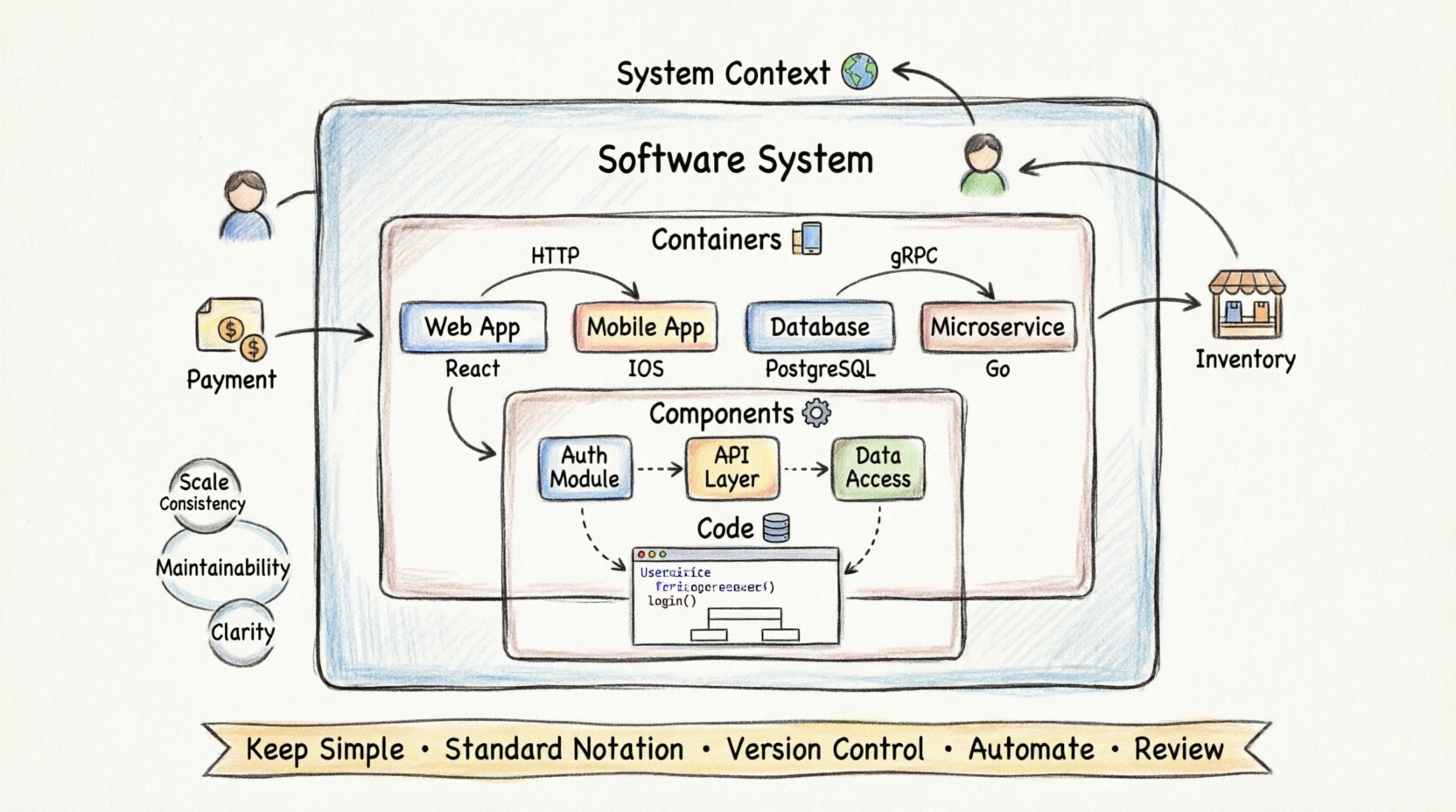
This is the highest level of abstraction. It shows the entire software system as a single box. The goal is to answer the question: Who uses this system, and what does it interact with?
- Primary Element: The software system itself.
- External Entities: Users, other systems, or external services.
- Relationships: Arrows showing data flow or interaction.
This diagram is crucial for business stakeholders. It does not show internal components. It focuses on boundaries. For example, if you are building an e-commerce platform, the System Context shows the platform, the customer, the payment provider, and the inventory system.
2. Containers 📦
Once you understand the context, you need to see what makes up the system. A container is a distinct unit of software. It could be a web application, a mobile app, a database, or a microservice.
- Primary Elements: Applications, databases, data stores.
- Technology: You may specify the technology used (e.g., Java, Python, SQL).
- Relationships: Communication protocols between containers (e.g., HTTP, gRPC).
This level is vital for development teams. It clarifies the runtime architecture. It helps developers understand where code runs and how data moves between services. It separates the logical units from the physical infrastructure.
3. Components ⚙️
Inside a container, there are often multiple parts. Components represent a distinct part of a container’s functionality. This level zooms into a single container to show its internal structure.
- Primary Elements: Modules, classes, libraries, or subsystems.
- Functionality: Each component performs a specific task.
- Relationships: Dependencies between components.
This diagram is useful for developers working on a specific part of the application. It prevents the need to read through thousands of lines of code to understand a feature. It shows how the container is organized logically.
4. Code 💻
This is the most detailed level. It shows the internal implementation of a component. It maps directly to the source code.
- Primary Elements: Classes, interfaces, methods, functions.
- Relationships: Inheritance, association, aggregation.
- Focus: Specific implementation details.
Not every diagram needs this level. It is often generated automatically from code. It is used for deep debugging or specific architectural reviews. Most high-level documentation stops at the component level.
Comparing the Levels 🔍
Understanding the differences between levels is key to using the model effectively. The table below summarizes the scope and audience for each tier.
| Level | Focus | Typical Audience | Granularity |
|---|---|---|---|
| System Context | System boundaries | Stakeholders, Managers | High |
| Containers | Runtime units | Developers, Architects | Medium |
| Components | Internal functionality | Developers | Low |
| Code | Implementation details | Code Reviewers | Very Low |
Best Practices for Documentation ✍️
Creating diagrams is only half the work. Keeping them accurate and useful requires discipline. Here are strategies to ensure your documentation remains valuable.
- Keep it Simple: Avoid cluttering diagrams with unnecessary details. If it does not explain the structure, remove it.
- Use Standard Notation: Stick to the shapes and colors defined by the model. Consistency helps readers navigate faster.
- Version Control: Treat diagrams as code. Store them in the same repository. This ensures they evolve with the software.
- Automate Where Possible: Use tools to generate diagrams from code. This reduces the manual effort required to keep them updated.
- Review Regularly: Schedule times to review diagrams against the current state of the system.
Common Pitfalls to Avoid ⚠️
Even with a clear model, teams often make mistakes. Being aware of these traps helps maintain diagram quality.
Over-Engineering
Some teams try to map every single class into a component diagram. This creates a mess that is hard to read. Remember that the component level is about logical grouping, not every class.
Inconsistent Detail
Ensure all containers are treated equally. Do not show the internals of one container while leaving others as black boxes unless there is a specific reason. Consistency aids understanding.
Ignoring Relationships
Diagrams are not just boxes. The lines connecting them are critical. They show data flow, dependencies, and trust boundaries. Ensure every line has a label describing the interaction.
Lack of Maintenance
Diagrams that are outdated are worse than no diagrams. They create false confidence. If a diagram does not match the code, update it or remove it.
Integrating into Workflow 🔄
The C4 model fits well into modern development practices. It supports Agile and DevOps workflows by providing a visual contract for the system.
During Planning
Use the System Context diagram to define the scope of a project. Ensure all stakeholders agree on who the users are and what external systems are involved before writing code.
During Design
Use the Container and Component diagrams to plan the technical structure. This helps identify potential bottlenecks or security risks early in the process.
During Onboarding
New team members can use these diagrams to understand the codebase. They provide a map that reduces the time needed to become productive.
Tools and Implementation 🛠️
While the model is independent of specific software, using the right tools helps. There are many platforms available to create and maintain these diagrams.
- Diagramming Software: Use generic drawing tools that support the standard shapes.
- Code Generators: Some platforms can generate diagrams directly from codebases.
- Collaboration: Choose tools that allow multiple people to edit and comment.
The choice of tool matters less than the adherence to the model. Focus on the content and structure rather than the aesthetics of the drawing software.
Security Considerations 🔒
Architecture diagrams often reveal sensitive information. When sharing these documents, consider the security implications.
- Trust Boundaries: Clearly mark where data crosses trust boundaries in your diagrams.
- External Connections: Be careful when showing external API endpoints or third-party integrations.
- Access Control: Restrict access to detailed diagrams that contain intellectual property.
Evolution of the Model 📈
The C4 model is not static. It has evolved since its initial release to better fit modern needs. The core principles remain the same, but the community continues to refine the guidelines.
- Cloud Native: Adapting diagrams for cloud environments and serverless functions.
- Microservices: Scaling the container level to handle large numbers of services.
- Visual Standards: Ongoing work to standardize icons and colors for better readability.
Measuring Success 📏
How do you know if the C4 model is working for your team? Look for these indicators of improvement.
- Faster Onboarding: New hires understand the system faster.
- Better Communication: Fewer misunderstandings between developers and stakeholders.
- Reduced Technical Debt: Easier identification of structural issues.
- Active Documentation: Diagrams are updated regularly as part of the workflow.
Final Thoughts on Architecture 🎯
Effective documentation is an investment. It pays off in reduced maintenance costs and clearer communication. The C4 model offers a structured path to achieving this. By focusing on the right level of detail for the right audience, teams can manage complexity without losing sight of the big picture.
Start small. Begin with the System Context. Add detail as needed. Ensure everyone agrees on the definitions. With consistent effort, your architecture diagrams will become a valuable asset rather than a burden. 🚀