The landscape of software engineering is shifting rapidly. As systems grow in complexity and deployment cycles accelerate, the need for clear, maintainable architecture documentation has never been more critical. The C4 model provides a structured approach to visualizing software architecture, but its application has evolved alongside modern practices like DevOps and Artificial Intelligence. This guide explores how the C4 model adapts to these changes, ensuring architecture remains a living asset rather than a static artifact.
📚 Understanding the Core of the C4 Model
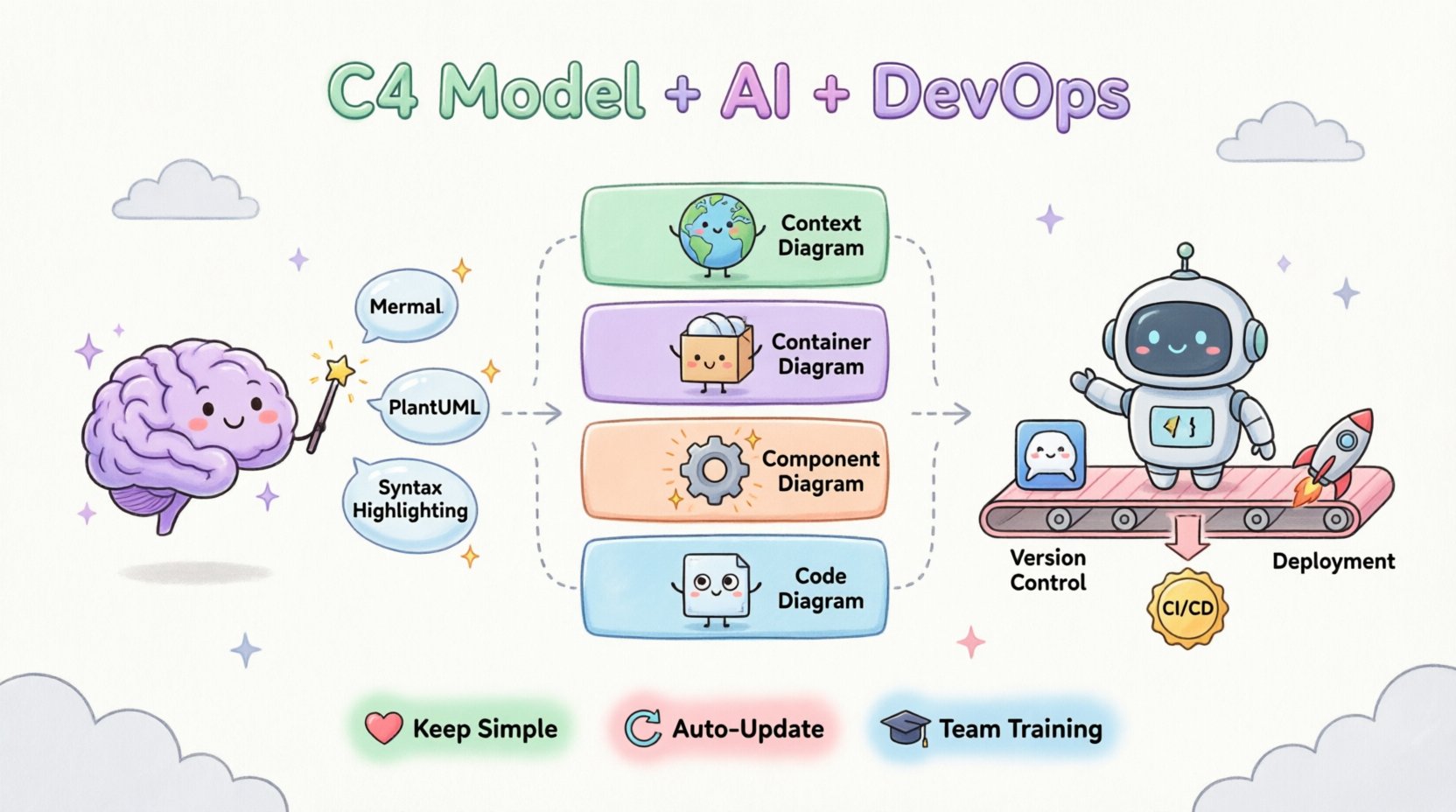
Before diving into modern integrations, it is essential to understand the foundation. The C4 model was designed to solve the problem of overcrowded diagrams. Traditional approaches often attempted to show too much detail in a single view, leading to confusion and maintenance overhead. The C4 model addresses this by breaking architecture down into four distinct levels of abstraction.
- Level 1: Context Diagram 🌍
This provides a high-level overview of the system within its environment. It shows the software system as a single box and highlights the people and systems that interact with it. The goal is to communicate the purpose and boundaries of the system to stakeholders. - Level 2: Container Diagram 📦
This level drills down into the major building blocks of the system. A container is a runtime process, such as a web application, a mobile app, a database, or a microservice. This diagram illustrates how these containers interact and the technologies used. - Level 3: Component Diagram ⚙️
Inside each container, there are components. These are distinct parts of the code that provide a specific function, like a payment processing module or a user authentication service. This level bridges the gap between high-level architecture and implementation details. - Level 4: Code Diagram 💻
This is the most detailed level, showing classes, interfaces, and relationships. While often generated automatically, it serves as a reference for developers working on specific modules.
Each level serves a specific audience. Executives might only need the Context diagram, while developers working on a specific feature might need the Component view. This separation of concerns is what makes the model robust.
🚀 Integrating C4 with DevOps Pipelines
DevOps focuses on the collaboration between development and operations to shorten the systems development life cycle. Documentation often suffers in fast-paced environments, becoming outdated immediately after release. Integrating the C4 model into DevOps workflows ensures that architecture diagrams remain synchronized with the actual codebase.
Documentation as Code 📝
To maintain accuracy, architecture descriptions should be treated as code. This means storing diagram definitions in version control systems alongside the application code. When a pull request is submitted, the diagram update can be reviewed simultaneously with the code change.
- Version Control: Diagram files should reside in the same repository as the source code. This ensures that if a feature is deprecated, the diagram is updated in the same commit.
- CI/CD Integration: Build pipelines can include steps to validate diagram syntax. If a developer changes a container connection, the pipeline can check if the diagram reflects that change.
- Deployment Artifacts: Architecture documentation can be part of the deployment artifact, ensuring that operations teams have the necessary context when deploying to production.
Automated Generation and Validation ⚙️
Manual diagramming is prone to error. Automation reduces the risk of drift between the code and the documentation. Tools can parse the codebase to generate initial diagrams, which developers then refine. This process ensures that the visual representation matches the implementation.
| Aspect | Traditional Approach | DevOps Integrated Approach |
|---|---|---|
| Update Frequency | Ad-hoc, often outdated | Continuous, tied to commits |
| Ownership | Architecture team only | All developers responsible |
| Storage | Static documents or wikis | Version controlled repository |
| Validation | Manual review | Automated pipeline checks |
🤖 The Role of Artificial Intelligence in Architecture
Artificial Intelligence is transforming how teams approach documentation. From generating diagram syntax to analyzing architectural drift, AI offers significant capabilities. However, these tools require careful oversight to ensure they support, rather than replace, human judgment.
Generating Diagrams with AI 🧠
Large Language Models can assist in creating C4 diagrams. Developers can describe a system in natural language, and the AI can output the corresponding diagram syntax (such as Mermaid or PlantUML). This speeds up the initial creation process.
- Prototyping: AI can quickly generate a Context or Container diagram to visualize a new idea before significant code is written.
- Refactoring Assistance: When refactoring a system, AI can suggest how the diagram should change based on the code modifications.
- Translation: AI can convert existing documentation into diagram syntax, reducing the burden of manual recreation.
Monitoring Architectural Drift 📉
One of the biggest challenges in software maintenance is architectural drift. Over time, the code may evolve in ways that contradict the original design. AI tools can scan the codebase and compare it against the stored C4 diagrams to identify discrepancies.
For example, if a new microservice is added but not reflected in the Container diagram, an AI analysis tool can flag this inconsistency. This allows teams to address documentation gaps before they become critical issues during onboarding or audits.
Enhancing Search and Discovery 🔍
As systems grow, finding the right diagram becomes difficult. AI-enhanced search engines can index the content of diagrams, allowing engineers to search for specific components or relationships. Instead of navigating through folders, a developer can ask, “Where is the payment processing logic located?” and receive the relevant diagram snippet.
| AI Capability | Benefit | Consideration |
|---|---|---|
| Syntax Generation | Reduces time to create diagrams | Requires human validation |
| Drift Detection | Keeps documentation accurate | May produce false positives |
| Intelligent Search | Improves developer efficiency | Depends on indexing quality |
| Code Analysis | Auto-updates diagrams | May miss contextual intent |
🛡️ Best Practices for Modern Teams
Implementing the C4 model in a modern environment requires discipline. It is not enough to simply create diagrams; they must be integrated into the culture of the team. Here are key practices to ensure success.
- Keep it Simple:
Avoid over-engineering the diagrams. If a diagram becomes too complex to read, it fails its purpose. Stick to the four levels and do not mix them. - Review Regularly:
Include diagram updates in the definition of done for every feature. If the code changes, the diagram must change. - Standardize Tools:
Choose a diagramming format that supports automation. Avoid proprietary formats that are difficult to integrate into pipelines. - Train the Team:
Ensure all developers understand the C4 levels. Confusion between a container and a component can lead to inconsistent diagrams. - Leverage Automation:
Use scripts to extract metadata from the codebase. This reduces the manual effort required to keep diagrams up to date.
🔮 Future Trends in Architecture Visualization
The intersection of AI, DevOps, and architecture modeling is still in its early stages. Several trends are emerging that will shape how teams visualize and maintain their systems.
Real-Time Visualization ⏱️
Future tools may offer real-time synchronization between the code editor and the diagram view. As a developer types code, the diagram updates instantly. This provides immediate feedback on how architectural changes affect the system structure.
Predictive Architecture Analysis 📊
AI models may go beyond detecting drift to predicting potential issues. By analyzing the structure of the C4 diagrams, these systems could identify high coupling risks or bottlenecks before they impact performance. This proactive approach helps teams design more resilient systems.
Interactive Documentation 📖
Static diagrams are becoming less common in favor of interactive interfaces. Clicking on a box in a diagram could reveal live metrics, recent commits, or deployment status. This turns the architecture map into a dashboard for system health.
🚧 Challenges and Mitigation Strategies
While the integration of C4 with modern practices offers many benefits, there are challenges to consider. Teams must be aware of these hurdles to navigate them effectively.
Resistance to Change 🛑
Developers often view documentation as a burden. Convincing a team to maintain diagrams alongside code requires cultural change. Emphasize the benefits, such as faster onboarding for new hires and clearer communication during incident response.
Tooling Complexity 🧩
Setting up automated pipelines for diagram generation can be complex. Teams need to invest time in configuring their build systems. Start small with manual updates and gradually introduce automation as the process stabilizes.
Context Loss in AI 🧠
AI tools are powerful but lack human context. They might generate diagrams that are syntactically correct but semantically wrong. Always have a human review the output to ensure it aligns with the actual business logic and intent.
🔗 Conclusion
The C4 model remains a vital tool for software architecture, even as technology evolves. Its structured approach to abstraction fits well with the iterative nature of DevOps and the data-driven capabilities of AI. By treating architecture diagrams as code, automating updates, and leveraging intelligent analysis, teams can maintain a clear view of their systems without slowing down development.
Success lies in balance. Do not let documentation become a bottleneck, but do not let it disappear entirely. With the right practices and tools, architecture documentation becomes a living asset that supports growth and stability. As you move forward, focus on clarity, automation, and continuous improvement to ensure your system designs remain as robust as the code they represent.
Remember, the goal is not just to draw diagrams, but to improve communication and understanding across the organization. Whether you are designing a monolith or a distributed microservice architecture, the C4 model provides a common language to discuss how your software works.