Enterprise architecture demands structure. Without a clear framework, diagrams become cluttered and insights fade. ArchiMate provides a standardized language for describing, analyzing, and visualizing architecture. At the heart of this methodology lies the concept of layered modeling. This approach separates concerns into distinct domains, allowing architects to manage complexity without losing coherence.
This guide outlines proven strategies for structuring your models effectively. We will explore how to maintain clarity across the business, application, and technology domains while ensuring alignment with strategic goals. Whether you are refining an existing model or starting fresh, these practices help build a foundation that stands the test of time. 🛡️
🌐 Understanding the Core Structure
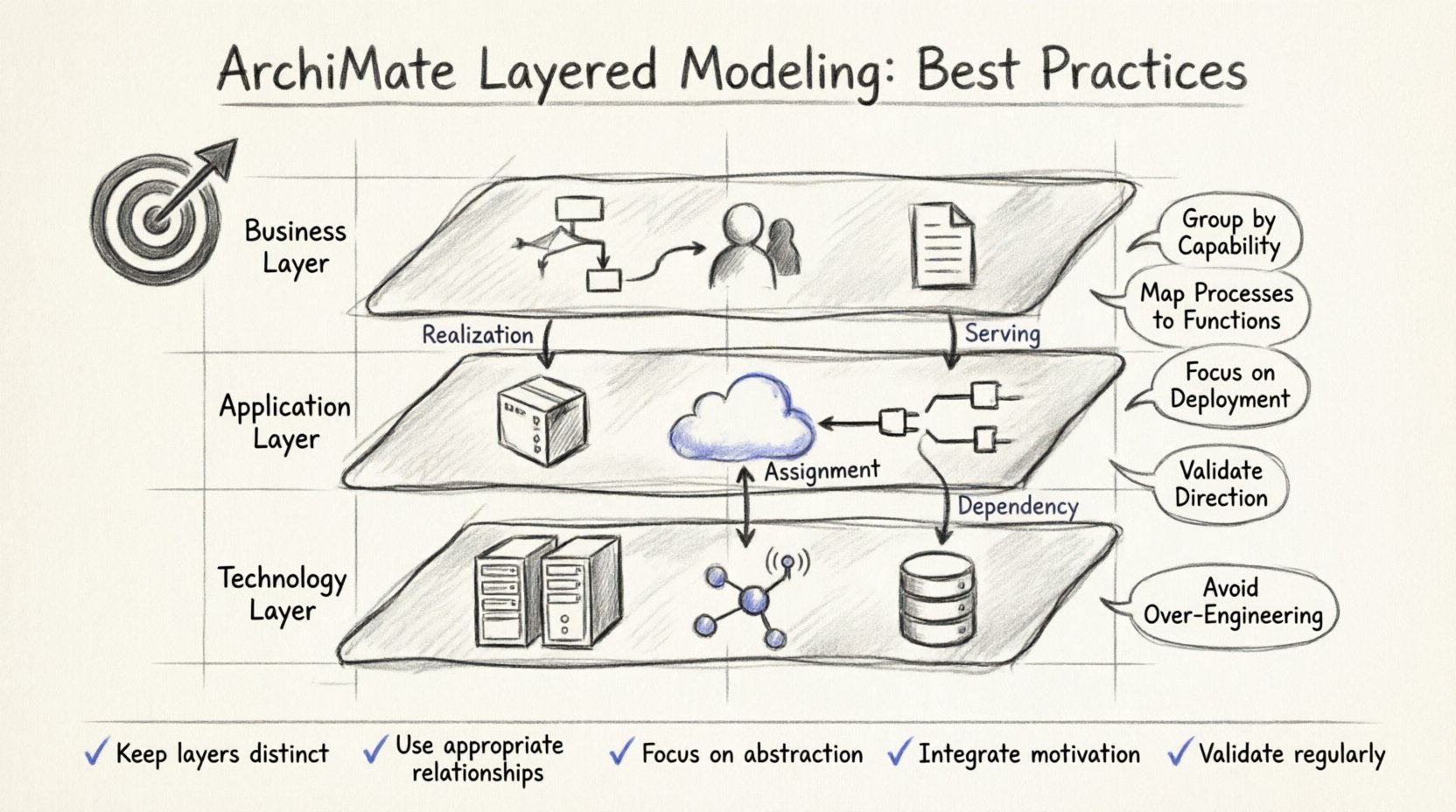
ArchiMate defines a reference architecture that divides enterprise elements into specific layers. This separation is not merely aesthetic; it reflects how different parts of an organization function. By respecting these boundaries, you ensure that changes in one area do not inadvertently break others.
The standard structure consists of three core layers:
- Business Layer: Describes the organization’s business processes, roles, and organizational units.
- Application Layer: Represents the software applications supporting the business processes.
- Technology Layer: Covers the hardware, network, and infrastructure that host the applications.
Beyond these core layers, additional layers address motivation, implementation, migration, and physical aspects. However, the core three form the backbone of most enterprise architecture models. 🏛️
🏢 Deep Dive: The Business Layer
The business layer focuses on how value is delivered to customers and stakeholders. It captures the “what” and “who” of the organization, independent of the specific technology used to execute it.
Key Elements to Model
- Business Process: A collection of activities that achieve a specific business goal. Define these with clear inputs and outputs.
- Business Role: An actor who performs activities. Examples include “Manager,” “Customer,” or “Analyst.”
- Business Object: A static part of the business environment, such as an Order or Invoice.
- Business Actor: A human or system that interacts with processes.
Modeling Best Practices
When constructing the business layer, focus on abstraction. Avoid dragging technical details into this view unless they directly impact business capability. Use the following guidelines:
- Group by Capability: Organize processes into business capabilities. This helps in identifying gaps where a process does not exist.
- Define Clear Boundaries: Ensure every process has a clear start and end point. Avoid orphaned activities that lack context.
- Link to Strategy: Connect business processes to strategic goals. This ensures alignment between daily operations and long-term vision.
- Use Consistent Naming: Adopt a standard naming convention. For example, always use nouns for objects and verbs for processes.
💻 Deep Dive: The Application Layer
The application layer bridges the gap between business needs and technical reality. It represents the software systems that automate or support business processes.
Key Elements to Model
- Application Function: A function that performs a specific business function or supports a business process.
- Application Service: A function that provides a specific service to a business actor or other application.
- Application Component: A part of an application system that encapsulates functionality.
- Application Interface: The boundary through which the application interacts with other elements.
Modeling Best Practices
Maintain a focus on functionality rather than implementation details. The goal is to understand what the system does, not necessarily how the code is written.
- Map Processes to Functions: Every business process should ideally be supported by at least one application function. Identify where manual workarounds exist.
- Avoid Over-Engineering: Do not model every microservice or API endpoint unless they are critical to the architecture. Keep the view at a level of granularity that serves decision-making.
- Document Dependencies: Clearly show which applications depend on others. This is crucial for impact analysis during system updates.
- Separate Logic from Interface: Distinguish between the service provided and the interface used to access it. This clarifies internal vs. external interactions.
⚙️ Deep Dive: The Technology Layer
The technology layer provides the foundation upon which applications run. It includes hardware, networks, and system software.
Key Elements to Model
- Device: A computing device such as a server, PC, or mobile phone.
- System Software: Software that manages the device, such as an operating system or database management system.
- Network: The infrastructure that connects devices, such as LAN or WAN.
- Node: A physical or logical computation resource.
Modeling Best Practices
The technology layer often becomes too detailed too quickly. Resist the urge to document every cable or switch unless it is part of a critical infrastructure project.
- Focus on Deployment: Use deployment relationships to show where application components run on devices.
- Abstract Infrastructure: If specific hardware models are not required, use generic “Node” elements to represent servers or clusters.
- Highlight Critical Paths: Emphasize network paths that support critical business processes. These require higher reliability and monitoring.
- Align with Security: Ensure that security boundaries in the technology layer match the security requirements of the applications they host.
🔗 Managing Relationships Between Layers
The true power of layered modeling lies in the relationships that connect the layers. These connections explain how business needs translate into technical requirements.
Types of Cross-Layer Relationships
ArchiMate defines specific relationship types to maintain semantic accuracy. Using the wrong relationship type can lead to confusion.
| Relationship Type | Direction | Meaning | Example |
|---|---|---|---|
| Realization | Lower → Higher | Concrete element realizes abstract element | Application Function realizes Business Process |
| Serving | Lower → Higher | Lower layer provides service to higher layer | Application Service serves Business Process |
| Assignment | Any Direction | Actor assigned to perform activity | Business Role assigned to Business Process |
| Flow | Same Layer | Data or material movement | Object flows between Processes |
| Dependency | Lower → Higher | Element depends on another for operation | Application Component depends on System Software |
Best Practices for Connections
- Validate Direction: Ensure arrows point logically. For instance, a Business Process should not “realize” an Application Function; the function realizes the process.
- Minimize Crossing Lines: In visual diagrams, try to keep connections within the same layer or between adjacent layers to reduce visual clutter.
- Use Aggregation: If many elements connect to a single node, consider using aggregation or grouping to simplify the view.
- Avoid Redundancy: If a relationship is implied by another, do not add it explicitly unless it adds specific context.
🎯 The Motivation Layer: Why Are We Doing This?
Architecture is not just about structure; it is about purpose. The motivation layer captures the drivers behind the architecture, such as goals, principles, and requirements.
Integrating motivation early prevents building the wrong thing. When you link a Business Process to a specific Goal, you can trace the value of that process.
- Define Principles: Establish rules that guide design decisions. For example, “All data must be stored in compliance with GDPR.”
- Link Requirements to Assets: Show how specific technical assets fulfill business requirements. This validates the investment.
- Identify Gaps: Use motivation elements to highlight areas where current capabilities do not meet strategic needs.
🔄 Implementation and Migration
Enterprise architecture is rarely static. It evolves through projects and migrations. The Implementation and Migration layer helps plan this transition.
Strategies for Migration Modeling
- Define Baseline and Target: Clearly distinguish between the current state (baseline) and the desired future state (target).
- Identify Projects: Group work into projects or initiatives. Link these projects to the specific changes they will deliver.
- Sequence Changes: Use timeframes to order the migration. Some technology changes must happen before application updates.
- Assess Impact: Use the migration layer to simulate the effect of changes before they occur in the live environment.
⚠️ Common Pitfalls in Layered Modeling
Even experienced architects make mistakes when dealing with layers. Recognizing these traps helps maintain model integrity.
1. The “God Layer” Syndrome
This occurs when a single layer contains elements that belong elsewhere. For example, putting a database server (Technology) directly inside a Business Process (Business). This violates the separation of concerns. Always check if an element fits the definition of its layer.
2. Excessive Detail
Modeling every single API endpoint or database table in the application layer creates noise. Focus on the capabilities that matter to the stakeholders. If a stakeholder does not need to see it, it might not belong in that specific view.
3. Inconsistent Granularity
Ensure that the level of detail is consistent across layers. If the Business Layer lists high-level processes, the Application Layer should list high-level functions, not low-level modules.
4. Ignoring the Physical Layer
While less common, the Physical Layer represents actual hardware locations. Ignoring this can lead to issues with latency and data sovereignty. If physical location matters, model it explicitly.
📊 Maintaining Model Quality
A model is only as good as its consistency and accuracy. Regular maintenance is required to keep the architecture relevant.
Quality Checks
- Syntax Validation: Run automated checks to ensure no orphaned elements or invalid relationships exist.
- Semantic Review: Have a peer review the model to ensure the relationships make logical sense.
- Version Control: Track changes to the model over time. This allows you to revert decisions if a migration fails.
- Access Control: Define who can edit which parts of the model. Protecting core layers from unauthorized changes preserves integrity.
📝 View Management and Stakeholder Alignment
Not every stakeholder needs to see every layer. A CEO cares about Business and Motivation layers. A CTO cares about Application and Technology layers. Use views to tailor the presentation.
Creating Effective Views
- Define the Audience: Who is reading this diagram? What is their technical background?
- Select Relevant Layers: Show only the layers that are pertinent to the question at hand. Hide the Technology layer if discussing high-level strategy.
- Use Grouping: Group elements by department or domain to reduce visual complexity.
- Provide Context: Add brief descriptions or legends to explain symbols used in the view.
🚀 Scaling the Architecture
As the organization grows, so does the complexity of the model. You need a strategy to scale without losing clarity.
- Modularization: Split the model into logical packages or domains. For example, “Finance,” “HR,” and “Supply Chain” can be separate packages.
- Reference Models: Use standard industry reference models to populate common elements quickly. This ensures consistency across different parts of the organization.
- Reuse Elements: When the same Business Role appears in multiple domains, link to a single definition rather than duplicating it.
- Documentation: Maintain a repository of definitions for all elements. This prevents ambiguity when new architects join the team.
🛠️ Governance and Standards
To ensure long-term success, governance is essential. Establish rules for how the architecture is built and maintained.
- Naming Standards: Create a dictionary for naming conventions. Consistency aids searchability and understanding.
- Review Cadence: Schedule regular reviews. Quarterly reviews can ensure the model stays aligned with business changes.
- Change Management: Implement a process for requesting changes. Every modification should be reviewed for impact on other layers.
- Training: Ensure all modelers understand the layering concepts. Misunderstandings lead to structural errors.
🌟 Summary of Key Takeaways
Layered modeling in ArchiMate is about managing complexity through separation of concerns. By strictly adhering to the definitions of Business, Application, and Technology layers, you create a clear map of your enterprise.
- ✅ Keep layers distinct to avoid confusion.
- ✅ Use appropriate relationships to connect layers logically.
- ✅ Focus on abstraction levels that serve your audience.
- ✅ Integrate motivation to explain the “why.”
- ✅ Regularly validate and clean your models.
Following these practices results in an architecture model that is robust, understandable, and valuable. It becomes a living document that guides decision-making rather than a static diagram that gathers dust. With discipline and attention to detail, layered modeling becomes a powerful tool for driving enterprise success. 🚀